
1. Introducción y másview
The Brother CTS-410-ES is a versatile 4-line executive phone system designed for efficient communication in office or home environments. It can function as a stand-alone unit or integrate into a larger system. Key features include a built-in caller ID, a 99-number call log, and a desktop data port for convenient access to line 4. This manual provides detailed instructions for setup, operation, maintenance, and troubleshooting to ensure optimal performance of your device.
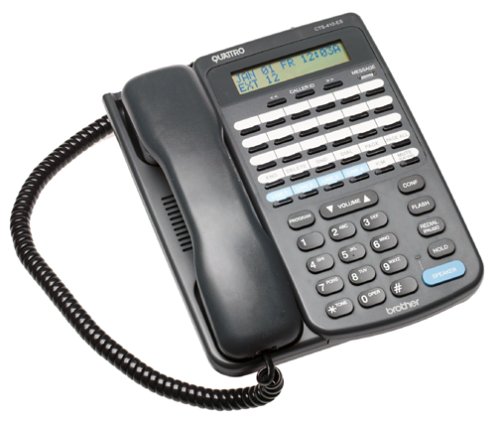
Frente view of the Brother CTS-410-ES 4-line executive phone system, showing the keypad, display, and line buttons.
2. Información de seguridad
Please read and follow these safety precautions to prevent damage to the unit and ensure your safety:
- No exponga la unidad al agua ni a la humedad.
- Evite colocar la unidad cerca de fuentes de calor o luz solar directa.
- Utilice únicamente el adaptador de corriente suministrado con la unidad.
- No intente abrir ni reparar la unidad usted mismo. Encargue cualquier servicio técnico a personal cualificado.
- Mantenga la unidad alejada de campos electromagnéticos fuertes.
3. Contenido del paquete
Verifique que su paquete contenga los siguientes elementos:
- Brother CTS-410-ES 4-Line Executive Phone System Unit
- Adaptador de corriente alterna
- Telephone Line Cords (typically 4)
- Noise-Canceling Headset
- Manual de usuario (este documento)
4. Configuración
Follow these steps to set up your Brother CTS-410-ES phone system:
- Conecte la electricidad: Plug the AC power adapter into the power jack on the back of the phone unit, then plug the adapter into a standard electrical outlet.
- Conectar líneas telefónicas: Connect each telephone line cord from your wall jacks to the corresponding line jacks (Line 1, Line 2, Line 3, Line 4) on the back of the phone unit.
- Conectar auriculares: If using the included noise-canceling headset, plug it into the dedicated headset jack on the side or front of the phone unit.
- Encendido inicial: The unit should power on automatically. The display will illuminate, and you may hear a brief self-test sequence.
5. Instrucciones de funcionamiento
This section details the various functions and operations of your phone system.
5.1 Funciones básicas de llamada
- Haciendo una llamada: Lift the handset or press the SPEAKER button. Select an available line button (Line 1-4). Dial the desired number.
- Responder una llamada: When the phone rings, lift the handset or press the SPEAKER button. The corresponding line button will flash.
- Terminar una llamada: Place the handset back in the cradle or press the SPEAKER button again if using the speakerphone.
- Sostener: During a call, press the HOLD button to place the call on hold. Press the flashing line button to resume the call.
5.2 Caller ID and Call Log
- Identificador de llamadas: When a call comes in, the caller's name and number will appear on the display (if available from your service provider).
- Registro de llamadas: The system stores up to 99 incoming calls. Use the navigation buttons (e.g., UP/DOWN arrows) to scroll through the call log.
- Marcar desde el registro de llamadas: Select an entry from the call log and press the DIAL or SPEAKER button to call back.
5.3 Speakerphone and Headset
- Altavoz: Press the SPEAKER button to activate hands-free communication. Adjust volume using the volume controls.
- Funcionamiento de los auriculares: With the headset connected, press the HEADSET button (if available) or simply lift the handset to activate the headset for calls.
5.4 Intercom and Paging
- Intercomunicador: If multiple CTS-410-ES units are connected, use the INTERCOM function to communicate between units. Refer to your system's specific intercom setup.
- Paginación: Use the PAGING function to broadcast an announcement to other connected units.
5.5 Message Waiting Light and Data Port
- Luz de mensaje en espera: A dedicated light will illuminate to indicate new messages (requires compatible voicemail service from your provider).
- Desktop Data Port: The data port provides quick access to Line 4, allowing you to connect a modem or other data device.
6. Mantenimiento
Proper maintenance ensures the longevity and performance of your phone system.
- Limpieza: Wipe the unit with a soft, dry cloth. Do not use liquid or aerosol cleaners.
- Almacenamiento: If storing the unit for an extended period, disconnect it from power and telephone lines. Store in a cool, dry place.
- Manejo del cable: Ensure all cords are free from kinks or damage. Replace damaged cords immediately.
7. Solución de problemas
If you encounter issues with your phone system, try these common solutions:
| Problema | Posible solución |
|---|---|
| Sin tono de marcado | Check all telephone line connections. Ensure the power adapter is securely plugged in. Test with a different phone line if possible. |
| El identificador de llamadas no se muestra | Verify that Caller ID service is activated with your telephone service provider. Ensure the phone is connected to a compatible line. |
| Speakerphone audio is low or distorted | Adjust the speaker volume. Ensure the microphone is not obstructed. Move closer to the unit. |
| Message waiting light not working | Confirm that you have voicemail service with your provider and that it is properly configured. |
8. Especificaciones
Technical specifications for the Brother CTS-410-ES phone system:
| Característica | Detalle |
|---|---|
| Marca | Hermano |
| Número de modelo | CTS-410-ES |
| Tipo de teléfono | Cortado |
| Número de líneas | 4 |
| Fuente de poder | Eléctrico con cable |
| Tipo de marcador | Teclado único |
| Dimensiones del artículo (largo x ancho x alto) | 17.8 x 22.9 x 10.8 cm |
| Tipo de sistema de contestación | Digital |
| Capacidad de realizar llamadas en conferencia | 4 vías |
| Operación multilínea | Sí |
| Identificación de llamadas | Sí |
| Capacidad de grabación | 20 Minutes (for answering system, if applicable) |
| Expandible | Yes, with other optional CTS410ES units |
| Call Log Memory | 99 números |
| Toma de auriculares | Sí |
| Desktop Data Port | Yes (for Line 4) |
9. Garantía y soporte
This Brother CTS-410-ES product comes with a Garantía limitada de 90 días. For warranty claims or technical assistance, please contact Brother customer support. Keep your purchase receipt as proof of purchase.
For further support, visit the official Brother support websitio o consulte a su distribuidor local.