
Introducción
This manual provides detailed instructions for the proper setup, operation, maintenance, and troubleshooting of your Palm Treo 600 (Sprint) smartphone. Please read this manual thoroughly to ensure optimal performance and longevity of your device.
Dispositivo terminadoview
Familiarize yourself with the physical components of your Treo 600.

Figura 1: Arriba View of Palm Treo 600 (CDMA)
This diagram illustrates the top side of the Treo 600, highlighting key features including the Ringer Switch, Power Button, Antenna, Stylus, IR Port, and SD Slot.
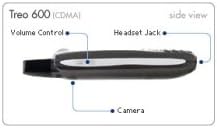
Figura 2: Lado View of Palm Treo 600 (CDMA)
This diagram shows the side profile of the Treo 600, indicating the location of the Volume Control buttons, Headset Jack, and Camera lens.
Configuración
1. Instalación de la batería
- Localice la tapa del compartimiento de la batería en la parte posterior del dispositivo.
- Gently slide or lift the cover to remove it.
- Alinee los contactos de la batería con los terminales dentro del compartimiento.
- Inserte la batería con firmeza hasta que encaje en su lugar.
- Vuelva a colocar la tapa del compartimiento de la batería.
2. Encendido y activación inicial
- Mantenga pulsado el Botón de encendido (refer to Figure 1) until the screen illuminates.
- Siga las instrucciones en pantalla para completar la configuración inicial, que puede incluir la configuración de la fecha, la hora y el idioma.
- For Sprint network activation, follow the specific instructions provided by your service provider or contact Sprint customer service if automatic activation does not occur.
Instrucciones de funcionamiento
1. Realización y recepción de llamadas
- Para realizar una llamada: From the Phone application, dial the number using the keypad or select a contact, then press the green Call button.
- Para responder una llamada: Presione el botón verde de llamada cuando suene el teléfono.
- Para finalizar una llamada: Press the red End button.
- Ajuste de volumen: Utilice el Control de volumen buttons on the side of the device (refer to Figure 2) during a call.
2. Using the QWERTY Keyboard
The integrated QWERTY keyboard allows for efficient text entry. Press the keys firmly. For special characters, use the Alt tecla en combinación con otras teclas.
3. Palm OS Navigation and Applications
- Pantalla de inicio: Access applications and settings.
- Aguja: Utilice el Aguja (refer to Figure 1) for precise interaction with the touchscreen, especially for smaller icons or handwriting input.
- Botón de navegación: The 5-way navigation button (usually located below the screen) allows for scrolling and selection without the stylus.
- Aplicaciones clave: Access Calendar, Contacts, Memos, Tasks, and other pre-installed applications.
4. Messaging (SMS and Email)
- Mensaje de texto: Use the Messaging application to send and receive text messages.
- Correo electrónico: Configure your email accounts in the VersaMail application to send and receive emails. Consult your email provider for server settings.
5. Uso de la cámara
The Treo 600 features a built-in camera (refer to Figure 2) for capturing photos.
- Abra la aplicación Cámara.
- Encuadre su toma usando la pantalla como viewdescubridor.
- Press the designated camera button or an on-screen button to capture the image.
- Nota: Image quality may vary, especially in low-light conditions. For best results, use in bright, outdoor environments.
6. Uso de la tarjeta SD
El Ranura SD (refer to Figure 1) allows for expandable storage and functionality.
- Insert a compatible SD (Secure Digital) card into the slot until it clicks.
- The device will recognize the card, allowing you to store photos, music, documents, and applications.
- Para quitarla, presione suavemente la tarjeta hacia adentro hasta que salga.
7. Conectividad
- USB: Connect the Treo 600 to a computer using a USB cable for data synchronization and charging.
- Puerto IR: El Puerto IR (Infrared, refer to Figure 1) can be used for short-range wireless data transfer with other IR-enabled devices. Ensure a clear line of sight between devices.
Mantenimiento
1. Limpieza del dispositivo
- Utilice un paño suave que no suelte pelusa para limpiar la pantalla y el exterior.
- Evite utilizar productos químicos agresivos, limpiadores abrasivos o humedad excesiva.
- Para manchas difíciles, un poco deampEnjuague el paño con agua o una solución limpiadora de pantallas diseñada para dispositivos electrónicos.
2. Cuidado de la batería
- Charge the battery regularly. Avoid completely draining the battery frequently.
- No exponga la batería a temperaturas extremas.
- If the battery performance significantly degrades, consider replacing it with an authorized Palm replacement battery.
3. Actualizaciones de software
Periodically check the Palm support website for any available software updates for your Treo 600. Updates can improve performance and add new features.
Solución de problemas
Problemas comunes y soluciones
- El dispositivo no enciende: Ensure the battery is charged and properly installed. Try connecting to the charger.
- Poor call quality/reception: Move to an area with better network coverage. Check the antenna for any damage.
- La pantalla no responde: Perform a soft reset (refer to the device's specific reset procedure, often involving a small reset button or battery removal).
- Aplicaciones congeladas: Close and restart the application. If the issue persists, perform a soft reset.
- Camera images are poor: Ensure adequate lighting. Clean the camera lens (refer to Maintenance section).
- Problemas de sincronización de datos: Verify USB connection and ensure Palm Desktop software (or equivalent) is correctly installed on your computer.
Realizar un reinicio suave
A soft reset can resolve many minor software issues without erasing data. Locate the small reset hole (often near the battery compartment or stylus slot) and gently press it with the tip of the stylus or a straightened paperclip. The device will restart.
Presupuesto
| Modelo | Palm Treo 600 |
| Tecnologías de conectividad | USB |
| Otras funciones de visualización | Inalámbrico |
| Otras características de la cámara | Delantero trasero (Note: Refers to general capability, Treo 600 has a single rear camera) |
| Peso del artículo | 1.95 libras |
| Dimensiones del paquete | 10.5 x 7.4 x 3.2 pulgadas |
| Fecha de primera disponibilidad | 5 de agosto de 2014 |
Nota: las especificaciones están sujetas a cambios sin previo aviso.
Garantía y soporte
For information regarding your product's warranty, please refer to the warranty card included with your purchase or visit the official Palm support website. For technical assistance, contact Palm customer support or your service provider (Sprint).
- Soporte en línea: www.palm.com/support (Note: Link is illustrative, actual link may vary or be defunct for older products)
- Soporte del proveedor de servicios: Contact Sprint customer service for network-related issues.