
Introducción
The Nyko 80610 Airflo PC Game Controller is designed to enhance your PC and Mac gaming experience. This controller features an ergonomic design for comfortable use and an integrated airflow system to help keep your hands cool during extended gaming sessions. This manual provides detailed instructions for setting up, operating, maintaining, and troubleshooting your Airflo controller.
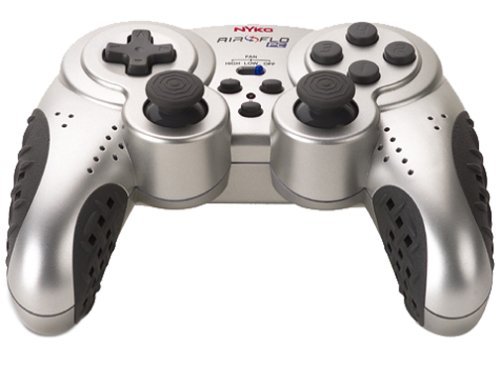
Image of the Nyko 80610 Airflo PC Game Controller, showcasing su diseño ergonómico y disposición de botones.
Configuración
Contenido del paquete
- Nyko 80610 Airflo PC Game Controller (Set of two 12-button gamepads)
- Driver Installation CD (if applicable)
- Manual de usuario (este documento)
Requisitos del sistema
- Operating System: Windows 2000/XP/Vista/7/8, Mac-Intel OS X
- Puerto USB disponible
Instalación
- Ensure your computer is powered on and running.
- Ubique un puerto USB disponible en su computadora.
- Plug the USB connector of the Nyko Airflo controller into the USB port.
- For most Windows operating systems, the controller will be automatically detected and drivers installed. If prompted, follow the on-screen instructions.
- If automatic installation does not occur, insert the provided Driver Installation CD into your computer's optical drive and follow the installation wizard.
- Once installed, the controller is ready for use. It is recommended to have the gamepad plugged in and ready before launching a game to ensure proper recognition.
Instrucciones de funcionamiento
Controles básicos
The Nyko Airflo controller features a standard gamepad layout, including:
- Two Analog Sticks: For precise movement and camera control.
- D-Pad (Directional Pad): For directional input.
- Action Buttons: Typically labeled for in-game actions.
- Shoulder Buttons/Triggers: Located on the top of the controller.
- Start and Select/Back Buttons: For menu navigation and game functions.
Airflow Feature
The integrated airflow system helps to cool your hands during intense gaming. The controller includes a switch or button to activate and adjust the fan speed. While effective, the fan may produce some noise, especially on higher settings.
- Locate the fan control switch/button on the controller.
- Toggle the switch or press the button to turn the fan on/off or cycle through different speed settings.
Configuración del juego
Most PC games allow for controller configuration within their settings menu. You may need to:
- Navigate to the 'Controls' or 'Options' section of your game.
- Select 'Gamepad' or 'Controller' as the input device.
- Map the in-game actions to the corresponding buttons and sticks on your Nyko Airflo controller.
- The controller may come with mapping software that allows for custom button assignments, which can be useful for games that do not natively support the controller's default layout or for remapping keyboard commands.
Mantenimiento
- Limpieza: Utilice un paño suave y seco para limpiar el mando. Para suciedad difícil de eliminar, limpie ligeramenteampEnjuague el paño con agua. Evite usar productos químicos agresivos o limpiadores abrasivos.
- Almacenamiento: Store the controller in a clean, dry place away from direct sunlight and extreme temperatures. Avoid wrapping the cable too tightly to prevent damage.
- Cuidado de cables: Do not pull the controller by its cable. Always grasp the USB connector when plugging or unplugging it from your computer.
Solución de problemas
- Controlador no reconocido:
- Asegúrese de que el cable USB esté conectado de forma segura tanto al controlador como a la computadora.
- Intente conectar el controlador a un puerto USB diferente.
- Restart your computer with the controller connected.
- Verify that the necessary drivers are installed (refer to the Installation section).
- Analog Stick or D-Pad Issues:
- If analog sticks are not calibrated correctly in-game, try unplugging the gamepad, closing the game, plugging the gamepad back in, and then restarting the game.
- Some users have reported that the D-pad may not register diagonal inputs reliably or may simultaneously press adjacent directions. This can be a characteristic of the controller's design.
- Buttons Sticking or Requiring Heavy Pressing:
- Asegúrese de que el controlador esté limpio y libre de residuos alrededor de los botones.
- If the issue persists, it may indicate wear or a manufacturing characteristic.
- Ruido del ventilador:
- The airflow fan may produce audible noise, especially on higher settings. This is normal operation.
Presupuesto
| Marca | Nyko |
| Modelo | 80610 Airflo |
| Dispositivos compatibles | Mac, Windows |
| Tipo de controlador | Mando para juegos |
| Tecnología de conectividad | USB (eléctrico con cable) |
| Color | Negro/plata |
| Características adicionales | Ergonomic, Integrated Airflow System |
| Cantidad de botones | 12 (per gamepad) |
| Plataforma de hardware | PC |
| Longitud del cable | Extra largo |
| GTIN/UPC | 743840806103 |
| ASIN | B0000TNJWM |
Garantía y soporte
For information regarding warranty coverage, technical support, or replacement parts, please contact Nyko customer service directly. Details can typically be found on the manufacturer's official websitio o embalaje del producto.
Conserve su comprobante de compra para cualquier reclamo de garantía.