Introducción
The Astatic RD104E Road Devil is an amplified 4-pin CB microphone designed for clear and powerful communication in automotive and truck environments. It features a high-gain amplifier with electronic equalization and noise-canceling capabilities to ensure maximum talk power and intelligibility, even in noisy conditions. This manual provides essential information for the proper setup, operation, maintenance, and troubleshooting of your RD104E microphone.
Características
- Designed for CB Radio-Automotive and Truck Use.
- Features a High Gain Amplifier with Electronic Equalization.
- Provides Maximum Talk Power and Intelligibility even Under Noisy Conditions.
- Designed for Close Talking Handheld Applications.
- Incluye Amplifier & 6 Wire Cable.
- Polyurethane Coated Steel Grille Screen for durability.
- Volume Control boosts power and amplifies microphone output.
- Electret Noise Canceling Element assures clarity in noisy conditions.
- Super High Quality Heavy Duty Cord.
Configuración
Follow these steps to set up your Astatic RD104E microphone:
- Instalación de la batería: The RD104E requires one 9V battery for its internal ampmás duradero.
- Abra con cuidado la tapa del micrófono.asing para acceder al compartimento de la batería.
- Connect a fresh 9V battery to the battery clips, ensuring correct polarity.
- Securely close the microphone casing.
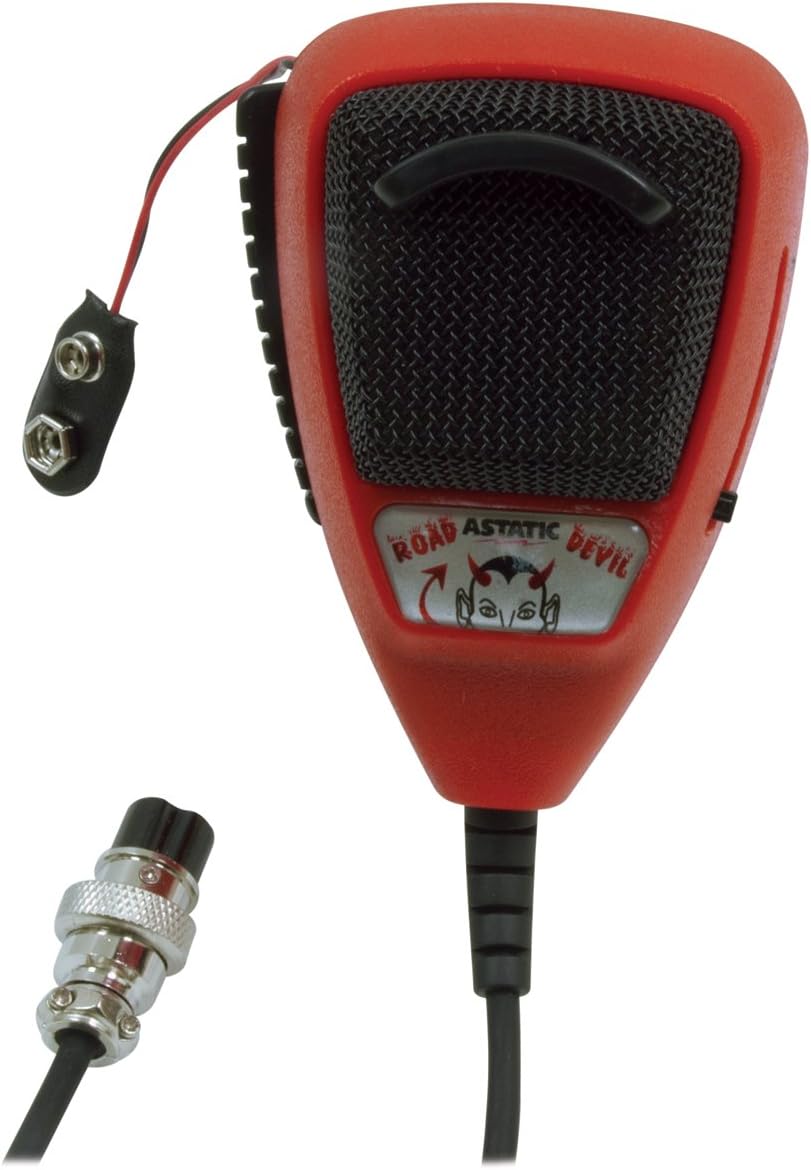
Image: The Astatic RD104E microphone with its internal battery wires visible, ready for 9V battery connection.
- Connecting to CB Radio: The microphone is equipped with a 4-pin connector.
- Locate the 4-pin microphone input on your CB radio.
- Align the pins of the microphone connector with the corresponding holes on the radio's input.
- Empuje y gire suavemente el conector en el sentido de las agujas del reloj hasta que quede bien fijado.

Image: The Astatic RD104E microphone showing its coiled cord and the 4-pin connector for attachment to a CB radio.
Instrucciones de funcionamiento
To achieve optimal performance from your RD104E microphone, follow these operating guidelines:
- Encendido/apagado: The microphone's amplifier is powered by the installed 9V battery. There is no separate power switch on the microphone itself; it activates when connected to the CB radio and the radio is powered on.
- Botón pulsar para hablar (PTT):
- To transmit, press and hold the PTT button located on the side of the microphone.
- Speak clearly into the microphone while holding the PTT button.
- Suelte el botón PTT para detener la transmisión y volver al modo de recepción.
- Volume/Gain Adjustment: The RD104E features a volume control slider on the side of the microphone.
- Slide the control to adjust the microphone's output gain. Start with a lower setting and gradually increase it to find the optimal level for your voice and radio.
- Avoid setting the gain too high, as this can cause distortion and over-modulation, making your transmissions unclear.

Imagen: Un primer plano view of the Astatic RD104E microphone, highlighting the adjustable volume control slider on its side.
- Distancia óptima para hablar: For best audio clarity and to utilize the noise-canceling feature effectively, hold the microphone close to your mouth (approximately 1-2 inches) while speaking.

Image: A person holding and speaking into the Astatic RD104E microphone inside a vehicle, demonstrating typical usage.
Mantenimiento
Un mantenimiento adecuado prolongará la vida útil y el rendimiento de su micrófono:
- Limpieza: Utilice un paño suave y seco para limpiar el exterior del micrófono. Evite el uso de productos químicos agresivos o limpiadores abrasivos.
- Reemplazo de batería: Replace the 9V battery when you notice a decrease in audio output or clarity, or if the microphone stops functioning. Always use a fresh, high-quality 9V battery.
- Cuidado del cordón: Avoid excessive pulling, twisting, or kinking of the coiled cord to prevent internal wire damage.
- Almacenamiento: Cuando no esté en uso, guarde el micrófono en un lugar limpio y seco, alejado de temperaturas extremas y de la luz solar directa.
Solución de problemas
If you encounter issues with your Astatic RD104E microphone, refer to the following common problems and solutions:
| Problema | Posible causa | Solución |
|---|---|---|
| No hay salida de audio o el audio es muy bajo. |
|
|
| Audio distorsionado o poco claro. |
|
|
| PTT button not engaging transmission. |
|
|
If the problem persists after attempting these solutions, please contact Astatic customer support or a qualified technician.
Presupuesto
| Nombre del modelo | RD104E (302-10036) |
| Marca | Astático |
| Factor de forma del micrófono | Portátil |
| Tecnología de conectividad | XLR (4-Pin Connector) |
| Fuente de poder | Battery Powered (1 x 9V Lithium Ion battery required for ampmás vivo) |
| Material | Plástico |
| Color | Negro |
| Patrón polar | Unidireccional |
| Relación señal a ruido | 80 dB |
| Peso del artículo | 0.01 onzas |
| Dimensiones del producto (L x An x Al) | 10.25 x 2.9 x 8.3 pulgadas |
| Dispositivos compatibles | Radio CB |
| Características especiales | Runs on Plug-In Power (for connection to CB radio) |
Información de garantía
For detailed warranty information regarding your Astatic RD104E Road Devil Amplified 4-Pin CB Microphone, please refer to the official Astatic website or the warranty card included with your product packaging. Warranty terms and conditions may vary.
Apoyo
If you require further assistance, have questions not covered in this manual, or need technical support, please contact Astatic customer service. Contact information can typically be found on the official Astatic websitio o en el embalaje de su producto.