
1. Introducción
Gracias por la compraasing the GPX CDP6806DT Personal CD Player. This manual provides important safety instructions, operational guidelines, and maintenance procedures to ensure optimal performance and longevity of your device. Please read this manual thoroughly before using the product and retain it for future reference.
2. Información de seguridad
Instrucciones de seguridad importantes
- No exponga la unidad al agua ni a la humedad.
- Evite colocar la unidad cerca de fuentes de calor como radiadores, rejillas de calefacción, estufas u otros aparatos (incluidos ampificadores) que producen calor.
- No intente desmontar ni modificar la unidad. Encargue cualquier reparación a personal técnico cualificado.
- Use only the specified batteries (2 x AA batteries). Ensure correct polarity when inserting batteries.
- Retire las baterías si la unidad no se utilizará durante un período prolongado.
- Evite escuchar a niveles altos de volumen durante períodos prolongados para evitar daños auditivos.
- Limpie la unidad únicamente con un paño seco.
3. Contenido del paquete
Carefully unpack your GPX CDP6806DT Personal CD Player and ensure all items are present:
- GPX CDP6806DT Personal CD Player
- Manual de usuario (este documento)
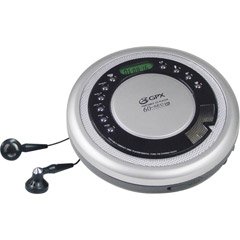
Figure 1: GPX CDP6806DT Personal CD Player. This image illustrates the compact design and general appearance of the device.
4. Controles y características
Familiarize yourself with the controls and features of your GPX CDP6806DT for optimal use.
- Pantalla LCD: 6-digit display for track number, time, and FM frequency.
- REPRODUCIR/PAUSA (►/−): Presione para iniciar o pausar la reproducción del CD.
- ALTO (■): Presione para detener la reproducción del CD.
- SALTAR/BUSCAR (◀◀/▶▶): Press to skip tracks. Hold to search within a track.
- VOLUMEN (+/-): Ajusta el nivel de salida de audio.
- MODE/PROG: Selects playback mode (Repeat, Random) or programs CD tracks.
- FM TUNER (ON/OFF/BAND): Switches to FM radio mode, turns FM on/off, or changes FM band.
- PRESET (+/-): Navigates saved FM radio presets.
- Compartimento de CD: Area for inserting audio CDs.
- Compartimento de la batería: Located on the bottom, holds 2 AA batteries.
- Toma de auriculares (3.5 mm): Conecta auriculares para escuchar en privado.
Figure 2: GPX CDP6806DT Controls Layout. This image provides a visual reference for the location of various buttons and ports on the device.
5. Configuración
5.1 Instalación de la batería
The GPX CDP6806DT requires two (2) AA batteries (not included) for portable operation.
- Localice el compartimiento de la batería en la parte inferior de la unidad.
- Deslice la tapa del compartimento de la batería para abrirla.
- Inserte dos pilas AA, asegurándose de la polaridad correcta (+ y -) como se indica dentro del compartimento.
- Cierre bien la tapa del compartimento de la batería.
5.2 Conexión de auriculares
For private listening, connect your 3.5mm stereo headphones (not included) to the headphone jack located on the side of the unit.
6. Instrucciones de funcionamiento
6.1 Reproducción de CD
The unit supports CD and CD-R/RW disc formats.
- Open the CD compartment lid by gently pressing the OPEN button (if present, or lifting the lid).
- Coloque un CD con la etiqueta hacia arriba sobre el eje central.
- Cierre firmemente la tapa del compartimento del CD hasta que haga clic.
- Presione el REPRODUCIR/PAUSA (►/−) button to begin playback. The track number and elapsed time will appear on the LCD display.
- Para pausar la reproducción, presione REPRODUCIR/PAUSA (►/−). Presione nuevamente para reanudar.
- Para detener la reproducción, presione el ALTO (■) botón.
- Para saltar a la siguiente pista, presione SKIP/SEARCH (▶▶).
- To go back to the beginning of the current track, press SKIP/SEARCH (◀◀) once. Press twice to go to the previous track.
- To search rapidly forward or backward within a track, hold down SKIP/SEARCH (▶▶) or (◀◀) respectivamente.
- Ajuste el volumen con el VOLUMEN (+/-) controles
6.2 Funcionamiento de la radio FM
The unit features a digital FM tuner with station presets.
- Deslice el SINTONIZADOR FM switch to the ON position or press the BANDA para ingresar al modo FM.
- Presione el SKIP/SEARCH (▶▶) or (◀◀) Botones para sintonizar manualmente una frecuencia deseada.
- To auto-scan and save stations, hold down the REPRODUCIR/PAUSA (►/−) button (or refer to specific instructions for auto-scan if available on the device).
- To recall saved presets, use the PRESET (+/-) botones.
6.3 CD Programming (24-Track)
Puede programar hasta 24 pistas para reproducir en un orden específico.
- Con el CD parado, presione el botón MODO/PROG Botón. "PROG" parpadeará en la pantalla.
- Utilice el SKIP/SEARCH (▶▶) or (◀◀) botones para seleccionar la primera pista que desea programar.
- Prensa MODO/PROG again to confirm the selection. The display will show the program number and the next available program slot.
- Repita los pasos 2 y 3 para agregar hasta 24 pistas a su programa.
- Después de programar todas las pistas deseadas, presione REPRODUCIR/PAUSA (►/−) para iniciar la reproducción programada.
- Para borrar el programa, presione el botón ALTO (■) botón dos veces.
6.4 Protección antisaltos (ASP)
The GPX CDP6806DT features a 60-second Anti-Skip Protection system. This system buffers audio data to minimize interruptions caused by minor shocks or vibrations during CD playback. The ASP activates automatically when a CD is playing.
7. Mantenimiento
7.1 Limpieza de la unidad
- Limpie el exterior de la unidad con un paño suave y seco.
- No utilice limpiadores abrasivos, ceras o disolventes.
- If the CD lens needs cleaning, use a specialized CD lens cleaner disc or a soft, lint-free cloth designed for optical lenses.
7.2 Cuidado de la batería
- Retire las baterías si la unidad no se utilizará durante un período prolongado para evitar fugas.
- No mezcle baterías viejas y nuevas, o diferentes tipos de baterías.
- Deseche las baterías usadas de manera responsable de acuerdo con las regulaciones locales.
8. Solución de problemas
If you experience issues with your GPX CDP6806DT, please consult the following table for common problems and solutions.
| Problema | Posible causa / solución |
|---|---|
| La unidad no se enciende. | Check if batteries are inserted correctly with proper polarity. Ensure batteries are fresh and not depleted. |
| No hay sonido en los auriculares. | Ensure headphones are fully plugged into the headphone jack. Increase the volume level. Test with another pair of headphones. |
| CD skips or playback is interrupted. | Ensure the CD is clean and free of scratches or smudges. Clean the CD with a soft, lint-free cloth. Ensure the unit is on a stable surface or held steadily during use. |
| El CD no se reproduce. | Ensure the CD is inserted correctly with the label side up. Close the CD compartment lid completely. Check if the CD is a supported format (CD, CD-R/RW). |
| La recepción de radio FM es mala. | Extend the headphone cable as it acts as the antenna. Try moving to a different location. |
9. Especificaciones
- Marca: GPX
- Modelo: CDP6806DT
- Formatos de disco compatibles: CD, CD-R / RW
- Protección anti-saltos: 60 segundos
- Mostrar: LCD de 6 dígitos
- Radio: Digital FM Tuner with Presets
- CD Programming: 24 pistas
- Fuente de energía: 2 pilas AA (no incluidas)
- Conectividad: Conector para auriculares de 3.5 mm (auxiliar)
10. Garantía y soporte
For detailed warranty information, please refer to the warranty card included with your original product packaging. For technical support, service inquiries, or to purchase replacement parts, please visit the official GPX websitio o comuníquese con su departamento de atención al cliente utilizando la información de contacto proporcionada en la documentación de su producto.
Conserve su comprobante de compra para reclamos de garantía.