
Casio A-158WA-1
Casio A158WA Series Digital Watch User Manual
Model: A-158WA-1
Marca: Casio
1. Introducción
Thank you for choosing the Casio A158WA-1 Digital Watch. This classic timepiece combines vintage aesthetics with practical digital functions, including a stopwatch, daily alarm, and LED light. Designed for everyday wear, it offers reliable timekeeping and water resistance for daily splashes. This manual provides detailed instructions to help you get the most out of your watch.
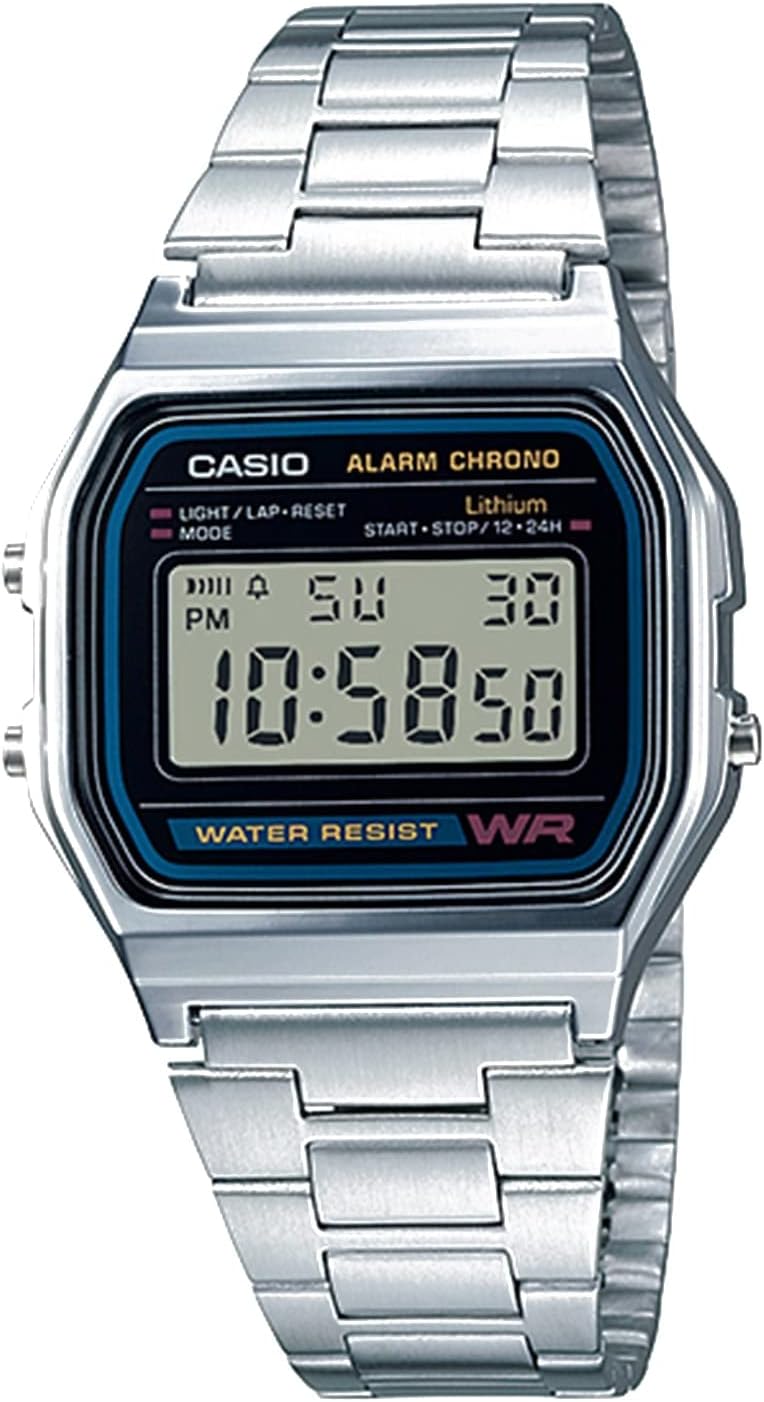
Figura 1: Frente view of the Casio A158WA-1 Digital Watch, showcasing its digital display and classic silver-tone design.
2. Configuración
2.1 Configuración de la hora y la fecha
- En el modo de cronometraje normal, presione el botón Modo button (bottom left) repeatedly until the seconds start flashing.
- Presione el Light/Lap/Reset button (top left) to reset the seconds to 00.
- Presione el Modo de nuevo para pasar al ajuste de la hora. Utilice el Start/Stop/12-24h button (top right) to adjust the hour. Note the 'P' indicator for PM.
- Repeat the process for minutes, month, date, and day of the week.
- Una vez que todos los ajustes sean correctos, presione el botón Modo button to return to normal timekeeping.
2.2 Ajuste de la pulsera
The stainless steel bracelet can be adjusted to fit your wrist. Locate the clasp and lift the small lever. Slide the clasp along the bracelet to the desired position and press the lever down firmly to secure it. Ensure it clicks into place to prevent accidental opening.

Figure 2: The Casio A158WA-1 Digital Watch in a lifestyle setting, highlighting its compact size and classic appeal.
3. Instrucciones de funcionamiento
3.1 Función de cronómetro
- Desde el modo de cronometraje normal, presione el botón Modo button twice to enter stopwatch mode. The display will show '00:00:00'.
- Presione el Start/Stop/12-24h Botón (arriba a la derecha) para iniciar el cronómetro.
- Presione el Start/Stop/12-24h Presione nuevamente el botón para detener el cronómetro.
- Presione el Light/Lap/Reset button (top left) to reset the stopwatch to '00:00:00'.
3.2 Alarma diaria
- Desde el modo de cronometraje normal, presione el botón Modo button once to enter alarm mode. The display will show the alarm time.
- Presione el Light/Lap/Reset button (top left) to turn the alarm ON/OFF. An alarm indicator will appear when the alarm is active.
- Para configurar la hora de la alarma, presione el botón Start/Stop/12-24h button (top right) to adjust the hour, then press Modo Para pasar a minutos y ajustar.
- Presione el Modo button to return to normal timekeeping.
Luz LED de 3.3 pulgadas
Presione el Light/Lap/Reset button (top left) in any mode to illuminate the display. The light is designed for low-light conditions and may appear dim in bright environments.
4. Mantenimiento
4.1 Resistencia al agua
The Casio A158WA-1 is water resistant. This means it can withstand splashes, rain, or brief immersion in water. It is no apto Para nadar, ducharse o bucear. Evite usar los botones mientras el reloj esté mojado para evitar la entrada de agua.
4.2 Limpieza
Para limpiar su reloj, límpielo con un paño suave y seco. Para la suciedad difícil, un paño ligeramente seco.amp Se puede usar un paño y secarlo inmediatamente. Evite usar limpiadores químicos o materiales abrasivos, ya que pueden dañar el acabado del reloj.
4.3 Duración de la batería
The watch is equipped with a long-life battery, typically lasting up to 7 years. When the display becomes dim or functions become erratic, it may be time for a battery replacement. It is recommended to have the battery replaced by a qualified watch technician to ensure water resistance is maintained.
5. Solución de problemas
- La pantalla está en blanco o tenue: La batería puede estar baja o agotada. Reemplace la batería.
- La hora es incorrecta: Re-set the time and date following the instructions in Section 2.1. Ensure AM/PM is correctly set.
- La alarma no suena: Check if the alarm is activated (alarm indicator on display). Ensure the alarm time is set correctly.
- Los botones no responden: Asegúrese de que el reloj no esté mojado. Si el problema persiste, podría ser necesario reiniciarlo (consulte con un centro de servicio) o la batería podría estar baja.
6. Especificaciones
| Característica | Detalle |
|---|---|
| Número de modelo | A158W-1 (A-158WA-1 variant) |
| Tipo de pantalla | Digital |
| Dimensiones de la caja | 33 milímetros |
| Resistencia al agua | Yes (splashes/brief immersion) |
| Funciones | Time, Date, Day, Daily Alarm, 1/100 Sec Stopwatch, LED Light |
| Duración de la batería | Aproximadamente 7 años |
| Exactitud | ± 30 segundos por mes |
| Material | Resin (case), Stainless Steel (band) |
7. Garantía y soporte
7.1 Información de garantía
Your Casio A158WA-1 Digital Watch comes with a manufacturer's warranty covering defects in materials and workmanship. Please refer to the warranty card included with your purchase for specific terms, conditions, and duration. Keep your proof of purchase for warranty claims.
7.2 Atención al cliente
For further assistance, technical support, or service inquiries, please visit the official Casio websitio o contacte con su departamento de atención al cliente. También puede consultar la información completa Manual de usuario (PDF) Para más detalles.
Ask a question about this manual
Ask about setup, troubleshooting, compatibility, parts, safety, or missing instructions. Manuals+ will review the question and use this page’s manual context to help answer it.