
1. Introducción
This manual provides essential information for the safe and efficient operation of your Technaxx Wireless CarPlay & Android Car Monitor TX-361. Please read this manual thoroughly before using the device and retain it for future reference. The TX-361 is designed to integrate modern smartphone connectivity, including Apple CarPlay and Android Auto, into your vehicle without requiring a complex car radio replacement. It also features an integrated DAB digital radio for enhanced audio experience.
2. Información de seguridad
- Utilice siempre el dispositivo de forma responsable y conforme a las normas de tráfico locales. Conducir distraído puede provocar accidentes.
- No intente desmontar ni modificar el dispositivo. Esto podría anular la garantía y suponer riesgos de seguridad.
- Mantenga el dispositivo alejado de temperaturas extremas, luz solar directa y humedad.
- Asegúrese de que el dispositivo esté montado de forma segura y no obstruya su view o interferir con los controles del vehículo.
- Utilice únicamente el cable de alimentación y los accesorios proporcionados.
- If the device malfunctions, disconnect it from the power source and contact customer support.
3. Contenido del paquete
Verifique que todos los artículos enumerados a continuación estén incluidos en su paquete:
- DAB 7-inch CarPlay with Touch Screen TX-361
- Power Supply (USB-A to USB-C, 1.5m cable)
- Cable auxiliar (1 m)
- Antena DAB
- Holder (Mounting Bracket)
- Manual de usuario
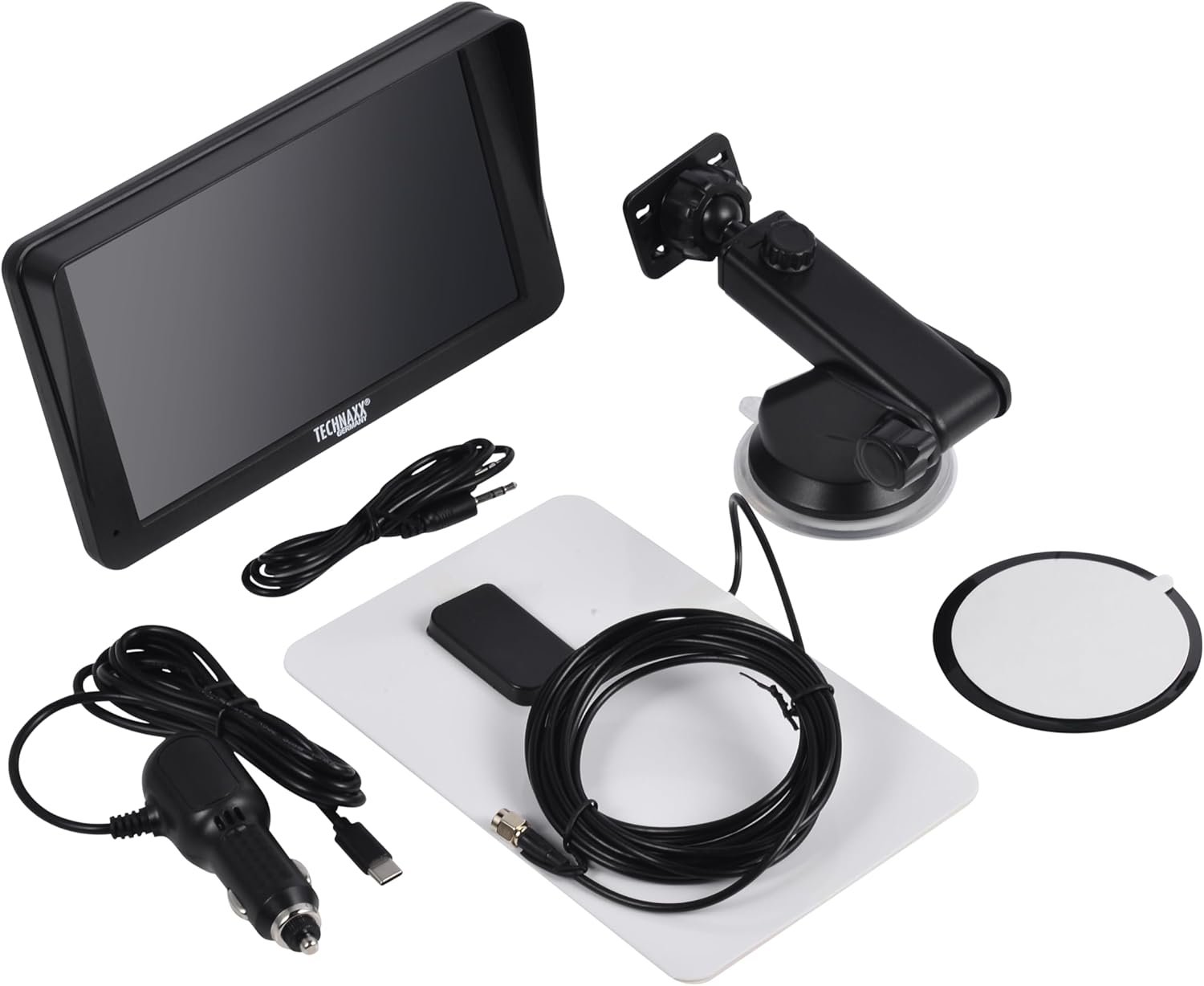
Image: All components included in the Technaxx TX-361 package, neatly laid out.
4. Producto terminadoview
Familiarize yourself with the main components of your TX-361 monitor.
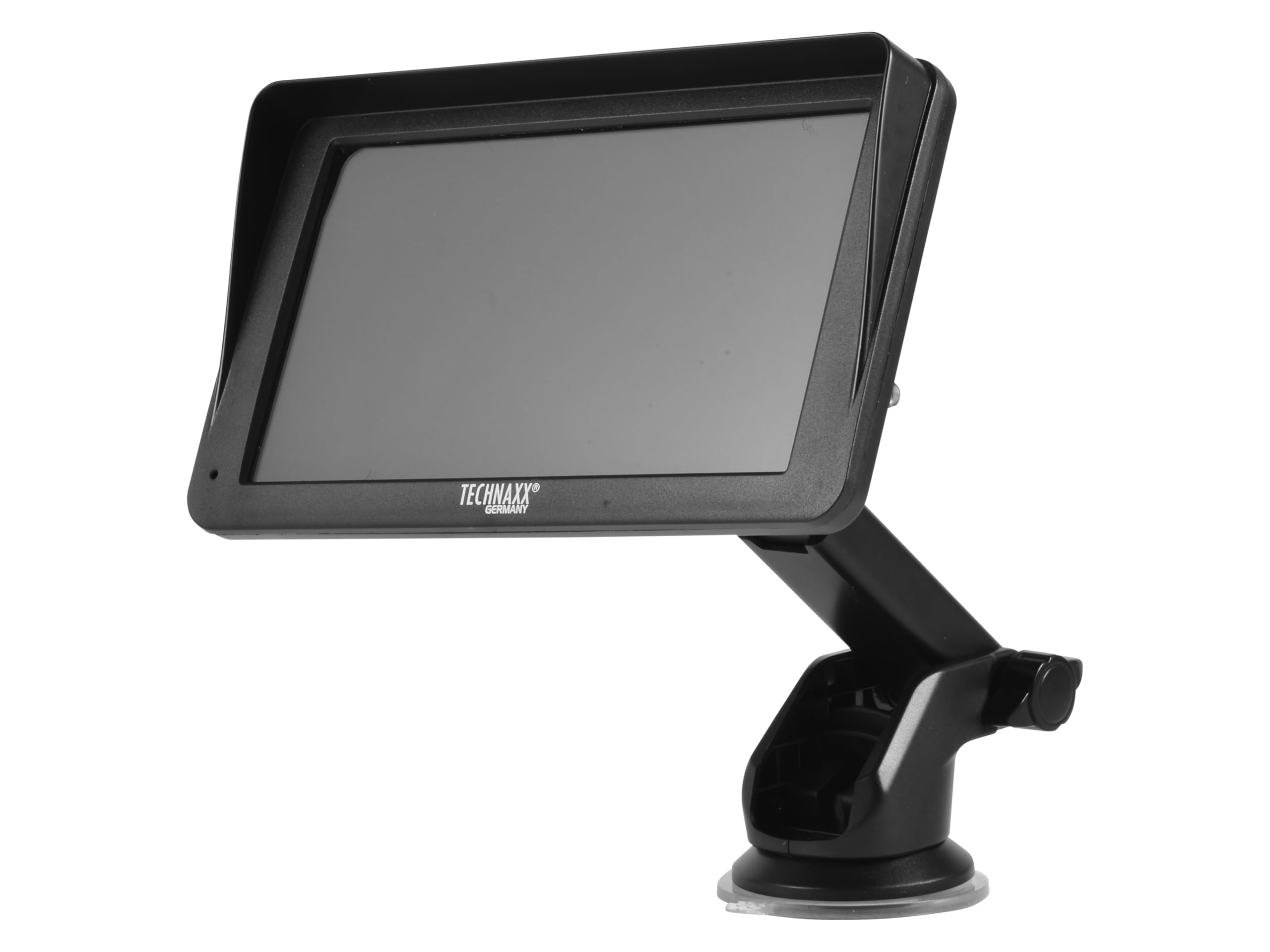
Imagen: Frente view of the TX-361 monitor with its 7-inch display and 'TECHN AXX GERMANY' branding, attached to the adjustable mounting stand.

Imagen: Trasera view of the TX-361 monitor, highlighting the ventilation grilles and the attachment point for the mounting bracket.

Imagen: Detallada view of the right side of the TX-361 monitor, showing the power button, reset button, USB-C power input, AUX output, and USB-A port.
4.1. Componentes del dispositivo
- Pantalla táctil capacitiva de 7 pulgadas: Pantalla principal para todas las funciones.
- Botón de encendido: Ubicado en el lado superior derecho.
- Botón de reinicio: Small pinhole button for system reset.
- Puerto USB-C: Para entrada de energía.
- Salida auxiliar: 3.5mm jack for wired audio transmission.
- Puerto USB-A: For media playback or charging external devices.
- Entrada de antena DAB: Connector for the external DAB antenna.
- Altavoz integrado: Para reproducción de audio directa.
5. Configuración
5.1. Montaje del dispositivo
The TX-361 can be mounted on your vehicle's windscreen or dashboard using the provided holder.
- Attach the monitor to the mounting bracket.
- For Windscreen Mounting: Clean the desired area on the windscreen. Press the suction cup firmly against the glass and engage the lever to secure it.
- Para montaje en tablero: Clean the desired area on the dashboard. If necessary, use the adhesive disc provided for a more secure attachment point for the suction cup. Press the suction cup firmly and engage the lever.
- Ajuste el ángulo del monitor para una óptima viewSin obstruir su conducción view.

Image: The TX-361 monitor securely mounted on a car dashboard, showing its position relative to the driver's view.

Image: The TX-361 monitor mounted on a car windscreen, demonstrating an alternative placement option.
5.2. Conexión de alimentación
- Connect the USB-C end of the power cable to the USB-C port on the monitor.
- Plug the USB-A end of the power cable into the provided 12V/24V cigarette lighter adapter.
- Insert the cigarette lighter adapter into your vehicle's 12V/24V power socket. The device will power on automatically or can be turned on using the power button.
5.3. DAB Antenna Connection
For optimal DAB radio reception, connect the included DAB antenna:
- Connect the DAB antenna cable to the dedicated DAB antenna input on the monitor.
- Mount the DAB antenna on your windscreen or another suitable location, ensuring it has clear line of sight for best signal reception.
6. Instrucciones de funcionamiento
6.1. Encendido / apagado
- Encendido: The device typically powers on automatically when connected to the vehicle's power. If not, press and hold the power button on the top right side.
- Apagado: Press and hold the power button until the device shuts down. A short press will turn the screen off/on.
6.2. Initial Setup and Smartphone Connection
The TX-361 supports wireless Apple CarPlay and Android Auto via Wi-Fi and Bluetooth 5.0.
- Asegúrese de que el Wi-Fi y el Bluetooth de su teléfono inteligente estén habilitados.
- On the TX-361 monitor, navigate to the CarPlay or Android Auto section.
- The monitor will display a Bluetooth name. On your smartphone, search for and connect to this Bluetooth device.
- Once connected via Bluetooth, the device will prompt you to enable Wi-Fi for CarPlay/Android Auto functionality. Confirm the connection on your phone.
- After successful pairing, Apple CarPlay or Android Auto will launch automatically on the monitor.
6.3. Funcionamiento de la pantalla táctil
The 7-inch capacitive touchscreen allows for intuitive control:
- Grifo: Seleccionar elementos o confirmar acciones.
- Golpe fuerte: Navegar por menús o listas.
- Pellizcar para hacer zoom: (Where supported, e.g., in navigation apps) Adjust map zoom levels.
6.4. DAB Digital Radio
To use the integrated DAB digital radio:
- Ensure the DAB antenna is properly connected.
- From the main menu, select the 'DAB Radio' option.
- The device will automatically scan for available DAB stations.
- Seleccione la estación deseada de la lista.
6.5. Radio FM
For traditional FM radio reception:
- From the main menu, select the 'FM Radio' option.
- Utilice los controles en pantalla para buscar estaciones o sintonizar manualmente una frecuencia.
6.6. Opciones de salida de audio
The TX-361 offers several ways to transmit audio to your vehicle's sound system:
- Altavoz integrado: Audio will play directly from the monitor's built-in speaker.
- cable auxiliar: Connect the provided 3.5mm AUX cable from the monitor's AUX output to your car's AUX input. Select 'AUX' as the input source on your car radio.
- Transmisión FM: Select an unused FM frequency on the TX-361 and tune your car radio to the same frequency. Audio will be transmitted wirelessly to your car's speakers.
7. Mantenimiento
- Limpieza: Utilice un paño suave y seco para limpiar la pantalla y el exterior del dispositivo. No utilice limpiadores abrasivos ni disolventes.
- Almacenamiento: Si va a almacenar el dispositivo durante un período prolongado, desconéctelo de la alimentación y guárdelo en un lugar fresco y seco.
- Actualizaciones de software: Revise periódicamente las instrucciones del fabricante. websitio para obtener actualizaciones de firmware disponibles para garantizar un rendimiento óptimo.
8. Solución de problemas
| Problema | Posible solución |
|---|---|
| El dispositivo no se enciende. |
|
| No se puede conectar a CarPlay/Android Auto. |
|
| Poor DAB/FM radio reception. |
|
| Sin salida de audio. |
|
9. Especificaciones
| Característica | Especificación |
|---|---|
| Número de modelo | 5361 |
| Mostrar | Pantalla táctil capacitiva de 7 pulgadas |
| Tecnología de conectividad | Wi-Fi (Dual-band 2.4 / 5 GHz), Bluetooth 5.0 |
| Características especiales | Wireless CarPlay & Android Auto, DAB Digital Radio, FM Radio, Touchscreen Display |
| Rango de frecuencia DAB | Band III: 174-240 MHz |
| Salida de audio | AUX, FM Transmission, Integrated Speaker |
| Fuente de alimentación | 12V/24V via Cigarette Lighter |
| Dimensiones del producto (Pr. x An. x Al.) | 18.8D x 10.8W x 3.5H centímetros |
| Peso del artículo | 0.58 libras (aproximadamente 263 gramos) |
10. Garantía y soporte
Technaxx products are covered by a manufacturer's warranty. For detailed warranty information, please refer to the warranty card included with your product or visit the official Technaxx website. For technical support, troubleshooting assistance, or service inquiries, please contact Technaxx customer support through their official channels.
A menudo puede encontrar recursos adicionales, preguntas frecuentes e información de contacto en el Technaxx official websitio.