
Producto terminadoview
The Western Digital My Book Essential external hard drive provides 1 terabyte (1TB) of storage capacity. Designed for data backup and archiving, this device features a high-speed USB 2.0 interface for broad compatibility and efficient data transfer. Its design allows it to power on and off in conjunction with your computer, contributing to energy efficiency.
Características principales:
- Instalación sencilla: Funcionalidad plug-and-play para uso inmediato.
- Diseño compacto: Occupies minimal desk space, similar to a paperback book.
- Eficiencia energética: Automatically enters standby mode after 10 minutes of inactivity to conserve power.
- Interfaz USB 2.0: Offers convenient and compatible connectivity with various computers.
- Compatible con PC y Mac: Supports Windows 2000/XP/Vista and Mac OS X 10.4.8 or later.
¿Qué hay en la caja?
Verifique que todos los siguientes elementos estén incluidos en el paquete de su producto:
- Western Digital My Book Essential WDBAAF0010HBK Hard Drive
- Cable USB
- Adaptador de CA
- Guía de instalación rápida
Instrucciones de instalación
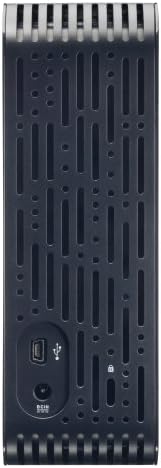
- Conecte el adaptador de CA: Plug the AC adapter into the power port on the back of the My Book Essential drive. Connect the other end of the AC adapter to a power outlet.
- Conecte el cable USB: Connect one end of the supplied USB cable to the USB 2.0 port on the back of the My Book Essential drive. Connect the other end of the USB cable to an available USB port on your computer.
- Encendido: The drive is designed to power on automatically with your computer. Ensure your computer is powered on. The drive's indicator light will illuminate.
- Reconocimiento inicial: Your operating system (Windows or Mac OS) should automatically detect and install the necessary drivers for the drive. This process may take a few moments.
- Accediendo a la unidad: Once installed, the drive will appear as a new storage device in 'My Computer' (Windows) or 'Finder' (Mac OS). You can now begin transferring files.
Note: For detailed operating system-specific instructions or if the drive is not recognized, refer to the included Quick Install Guide or the Western Digital support websitio.
Instrucciones de funcionamiento
The Western Digital My Book Essential drive functions as an external storage device for your computer. It is ideal for backing up important files, storing large media libraries, and freeing up space on your computer's internal hard drive.
Transferencia de datos:
- Para transferir files, simply drag and drop them to and from the My Book Essential drive icon in your computer's file explorador.
- For optimal performance, ensure the USB cable is securely connected to a USB 2.0 port on your computer.
Administración de energía:
- The drive is designed to turn on and off with your computer. When your computer is shut down or put to sleep, the drive will also enter a low-power state.
- After 10 minutes of inactivity, the drive will automatically enter standby mode to save energy. It will resume normal operation when accessed.
Eliminación segura:
Always use the "Safely Remove Hardware" option (Windows) or drag the drive icon to the Trash/Eject (Mac OS) before disconnecting the USB cable to prevent data corruption.
Mantenimiento
Proper maintenance ensures the longevity and reliable performance of your external hard drive.
- Cuidado físico: Mantenga la unidad en un lugar estable y bien ventilado. Evite exponerla a temperaturas extremas, luz solar directa o humedad. No obstruya las ranuras de ventilación.
- Limpieza: Utilice un paño suave y seco para limpiar el exterior de la unidad. No utilice limpiadores líquidos ni aerosoles.
- Copia de seguridad de datos: Regularly back up critical data stored on the external drive to another location (e.g., cloud storage, another hard drive) to prevent data loss in case of unforeseen issues.
- Actualizaciones de firmware: Verifique periódicamente el soporte de Western Digital websitio para obtener actualizaciones de firmware disponibles para su modelo.
Solución de problemas
If you encounter issues with your My Book Essential drive, try the following steps:
- Unidad no detectada:
- Asegúrese de que el adaptador de CA esté conectado de forma segura tanto a la unidad como a una toma de corriente que funcione.
- Verify the USB cable is firmly connected to both the drive and your computer's USB port. Try a different USB port or cable if available.
- Reinicie su computadora.
- Check your computer's Disk Management (Windows) or Disk Utility (Mac OS) to see if the drive is recognized but unformatted or unallocated.
- Transferencia lenta de datos:
- Ensure you are using a USB 2.0 port. While compatible with USB 1.1, performance will be significantly slower.
- Evite ejecutar múltiples aplicaciones exigentes durante grandes file transferencias.
- Check for background processes that might be using system resources or disk I/O.
- La luz de conducción no está encendida:
- Confirm the AC adapter is connected and the power outlet is active.
- If connected to a computer, ensure the computer is powered on and not in sleep mode.
For further assistance, consult the Quick Install Guide or visit the Western Digital support websitio.
Presupuesto
| Característica | Detalle |
|---|---|
| Nombre del modelo | My Book Essential Edition 2.0 |
| Número de modelo | WDH1U10000N |
| Capacidad de almacenamiento digital | 1024 GB (1 TB) |
| Interfaz del disco duro | USB 2.0 |
| Tecnología de conectividad | USB |
| Factor de forma del disco duro | 3.5 pulgadas |
| Descripción del disco duro | De oficina |
| Dispositivos compatibles | De oficina |
| Tipo de instalación | Conectar |
| Color | Negro |
| Velocidad de rotación del disco duro | 7200 RPM |
| Velocidad de lectura | 60 megabytes por segundo |
| Velocidad de los medios | 30 MB/s |
| Material del recinto | Hard Plastic or Metal |
| Peso del artículo | 3.3 libras |
| Requisitos del sistema | Available USB port, Windows 2000/XP/Vista, Mac OS X 10.4.8 or later |
Garantía y soporte
The Western Digital My Book Essential drive comes with a Garantía limitada de 1 años. For warranty claims, technical support, or to access additional resources such as drivers and software, please visit the official Western Digital support websitio.
Soporte en línea: soporte.wdc.com
Imágenes del producto




Vídeos de productos
WD Hard Drives: Essential vs. Home Edition Comparison
This video provides a comparison between the Western Digital My Book Essential and Home Edition hard drives, highlighting their physical differences and connectivity options. It helps users understand the specific features of the Essential model in context.