
1. Introducción
The IOGEAR GHDMIFDVIMW6 adapter facilitates the connection between an HDMI-enabled source device and a DVI-enabled display device. This adapter features a gold-plated HDMI female connector on one end and a DVI-D Dual Link male connector on the other, ensuring a reliable digital video signal transmission.
2. Producto terminadoview
The IOGEAR GHDMIFDVIMW6 is designed for high-quality video signal conversion. Its gold-plated connectors resist corrosion and enhance signal integrity.
- Conector 1: HDMI Female (19-pin Type A)
- Conector 2: DVI-D Dual Link Male (24-pin)
- Objetivo: Connects HDMI output to DVI input.
- Características: Gold-plated connectors for optimal signal transfer.
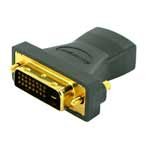
Figura 2.1: IOGEAR GHDMIFDVIMW6 Adapter. This image shows the compact adapter with an HDMI female port on one side and a DVI-D Dual Link male connector on the other.
3. Contenido del paquete
- 1 x IOGEAR GHDMIFDVIMW6 HDMI Female to DVI-D Dual Link Male Adapter
4. Instrucciones de configuración
Follow these steps to connect your HDMI source device to a DVI display:
- Identificar puertos: Locate the HDMI output port on your source device (e.g., computer, game console, media player) and the DVI-D input port on your display (e.g., monitor, projector).
- Connect Adapter to Display: Plug the DVI-D Dual Link male connector of the IOGEAR GHDMIFDVIMW6 adapter directly into the DVI-D input port on your display device. Ensure a secure connection.
- Conecte el cable HDMI: Take a standard HDMI cable (not included) and plug one end into the HDMI output of your source device.
- Connect HDMI Cable to Adapter: Plug the other end of the HDMI cable into the HDMI female port on the IOGEAR GHDMIFDVIMW6 adapter.
- Dispositivos de encendido: Asegúrese de que tanto el dispositivo de origen como el dispositivo de visualización estén encendidos.
The connection is now complete.
5. Instrucciones de funcionamiento
Once the physical connection is established as described in the Setup section:
- Seleccionar entrada: On your DVI display, use its menu or input selection button to choose the correct DVI input source.
- Ajustar resolución: If the image does not appear correctly or is distorted, adjust the display resolution settings on your source device to match the native resolution of your DVI display. Refer to your source device's operating manual for instructions on changing display settings.
- Audio: Note that DVI connections transmit video signals only. For audio, a separate audio cable connection from your source device to an audio system or speakers will be required.
6. Mantenimiento
The IOGEAR GHDMIFDVIMW6 adapter requires minimal maintenance.
- Limpieza: Use a soft, dry cloth to gently wipe the adapter if it becomes dusty. Do not use liquid cleaners or solvents.
- Almacenamiento: Guarde el adaptador en un lugar fresco y seco, alejado de la luz solar directa y de temperaturas extremas cuando no esté en uso.
- Manejo: Avoid bending or twisting the adapter excessively, as this can damage the internal wiring or connectors.
7. Solución de problemas
Si encuentra problemas, consulte los siguientes pasos de solución de problemas:
- Sin señal de vídeo:
- Ensure all connections (HDMI cable, adapter, DVI cable if applicable) are secure and fully seated.
- Verify that both the source device and the display are powered on.
- Confirm that the correct DVI input is selected on your display.
- Test with a different HDMI cable or DVI display if possible to rule out faulty components.
- Distorted or Incorrect Resolution:
- Adjust the display resolution settings on your source device. DVI displays often have a native resolution that provides the best picture quality.
- Ensure your source device's graphics driver is up to date.
- Sin audio:
- This adapter transmits video only. For audio, a separate audio connection is required from your source device to an audio system.
8. Especificaciones
| Característica | Detalle |
|---|---|
| Número de modelo | GHDMIFDVIMW6 |
| Connector Type (Left) | 19 pin HDMI Type A Female |
| Connector Type (Right) | 24 pin DVI-Digital (Dual-Link) Male |
| Dimensiones del producto (L x An x Al) | 0.63 x 0.63 x 1.73 pulgadas |
| Peso del artículo | 0.96 onzas (aproximadamente 0.06 libras) |
| Tipo de acabado | Gold-plated HDMI |
| Fabricante | YO GEAR |
9. Información de seguridad
- No exponga el adaptador al agua, la humedad o temperaturas extremas.
- No intente desmontar ni modificar el adaptador.
- Mantener fuera del alcance de los niños.
- Use only as intended for connecting HDMI to DVI-D video signals.
10. Garantía y soporte
IOGEAR products are backed by a manufacturer's warranty. For specific warranty details, technical support, or customer service, please visit the official IOGEAR websitio o comuníquese directamente con su servicio de atención al cliente.
IOGEAR Official Websitio: www.iogear.com