
Introducción
This manual provides detailed instructions for the proper use and maintenance of your Royal DM2070 Electronic Organizer. Please read this manual thoroughly before operating the device to ensure safe and efficient use. Keep this manual for future reference.
Información de seguridad
- No exponga el dispositivo a temperaturas extremas, luz solar directa o humedad alta.
- Evite dejar caer el dispositivo o someterlo a fuertes impactos.
- No intente desmontar ni reparar el dispositivo usted mismo. Encargue cualquier servicio técnico a personal cualificado.
- Mantenga el dispositivo alejado del agua y otros líquidos.
- Utilice únicamente el tipo de batería especificado para el reemplazo.
Contenido del paquete
Verifique que todos los artículos estén presentes en su paquete:
- Royal DM2070 Electronic Organizer
- Stylus (if applicable)
- Guía de inicio rápido
- Tarjeta de garantía
Configuración
1. Instalación de la batería
The Royal DM2070 requires batteries for operation. Follow these steps to install them:
- Localice la tapa del compartimiento de la batería en la parte posterior del dispositivo.
- Deslice o levante la tapa para abrir el compartimento.
- Inserte las pilas necesarias, asegurándose de la polaridad correcta (+ y -) como se indica dentro del compartimento.
- Vuelva a colocar la tapa del compartimiento de la batería de forma segura.
2. Encendido inicial y configuración
After installing batteries, power on your device and configure basic settings:
- Mantenga pulsado el FUERZA botón hasta que la pantalla se ilumine.
- The device may prompt you to set the date and time. Use the navigation buttons or stylus to enter the correct information.
- Confirm your settings to complete the initial setup.
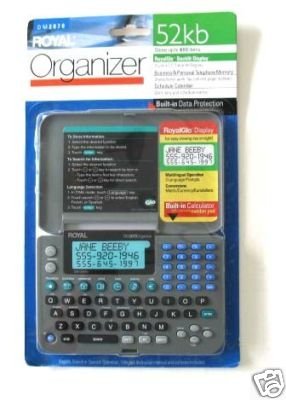
Image: Royal DM2070 Electronic Organizer. This image displays the device's front view, highlighting its screen and keypad, essential for navigation and data entry.
Instrucciones de funcionamiento
1 Navegación
The DM2070 features a keypad and potentially a stylus for navigation. Use the arrow keys to move between menu options and press INGRESAR or a designated selection button to confirm.
2. Introducción de datos
To enter information such as contacts, appointments, or notes:
- Navigate to the desired application (e.g., 'Contacts', 'Calendar', 'Notes').
- Select 'New Entry' or a similar option.
- Use the alphanumeric keypad to input text. Some models may offer an on-screen keyboard via stylus.
- Save your entry before exiting the application.
3. Uso de aplicaciones
The DM2070 includes various applications:
- Calendario: View daily, weekly, or monthly schedules. Add and edit appointments.
- Contactos: Store names, phone numbers, addresses, and email information.
- Notas: Create and manage text notes or memos.
- Calculadora: Realizar cálculos aritméticos básicos.
- Convertidor de moneda: Convert between different currencies (requires manual update of exchange rates on some models).
Mantenimiento
1. Limpieza del dispositivo
To keep your DM2070 in optimal condition:
- Limpia la pantalla y casing con un paño suave, seco y sin pelusa.
- Para marcas difíciles, ligeramente dampEnjuague el paño con agua; evite productos químicos fuertes o limpiadores abrasivos.
- Ensure no moisture enters openings.
2. Cuidado de la batería
- Reemplace las baterías rápidamente cuando aparezca el indicador de batería baja.
- Retire las baterías si el dispositivo no se utilizará durante un período prolongado para evitar fugas.
Solución de problemas
If you encounter issues with your Royal DM2070, refer to the following common solutions:
| Problema | Posible causa | Solución |
|---|---|---|
| El dispositivo no se enciende. | Baterías muertas o instaladas incorrectamente. | Reemplace las baterías por otras nuevas, asegurándose de la polaridad correcta. |
| La pantalla está en blanco o congelada. | Fallo de software o batería baja. | Try a soft reset (refer to Quick Start Guide for specific button combination) or replace batteries. |
| Data loss. | Battery depletion or improper shutdown. | Ensure batteries are fresh. Always save data before powering off. |
| El teclado no responde. | Polvo/residuos debajo de las teclas o problema interno. | Clean keypad gently. If problem persists, contact support. |
Presupuesto
Key technical specifications for the Royal DM2070 Electronic Organizer:
| Característica | Detalle |
|---|---|
| Marca | REAL |
| Número de modelo | 2070 DM |
| Material de la cubierta | Cuero |
| Formato | Organizador |
| Peso del artículo | 181 gramos |
| Dimensiones del artículo (LxWxH) | 24.4 x 14.5 x 1 centímetros |
| Público objetivo | Adulto |
Garantía y soporte
The Royal DM2070 Electronic Organizer comes with a standard manufacturer's warranty. Please refer to the warranty card included in your package for specific terms and conditions. For technical support, service, or inquiries, please contact Royal customer service through the contact information provided on the warranty card or the official Royal websitio.