
Introducción
Gracias por la compraasing the Snakebyte Wireless Bluetooth Premium PS3 Controller. This manual provides detailed instructions for setting up, operating, maintaining, and troubleshooting your new controller. Please read this manual thoroughly before use to ensure optimal performance and longevity of your device.
Contenido del paquete
Por favor, compruebe que todos los artículos estén presentes en el paquete:
- Snakebyte Wireless Bluetooth Premium PS3 Controller
- USB Charging Cable (approximately 3 meters)
- Manual de instrucciones (este documento)

Image: The Snakebyte Wireless Bluetooth Premium PS3 Controller shown in its retail blister packaging, indicating the product and included cable.
Configuración
1. Carga del controlador
Before initial use, fully charge the controller. Connect the supplied USB charging cable to the controller's charging port and the other end to a USB port on your PlayStation 3 console or a compatible USB power adapter. The indicator lights on the controller will show charging status and turn off or change color when fully charged.
2. Conexión a PlayStation 3
To connect the controller wirelessly to your PlayStation 3 console:
- Asegúrese de que su consola PlayStation 3 esté encendida.
- Connect the controller to the PS3 console using the supplied USB charging cable. This will register the controller with the console.
- Presione el Botón PS (located in the center of the controller) once. The controller will power on and attempt to establish a connection.
- Once the controller is registered and connected, the indicator lights will illuminate, typically assigning a player number.
- You can now disconnect the USB cable for wireless gameplay. If the connection is lost, reconnect the USB cable and press the PS button again.

Imagen: Frente view of the Snakebyte Wireless Bluetooth Premium PS3 Controller, showing the button layout including the central PS button.
Instrucciones de funcionamiento
Disposición y funciones del controlador
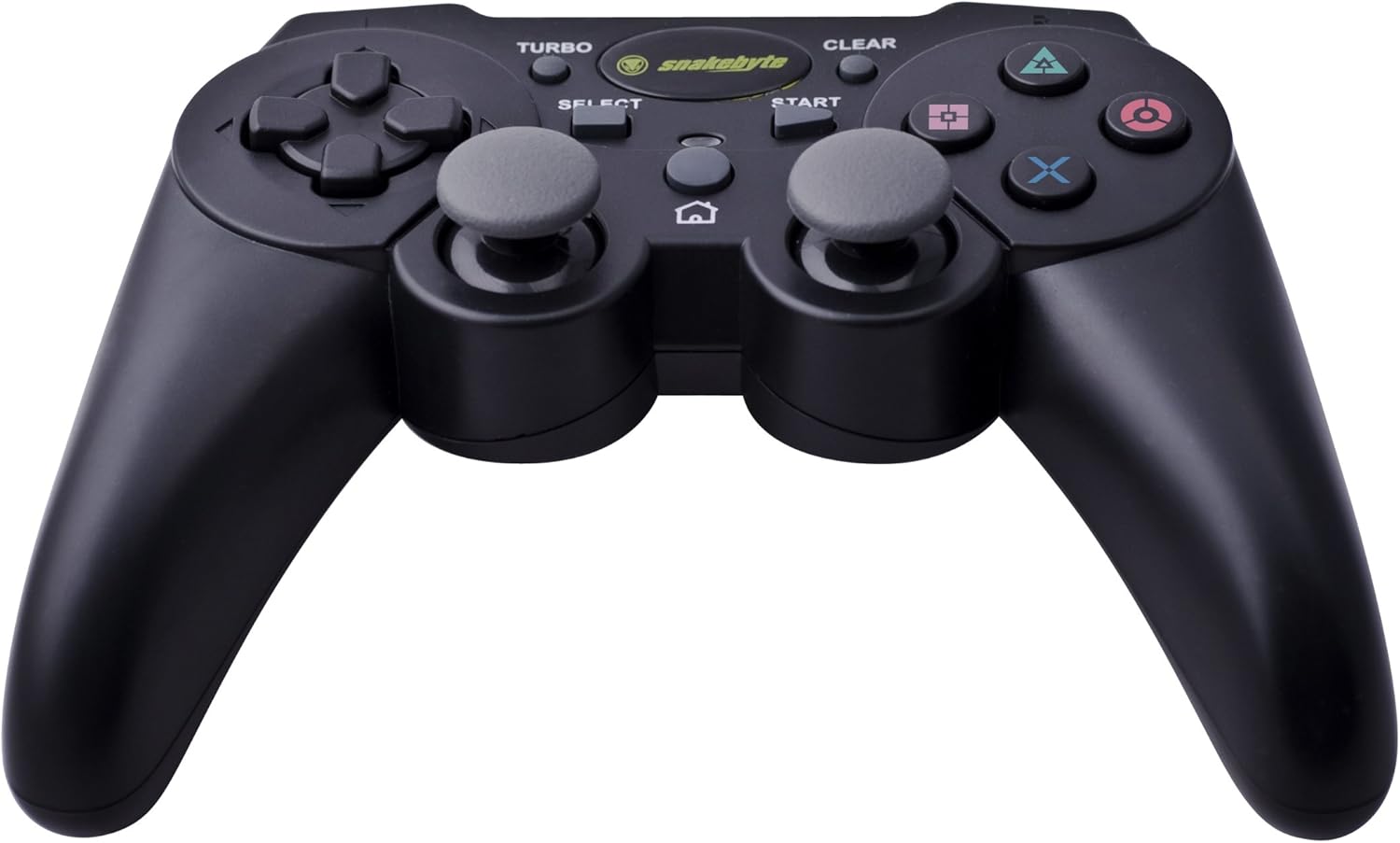
Image: The Snakebyte Wireless Bluetooth Premium PS3 Controller, highlighting the dual analog sticks and various buttons.
- Pad direccional (D-Pad): For precise directional input in games.
- Joystick analógico izquierdo: Control de movimiento primario.
- Joystick analógico derecho: Control de cámara o movimiento secundario.
- Botones de acción (triángulo, círculo, cruz, cuadrado): Acciones específicas del juego.
- Botones L1/R1: Botones de hombro para diversas funciones del juego.
- Disparadores L2/R2: Analog triggers for pressure-sensitive input, often used for acceleration/braking or aiming/firing.
- Botón de inicio: Pauses games or opens menus.
- Botón SELECCIONAR: Opens in-game maps, inventories, or other menus.
- Botón PS: Powers on the controller, accesses the PS3 XMB (Cross Media Bar) menu, or turns off the controller/console.
- Botón TURBO: Activates the turbo function for other buttons.
- Botón CLEAR: Desactiva la función turbo.
Función Turbo
The controller features a TURBO function, allowing a selected button to register multiple presses rapidly with a single hold. This can be useful for certain game mechanics.
- Para activar TURBO: Mantenga presionado el botón Botón TURBO, then press the desired action button (e.g., Cross, Square, Circle, Triangle, L1, R1, L2, R2). Release both buttons. The selected button will now have the TURBO function enabled.
- To deactivate TURBO for a specific button: Press and hold the Botón CLEAR, then press the button for which TURBO is currently active. Release both buttons.
- To deactivate all TURBO functions: Press the Botón CLEAR once without holding it down.
Motion Sensing and Vibration Feedback
This controller supports motion sensing capabilities, allowing for intuitive control in compatible games. It also provides vibration feedback to enhance immersion during gameplay, reacting to in-game events such as impacts or explosions.
Encendido y apagado
- Para encender: Presione el botón Botón PS.
- To power off: The controller will automatically enter sleep mode after a period of inactivity to conserve battery. Alternatively, you can hold the Botón PS for several seconds to bring up the PS3 menu, where you can choose to turn off the controller.
Mantenimiento
- Limpieza: Utilice un paño suave y seco para limpiar el controlador. No utilice limpiadores abrasivos ni disolventes.
- Almacenamiento: Guarde el controlador en un lugar fresco y seco, alejado de la luz solar directa y de temperaturas extremas.
- Cuidado de la batería: Para prolongar la vida útil de la batería, evite descargar completamente el mando con frecuencia. Cárguelo regularmente, incluso si no lo usa constantemente.
- Evitar daños: Do not drop the controller or expose it to excessive force or moisture.
Solución de problemas
| Problema | Posible solución |
|---|---|
| El controlador no se conecta de forma inalámbrica. |
|
| Los botones o joysticks analógicos no responden. |
|
| El controlador no carga. |
|
Restablecer el controlador
If the controller behaves erratically or becomes unresponsive, you can perform a reset. Locate the small reset button on the back of the controller (often in a small hole). Use a thin, pointed object (like a straightened paperclip) to press and hold the reset button for a few seconds. This will restart the controller's internal electronics.
Presupuesto
- Marca: Snakebyte
- Número de modelo: SB904714
- Plataforma compatible: Sony PlayStation 3
- Conectividad: Inalámbrico (Bluetooth)
- Número de botones: 16
- Dimensiones (L x An x Al): Aproximadamente 23.01 x 16.31 x 8.51 cm (9.06 x 6.42 x 3.35 pulgadas)
- Peso: Aproximadamente 419.99 g (0.93 libras)
- Color: Negro
Garantía y soporte
For warranty information and technical support, please refer to the documentation provided with your purchase or contact your retailer. You may also visit the official Snakebyte webSitio para obtener más ayuda e información del producto.