
VTech 80-109744
VTech Schulstart Laptop E Instruction Manual
Modelo: 80-109744
1. Introducción
This manual provides essential information for the safe and effective use of your VTech Schulstart Laptop E. This learning computer is designed for children aged 6 and up, offering 160 educational games in both German and English. It covers subjects such as letters, words, mathematics, nature, science, and creativity.
Lea este manual detenidamente antes de utilizar el dispositivo y consérvelo para futuras consultas.
2. Información de seguridad
ADVERTENCIA: Choking hazard due to small parts that can be swallowed. Not suitable for children under 36 months.
ADVERTENCIA: Strangulation hazard. Keep packaging materials away from children.
- Supervise siempre a los niños durante el uso.
- No exponga el dispositivo a temperaturas extremas ni a la luz solar directa.
- Keep the device dry. Do not immerse in water or other liquids.
- Limpie el dispositivo con un paño suave y seco. No utilice limpiadores abrasivos.
- Asegúrese de que las baterías estén insertadas correctamente de acuerdo con las marcas de polaridad.
- Retire las baterías agotadas de inmediato.
- No mezcle baterías viejas y nuevas, o diferentes tipos de baterías.
- Las baterías no recargables no deben recargarse.
- Las baterías recargables solo deben cargarse bajo la supervisión de un adulto.
- Retire las pilas recargables del juguete antes de cargarlo.
- Los terminales de alimentación no deben cortocircuitarse.
3. Contenido del paquete
The VTech Schulstart Laptop E package includes:
- 1 x VTech Schulstart Laptop E
- 1 x Cursor Mouse
- 3 x AA Demonstration Batteries (for test purposes only)
Note: A VTech power adapter and VTech laptop bag are sold separately and are not included.
4. Configuración
4.1 Instalación de la batería
The device requires 3 AA batteries. The included demonstration batteries are for testing purposes only and should be replaced with new batteries for regular use.
- Localice el compartimiento de la batería en la parte inferior de la computadora portátil.
- Usando un destornillador, abra la tapa del compartimiento de la batería.
- Remove the old demonstration batteries (if present).
- Inserte 3 pilas AA nuevas, asegurándose de la polaridad correcta (+/-) como se indica dentro del compartimento.
- Vuelva a colocar la tapa del compartimiento de la batería y asegúrela con el tornillo.

Figure 4.1: Battery installation guide. Replace demonstration batteries with new ones for extended play.
4.2 Connecting the Cursor Mouse
The VTech Schulstart Laptop E comes with a wired cursor mouse for interactive play.
- Locate the mouse port on the side of the laptop.
- Carefully insert the mouse connector into the port.
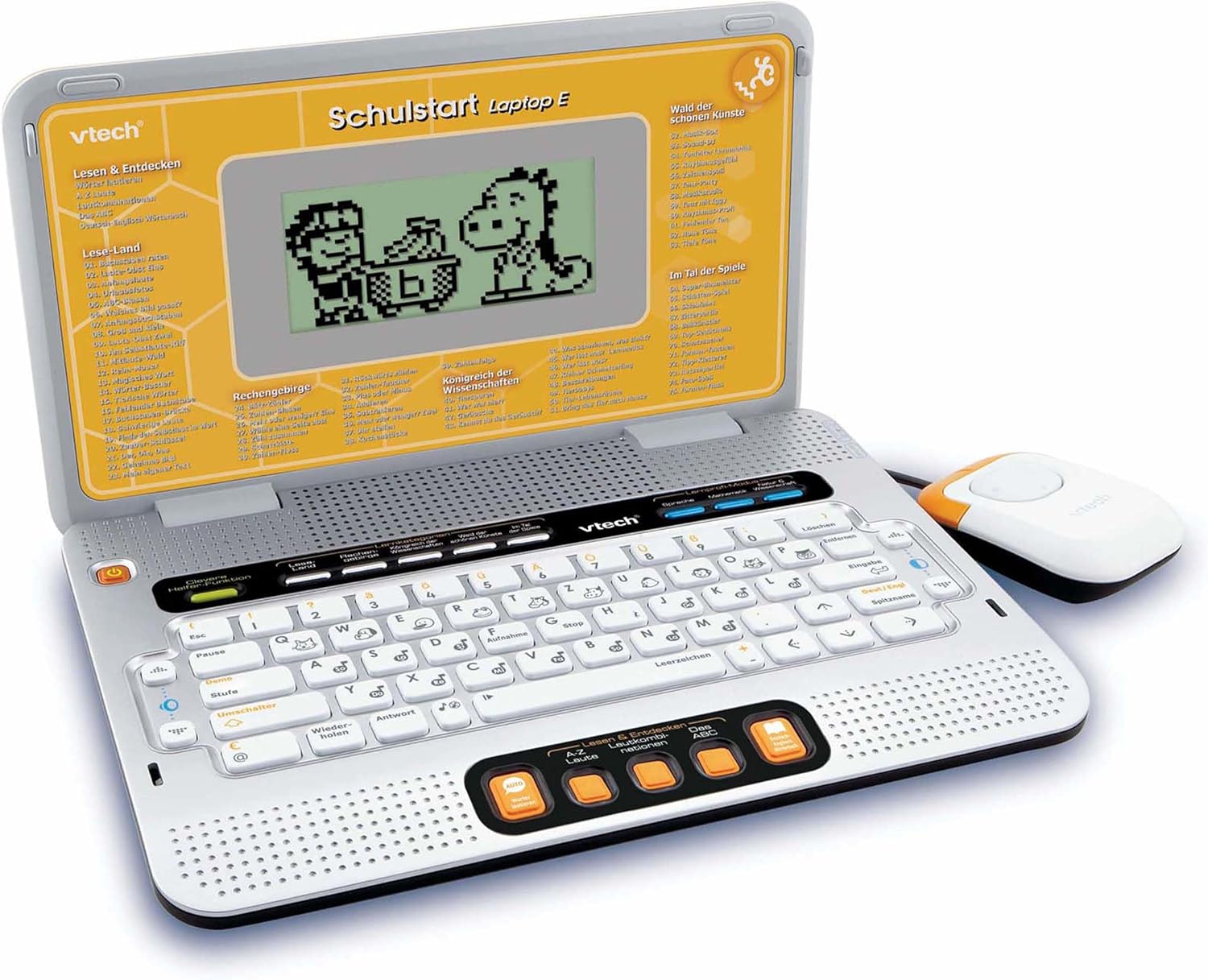
Figure 4.2: VTech Schulstart Laptop E with connected cursor mouse.
5. Instrucciones de funcionamiento
5.1 Encendido y apagado
Para encender la computadora portátil, presione el botón Fuerza button, usually located on the top left of the keyboard area. To turn off, press the Fuerza button again or the laptop will automatically shut down after a period of inactivity to conserve battery life.
5.2 Selección de idioma
The VTech Schulstart Laptop E supports both German and English. You can switch between languages using the dedicated language selection button or through the settings menu, if available. Refer to the on-screen prompts for initial setup.
5.3 Game Categories and Selection
The laptop features 160 educational games categorized as follows:
- Herramientas del lenguaje: 5 programas
- Letters & Words: 23 programas
- Matemáticas: 16 programas
- Nature & Science: 12 programas
- Creatividad: 12 programas
- Logic & Games: 12 programas
Use the arrow keys and the Enter button on the keyboard, or the cursor mouse, to navigate through the menu and select a game.

Figure 5.1: Navigating game categories on the VTech Schulstart Laptop E.
5.4 Tutor Function and Learning Modes
The laptop includes a Tutor function and a Learning Pro mode to enhance the learning experience:
- Tutor Function: Features 5 direct-dial keys for language tools (sounds, phonics, sound combinations, ABC with example words, German-English dictionary). These programs assist with letter pronunciation and reading.
- Learning Pro Mode: Offers progressive learning through increasing difficulty levels, adapting to the child's progress.
- Smart Helper Function: Provides additional hints and tips in many educational games upon request.

Figure 5.2: Child using the VTech Schulstart Laptop E's interactive learning features.
6. Mantenimiento
6.1 Limpieza
To clean the VTech Schulstart Laptop E, use a soft, slightly damp Paño. No utilice productos químicos agresivos ni limpiadores abrasivos. Asegúrese de que el dispositivo esté apagado y desconectado de la fuente de alimentación antes de limpiarlo.
6.2 Almacenamiento
Store the laptop in a cool, dry place away from direct sunlight and extreme temperatures. If the device will not be used for an extended period, remove the batteries to prevent leakage.

Figure 6.1: Optional VTech laptop bag for storage and transport (sold separately).
7. Solución de problemas
| Problema | Posible causa | Solución |
|---|---|---|
| El dispositivo no se enciende. |
|
|
| La pantalla está en blanco o parpadea. |
|
|
| Keys or mouse not responding. |
|
|
| El sonido está distorsionado o ausente. |
|
|
8. Especificaciones
- Número de modelo: 80-109744
- Dimensiones (L x An x Al): 4 x 28 x 20 cm (1.57 x 11.02 x 7.87 pulgadas)
- Peso: 1.29 kg (2.84 libras)
- Edad recomendada: 6 años y más
- Baterías: 3 pilas AA (no incluidas para uso habitual)
- Idiomas: Alemán, Inglés
- Número de juegos: 160
- Fecha de lanzamiento: 31 de julio de 2010
9. Garantía y soporte
Para obtener información sobre la garantía y atención al cliente, consulte el sitio web oficial de VTech. webSitio web o contacte a su distribuidor local de VTech. Conserve su recibo de compra como comprobante.
Oficial de VTech Websitio: www.vtech.com
Ask a question about this manual
Ask about setup, troubleshooting, compatibility, parts, safety, or missing instructions. Manuals+ will review the question and use this page’s manual context to help answer it.