
1. Introducción
The Bayer Contour TS Low Level Control Solution is designed for use with the Contour TS Blood Glucose Monitoring System. This solution is used to verify the accuracy of your blood glucose meter and test strips. It contains a known amount of glucose that reacts with the test strips, allowing you to confirm that your system is working correctly. Regular use of control solutions helps ensure reliable test results.
Importante: This control solution is for in vitro diagnostic use only. It is not intended for internal use or for testing on humans or animals.
2. Información de seguridad
- Para in vitro diagnostic use only: No ingerir. Mantener fuera del alcance de los niños.
- Fecha de expiración: Always check the expiration date printed on the vial label. Do not use expired control solution.
- Almacenamiento: Store the control solution at room temperature (between 15°C and 30°C or 59°F and 86°F). Do not freeze.
- Contaminación: Avoid contaminating the control solution. Do not touch the tip of the vial to the test strip or any other surface.
- Desecho: Dispose of used control solution vials and test strips according to local regulations for biohazardous waste.
3. Contenido del paquete
Su paquete contiene:
- One (1) vial of Bayer Contour TS Low Level Control Solution (2.5 mL)
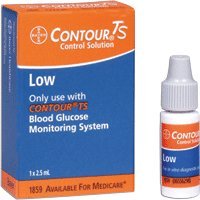
Image: A single vial of Bayer Contour TS Low Level Control Solution. The label indicates 'Low Level' and the volume of 2.5 mL.
4. Configuración y preparación
- Reúna los materiales: Ensure you have your Contour TS meter, a Contour TS test strip, and the Contour TS Low Level Control Solution.
- Consultar fechas de caducidad: Verify that both the test strips and the control solution are not expired. Do not use expired products.
- Preparar solución de control: Gently invert the control solution vial several times to mix the contents. Do not shake vigorously, as this can create bubbles.
- Inserte la tira de prueba: Insert a new Contour TS test strip into the meter as directed in your meter's user manual. The meter should turn on automatically.
5. Operating Instructions (Performing a Control Test)
Follow these steps to perform a control test:
- Aplicar solución de control: With the test strip inserted into the meter, remove the cap from the control solution vial. Squeeze the vial gently to dispense a small drop of control solution onto the tip of the test strip. Ensure the test strip absorbs enough solution to start the test.
- Esperar resultado: The meter will begin counting down. Do not remove the test strip until the result is displayed.
- Resultado del récord: Note the control test result displayed on the meter.
- Comparar con el rango: Compare the displayed result with the acceptable range printed on the Contour TS test strip vial label. The result should fall within this specified range.
- Tapa del vial: Immediately replace the cap on the control solution vial after use to prevent contamination and evaporation.
6. Mantenimiento y almacenamiento
- Condiciones de almacenamiento: Store the control solution vial tightly capped at room temperature (15°C - 30°C or 59°F - 86°F). Do not refrigerate or freeze.
- Duración: The control solution is stable until the expiration date printed on the label when stored unopened. Once opened, the control solution is typically stable for 90 days or until the expiration date, whichever comes first. Write the date you opened the vial on the label to track its usability.
- Limpieza: Keep the vial and its cap clean. Avoid touching the dispenser tip.
- Desecho: Dispose of the control solution vial and any used test strips responsibly, following local guidelines for medical waste.
7. Solución de problemas
If your control test result falls outside the acceptable range, consider the following:
- Consultar fechas de caducidad: Asegúrese de que tanto la solución de control como las tiras de prueba no estén vencidas.
- Condiciones de almacenamiento: Verify that the control solution and test strips have been stored correctly, away from extreme temperatures or direct sunlight.
- Técnica de aplicación: Ensure you applied enough control solution to the test strip and that the strip absorbed it properly.
- Contaminación del vial: Check if the control solution vial tip has touched any surface, potentially causing contamination.
- Mal funcionamiento del medidor: If all other factors are ruled out, your meter may require servicing. Refer to your Contour TS meter's user manual for troubleshooting specific error codes or contact customer support.
- Repetir prueba: Perform another control test with a new test strip and fresh control solution. If the result is still out of range, do not use your meter for blood glucose testing until the issue is resolved.
8. Especificaciones
- Nombre del producto: Contour TS Low Level Control Solution
- Fabricante: Bayer
- Volumen: 2.5 mL per vial
- Tipo: Nivel bajo
- Uso previsto: Para in vitro diagnostic use with Contour TS Blood Glucose Monitoring Systems
- Temperatura de almacenamiento: 15 °C - 30 °C (59 °F - 86 °F)
- Peso del artículo: Aproximadamente 0.01 onzas
- Código postal: 301937109010
9. Garantía y soporte
For specific warranty information regarding the Bayer Contour TS Low Level Control Solution, please refer to the documentation provided with your Contour TS Blood Glucose Monitoring System or contact Bayer customer support directly. General product information and support can often be found on the official Bayer websitio.
Fabricante: Bayer
Websitio: www.bayer.com
For technical assistance or to report product issues, please use the contact information provided in your meter's user manual or on the Bayer websitio.