
1. Introducción
The BUFFALO Giga Switching Hub LSW3-GT-24NSR is a 24-port Gigabit Ethernet switch designed for high-speed network environments. It is ideal for small to medium-sized offices and workplaces requiring robust and reliable network connectivity. This device supports full Gigabit speeds across all ports, ensuring efficient data transfer.
Key features include a fanless design for silent operation and enhanced reliability, as well as a loop detection function to prevent network disruptions caused by accidental network loops.
2. Información de seguridad
Please read and understand the following safety precautions before using the device to prevent injury or damage.
- Fuente de alimentación: Utilice únicamente el adaptador de corriente proporcionado. Asegúrese de que la toma de corriente cumpla con el voltaje especificado.tagy requisitos.
- Ventilación: No bloquee las aberturas de ventilación. Asegúrese de que haya suficiente flujo de aire alrededor del dispositivo para evitar el sobrecalentamiento.
- Ambiente: Avoid exposing the device to water, high humidity, extreme temperatures, or direct sunlight.
- Manejo: Do not drop or subject the device to strong impacts. Do not attempt to open or repair the device yourself. Refer all servicing to qualified personnel.
- cables: Ensure all network cables are properly connected and secured.
3. Contenido del paquete
Verifique que todos los artículos estén presentes en el paquete:
- BUFFALO Giga Switching Hub LSW3-GT-24NSR Unit
- Cable de alimentación
- Rack Mount Brackets (if included with your model)
- Patas de goma (para colocar en el escritorio)
4. Configuración
4.1 Instalación física
The LSW3-GT-24NSR can be installed on a desktop or mounted in a 19-inch equipment rack.
Colocación de escritorio:
- Attach the included rubber feet to the bottom of the unit to prevent slipping and provide stability.
- Coloque la unidad sobre una superficie plana y estable con ventilación adecuada.
Montaje en bastidor:
- Attach the rack mount brackets to the sides of the unit using the provided screws.
- Secure the unit into a standard 19-inch equipment rack using appropriate rack screws (not included).
4.2 Conexión de cables de red
Connect your network devices (computers, servers, other switches) to any of the 24 RJ-45 ports on the front panel using standard Ethernet cables (Category 5e or higher recommended for Gigabit speeds).

Figura 1: Panel frontalview with 24 Ethernet Ports and Status LEDs.
4.3 Conexión de la alimentación
- Connect the power cable to the AC IN port on the rear of the device.
- Conecte el otro extremo del cable de alimentación a una toma de corriente adecuada.
- The device will power on automatically. The POWER LED on the front panel should illuminate.

Figura 2: Panel trasero terminadoview with AC IN Power Port.
5. Instrucciones de funcionamiento
5.1 Indicadores LED
The front panel features several LED indicators to monitor the status of the switch and its ports.
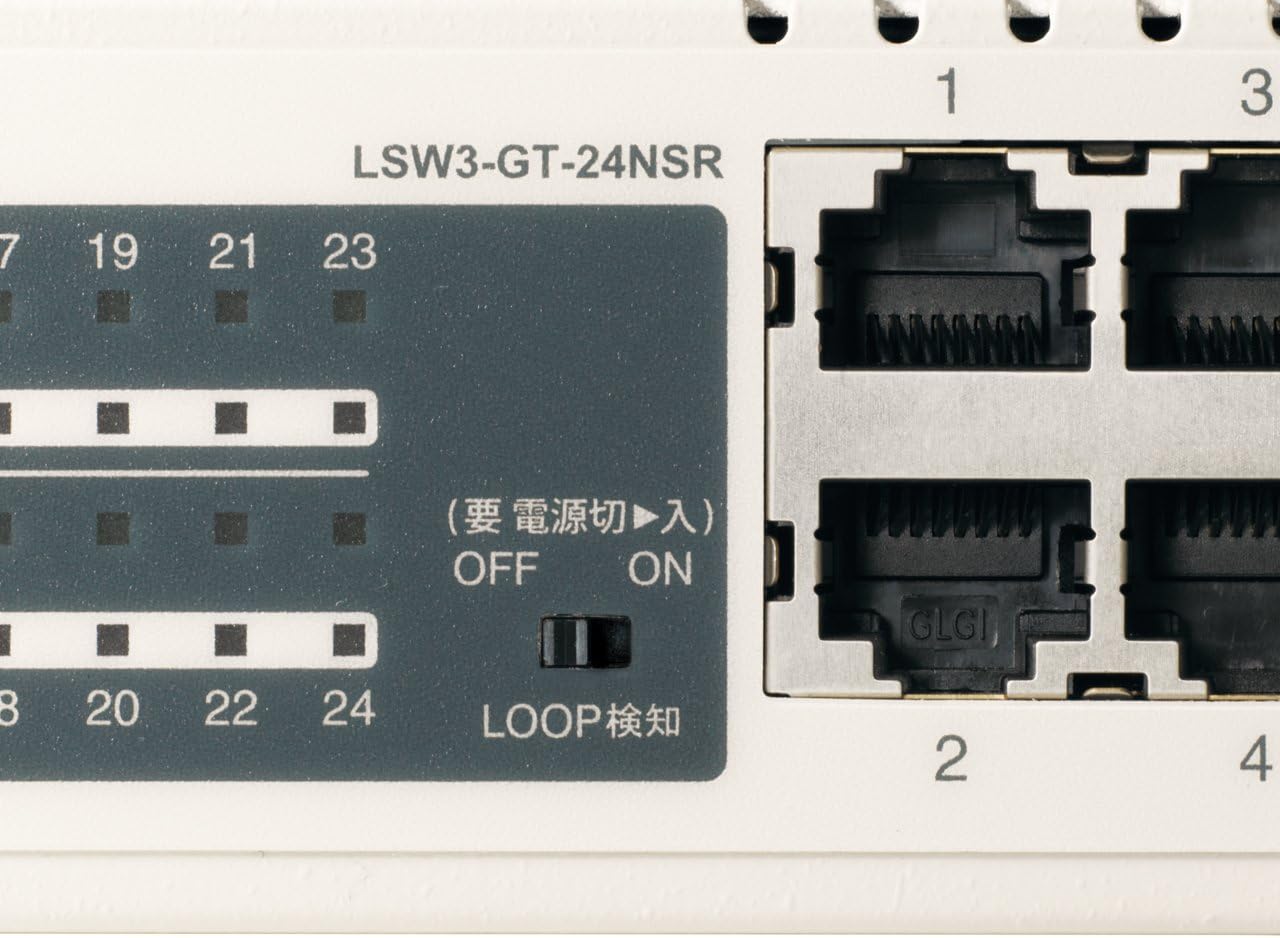
Figura 3: detallada view of LED Indicators and Loop Detection Switch.
| Nombre del LED | Estado | Descripción |
|---|---|---|
| FUERZA | On | El dispositivo está encendido. |
| ENLACE / ACTUAR (por puerto) | On | A network device is connected and a link is established. |
| Brillante | Se están transmitiendo o recibiendo datos a través del puerto. | |
| 1000/100/10M (por puerto) | Verde | Port is operating at 1000 Mbps (Gigabit Ethernet). |
| Naranja | Port is operating at 100 Mbps (Fast Ethernet). | |
| Apagado | Port is operating at 10 Mbps (Ethernet). | |
| LOOP DETECT | On | A network loop has been detected. |
5.2 Loop Detection Function
The LSW3-GT-24NSR features a hardware switch for enabling or disabling the loop detection function. This function helps prevent network instability caused by accidental network loops.
Figure 4: Loop Detection Switch (ON/OFF).
- EN: Loop detection is active. If a loop is detected, the corresponding port will be automatically shut down to prevent network broadcast storms, and the LOOP DETECT LED will illuminate.
- OFF: Loop detection is disabled.
It is recommended to keep the loop detection function ON for network stability.
6. Mantenimiento
6.1 Limpieza del dispositivo
Para mantener un rendimiento óptimo, limpie periódicamente el exterior del interruptor.
- Desconecte el cable de alimentación antes de limpiar.
- Utilice un paño suave y seco para limpiar la superficie.
- Do not use liquid cleaners, aerosols, or solvents, as these may damage the casing o componentes internos.
6.2 Consideraciones ambientales
Ensure the device is operated within its specified environmental conditions:
- Temperatura: 0 °C a 40 °C (32 °F a 104 °F)
- Humedad: 10% a 85% (sin condensación)
7. Solución de problemas
If you encounter issues with your BUFFALO Giga Switching Hub, refer to the following common problems and solutions.
7.1 Sin energía
- Síntoma: El LED de ENCENDIDO está apagado.
- Solución: Compruebe que el cable de alimentación esté bien conectado tanto al dispositivo como a la toma de corriente. Asegúrese de que la toma de corriente funcione.
7.2 No Link or Slow Speed on a Port
- Síntoma: The LINK/ACT LED for a connected port is off, or the 1000/100/10M LED indicates a lower speed than expected (e.g., 100M instead of 1000M).
- Solución:
- Verifique que el cable Ethernet esté conectado de forma segura en ambos extremos.
- Try a different Ethernet cable. Ensure it is a Category 5e or higher cable for Gigabit speeds.
- Conecte el dispositivo a un puerto diferente en el conmutador.
- Check the network adapter settings on the connected device (computer, server) to ensure it is configured for auto-negotiation or the correct speed.
7.3 Network Instability / LOOP DETECT LED is On
- Síntoma: The LOOP DETECT LED is illuminated, and network performance is degraded or unstable.
- Solución:
- A network loop has been detected. This typically occurs when two ports on the same switch (or different switches) are connected to each other, creating an infinite data path.
- Carefully inspect your network cabling to identify and remove any redundant connections that form a loop.
- If the loop detection switch is ON, the affected port will be automatically shut down. Once the loop is resolved, the port should resume normal operation.
8. Especificaciones
| Característica | Descripción |
|---|---|
| Marca | BÚFALO |
| Número de modelo | LSW3-GT-24NSR |
| Recuento de puertos | 24 puertos RJ-10 100/1000/45BASE-T |
| Capacidad de conmutación | 48 Gbps (Non-blocking) |
| Tasa de reenvío | 35.7 Mpps |
| Tamaño de la tabla de direcciones MAC | 8K entradas |
| Soporte Jumbo Frame | Hasta 9 KB |
| Características | Auto-MDI/MDIX, Auto-Negotiation, Loop Detection Function, Fanless Design |
| Fuente de alimentación | Fuente de alimentación de CA interna |
| Dimensiones (An x Pr x Al) | (Specific dimensions not provided in source, typical for 1U rackmount) |
| Peso | (Specific weight not provided in source) |
| Temperatura de funcionamiento | De 0 °C a 40 °C |
| Humedad de funcionamiento | 10% a 85% (sin condensación) |
9. Garantía y soporte
This BUFFALO product is covered by a manufacturer's warranty. Please refer to the warranty card included with your product or visit the official BUFFALO webSitio para conocer los términos y condiciones detallados de la garantía.
For technical support, product registration, or further assistance, please visit the official BUFFALO support websitio o contacte con su departamento de atención al cliente. La información de contacto normalmente se encuentra en la ficha del fabricante. websitio o en el embalaje del producto.