
Introducción
The Mackie HD1221 is a 12-inch 2-way compact high-definition powered loudspeaker designed for professional audio applications. It features 1200W of Class-D Fast Recovery amplification, high-definition audio processing, and custom-designed transducers by EAW. This manual provides essential information for the safe and effective use of your HD1221 loudspeaker, including setup, operation, maintenance, and troubleshooting.
Información de seguridad
Before operating the Mackie HD1221 loudspeaker, please read and understand all safety instructions. Failure to do so may result in electric shock, fire, or other injuries. Keep these instructions for future reference.
- Fuente de energía: Conecte la unidad únicamente a una fuente de alimentación del tipo descrito en las instrucciones de funcionamiento o como está marcado en el aparato.
- Toma de tierra: Ensure the loudspeaker is properly grounded to prevent electric shock.
- Ventilación: No obstruya las aberturas de ventilación. Instale el producto según las instrucciones del fabricante.
- Agua y humedad: No utilice este aparato cerca del agua ni lo exponga a goteos o salpicaduras.
- Limpieza: Limpiar únicamente con un paño seco.
- Servicio: Encargue todas las tareas de mantenimiento a personal técnico cualificado. Se requiere realizar el mantenimiento cuando el aparato haya sufrido algún daño, como por ejemplo si el cable de alimentación o el enchufe están dañados, si se ha derramado líquido o han caído objetos en el interior del aparato, si el aparato ha estado expuesto a la lluvia o la humedad, si no funciona con normalidad o si se ha caído.
- Montaje: Utilice únicamente el carrito, el soporte, el trípode, el soporte o la mesa especificados por el fabricante o vendidos con el aparato. Cuando utilice un carrito, tenga cuidado al mover la combinación carrito/aparato para evitar lesiones por vuelco.
Contenido del paquete
Verify that the following items are included in your Mackie HD1221 package:
- Mackie HD1221 Powered Loudspeaker
- Cable de alimentación
- Guía de inicio rápido (si corresponde)
- Información de garantía
Si falta algún elemento o está dañado, comuníquese con su distribuidor de inmediato.
Producto terminadoview
The Mackie HD1221 is a versatile loudspeaker designed for various applications, including main PA, stage monitor, and flown installations. It features a robust construction and advanced audio processing.
Frontal y lateral Views
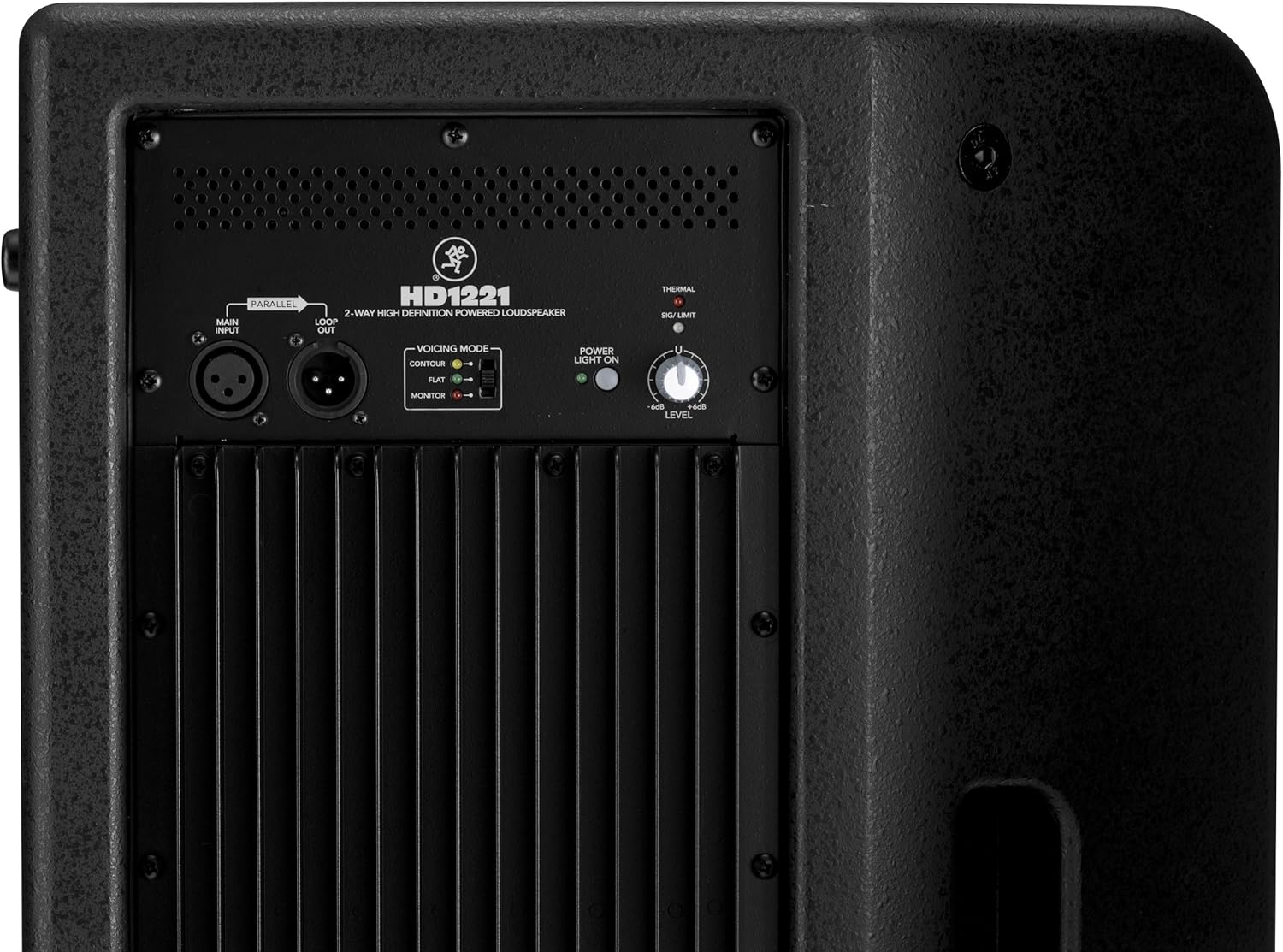
Figura 1: Frente y lateral view of the HD1221 loudspeaker, highlighting the durable grille and integrated handles for portability.

Figura 2: Lado izquierdo view of the HD1221 loudspeaker.
Controles y conexiones del panel trasero

Figure 3: Rear panel of the HD1221, detailing the input/output section, voicing mode switch, power indicator, and level control knob.
- Main Input (XLR): Connect your audio source here.
- Loop Out (XLR): Provides a parallel output of the main input signal for connecting to additional loudspeakers or other audio equipment.
- Voicing Mode Switch: Selects between Contour, Flat, and Monitor modes to optimize the loudspeaker's frequency response for different applications.
- Luz de encendido encendida: Indica el estado de energía de la unidad.
- Thermal/Sig/Limit Indicators: Provide visual feedback on the loudspeaker's operational status, including thermal protection, signal presence, and limiting.
- Control de nivel: Ajusta el volumen de salida general del altavoz.
- Entrada de alimentación de CA: Conecta el cable de alimentación a la red eléctrica.
Componentes internos
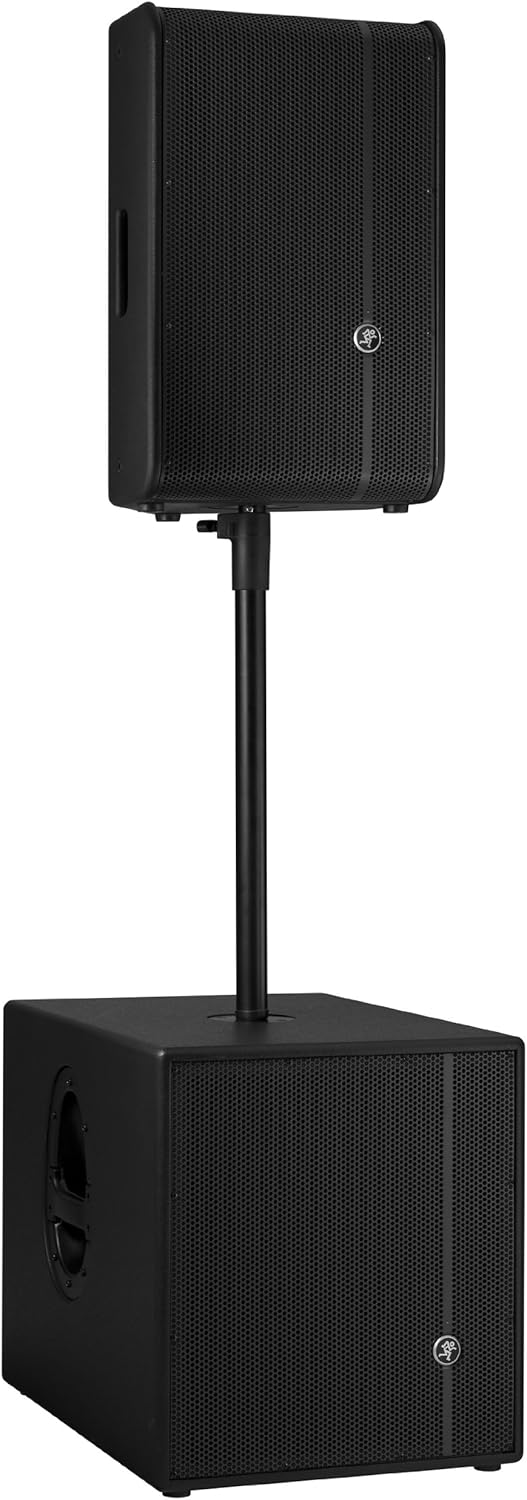
Figura 4: Interna view of the HD1221, showcasing the 12-inch neodymium woofer and 1.75-inch titanium compression driver, designed by EAW.
Configuración
Proper setup ensures optimal performance and safety. Follow these steps for initial setup:
Conexión de energía
- Ensure the Level control on the rear panel is set to its minimum position.
- Connect the supplied AC power cable to the AC Power Input on the rear panel of the HD1221.
- Conecte el otro extremo del cable de alimentación a una toma eléctrica con conexión a tierra.
Conexiones de audio
- Connect your audio source (e.g., mixer, instrument) to the Main Input (XLR) on the rear panel.
- If connecting multiple loudspeakers, use the Loop Out (XLR) to send the signal to the next loudspeaker.
Opciones de montaje
The HD1221 offers several mounting options for flexibility:
Montaje en poste

Figure 5: The HD1221 mounted on a pole, typically above a subwoofer like the HD1501 for a full-range PA system.
The HD1221 can be mounted on a standard speaker pole stand. Ensure the stand is stable and rated for the weight of the loudspeaker (approximately 58 lbs).
Stage Monitor Placement
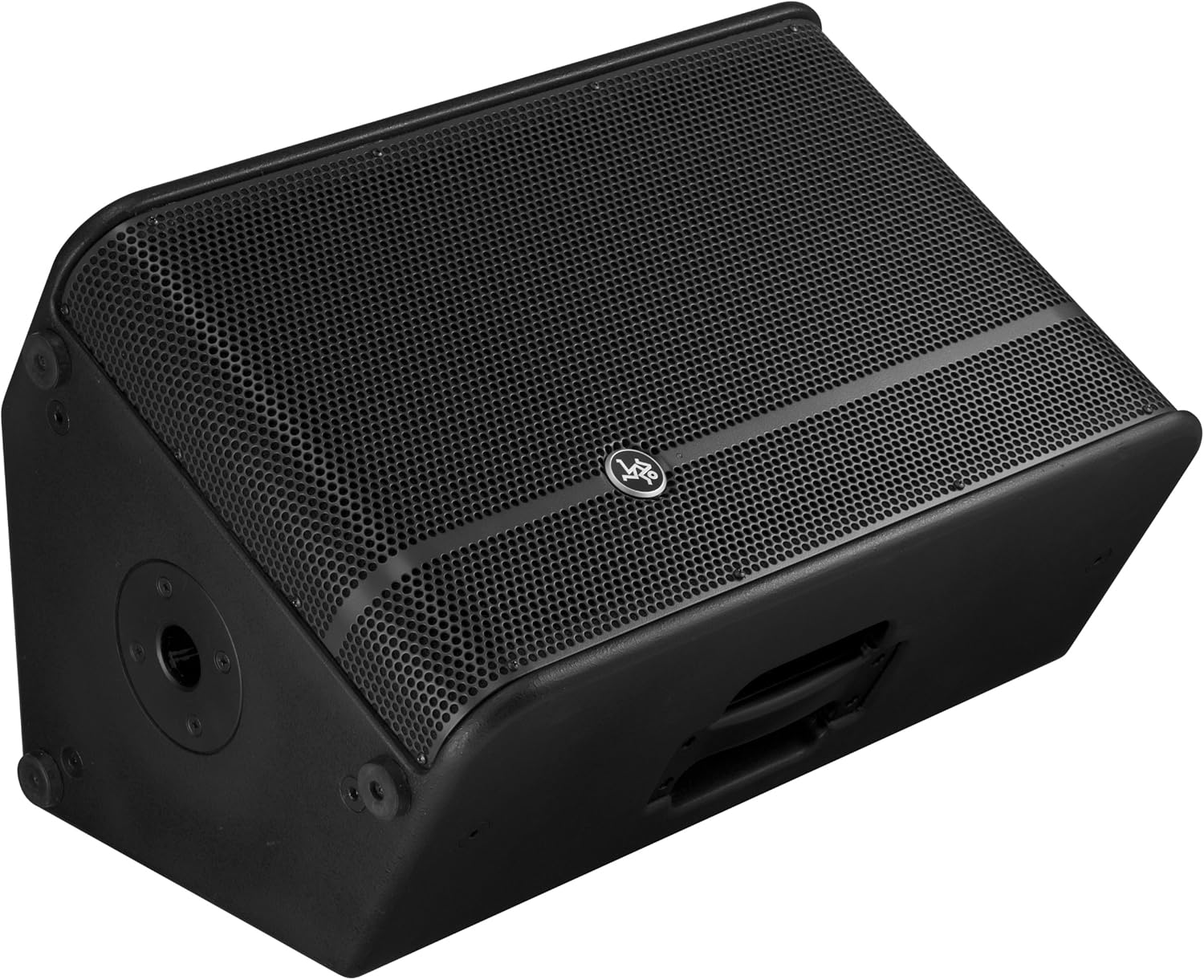
Figure 6: The HD1221 configured as a stage monitor, utilizing its 60-degree angle for optimal sound projection towards the performer.
El diseño del gabinete permite su uso comotage monitor with a 60-degree angle. Place the loudspeaker directly on the stage floor, angled towards the performer.
Flying/Suspension

Figure 7: The HD1221 suspended vertically using appropriate rigging hardware.

Figure 8: The HD1221 suspended horizontally using appropriate rigging hardware.
The HD1221 can be flown both vertically and horizontally. Always use certified rigging hardware and consult with a qualified professional for safe installation. The user-rotatable horn allows for precise sound placement in either orientation.
Instrucciones de funcionamiento
Once the loudspeaker is set up, follow these steps for operation:
- Encendido: Turn on your audio source (mixer, etc.) first, then turn on the HD1221 loudspeaker. The 'Power Light On' indicator should illuminate.
- Set Voicing Mode: Use the Voicing Mode switch on the rear panel to select the appropriate setting for your application:
- Contorno: Provides a sculpted frequency response, often suitable for music playback.
- Plano: Offers a neutral frequency response, ideal for critical listening or when external EQ is used.
- Monitor: Optimizes the frequency response for use as a stage monitor, reducing low-end rumble and enhancing clarity.
- Ajustar nivel: Slowly increase the Level control on the rear panel to achieve the desired volume. Monitor the 'Sig/Limit' indicator; if it flashes frequently or stays lit, reduce the input level from your source or the HD1221's level to prevent distortion and potential damage.
- Apagado: When finished, turn off the HD1221 loudspeaker first, then turn off your audio source.
Vídeo oficial del producto
Vídeo 1: Un finalview of the Mackie HD1221 12-inch 2-Way High-Definition Powered Loudspeaker, demonstrating its features and applications.
Mantenimiento
Regular maintenance helps prolong the life and performance of your HD1221 loudspeaker.
- Limpieza: Use a dry, lint-free cloth to clean the exterior of the loudspeaker. Do not use liquid cleaners or solvents.
- Reja: Periodically check the steel grille for any damage or debris. Clean gently if necessary.
- Conexiones: Asegúrese de que todos los cables estén conectados de forma segura y libres de daños.
- Almacenamiento: When not in use, store the loudspeaker in a dry, temperate environment, protected from dust and extreme temperatures.
Solución de problemas
If you encounter issues with your HD1221, refer to the following common problems and solutions:
| Problema | Posible causa | Solución |
|---|---|---|
| No hay salida de sonido | No power; incorrect connections; low level setting; faulty cable. | Check power cable and outlet. Verify audio cable connections. Increase Level control. Test with a different cable. |
| Sonido distorsionado | Input level too high; faulty cable; damaged speaker component. | Reduce input level from source or HD1221. Check 'Sig/Limit' indicator. Test with a different cable. If distortion persists, contact support. |
| Sin luz de encendido | No power; power switch off; internal fuse blown. | Ensure power cable is connected and outlet is active. Check power switch. If still no light, contact support. |
| Overheating (Thermal indicator lit) | Insufficient ventilation; prolonged high-volume operation. | Ensure adequate airflow around the unit. Reduce volume. Allow unit to cool down. |
Presupuesto
Detailed technical specifications for the Mackie HD1221 powered loudspeaker:
- Potencia de salida: 1200 W pico
- Tipo de altavoz: 2-Way High-Definition Powered Loudspeaker
- woofer: 12-inch Neodymium Woofer
- Controlador de compresión: Controlador de compresión de titanio de 1.75 pulgadas
- Bocina: Bocina de 90° x 50° giratoria por el usuario
- Material del gabinete: Contrachapado de abedul de 15 mm
- Reja: Acero laminado en frío
- Ángulo del monitor: 60 grados
- Voicing Modes: Contour, Flat, Monitor
- Amplificación: Class-D Fast Recovery
- Impedancia: 8 ohmios
- Peso del artículo: 58 libras
- Protocolo de conectividad: Wi-Fi (Note: This specification might refer to internal processing or future features, as direct Wi-Fi audio input is not typical for this type of speaker.)
- Número de modelo: HD1221
- Código postal: 663961030495
Garantía
The Mackie HD1221 loudspeaker comes with a comprehensive warranty:
- Electrónica: 3 año de garantía
- Conductores: 2 año de garantía
Please retain your proof of purchase for warranty claims. For full terms and conditions, refer to the warranty card included with your product or visit the official Mackie websitio.
Apoyo
For additional assistance, technical support, or service inquiries, please contact Mackie Customer Support. You can find contact information and frequently asked questions on the official Mackie websitio.
Recursos en línea: Visita el Mackie Store on Amazon Para obtener información y actualizaciones del producto.