
Introducción
This manual provides essential information for the safe and efficient operation of your Brookstone iDesign Tower Stereo System. Please read this manual thoroughly before using the product and retain it for future reference.
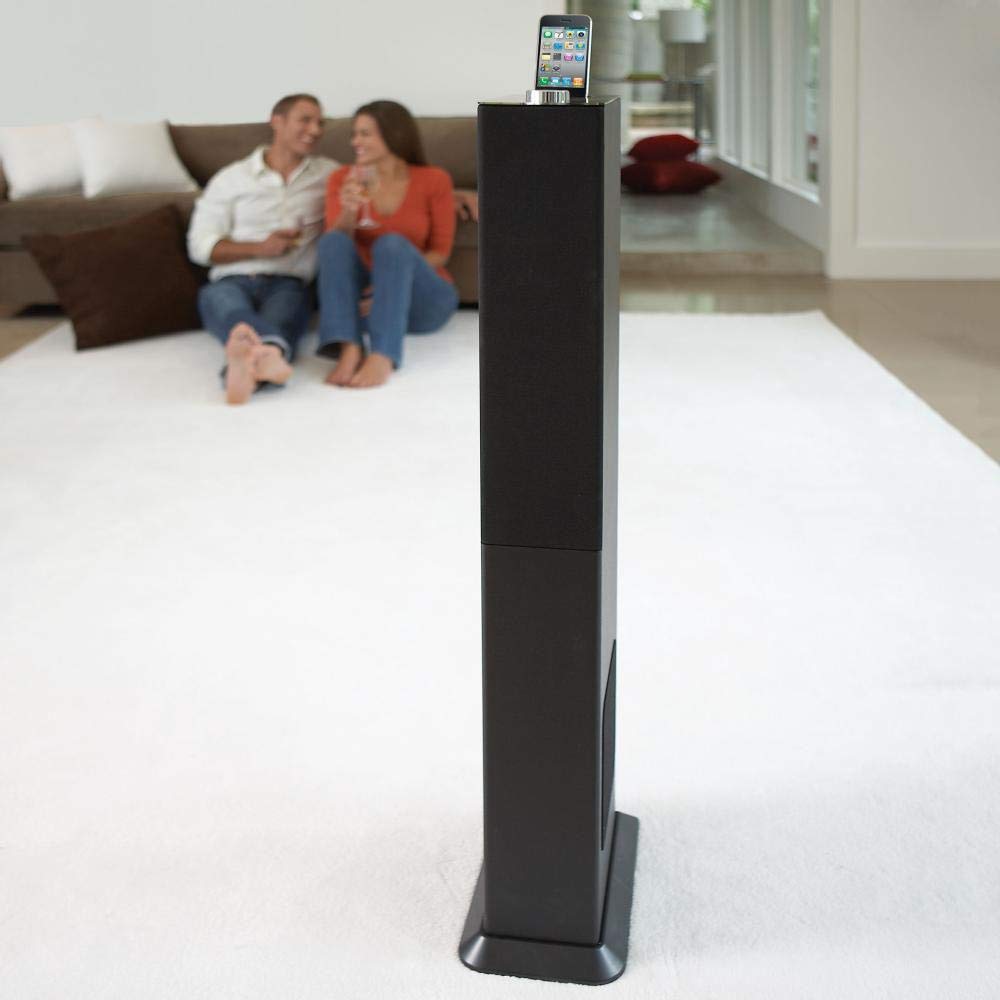
Image: The Brookstone iDesign Tower Stereo System, a tall, slender speaker unit designed for audio playback and device charging.
Información de seguridad
- Fuente de energía: Utilice únicamente el adaptador de corriente especificado. Asegúrese de que el voltage coincide con su fuente de alimentación local.
- Ventilación: No obstruya las aberturas de ventilación. Instale el producto según las instrucciones del fabricante.
- Agua y humedad: No exponga este aparato a la lluvia ni a la humedad. No coloque objetos con líquido, como jarrones, sobre él.
- Calor: No lo instale cerca de fuentes de calor como radiadores, rejillas de calefacción, estufas u otros aparatos (incluidos ampificadores) que producen calor.
- Limpieza: Limpiar únicamente con un paño seco.
- Servicio: Refiera todo el servicio a personal de servicio calificado. Se requiere servicio cuando el aparato ha sido dañado de alguna manera.
Contenido del paquete
Por favor, compruebe que todos los artículos estén presentes en el paquete:
- iDesign Tower Stereo System
- Mando a distancia
- Adaptador de corriente
- Manual de usuario (este documento)
- Note: iPod/iPhone devices are not included.
Producto terminadoview
The iDesign Tower Stereo System features a sleek design with integrated speakers and a docking station for compatible Apple devices. It includes a backlit on/volume knob and a remote control for convenient operation, delivering full, deep bass, crisp, clear highs, and warm middle tones.
Componentes principales:
- Rejillas de altavoz: Multi-angled speakers for room-filling sound.
- Puerto de atraque: For iPod and iPhone devices (1st and 2nd generation iPod touch, iPod classic, 4th and 5th generation iPod nano, iPhone 3GS, iPhone 3G, iPhone).
- On/Volume Knob: Backlit control for power and volume adjustment.
- Entrada auxiliar: For connecting other audio devices (cable not included).
- Entrada de energía: Para conectar el adaptador de corriente.
- Sensor de control remoto: Recibe señales del mando a distancia.
Configuración
1 Colocación
Place the iDesign Tower Stereo System on a stable, flat surface. Ensure there is adequate space around the unit for proper ventilation. Avoid placing it in direct sunlight or near heat sources.
2. Conexión de alimentación
- Connect the power adapter cable to the Power Input port on the back of the iDesign Tower Stereo System.
- Enchufe el adaptador de corriente en un tomacorriente de pared estándar.
3. Device Docking (iPod/iPhone)
The system is designed for specific iPod and iPhone models:
- iPod touch (1st and 2nd generation)
- iPod clásico
- iPod nano (4th and 5th generation)
- iPhone 3GS
- iPhone 3G
- iPhone
Carefully align your compatible iPod or iPhone device with the docking port and gently push it down until it is securely seated. The device will begin charging automatically when docked and the system is powered on.
4. Entrada auxiliar (opcional)
To connect other audio devices (e.g., MP3 players, CD players) that are not compatible with the docking port, use a 3.5mm audio cable (not included) to connect the device's headphone output to the Auxiliary Input port on the iDesign Tower Stereo System.
Instrucciones de funcionamiento
1. Encendido y apagado
Press the On/Volume knob to turn the system on or off. The knob will illuminate when the system is powered on.
2. Control de volumen
Rotate the On/Volume knob clockwise to increase the volume and counter-clockwise to decrease it. You can also adjust the volume using the remote control.
3. Selección de fuente
The system automatically detects a docked iPod or iPhone. If an auxiliary device is connected, you may need to select the input source using the remote control (if available) or by cycling through inputs with a dedicated button (refer to remote control section for details).
4. Uso del control remoto
The included remote control allows you to manage playback functions (play, pause, skip tracks) and volume for your docked iPod or iPhone from a distance. Point the remote control towards the sensor on the front of the tower system.
5. Dispositivos de carga
When a compatible iPod or iPhone is docked and the system is powered on, the device will charge automatically.
Mantenimiento
Limpieza
Wipe the exterior of the system with a soft, dry cloth. Do not use liquid cleaners or aerosol sprays, as these may damage the finish or internal components. Ensure the system is unplugged before cleaning.
Almacenamiento
Si va a almacenar el sistema durante un período prolongado, desconéctelo del tomacorriente y guárdelo en un lugar fresco y seco, alejado de la luz solar directa y de temperaturas extremas.
Solución de problemas
| Problema | Posible causa | Solución |
|---|---|---|
| Sin poder | El adaptador de corriente no está conectado o la toma de corriente no funciona. | Ensure power adapter is securely connected to the system and a working wall outlet. |
| No hay sonido desde el dispositivo acoplado | Device not properly docked; volume too low; device not playing. | Re-seat the device in the dock. Increase system volume and device volume. Ensure music is playing on the device. |
| No sound from auxiliary input | Auxiliary cable not connected; incorrect source selected; volume too low. | Ensure auxiliary cable is securely connected. Select auxiliary input. Increase system and source device volume. |
| El control remoto no funciona | Pilas agotadas; control remoto no apunta al sensor; obstrucción. | Replace remote control batteries. Point remote directly at the sensor. Remove any obstructions between remote and system. |
| El dispositivo no se carga | Device not compatible; system not powered on; device not properly docked. | Verify device compatibility (see Setup section). Ensure system is powered on. Re-seat the device in the dock. |
Presupuesto
- Modelo: B003YB9T2C
- Marca: Piedra de Brookstone
- Dimensiones del paquete: 42.6 x 14 x 8.6 pulgadas
- Peso del artículo: 28.3 libras
- Primero disponible: 10 de marzo de 2010
- Compatibilidad: iPod touch (1st/2nd gen), iPod classic, iPod nano (4th/5th gen), iPhone 3GS, iPhone 3G, iPhone.
Garantía y soporte
Para obtener información sobre la garantía y atención al cliente, consulte la documentación incluida con su compra o visite el sitio web oficial de Brookstone. webSitio. Conserve su comprobante de compra para reclamaciones de garantía.
"Made for iPod" and "Made for iPhone" mean that an electronic accessory has been designed to connect specifically to iPod or iPhone, respectively, and has been certified by the developer to meet Apple performance standards. Apple is not responsible for the operation of this device or its compliance with safety and regulatory standards. Please note that the use of this accessory with iPod or iPhone may affect wireless performance.