
Introducción
The GIGABYTE GM-M7600 is a wireless precision optical mouse designed for comfortable and reliable use. This manual provides instructions for setting up, operating, maintaining, and troubleshooting your device.
Contenido del paquete
Verifique el contenido del paquete para asegurarse de que todos los artículos estén presentes:
- GIGABYTE GM-M7600 Wireless Optical Mouse
- Portable Nano USB Receiver
- 2 pilas AAA
Configuración
1. Instalación de baterías
The GM-M7600 mouse requires two AAA batteries for operation. The batteries are included in the package.
- Localice la tapa del compartimiento de la batería en la parte inferior del mouse.
- Deslice o levante suavemente la tapa para abrir el compartimento.
- Inserte las dos pilas AAA, asegurándose de que los terminales positivo (+) y negativo (-) estén alineados correctamente con las marcas dentro del compartimiento.
- Cierre bien la tapa del compartimento de la batería.
2. Conexión del receptor USB
The mouse connects to your computer via a portable Nano USB receiver.
- Locate the Nano USB receiver. It may be stored inside the mouse's battery compartment or packaged separately.
- Plug the Nano USB receiver into an available USB port on your computer (Laptop or Personal Computer).
- Your operating system (e.g., Windows XP, Linux) should automatically detect and install the necessary drivers. This process may take a few moments.
- Una vez instalados los controladores, el mouse está listo para usarse.
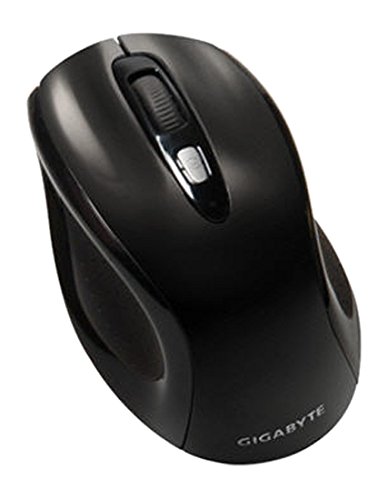
Figura 1: GIGABYTE GM-M7600 Wireless Optical Mouse. This image displays the ergonomic design of the mouse, highlighting its form factor and the location of its buttons. The Nano USB receiver is typically stored within the mouse or connected to a computer's USB port.
Instrucciones de funcionamiento
1. Encendido / apagado
The mouse typically has a power switch on its underside. Slide the switch to the 'ON' position to activate the mouse. Slide it to 'OFF' when not in use to conserve battery life.
2. Ajuste de DPI (sensibilidad)
The GM-M7600 features an adjustable DPI switch, allowing you to change the mouse sensitivity between 800 DPI and 1600 DPI. This switch is usually located near the scroll wheel. Press the DPI button to toggle between the two sensitivity settings.
3. Funciones básicas del ratón
- Click izquierdo: Botón principal para seleccionar elementos, abrir files e interactuar con el software.
- Botón derecho del ratón: Botón secundario para acceder a menús contextuales y opciones adicionales.
- Rueda de desplazamiento: Se utiliza para desplazarse por los documentos y web páginas. También puede funcionar como botón de clic central.
Mantenimiento
1. Limpieza
Para mantener un rendimiento y una apariencia óptimos:
- Disconnect the mouse from your computer and turn off the power switch.
- Utilice un paño suave y sin pelusa ligeramente seco.ampLimpie con agua o una solución de limpieza suave la superficie del mouse.
- Evite utilizar productos químicos agresivos, limpiadores abrasivos o rociar líquidos directamente sobre el mouse.
- Clean the optical sensor area on the underside of the mouse with a dry cotton swab to remove any dust or debris.
2. Reemplazo de la batería
When the mouse performance degrades or it stops responding, it may be time to replace the batteries.
- Apague el mouse usando el interruptor de encendido.
- Open the battery compartment as described in the 'Installing Batteries' section.
- Retire las pilas AAA viejas.
- Inserte dos pilas AAA nuevas, observando la polaridad correcta (+/-).
- Cierre el compartimento de la batería y vuelva a encender el mouse.
Solución de problemas
If you encounter issues with your GIGABYTE GM-M7600 mouse, try the following solutions:
- El ratón no responde:
- Asegúrese de que el mouse esté encendido.
- Compruebe que las baterías estén correctamente instaladas y tengan suficiente carga. Reemplácelas si es necesario.
- Ensure the Nano USB receiver is securely plugged into a working USB port on your computer. Try a different USB port.
- Reinicie su computadora.
- Movimiento errático del cursor:
- Limpie el sensor óptico en la parte inferior del mouse.
- Asegúrese de usar el ratón sobre una superficie adecuada. Evite superficies muy reflectantes o transparentes.
- Check for any wireless interference. Move the mouse closer to the receiver or away from other wireless devices.
- DPI switch not working:
- Asegúrese de que el mouse esté encendido y conectado.
- Presione firmemente el botón DPI.
Presupuesto
| Nombre del modelo | GM-M7600 |
| Marca | GIGABYTE |
| Tecnología de conectividad | Radiofrecuencia inalámbrica de 2.4 GHz |
| Detección de movimiento | Óptico |
| DPI ajustable | 800/1600 ppp |
| Número de botones | 3 (izquierda, derecha, rueda de desplazamiento/clic central) |
| Fuente de poder | 2 pilas AAA (incluidas) |
| Tipo de receptor | Portable Nano USB Receiver |
| Dispositivos compatibles | computadora portátil, computadora personal |
| Compatibilidad con sistemas operativos | Linux, Windows XP |
| Material del recinto | Plastic with Rubberized Finish |
| Color | Negro |
Garantía y soporte
For warranty information and technical support, please refer to the warranty card included with your product or visit the official GIGABYTE websitio. Guarde su recibo de compra para reclamos de garantía.