
Introducción
This manual provides detailed instructions for the proper setup, operation, and maintenance of your Denon AVR-1312 5.1-channel AV Surround Receiver. The AVR-1312 is designed to deliver a powerful surround sound experience, supporting 3D video when connected to compatible equipment. It features Compressed Audio Restorer technology for enhanced sound from portable audio players and Quick Select buttons for easy source and surround mode selection.
Configuración inicial
1. Desembalaje
Carefully remove the receiver from its packaging. Ensure all accessories, such as the remote control, batteries, and FM/AM antennas, are present. Retain the packaging for future transport or storage.
2 Colocación
Place the receiver on a stable, level surface with adequate ventilation. Avoid placing it near heat sources or in direct sunlight. Ensure there is sufficient space around the unit for proper airflow to prevent overheating.
3. Conexiones
Antes de realizar cualquier conexión, asegúrese de que el receptor y todos los dispositivos conectados estén apagados y desconectados del tomacorriente de pared.

Figure 1: Rear panel connections of the Denon AVR-1312. This view displays HDMI inputs and output, analog audio inputs, digital audio inputs (optical and coaxial), video inputs, and speaker terminals.
Conexiones HDMI:
- Connect your video sources (e.g., Blu-ray player, game console, cable box) to the HDMI EN ports (HDMI 1-4).
- Connect your TV or projector to the HDMI OUT MONITOR port. This single cable will carry both video and audio signals to your display.
Conexiones de audio:
- Digital Audio Inputs (OPTICAL/COAXIAL): For devices with digital audio outputs (e.g., CD player, older game consoles).
- Analog Audio Inputs (AUDIO IN): For devices with analog stereo outputs (e.g., CD player, tape deck).
- Stereo Mini Jack (FRONT PANEL): For connecting portable audio players.
Video Connections (Legacy):
- Component Video (DVD, GAME, SAT/CBL): For devices using component video cables (red, green, blue).
- Composite Video (DVD, GAME, SAT/CBL, VCR): For devices using composite video cables (yellow).
Conexiones de altavoz:
- Connect your speakers to the corresponding terminals on the rear panel: DELANTERO IZQUIERDO/DERECHO, INNOVACIÓN, ENVOLVENTE I/D.
- Asegúrese de que la polaridad sea correcta (+ con + y - con -) para todos los altavoces.
- For the subwoofer, connect a single RCA cable from the SALIDA PREVIA DE SUBWOOFER to the subwoofer's LFE input.
- The receiver supports 6-8 ohm speakers.
Conexiones de antena:
- Conecte la antena interior FM suministrada a la ANTENA DE FM Terminal.
- Conecte la antena de bucle AM suministrada a la ANTENA AM terminales.
Operación básica
1. Encendido y apagado
Presione el FUERZA botón en el panel frontal o el EN MODO DE ESPERA Botón en el control remoto para encender o apagar el receptor.
2. Selección de entrada
Select the desired input source using the input selector buttons on the front panel (e.g., DVD, GAME, SAT/CBL) or the corresponding buttons on the remote control.
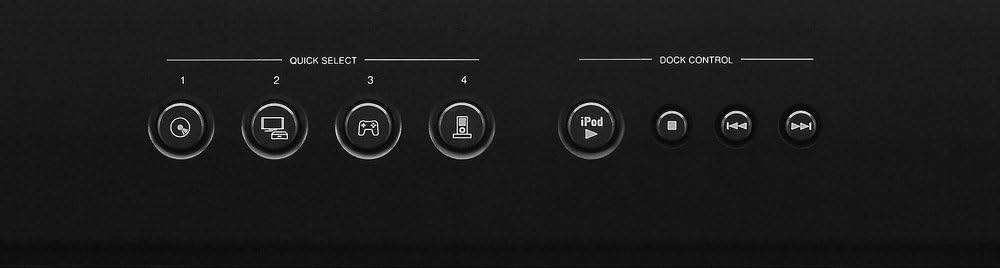
Figure 2: Front panel Quick Select and Dock Control buttons. These buttons allow for quick access to frequently used sources and sound modes.
Botones de selección rápida:
The AVR-1312 features four SELECCIÓN RÁPIDA buttons on the front panel and remote control. These buttons allow you to instantly switch to a pre-registered input source and surround mode. To register a setting, select the desired input and surround mode, then press and hold one of the Quick Select buttons (1-4) for a few seconds until the display flashes.
3. Control de volumen
Ajuste el volumen principal utilizando el control grande VOLUMEN perilla en el panel frontal o en el VOLUMEN +/- Botones del control remoto.
4. Modos de sonido
Presione el MODO or RODEAR buttons on the remote control to cycle through available sound modes (e.g., Stereo, Dolby Digital, DTS, Multi-Channel Stereo). The receiver automatically detects the incoming audio signal and suggests optimal modes.

Figure 3: Denon RC-1158 Remote Control. This remote provides full control over the receiver's functions, including power, input selection, volume, sound modes, and menu navigation.
Cuidado y mantenimiento
- Limpieza: Wipe the exterior of the receiver with a soft, dry cloth. Do not use abrasive cleaners, solvents, or chemical cloths, as these may damage the finish.
- Ventilación: Ensure that the ventilation openings on the top and sides of the receiver are not blocked. Proper airflow is essential to prevent internal heat buildup.
- Cable de alimentación: When unplugging the power cord, always grasp the plug, not the cord itself.
- Almacenamiento: If storing the unit for an extended period, disconnect the power cord and store it in a clean, dry place.
Guía para resolver problemas
If you encounter issues with your receiver, refer to the following common problems and solutions before contacting customer support.
| Problema | Posible causa | Solución |
|---|---|---|
| Sin poder | Cable de alimentación no conectado; problema con la toma de corriente. | Asegúrese de que el cable de alimentación esté bien enchufado. Verifique si la toma de corriente funciona. |
| Sin sonido | Entrada incorrecta seleccionada; altavoces no conectados; volumen demasiado bajo; silencio activado. | Select correct input. Check speaker connections. Increase volume. Deactivate mute. |
| Sin video | Incorrect input selected; HDMI cable issue; TV input issue. | Select correct input. Check HDMI cable connections. Ensure TV is on correct input. |
| El control remoto no funciona | Batteries depleted; obstruction; incorrect remote mode. | Replace batteries. Remove obstructions. Ensure remote is in the correct operating mode for the receiver. |
Especificaciones técnicas
| Marca | Denon |
| Número de modelo | AVR1312 |
| Potencia de salida | 75 vatios por canal |
| Número de canales | 5.1 |
| Puertos HDMI totales | 5 (4 entradas / 1 salida) |
| Tecnología de conectividad | Cableado |
| Modo de salida de audio | Estéreo, envolvente |
| Características especiales | 3D Pass-Through, Equal Power Amp Design, High-Definition Audio Support |
| Dispositivos compatibles | Consola de juegos, Televisión |
| Peso del artículo | 19.8 libras |
Información de garantía
The Denon AVR-1312 AV Surround Receiver comes with a 2 año de garantía from the date of purchase. This warranty covers defects in materials and workmanship under normal use. Please retain your proof of purchase for warranty claims. For full terms and conditions, refer to the warranty card included with your product or visit the official Denon websitio.
Atención al cliente
For further assistance, technical support, or service inquiries, please visit the official Denon website or contact their customer service department. You can typically find contact information, FAQs, and additional resources on the manufacturer's support pages.