
1. Introducción y másview
The Pro-User DFC530N is an intelligent microprocessor-controlled battery charger designed for 6V and 12V lead-acid batteries, providing a charging current of up to 5.3 Amperes. This charger is suitable for various battery types including lead-acid, gel, wet cell, MF, VRLA, calcium, and AGM, with capacities ranging from 5 Ah to 120 Ah.
The advanced electronics monitor battery status and apply the appropriate charging current. Once fully charged, the charger switches to a maintenance mode, providing a small current to prevent self-discharge, making it ideal for long-term connection, especially for seasonal vehicles. It features spark protection, short-circuit protection, overheating protection, and reverse polarity protection. The charger comes with both battery clamps and ring terminals with quick-release connectors for versatile connection options. It also includes an acoustic signal and LED warning indicators for operational status.
2. Instrucciones de seguridad
Lea y comprenda todas las instrucciones de seguridad antes de utilizar el cargador. Si no las sigue, podría sufrir una descarga eléctrica, un incendio o lesiones graves.
- Ventilación: Always operate the charger in a well-ventilated area. Batteries can produce explosive gases.
- Protección ocular: Wear appropriate eye protection (safety glasses) when working near batteries.
- Chispas y llamas: Avoid creating sparks or open flames near the battery or charger.
- Desconectar la energía: Always disconnect the AC power supply from the charger before connecting or disconnecting the battery leads.
- Polaridad correcta: Ensure correct polarity when connecting to the battery (positive to positive, negative to negative). The charger has reverse polarity protection, but incorrect connection should still be avoided.
- Niños y mascotas: Mantenga el cargador y la batería fuera del alcance de los niños y las mascotas.
- Equipo dañado: Do not operate the charger if it has been dropped, damaged, or if the cables are frayed.
- Uso en interiores: This charger is designed for indoor use. While it has an IP65 rating for water resistance, avoid prolonged exposure to rain or extreme moisture.
3. Contenido del paquete
Verifique que todos los artículos estén presentes en el paquete:
- Pro-User DFC530N Intelligent Battery Charger Unit
- Batería Clamps (Rojo para positivo, negro para negativo)
- Ring Terminals with Quick-Release Connector
- Cable de alimentación de CA

Image displaying the Pro-User DFC530N intelligent battery charger along with its included accessories: battery clamps, ring terminals with quick-release connectors, and the AC power cable.
4. Configuración y conexión
Siga estos pasos para conectar el cargador a su batería:
- Prepare la batería: Ensure the battery terminals are clean and free of corrosion. If the battery is in a vehicle, ensure the vehicle is turned off.
- Seleccionar método de conexión: Choose between the battery clamps for temporary connection or the ring terminals for a more permanent setup. Connect your chosen accessory to the charger's quick-release connector.
- Conectar a la batería:
- Conectar el ROJO positive (+) lead from the charger to the positivo (+) terminal de la batería.
- Conectar el NEGRO negative (-) lead from the charger to the negativo (-) terminal de la batería.
- Conectar a la alimentación de CA: Plug the charger's AC power cable into a standard electrical outlet. The charger will automatically begin its charging process.

Image showing the Pro-User DFC530N battery charger connected to a vehicle battery under the hood, illustrating a typical charging setup.
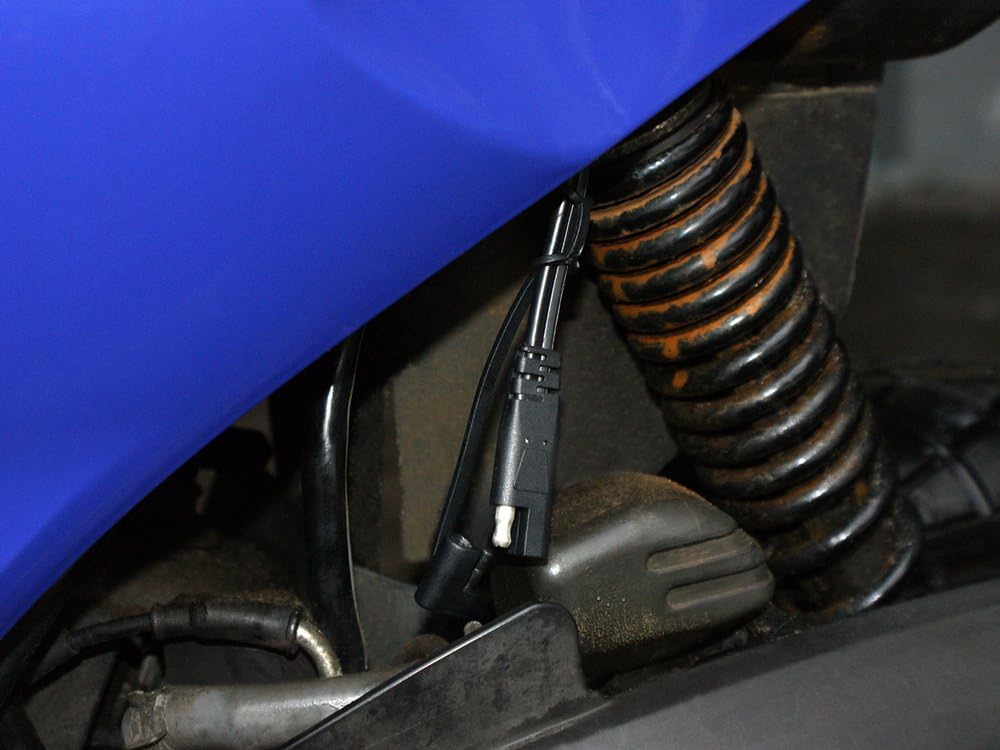
Image demonstrating a permanent connection setup using the ring terminals, secured to a vehicle's battery terminals, with the quick-release connector accessible for charger attachment.
5. Instrucciones de funcionamiento
The DFC530N charger operates automatically once connected to the battery and AC power. It features a 4-stagProceso de carga electrónica para optimizar la salud y la longevidad de la batería.
LED Indicators and Status:

De cerca view of the Pro-User DFC530N charger's control panel, highlighting the LED indicators for Reverse, Fault, Power, Charging, and Full status, as well as the mode selection buttons.
- LED DE ALIMENTACIÓN: Se ilumina cuando el cargador está conectado a la alimentación de CA.
- LED DE CARGA: Se ilumina cuando la batería se está cargando activamente.
- LED COMPLETO: Se ilumina cuando la batería está completamente cargada y el cargador ha cambiado al modo de mantenimiento.
- LED DE FALLO: Illuminates if an error occurs (e.g., short circuit, overheating). An acoustic signal may also sound.
- REVERSE LED: Illuminates if the battery leads are connected with incorrect polarity. An acoustic signal may also sound.
Proceso de carga:
- El cargador detecta automáticamente el volumen de la batería.tage (6 V o 12 V).
- It then proceeds through a multi-stage charging cycle, including desulfation (if needed), bulk charge, absorption, and float/maintenance charge.
- The CHARGING LED will be lit during active charging.
- Once the battery reaches full capacity, the FULL LED will illuminate, and the charger will enter a maintenance mode to prevent overcharging and self-discharge. The charger can remain connected indefinitely in this mode.
6. Mantenimiento
Un mantenimiento adecuado garantiza la longevidad y el funcionamiento seguro de su cargador:
- Limpieza: Desconecte el cargador de la alimentación de CA y la batería antes de limpiarlo. Limpie el casing con un toque seco o ligeramente damp paño. No utilice disolventes ni limpiadores abrasivos.
- Inspección de cables: Regularly inspect the AC power cable and battery leads for any signs of damage, cuts, or fraying. Replace if damaged.
- Almacenamiento: Guarde el cargador en un lugar fresco y seco cuando no lo use. Mantenga los cables bien enrollados.
- Terminales de la batería: Ensure battery terminals are clean and free of corrosion for optimal charging.
7. Solución de problemas
If you encounter issues with your Pro-User DFC530N charger, refer to the following common problems and solutions:
| Problema | Posible causa | Solución |
|---|---|---|
| Charger not turning on (no LEDs lit) | No hay alimentación de CA; toma de corriente defectuosa; cargador dañado. | Check AC power connection and outlet. Try a different outlet. Inspect charger for damage. |
| FAULT LED is lit / Acoustic signal | Short circuit; Overheating; Internal fault. | Disconnect immediately. Check for short circuits in cables or battery. Allow charger to cool down. If problem persists, contact support. |
| REVERSE LED is lit / Acoustic signal | Conexión de polaridad incorrecta de la batería. | Disconnect AC power. Reconnect battery leads ensuring RED to positive (+) and BLACK to negative (-). |
| Battery not charging (CHARGING LED not lit) | Poor connection; Battery too deeply discharged; Battery fault. | Check all connections for tightness and cleanliness. The charger may not initiate charging if the battery voltage is extremely low. Test battery condition. |
8. Especificaciones
Detailed technical specifications for the Pro-User DFC530N Intelligent Battery Charger:
- Modelo: DFC530N
- Número de pieza: 16605
- Vol de entradatage: 220-240V AC, 50/60Hz (typical for EU market)
- Vol de salidatage: 6 V CC / 12 V CC (detección automática)
- Corriente de carga: Hasta 5.3 Amperes DC
- Tipos de batería: All lead-acid batteries (Lead-Acid, Gel, Wet Cell, MF, VRLA, Calcium, AGM)
- Capacidad de la batería: 5 Ah - 120 Ah
- Control: Digital control with built-in 12-bit AD processor
- Cargando Stages: 4-stage charging characteristics with automatic maintenance mode
- Características de protección: Spark protection, short-circuit protection, overheating protection, reverse polarity protection
- Indicadores: LED status indicators (Power, Charging, Full, Fault, Reverse), Acoustic signal
- Clasificación del recinto: IP65 (Waterproof housing)
- Dimensiones (L x An x Al): Aproximadamente 164 x 75 x 43 mm
- Peso: Aproximadamente 0.620 kg
- Certificaciones: TÜV/GS tested
9. Garantía y soporte
Para obtener información sobre la garantía, asistencia técnica o consultas de servicio, consulte la tarjeta de garantía incluida con el producto o póngase en contacto directamente con su distribuidor o el fabricante. Conserve el comprobante de compra para cualquier reclamación de garantía.