
ZIPRO 5941329 L
ZIPRO Treadmill User Manual
Modelo: 5941329 L
1. Introducción
The ZIPRO Treadmill (Model 5941329 L) is a versatile and compact fitness machine designed for home use, offering a comprehensive range of features for effective cardiovascular training, jogging, and walking. Its foldable design makes it ideal for small spaces, allowing for easy storage when not in use.
This treadmill is equipped with a powerful 1.96 HP motor, providing a speed range of 1 to 16 km/h. It features 12 adjustable incline levels to increase workout intensity and engage different muscle groups. The integrated LED display and heart rate sensors provide real-time data on time, speed, distance, calories burned, and heart rate, helping you monitor your progress effectively.
For an enhanced training experience, the treadmill supports connectivity with compatible fitness applications like Kinomap and FitShow, allowing for interactive workouts and data tracking. It also includes a smartphone holder, MP3 function, and built-in speakers for entertainment during your exercise sessions. Designed with user comfort in mind, it features a spacious running surface (45 x 125 cm) and a joint-friendly cushioning system to minimize impact.

Image: The ZIPRO Treadmill in an unfolded state, with a user actively running on it. A smartphone with fitness app icons is shown in the background, highlighting the app connectivity feature.
2. Información de seguridad
Lea atentamente todas las instrucciones antes de usar la cinta de correr. Conserve este manual para futuras consultas.
- Capacidad máxima de peso: Do not exceed the maximum user weight of 130 kg (286 lbs). Exceeding this limit can cause damage to the treadmill and lead to injury.
- Colocación: Coloque la cinta de correr sobre una superficie plana y estable. Asegúrese de que haya al menos 2 metros (6.5 pies) de espacio libre detrás de la cinta y 0.6 metros (2 pies) a cada lado.
- Conexión de energía: Conecte la cinta de correr a una toma de corriente con conexión a tierra. No utilice cables alargadores ni adaptadores.
- Clave de seguridad: Always attach the safety key clip to your clothing before starting the treadmill. In case of an emergency or if you fall, the safety key will detach, immediately stopping the machine.
- Niños y mascotas: Mantenga a los niños y mascotas alejados de la cinta de correr, especialmente cuando esté en funcionamiento. Este equipo no es un juguete.
- Condiciones médicas: Consulte a su médico antes de comenzar cualquier programa de ejercicios, especialmente si tiene condiciones médicas preexistentes.
- Vestimenta adecuada: Use calzado deportivo y ropa adecuada que no quede atrapada en las partes móviles de la cinta de correr.
- Mantenimiento: Realice el mantenimiento regular como se describe en este manual para garantizar un funcionamiento seguro y óptimo.

Image: A user exercising on the ZIPRO treadmill, illustrating the safe and versatile training environment provided by the machine, including its adjustable speed range.
3. Contenido del paquete
Al desembalar, verifique que todos los siguientes componentes estén incluidos en el paquete:
- ZIPRO Treadmill (Main Unit)
- Manual de usuario (este documento)
- Kit de herramientas para montaje y mantenimiento
- Lubricant for treadmill belt maintenance
- Llave de seguridad
- Cable de alimentación
Si falta alguna pieza o está dañada, comuníquese con atención al cliente de inmediato.
4. Configuración y montaje
The ZIPRO Treadmill is designed for minimal assembly. Follow these steps for initial setup:
4.1 Despliegue de la cinta de correr
- Retire con cuidado la cinta de correr de su embalaje.
- Coloque la cinta de correr sobre una superficie plana y nivelada.
- Lift the console/handlebar assembly until it locks into the upright position. Ensure it is securely locked before proceeding.
- Lower the running deck gently until it rests flat on the floor.
4.2 Conexión a la alimentación
Plug the power cord into the treadmill's power input, then into a grounded electrical outlet. Ensure the power switch (usually located near the power cord input) is in the 'ON' position.
4.3 Plegado para almacenamiento
Para plegar la cinta de correr para guardarla:
- Asegúrese de que la máquina para correr esté apagada y desenchufada.
- Carefully lift the running deck until it clicks into the vertical locked position.
- The treadmill can then be moved using the transport wheels and stored vertically, requiring minimal space (approx. 31.5 cm high when folded flat, or 150 cm high when stored vertically).

Image: A user demonstrating the folding mechanism of the ZIPRO treadmill, highlighting its compact design and ease of vertical storage to save space.
5. Instrucciones de funcionamiento
5.1 Panel de control terminadoview
The treadmill features an intuitive LED display and control buttons on the console and handlebars. The display shows key metrics such as time, speed, distance, calories, and heart rate.
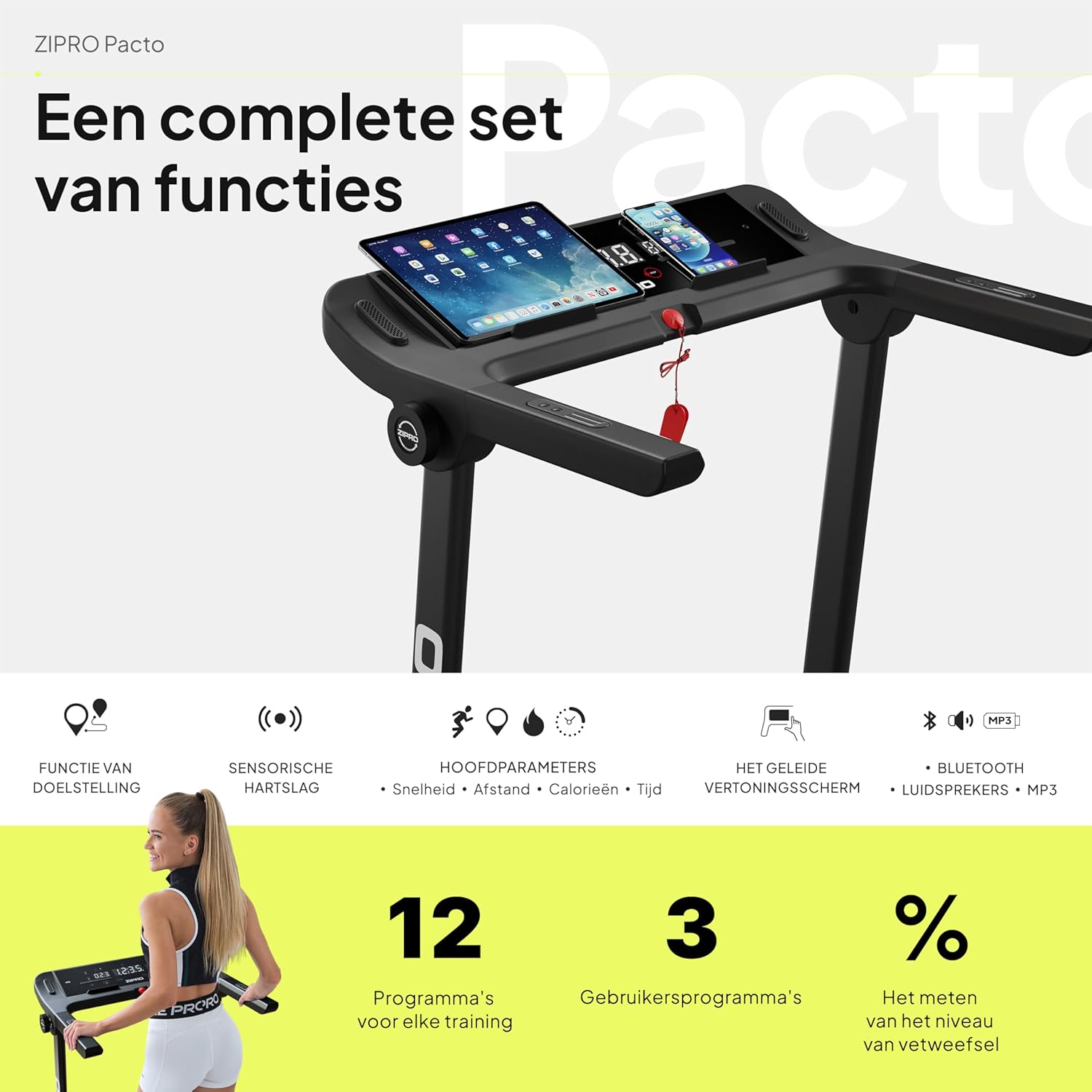
Imagen: Un detalle view of the ZIPRO treadmill's control panel, featuring a tablet and smartphone in their respective holders, illustrating the comprehensive set of functions available.
5.2 Comenzar un entrenamiento
- Asegúrese de que la llave de seguridad esté correctamente sujetada a la consola y a su ropa.
- Press the 'START' button. The treadmill will typically begin with a short countdown before the belt starts moving at a low speed.
5.3 Ajuste de la velocidad y la inclinación
- Velocidad: Use the '+' and '-' buttons on the console or handlebars to adjust the speed from 1 km/h to 16 km/h. Quick speed buttons (e.g., 3, 6, 9, 12 km/h) may also be available for rapid adjustments.
- Inclinación: Use the 'INCLINE +' and '-' buttons to adjust the incline level. The treadmill offers 12 adjustable incline levels to simulate uphill walking or running.
5.4 Uso de programas preestablecidos
The treadmill comes with 12 pre-set workout programs and 3 customizable user programs. Refer to the specific program section in your detailed manual for instructions on selecting and using these programs.
5.5 Monitoreo de la frecuencia cardíaca
Grasp the heart rate sensors on the handlebars to display your current heart rate on the LED screen. For accurate readings, ensure your hands are clean and firmly placed on the sensors.
5.6 App Connectivity (Kinomap & FitShow)
Enhance your workout experience by connecting your smartphone or tablet to the treadmill via Bluetooth and using compatible fitness apps like Kinomap and FitShow. These apps offer interactive training, virtual routes, and detailed workout tracking.
- Download the Kinomap or FitShow app from your device's app store.
- Habilite Bluetooth en su dispositivo.
- Open the app and follow the on-screen instructions to connect to your ZIPRO treadmill.

Image: A smartphone displaying the logos for Kinomap and FitShow applications, illustrating the treadmill's compatibility with these popular fitness apps for interactive training.
5.7 MP3 Function and Speakers
Connect your audio device to the treadmill's MP3 input to play music through the built-in speakers, making your workouts more enjoyable.
5.8 Detener un entrenamiento
Press the 'STOP' button to gradually slow down and stop the treadmill belt. Alternatively, pulling the safety key will immediately stop the treadmill.
6. Mantenimiento
Regular maintenance is crucial for the longevity and optimal performance of your ZIPRO treadmill.
6.1 Limpieza
- Limpie la consola y otras superficies con un paño suave.amp Paño después de cada uso para eliminar el sudor y el polvo.
- No utilice limpiadores abrasivos ni disolventes, ya que pueden dañar el acabado.
- Vacuum underneath the treadmill regularly to prevent dust and debris from accumulating.
6.2 Lubricación de la correa
The running belt requires periodic lubrication to reduce friction and extend its lifespan. Use the provided lubricant or a silicone-based treadmill lubricant.
- Apague y desenchufe la máquina para correr.
- Afloje ligeramente los pernos del rodillo trasero para levantar la correa.
- Apply a thin line of lubricant evenly under the center of the belt.
- Apriete los pernos del rodillo trasero.
- Haga funcionar la cinta de correr a baja velocidad (por ejemplo, 3 km/h) durante unos minutos para distribuir el lubricante.
Frequency of lubrication depends on usage: every 3-6 months for moderate use, or more frequently for heavy use.
6.3 Tensión y alineación de la correa
Check the belt tension and alignment periodically. If the belt slips or drifts to one side, adjust the rear roller bolts using the tool kit provided. Refer to the detailed manual for precise adjustment instructions.
7. Solución de problemas
This section addresses common issues you might encounter with your treadmill. If the problem persists, please contact customer support.
| Problema | Posible causa | Solución |
|---|---|---|
| La cinta de correr no se enciende. | El cable de alimentación no está enchufado; el interruptor de encendido está apagado; el disyuntor se disparó. | Ensure power cord is securely plugged in. Check if the power switch is ON. Reset the circuit breaker if necessary. |
| El cinturón no se mueve. | Safety key not in place; motor overload; loose belt. | Ensure the safety key is correctly inserted. Reduce user weight if exceeding capacity. Check belt tension and adjust if loose. |
| La pantalla no funciona correctamente. | Conexión de cable suelta; falla de software. | Check all cable connections to the console. Try turning the treadmill off and on again. |
| Ruido inusual durante el funcionamiento. | Lack of lubrication; loose parts; foreign object. | Lubricate the running belt. Inspect for any loose screws or foreign objects under the belt. |
| El cinturón resbala o se tambalea. | Belt too loose; lack of lubrication. | Adjust belt tension. Lubricate the running belt. |
8. Especificaciones
| Característica | Detalle |
|---|---|
| Marca | ZIPRO |
| Número de modelo | 5941329 |
| Color | Pacto |
| Tamaño | L |
| Tipo de pantalla | CONDUJO |
| Tamaño de la pantalla | 2.4 pulgadas |
| Potencia del motor | 1.96 CV |
| Velocidad máxima | 16 kilómetros por hora |
| Capacidad máxima de peso | 130 kilogramos |
| Dimensiones de la superficie de carrera | 45 x 125 centímetros |
| Dimensiones desplegadas (largo x ancho x alto) | 154 x 77.4 x 114 cm |
| Altura plegada | 31.5 cm (when folded flat) |
| Peso del artículo | 41.9 kilogramos |
| Programas preestablecidos | 12 |
| Customizable Programs | 3 |
| Adjustable Incline Levels | 12 |
| Fuente de poder | Eléctrico con cable |
| Características principales | Touchscreen, Adjustable Height, Bottle Holder, Timer, Heart Rate Monitor |
| Tipo de material | Alloy Steel, Plastic, Aluminum |
| Componentes incluidos | User Manual, Tool Kit, Lubricant, Safety Key, Power Cord |
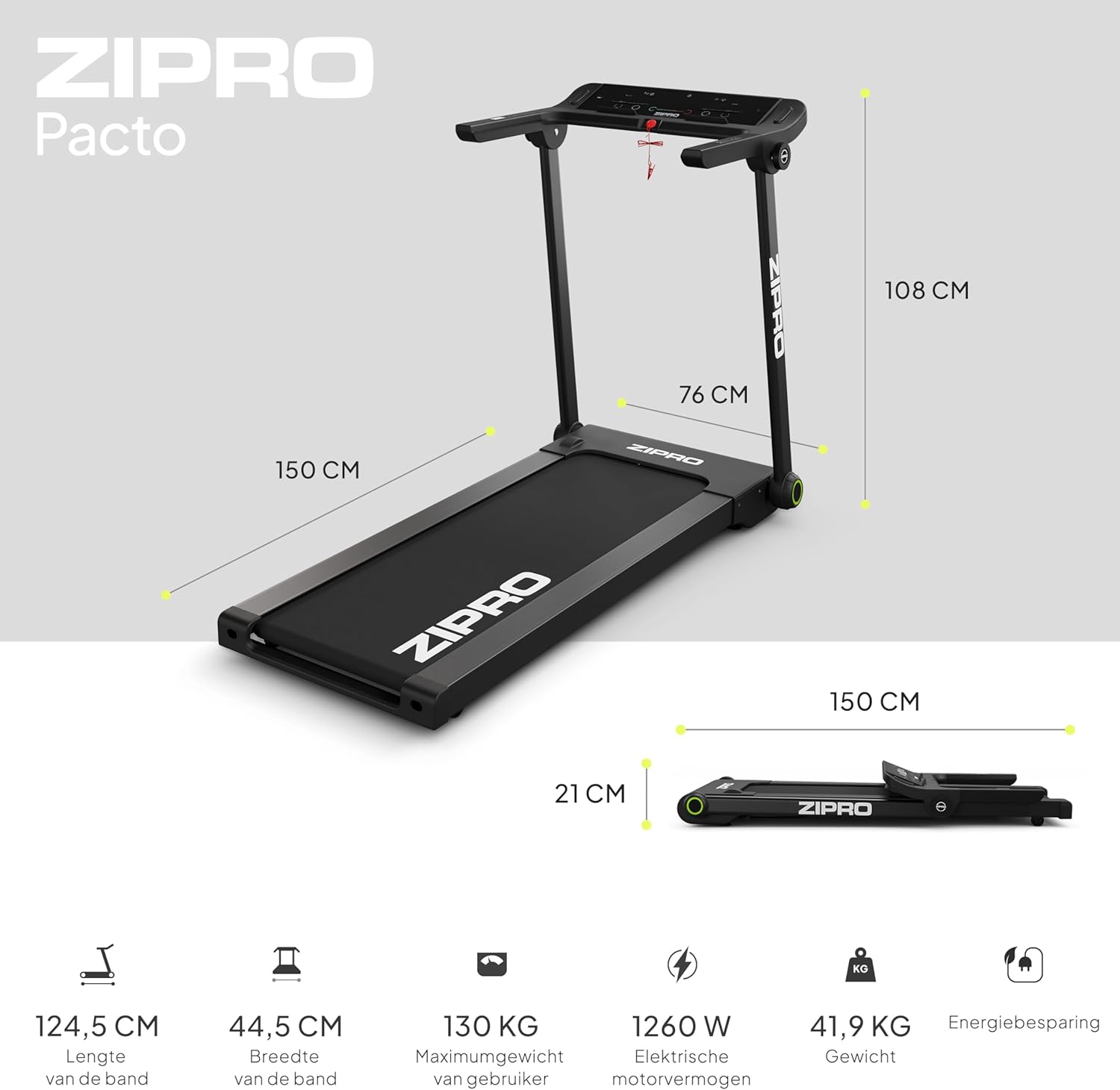
Image: A visual representation of the ZIPRO treadmill's dimensions when unfolded and folded, accompanied by key specifications such as belt length, width, maximum user weight, motor power, and item weight.

Imagen: Un detalle view of the ZIPRO treadmill's cushioning system, highlighting the shock absorbers designed to provide a comfortable and joint-friendly workout experience.
9. Garantía y soporte
Your ZIPRO Treadmill is covered by a manufacturer's warranty against defects in materials and workmanship. Please refer to the warranty card included in your package for specific terms and conditions, including the warranty period and coverage details.
For technical assistance, troubleshooting beyond this manual, or to inquire about warranty claims, please contact ZIPRO customer support. Contact information can typically be found on the product packaging, the warranty card, or the official ZIPRO websitio.
When contacting support, please have your model number (5941329 L) and proof of purchase readily available to expedite the service process.
Ask a question about this manual
Ask about setup, troubleshooting, compatibility, parts, safety, or missing instructions. Manuals+ will review the question and use this page’s manual context to help answer it.