
Introducción
The OSD Audio AB12 is an in-wall speaker selector A/B switch designed to manage audio output between two amplifiers and one pair of speakers, or one amplifier and two pairs of speakers. This device allows for convenient selection of audio sources or destinations within a dedicated audio zone. It is rated for up to 100 watts per channel and features a push-button control for easy operation.
Precauciones de seguridad
- Desconecte siempre la energía del amplifier and any connected audio equipment before installation or wiring.
- Ensure all wiring connections are secure to prevent short circuits or damage to equipment.
- Do not exceed the maximum power rating of 100 watts per channel.
- Consult a qualified electrician if you are unsure about any electrical wiring procedures.
Configuración e instalación
Herramientas necesarias
- Destornillador (cabeza Phillips)
- Pelacables
- Cinta aislante (opcional)
- Standard single-gang junction box (if not already installed)
Instrucciones de cableado
The AB12 features removable, solderless terminals for easy wiring. It accepts speaker wire up to 14 gauge. For optimal sound quality, 14-16 gauge wire is recommended.
- Prepare los cables: Strip approximately 1/4 to 1/2 inch of insulation from the ends of your speaker wires. Twist the bare wire strands tightly.
- Identificar terminales: The AB12 has clearly labeled terminals for 'OUTPUT' (to speakers) and 'AMP A INPUT' / 'AMP B INPUT' (from amplifiers). Each input/output has terminals for Left (+) and (-), and Right (+) and (-).
- Conectar altavoces: Connect your speaker wires to the 'OUTPUT' terminals. Ensure correct polarity (positive to positive, negative to negative).
- Conectar Ampsalvavidas: Connect the speaker output wires from your primary amplificador al 'AMP A INPUT' terminals. Connect the speaker output wires from your secondary amplifier (if used) to the 'AMP B INPUT' terminals. Maintain correct polarity.
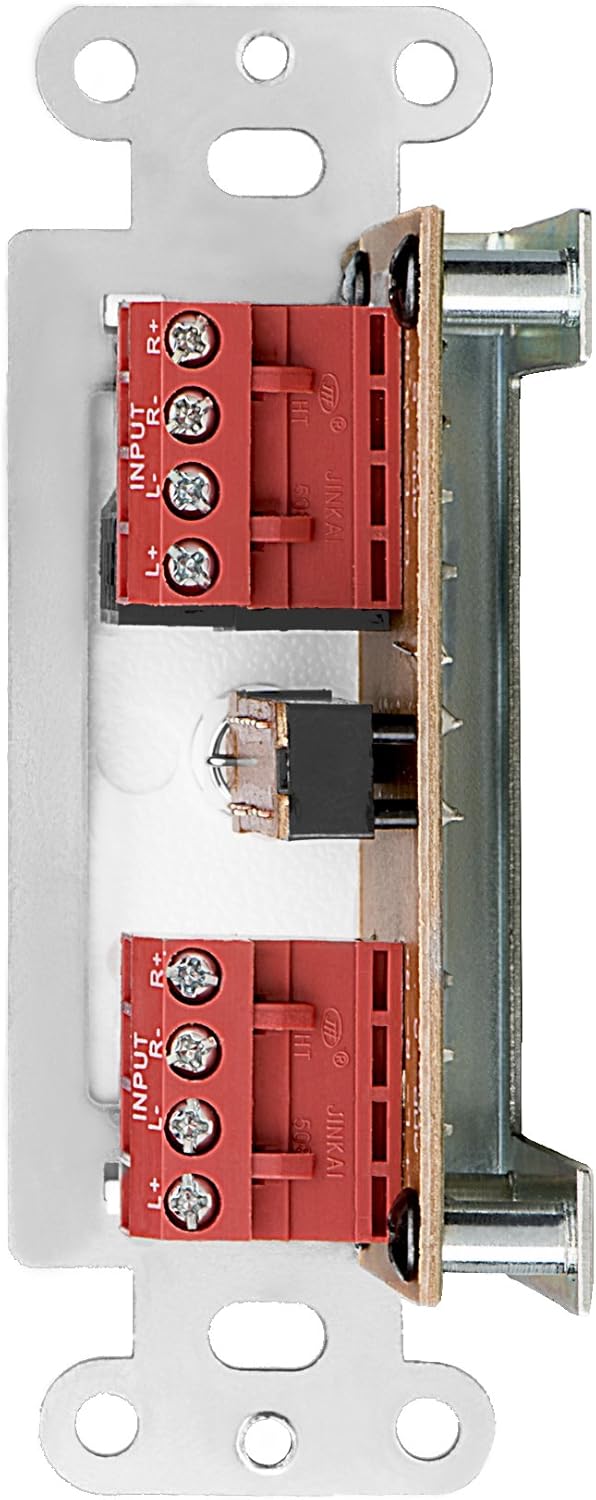
Figura 1: Posterior view of the AB12 switch with clearly labeled input and output terminals for wiring.

Figura 2: Example of speaker wire connections to the removable solderless terminals.
Montaje del interruptor
The AB12 is designed to fit into a standard single-gang junction box with a minimum depth of 2.9 inches. The dimensions of the selector are approximately 1 inch (W) x 2.75 inches (H) x 1.75 inches (D).
- Prepare la caja de conexiones: Ensure the junction box is securely installed in the wall.
- Interruptor de inserción: Carefully push the wired AB12 switch into the junction box. Ensure wires are not pinched.
- Placa frontal segura: Attach the desired color faceplate (white, beige, or light almond options are typically included) over the switch and secure it to the junction box using the provided screws.

Figure 3: Mounting brackets for securing the switch within a standard gang box.
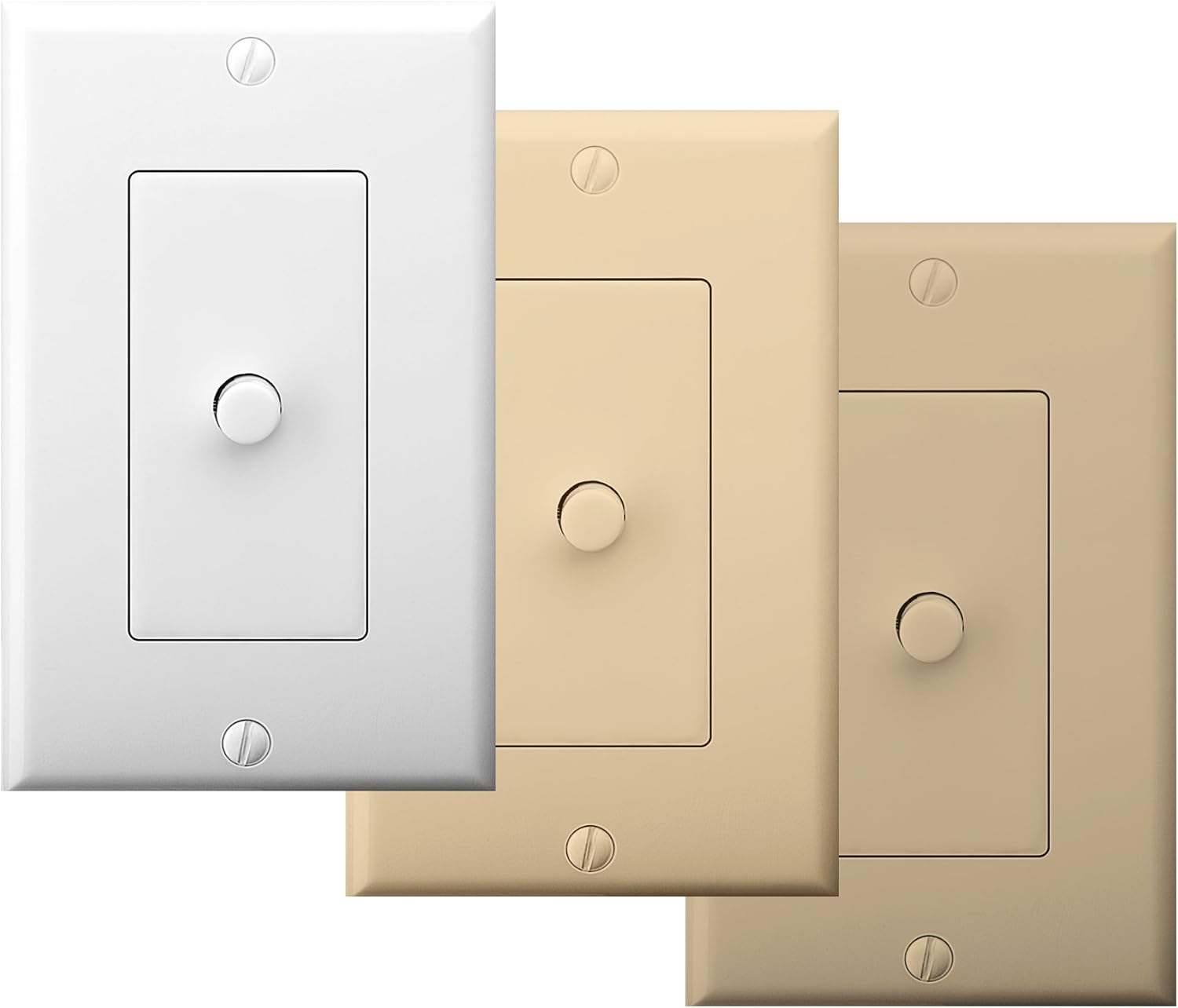
Figure 4: The AB12 switch typically includes multiple faceplate colors for aesthetic integration.
Instrucciones de funcionamiento
The OSD Audio AB12 switch provides a simple push-button mechanism to select between two audio configurations.
Funcionalidad
- Dos Amplifiers to One Speaker Pair: Conecta dos amplifiers to 'AMP A INPUT' and 'AMP B INPUT' respectively. Connect one pair of speakers to 'OUTPUT'. Press the button to switch between Amplificador A y Amplifier B playing through the single speaker pair.
- Uno Amplifier to Two Speaker Pairs: Conectar uno amplifier to 'AMP A INPUT'. Connect two pairs of speakers to 'OUTPUT' (one pair wired to the 'A' side of the output terminals, the other to the 'B' side, if applicable, or use the switch to select between two distinct output paths). Press the button to switch between Speaker Pair A and Speaker Pair B playing from the single ampmás duradero.
The switch is designed to allow power to flow to speakers from either A or B, but not from both simultaneously. This prevents potential damage to amplifiers or speakers due to conflicting signals.

Figure 5: The AB12 switch integrated into an audio system, allowing selection between different sources or destinations.
Mantenimiento
The OSD Audio AB12 In-Wall Speaker Selector requires minimal maintenance.
- Limpieza: To clean the faceplate, gently wipe it with a soft, dry cloth. Avoid using abrasive cleaners or solvents, as these can damage the finish.
- Conexiones: Periodically check all wiring connections to ensure they remain secure. Loose connections can lead to signal loss or poor audio quality.
- Ambiente: Ensure the switch is installed in a dry environment, away from excessive heat or moisture.
Solución de problemas
If you encounter issues with your AB12 speaker selector, refer to the following troubleshooting steps:
| Problema | Posible causa | Solución |
|---|---|---|
| No hay sonido de los altavoces | Conexiones de cableado sueltas Posición incorrecta del interruptor Amplifier or speaker issue | Check all speaker wire connections at the AB12 switch and at the amplifier/speakers. Ensure the switch is fully engaged in the desired A or B position. Verify amplifier and speakers are functioning correctly by bypassing the switch temporarily. |
| Sound from only one speaker (left or right channel) | Polaridad de cableado incorrecta Loose connection for one channel Mecanismo de conmutación defectuoso | Verify correct positive (+) and negative (-) wiring for both left and right channels. Check connections for the affected channel. If the issue persists, the internal switch mechanism may be faulty; contact support. |
| Difficulty fitting into standard gang box | Insufficient depth or width in junction box Excessive wiring inside box | Ensure the junction box meets the minimum depth requirement (2.9 inches). Carefully arrange wires to minimize bulk. Some older or non-standard boxes may require minor modification (e.g., widening the opening) or a deeper box. |
| Calidad de audio distorsionada o deficiente | Calibre de cable incorrecto Conexiones sueltas Exceeding power rating | Use recommended 14-16 gauge speaker wire. Check all connections. Ensure the amplifier output does not exceed the 100-watt rating of the switch. |
Presupuesto
| Característica | Especificación |
|---|---|
| Modelo | AB12 |
| Modo de operación | Interruptor A / B |
| Potencia nominal | 100 vatios por canal |
| Respuesta de frecuencia | 20 Hz a 20 KHz |
| Calibre del cable del altavoz | Up to 14 gauge (14-16 gauge recommended) |
| Tipo de conector | Terminales sin soldadura |
| Tipo de actuador | Botón pulsador |
| Número de posiciones | 2 |
| Tipo de montaje | Standard Single-Gang Box Mount |
| Dimensiones del producto (L x An x Al) | 4.5 x 2.75 x 2.5 pulgadas |
| Peso del artículo | 6.4 onzas |
| Material (carcasa) | Plástico |
| Material de contacto | Metal |
| Color | White (with additional faceplate options) |
Garantía y soporte
OSD Audio products are designed for reliability and performance. For warranty information or technical support, please refer to the official OSD Audio webSitio web o contacte con el departamento de atención al cliente. Conserve su recibo de compra como comprobante para cualquier reclamación de garantía.
Soporte en línea: www.osdaudio.com