
1. Introducción
Gracias por la compraasing the Gemini PS3-USB 3 Channel 10-Inch Mixer. This manual provides essential information for the proper setup, operation, and maintenance of your mixer. Please read this manual thoroughly before use to ensure optimal performance and to prevent damage.
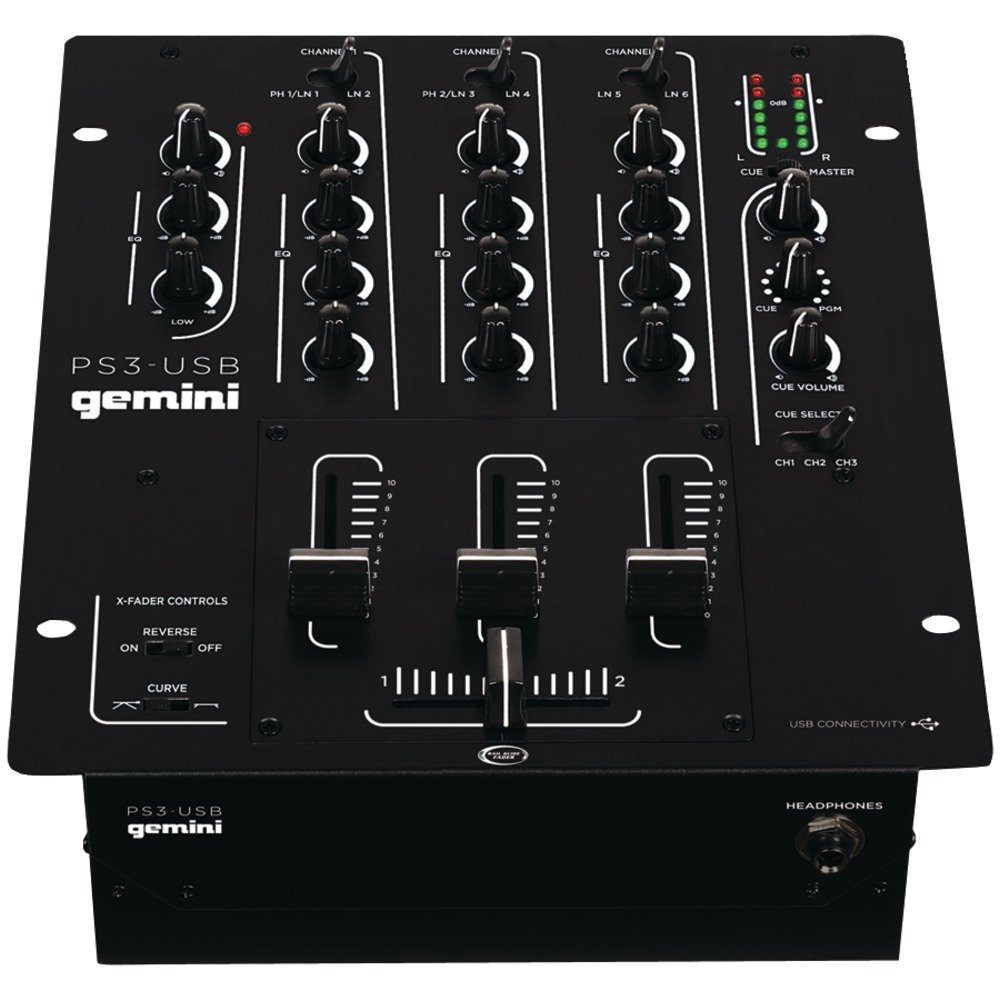
Figura 1: Frente view of the Gemini PS3-USB Mixer, showing controls and inputs.
2. Instrucciones de seguridad
- Fuente de energía: Conecte la unidad únicamente a la fuente de alimentación especificada.
- Ventilación: Asegúrese de que haya una ventilación adecuada. No bloquee las aberturas de ventilación.
- Agua y humedad: No exponga la unidad a la lluvia ni a la humedad. No coloque objetos con líquidos sobre ella.
- Calor: Mantenga la unidad alejada de fuentes de calor como radiadores, rejillas de calefacción, estufas u otros aparatos (incluidos ampificadores) que producen calor.
- Limpieza: Limpiar únicamente con un paño seco.
- Servicio: Encargue cualquier reparación a personal técnico cualificado. No intente reparar este producto usted mismo.
3. Configuración
3.1 Desembalaje
Carefully unpack the mixer and check for any signs of damage. Retain the packaging materials for future transport or storage.
3.2 Conexión de la alimentación
Connect the provided power adapter to the mixer's power input and then to a suitable electrical outlet.
3.3 Conexiones de audio
The PS3-USB features 5-line, 3-channel inputs with 2 convertible Phono/Line RCA inputs.
- Phono/Line Inputs: Connect turntables or line-level devices (CD players, media players) to the RCA inputs. Use the Phono/Line switch to select the appropriate input type for each channel.
- Salida maestra: Connect the Master RCA outputs to your ampAltavoces amplificados o amplificados.
- Salida de registro: Connect the Record RCA outputs to a recording device if you wish to record your mix.
- Auriculares: Plug your 1/4" (6.3mm) headphones into the front panel headphone connector.
3.4 Conexión USB
Connect the mixer to your Mac or PC using a standard USB cable. This allows for simultaneous playback and recording through your computer's media player software.
4. Instrucciones de funcionamiento
4.1 Controles y funciones sobreview
Familiarize yourself with the mixer's layout:
- Channel Gain Control: Ajusta el nivel de entrada para cada canal.
- 3-Band Rotary EQ: Provides control over High, Mid, and Low frequencies for each channel.
- Faders de canal: Controla el volumen de cada canal individual.
- Fundidor cruzado: A user-replaceable Rail Glide crossfader with curve and reverse controls for blending between channels.
- Volumen principal: Controla el nivel de salida general del mezclador.
- Medidores VU: Visual indicators for master or cue levels.
- Sección de señal: Includes rotary cue volume, CUE/PGM controls, and a split cue switch for headphone monitoring.
- Sección de micrófono: Features a rotary microphone volume control and a 2-band EQ for microphone input.
4.2 Mezcla básica
- Connect your audio sources to the appropriate Phono/Line inputs.
- Set the Phono/Line switch for each channel to match your source.
- Adjust the Gain control for each active channel to achieve a healthy input level without clipping (distortion).
- Use the channel faders to bring up the volume of your desired audio sources.
- Utilize the 3-band EQ to shape the sound of each channel.
- Use the crossfader to smoothly transition between channels.
- Monitor your mix using headphones via the Cue section and adjust the Master Volume for the main output.
4.3 Reproducción y grabación USB
Once connected via USB, your computer should recognize the PS3-USB as an audio device.
- Reproducción: Select the PS3-USB as the output device in your computer's sound settings or media player software to route audio through the mixer.
- Grabación: Select the PS3-USB as the input device in your recording software. The mixer's master output will be sent to your computer for recording.
5. Mantenimiento
- Limpieza: Utilice un paño suave y seco para limpiar el exterior de la batidora. No utilice limpiadores líquidos ni disolventes.
- Reemplazo del crossfader: The Rail Glide crossfader is user-replaceable. Refer to the Gemini website or authorized service centers for replacement parts and instructions if needed.
- Almacenamiento: When not in use for extended periods, store the mixer in a cool, dry place, preferably in its original packaging.
6. Solución de problemas
| Problema | Posible causa | Solución |
|---|---|---|
| No sound output from master. | Master volume too low; incorrect input selection; ampProblemas con el amplificador/altavoz. | Increase Master Volume. Check Phono/Line switches. Verify ampConexiones de amplificador/altavoz y alimentación. |
| No hay sonido de un canal específico. | Channel fader down; Gain too low; incorrect Phono/Line selection; source device off/muted. | Raise channel fader. Adjust Gain. Correct Phono/Line switch. Check source device. |
| Audio distorsionado. | Input Gain too high; Master Volume too high; faulty cable. | Reduce channel Gain. Reduce Master Volume. Replace cables. |
| USB recording/playback not working. | Incorrect USB connection; computer audio settings incorrect; driver issues. | Ensure USB cable is securely connected. Select PS3-USB as audio device in computer settings. Restart computer. |
7. Especificaciones
- Modelo: PS3USB
- Canales: 3
- Entradas: 5-Line, 2 Convertible Phono/Line RCA, USB
- Salidas: Master RCA, Record RCA, 1/4" (6.3mm) Headphone
- EQ: 3-Band Rotary EQ per channel, 2-Band EQ for Microphone
- Fundidor cruzado: User-replaceable Rail Glide with Curve and Reverse controls
- Conectividad: USB for Mac/PC Playback & Recording
- Dimensions (Approximate Shipping): 12.00 pulgadas x 10.00 pulgadas x 3.25 pulgadas
- Weight (Approximate Shipping): 6.2 libras (2.8 kg)
- Código postal: 747705208149
8. Garantía y soporte
This Gemini product is covered by a Garantía de 90 días from the date of purchase. This warranty covers manufacturing defects and workmanship under normal use. It does not cover damage caused by misuse, accident, modification, or unauthorized repair.
For technical support, service inquiries, or warranty claims, please contact your authorized Gemini dealer or visit the official Gemini websitio para información de contacto.
Conserve su comprobante de compra para validar la garantía.