
1. Introducción
The SIIG Analog to Digital Audio Converter (Model CE-CV0111-S1) is designed to convert analog left/right stereo audio input into simultaneous Coaxial and Toslink digital audio outputs. This device facilitates the integration of analog audio sources with modern digital audio systems, ensuring clear and reliable audio transmission.
Las características principales incluyen:
- Converts analog L/R stereo audio to Coaxial and Toslink digital outputs simultaneously.
- Admite audio sampling rate at 48KHz.
- Provides uncompressed 2-channel LPCM digital audio output.
- Features a durable metal housing for enhanced RF shielding.
2. Contenido del paquete
Por favor verifique que todos los artículos estén presentes en su paquete:
- SIIG Analog to Digital Audio Converter (CE-CV0111-S1)
- Adaptador de corriente continua de 5V
- Manual de usuario
3. Diagrama del producto
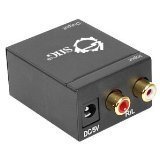
Figura 1: Frente view of the SIIG Analog to Digital Audio Converter. This image displays the DC 5V power input port on the left and the red (Right) and white (Left) RCA analog audio input ports on the right.
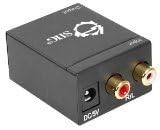
Figura 2: Trasero view of the SIIG Analog to Digital Audio Converter. This image shows the digital audio output ports: a Coaxial port and a Toslink (optical) port.
4. Configuración e instalación
Connecting the Audio Converter
- Connect Analog Audio Input: Using an RCA stereo audio cable (not included), connect the analog L/R audio output from your source device (e.g., TV, DVD player, game console) to the L/R RCA input ports on the SIIG Analog to Digital Audio Converter. Ensure the red connector goes to the 'R' (Right) input and the white connector goes to the 'L' (Left) input.
- Connect Digital Audio Output: Choose one or both digital output options:
- Salida coaxial: Connect a Coaxial audio cable (not included) from the Coaxial output port on the converter to the Coaxial digital audio input on your amplifier, receiver, or soundbar.
- Toslink (Optical) Output: Connect a Toslink optical audio cable (not included) from the Toslink output port on the converter to the optical digital audio input on your amplifier, receiver, or soundbar.
- Conecte la electricidad: Plug the included 5V DC power adapter into the 'DC 5V' input port on the converter. Then, plug the power adapter into a standard electrical outlet. The converter will power on automatically.
- Verificar conexiones: Asegúrese de que todos los cables estén conectados de forma segura a sus respectivos puertos.
5. Instrucciones de funcionamiento
Once all connections are made and the converter is powered on, the device operates automatically. It will continuously convert the incoming analog L/R stereo audio signal into both Coaxial and Toslink digital audio signals simultaneously.
- Ensure your source device is playing audio through its analog L/R outputs.
- Select the appropriate digital input (Coaxial or Toslink) on your receiving audio device (amplifier, receiver, etc.) to hear the converted audio.
- The converter supports uncompressed 2-channel LPCM audio at a 48KHz samptasa de ling.
6. Solución de problemas
| Problema | Posible causa | Solución |
|---|---|---|
| Sin salida de audio | 1. Conexiones de cable sueltas. 2. Incorrect input/output selection on receiving device. 3. Power adapter not connected or faulty. 4. Source device not outputting analog audio. | 1. Check all RCA, Coaxial, and Toslink cable connections. 2. Asegúrese de que su amplifier/receiver is set to the correct digital input (Coaxial or Optical). 3. Verify the power adapter is securely connected and the power outlet is functional. 4. Confirm the source device's analog audio output is active and functioning. |
| Calidad de audio distorsionada o deficiente | 1. Poor quality audio cables. 2. Interferencias de otros dispositivos electrónicos. 3. Volume levels too high on source or receiving device. | 1. Use high-quality shielded audio cables. 2. Ensure the converter is placed away from strong electromagnetic interference sources. 3. Adjust volume levels on both the source and receiving devices to prevent clipping or distortion. |
| Only one digital output works | Faulty Coaxial or Toslink cable/port. | Test with a different cable for the non-working output. If the issue persists, the port may be faulty. |
7. Especificaciones
- Modelo: CE-CV0111-S1
- Aporte: Analog L/R Stereo Audio (RCA)
- Producción: Coaxial Digital Audio, Toslink (Optical) Digital Audio
- S de audioampTasa de ling: 48 kHz
- Formato de audio: Uncompressed 2-channel LPCM
- Dimensiones (L x An x Al): 1.57 x 1.97 x 1.38 pulgadas (40 x 50 x 35 mm)
- Peso: 9.6 onzas (272 gramos)
- Fuente de alimentación: 5V DC (included adapter)
- Alojamiento: Metal
- Fabricante: SIIG Inc.
- ASIN: B006ZB2LJ6
- Código postal: 662774014524, 745449847037
8. Información de seguridad
- No exponga este dispositivo al agua ni a la humedad excesiva.
- No intente abrir ni modificar el dispositivo. No contiene piezas que puedan ser reparadas por el usuario.
- Use only the provided 5V DC power adapter. Using an incorrect power adapter may damage the device and void the warranty.
- Coloque el dispositivo en un área bien ventilada para evitar el sobrecalentamiento.
- Mantener fuera del alcance de los niños.
9. Garantía y asistencia técnica
SIIG Inc. products are designed for reliability and performance. For warranty information or technical assistance, please refer to the official SIIG website or contact their customer support directly. Please have your product model number (CE-CV0111-S1) and purchase details available when seeking support.
Para obtener la información de soporte más actualizada, visite el sitio SIIG Store on Amazon or the official SIIG websitio.