
1. Introducción
This user manual provides comprehensive instructions for the Western Digital WD XE 300 GB Enterprise SAS Hard Drive, model WD3001BKHG. It covers essential information regarding the drive's features, proper installation, operation, maintenance, and troubleshooting. Please read this manual thoroughly before installing or using your hard drive to ensure optimal performance and data integrity.
2. Producto terminadoview
The WD XE SAS hard drive is designed for demanding enterprise server and storage applications. It offers high performance and reliability in a compact 2.5-inch form factor. This drive is engineered to meet the rigorous requirements of high-performance computing and mission-critical environments, providing efficient data storage and retrieval.

Figura 1: Arriba view of the Western Digital WD XE 300 GB Enterprise SAS Hard Drive. This image displays the drive's casing and label, indicating its compact 2.5-inch form factor suitable for server and enterprise storage applications.
3. Características principales
- Enterprise-Grade Performance: Ideal for demanding high-performance computing and mission-critical environments.
- Ultra-Fast SAS Interface: Features a 6 Gb/s SAS interface for high-speed data transfer, combined with low power consumption and industry-leading reliability.
- Conectividad de doble puerto: Offers dual port, full duplex connectivity for enhanced reliability, performance, and data availability, eliminating single points of failure in high-availability enterprise systems.
- Amplia compatibilidad: Works with Windows, Windows Server, Linux, and Mac operating systems. Note that compatibility may vary based on the user's hardware configuration and specific operating system version.
- Factor de forma compacto: 2.5-inch design, allowing for more system airflow and potentially lower cooling costs in dense server environments.
- Fiabilidad: Backed by a 5-year limited warranty, reflecting its robust design for continuous operation.
4. Instalación y configuración
Installing an internal SAS hard drive requires careful handling and adherence to safety procedures. It is recommended that installation be performed by a qualified technician or in accordance with your system's specific documentation.
4.1 Precauciones de seguridad
- Always wear an anti-static wrist strap when handling the hard drive to prevent electrostatic discharge (ESD) damage.
- Ensure the system is powered off and unplugged from the power source before beginning installation.
- Handle the drive by its edges; avoid touching the circuit board or connector pins.
4.2 Instalación física
- Prepare el sistema: Open your server or workstation chassis according to the manufacturer's instructions. Identify an available 2.5-inch drive bay.
- Monte la unidad: Securely slide the WD XE drive into the designated drive bay. Use mounting screws if required by your system's design.
- Conectar cables: Connect the SAS data cable from the drive to an available SAS port on your system's motherboard or RAID controller. Then, connect the power cable to the drive. Ensure all connections are firm.
- Chasis cerrado: Once the drive is securely installed and connected, close the system chassis.
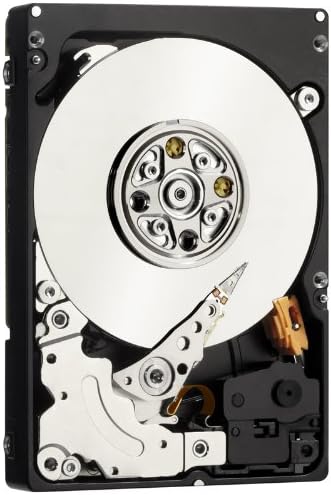
Figura 2: Interna view of the WD XE SAS Hard Drive. This image shows the internal platters and read/write heads, illustrating the precision engineering within the drive. This view is for informational purposes; the drive should not be opened by the user.
4.3 Configuración inicial
- Encendido: Reconnect the system to power and turn it on.
- Configuración de BIOS/UEFI: Access your system's BIOS/UEFI settings to confirm the drive is detected.
- Configuración del sistema operativo: Depending on your operating system, you may need to initialize, partition, and format the drive before it can be used for storage. Refer to your operating system's documentation for detailed instructions. For RAID configurations, consult your RAID controller's manual.
5. Operación del disco duro
Once installed and configured, the WD XE SAS hard drive operates as a high-speed storage device within your system. Its 10,000 RPM rotational speed and SAS interface ensure rapid data access and transfer rates, crucial for enterprise applications.
- Almacenamiento de datos: Use the drive for storing operating systems, applications, and critical data.
- Actuación: The drive is optimized for continuous operation and high I/O workloads typical in server environments.
- Escucha: Utilize system monitoring tools to check drive health, temperature, and performance metrics.
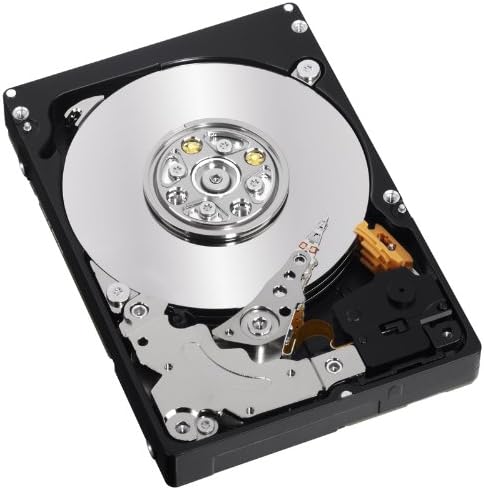
Figura 3: Ángulo interno view of the WD XE SAS Hard Drive. This perspective highlights the intricate mechanical components, including the actuator arm and spindle motor, which contribute to the drive's high performance and reliability.
6. Mantenimiento
Proper maintenance helps ensure the longevity and reliability of your WD XE hard drive.
- Copia de seguridad de datos: Regularly back up critical data to an external storage device or network location. Hard drives, like all mechanical devices, can fail.
- Actualizaciones de firmware: Consulte el soporte de Western Digital website periodically for firmware updates. Apply updates as recommended by Western Digital or your system manufacturer.
- Refrigeración del sistema: Ensure your system has adequate airflow and cooling to prevent the drive from overheating, which can degrade performance and lifespan.
- Manejo físico: Avoid dropping or subjecting the drive to physical shock, especially when it is operating.
7. Solución de problemas
If you encounter issues with your WD XE hard drive, consider the following common troubleshooting steps:
7.1 Unidad no detectada
- Comprobar conexiones: Ensure both the SAS data cable and power cable are securely connected to the drive and the system.
- Verify BIOS/UEFI: Confirm the drive is recognized in your system's BIOS/UEFI settings.
- Controlador RAID: If using a RAID controller, check its configuration utility to see if the drive is detected and properly configured within the array.
- Actualizaciones de controladores: Asegúrese de que los controladores de su controlador SAS estén actualizados.
7.2 Problemas de rendimiento
- Los recursos del sistema: Check if other system components (CPU, RAM) are bottlenecking performance.
- Salud de la unidad: Use diagnostic tools (e.g., SMART status) to check the drive's health.
- Fragmentación: While less common with modern file sistemas, excesivos file fragmentation can impact performance.
7.3 Ruidos inusuales
- Clicking or Grinding: These sounds often indicate a mechanical failure. Immediately back up any accessible data and consider replacing the drive.
- Vibración: Ensure the drive is securely mounted in its bay to prevent excessive vibration.
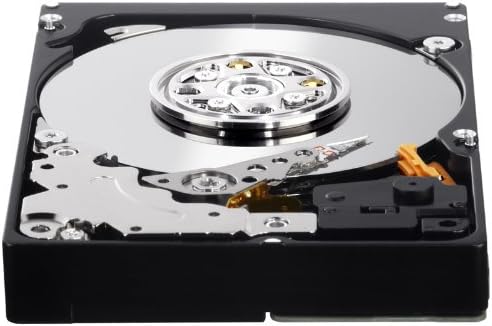
Figure 4: Close-up of the WD XE SAS Hard Drive's connector interface. This image details the SAS data and power connectors, which are crucial for proper installation and communication with the host system.
8. Especificaciones técnicas
| Característica | Especificación |
|---|---|
| Número de modelo | WD3001BKHG |
| Capacidad de almacenamiento digital | 300 GB |
| Interfaz del disco duro | SCSI conectado en serie (SAS) |
| Tecnología de conectividad | SAS |
| Factor de forma del disco duro | 2.5 pulgadas |
| Velocidad de rotación del disco duro | 10000 RPM |
| Cache Memory Installed Size | 32 MB |
| Velocidad de transferencia de datos | 204 megabytes por segundo |
| Dispositivos compatibles | Desktop (and server systems) |
| Tipo de instalación | Disco duro interno |
| Peso del artículo | 8.16 onzas |
9. Garantía y soporte
The Western Digital WD XE 300 GB Enterprise SAS Hard Drive (WD3001BKHG) comes with a Garantía limitada de 5 añosEsta garantía cubre defectos de materiales y mano de obra en condiciones normales de uso.
For detailed warranty terms and conditions, or to initiate a warranty claim, please visit the official Western Digital support webSitio web o contacte directamente con el servicio de atención al cliente. Conserve su comprobante de compra para validar la garantía.
9.1 Soporte técnico
If you require technical assistance, have questions about installation, or need help with troubleshooting beyond the scope of this manual, please refer to the following resources:
- Soporte de Western Digital Websitio: https://support.wdc.com (Tenga en cuenta: esto es un marcador de posición) URL. Refer to official product packaging or the Western Digital corporate website for the most current support links.)
- Base de conocimientos en línea: Access FAQs, articles, and guides for common issues.
- Servicio al cliente: Contact Western Digital customer service via phone or email for personalized support.