
1. Introducción
The D-Link GO-SW-5G is a 5-Port Unmanaged Gigabit Desktop Switch designed for home and small office environments. This device provides a simple and cost-effective solution to expand your network connectivity, offering high-speed Gigabit Ethernet ports for reliable data transfer. It incorporates D-Link's Green Technology for energy efficiency, reduced heat generation, and extended product lifespan.
This switch is a plug-and-play device, requiring no complex configuration or software installation, making it easy to integrate into an existing network.
2. Contenido del paquete
Verifique que todos los artículos enumerados a continuación estén incluidos en su paquete:
- D-Link GO-SW-5G 5-Port Gigabit Desktop Switch
- Adaptador de corriente
- Guía de instalación rápida
Si falta algún artículo o está dañado, comuníquese con su distribuidor para obtener ayuda.
3. Instrucciones de configuración
The D-Link GO-SW-5G switch is designed for easy plug-and-play installation. Follow these steps to set up your device:
3.1. Conecte el adaptador de corriente
- Locate the power input port on the side of the D-Link GO-SW-5G switch.
- Conecte el adaptador de corriente proporcionado a este puerto.
- Conecte el otro extremo del adaptador de corriente a una toma eléctrica estándar.
- The power LED on the front of the switch will illuminate, indicating that the device is receiving power.

Figura 1: Lado view of the D-Link GO-SW-5G switch with the power input port.
3.2. Conéctese a su red
- Using a standard Ethernet cable (RJ45), connect one end to an available LAN port on your router (not your modem).
- Connect the other end of this Ethernet cable to any of the five available ports on the back of the D-Link GO-SW-5G switch.
- The corresponding LED on the front of the switch will light up, indicating an active connection.
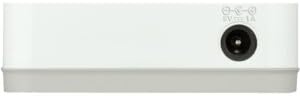
Figura 2: Trasero view of the D-Link GO-SW-5G switch with five Ethernet ports.
3.3. Connect Network Devices
- Connect your network devices (e.g., computers, gaming consoles, network printers, smart TVs) to the remaining available Ethernet ports on the D-Link GO-SW-5G switch using Ethernet cables.
- Each connected device will have its corresponding LED on the front of the switch illuminate, confirming a successful connection.

Figura 3: Frente view of the D-Link GO-SW-5G switch showing active port LEDs.
4. Instrucciones de funcionamiento
The D-Link GO-SW-5G is an unmanaged switch, meaning it operates automatically without requiring user configuration. Once connected as described in the Setup section, it will begin forwarding network traffic between connected devices.
- Automatic Negotiation: The switch automatically detects the network speed (10/100/1000 Mbps) and duplex mode (half/full) of connected devices and adjusts accordingly.
- MDI/MDIX automático: All ports support automatic MDI/MDIX crossover, eliminating the need for crossover cables when connecting to other switches or hubs.
- Indicadores LED: Each port has an LED indicator on the front panel. A lit LED indicates an active link, and blinking indicates network activity.
5. Mantenimiento
To ensure optimal performance and longevity of your D-Link GO-SW-5G switch, consider the following maintenance guidelines:
- Colocación: Coloque el interruptor en un lugar fresco y seco, alejado de la luz solar directa, fuentes de calor y humedad excesiva. Asegúrese de que haya una ventilación adecuada alrededor del dispositivo.
- Limpieza: Use a soft, dry cloth to clean the exterior of the switch. Avoid using liquid or aerosol cleaners, as they may damage the device.
- Sistema de organización de cables: Keep Ethernet cables neatly organized to prevent tangles and accidental disconnections.
- Ciclo de energía: If you experience network issues, a simple power cycle (unplugging the power adapter for 10 seconds and then plugging it back in) can often resolve minor problems.
6. Solución de problemas
If you encounter issues with your D-Link GO-SW-5G switch, refer to the following common troubleshooting steps:
- Sin LED de encendido:
- Asegúrese de que el adaptador de corriente esté conectado de forma segura tanto al interruptor como a una toma de corriente eléctrica que funcione.
- Verifique que el tomacorriente eléctrico funcione enchufando otro dispositivo.
- No Link/Activity LED for a Connected Device:
- Compruebe que el cable Ethernet esté conectado de forma segura tanto al puerto del conmutador como al dispositivo de red.
- Pruebe con un cable Ethernet diferente para descartar que el cable esté defectuoso.
- Asegúrese de que el dispositivo conectado esté encendido y que su adaptador de red esté funcionando correctamente.
- Intente conectar el dispositivo a un puerto diferente en el conmutador.
- Velocidad de red lenta:
- Verify that all connected devices and cables support Gigabit Ethernet (1000 Mbps) for optimal performance. The switch will operate at the lowest common speed.
- Ensure your router and internet service provider (ISP) plan support the desired speeds.
- Perform a power cycle on the switch and your router.
- Conectividad intermitente:
- Compruebe si hay conexiones de cables sueltas.
- Ensure the switch is not overheating; provide adequate ventilation.
- Pruebe con diferentes cables Ethernet.
7. Especificaciones
| Marca | Enlace D |
| Número de modelo | GO-SW-5G/B |
| Número de puertos | 5 |
| Tipo de interruptor | Sin gestión |
| Velocidad de transferencia de datos | 1 Gigabits por segundo (10/100/1000 Mbps) |
| Interfaz | RJ45 |
| Color | Blanco |
| Peso del artículo | 0.22 libras |
| Volumentage | 100-240 Voltios |
| Dispositivos compatibles | PC, Mac, and other Ethernet-enabled devices |
| Cambio de tela | 10 Gbps |
| Código Postal | 790069365669 |
8. Garantía y soporte
Garantía limitada: The D-Link GO-SW-5G switch comes with a 3-year limited warranty. For detailed terms and conditions, please refer to the warranty information included in your package or visit the official D-Link websitio.
Apoyo técnico: For technical assistance, product registration, or to download the latest firmware and documentation, please visit the Soporte D-Link Websitio or contact D-Link customer service.