
1. Introducción
This manual provides detailed instructions for the safe and effective installation, operation, and maintenance of the ICM Controls ICM280C OEM Furnace Control Board. This board is designed as a direct replacement for specific Goodman furnace models, ensuring proper control of the furnace's fan and other critical functions. Please read this manual thoroughly before proceeding with installation or operation.
2. Información de seguridad
ADVERTENCIA: La instalación, el ajuste, la alteración, el servicio o el mantenimiento incorrectos pueden causar daños materiales, lesiones o la muerte. Lea atentamente estas instrucciones antes de instalar o realizar el mantenimiento de este equipo.
- Always disconnect all power to the furnace unit before installing or servicing the control board. Failure to do so can result in electrical shock, fire, or death.
- La instalación y el mantenimiento deben ser realizados por un instalador o una agencia de servicio calificado.
- Asegúrese de que todas las conexiones del cableado sean seguras y cumplan con los códigos eléctricos locales y nacionales.
- No opere el horno con cableado o componentes dañados.
- Utilice equipo de protección personal (EPP) adecuado, como gafas de seguridad y guantes, durante la instalación.
3. Producto terminadoview
The ICM Controls ICM280C is an Original Equipment Manufacturer (OEM) replacement control board specifically designed for Goodman furnace systems. It manages the operational sequence of the furnace, including ignition, fan control, and safety monitoring. This board ensures reliable and efficient performance of your heating system.
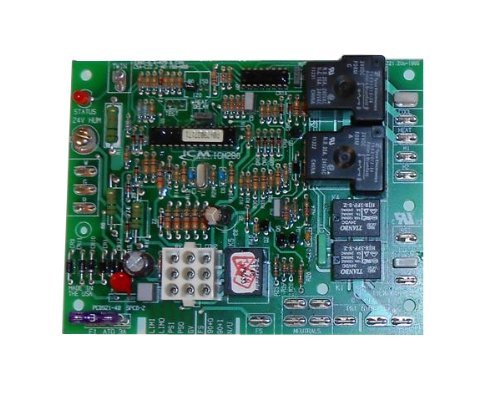
Figure 1: ICM Controls ICM280C OEM Furnace Control Board. This image shows the front view of the control board with various terminals and components.
4. Configuración e instalación
This section outlines the steps for safely replacing your existing furnace control board with the ICM Controls ICM280C.
4.1. Comprobaciones previas a la instalación
- Verify that the ICM280C board is the correct replacement for your specific Goodman furnace model. Refer to your furnace's documentation.
- Gather necessary tools: screwdriver set, wire strippers, multimeter (optional for diagnostics), and safety glasses.
- Take clear photographs of the existing wiring connections on your old control board before disconnecting anything. This will serve as a crucial reference during re-installation.
4.2. Procedimiento de instalación
- Desconectar la energía: Locate the main power switch for your furnace and turn it OFF. Additionally, turn off the circuit breaker supplying power to the furnace at your electrical panel. Verify power is off using a multimeter if available.
- Placa de control de acceso: Open the furnace access panel(s) to expose the existing control board.
- Desconectar el cableado: Carefully disconnect all wires from the old control board. Refer to your photographs taken in step 4.1. Ensure each wire is noted for its original connection point.
- Quitar el tablero antiguo: Desatornille o desenganche la placa de control vieja de sus soportes de montaje.
- Instalar nueva placa: Position the ICM Controls ICM280C board in the same location as the old board and secure it using the original screws or clips.
- Reconectar el cableado: Carefully reconnect all wires to the corresponding terminals on the new ICM280C board. Use your photographs as a guide. Double-check every connection for accuracy and tightness.
- Close Access Panels: Once all wiring is secure and verified, close and secure the furnace access panel(s).
- Restaurar energía: Turn on the circuit breaker for the furnace, then turn on the main power switch for the furnace unit.
5. Instrucciones de funcionamiento
After successful installation and power restoration, the ICM Controls ICM280C board will initiate the furnace's normal operating sequence. The board is designed to automatically manage the furnace's functions based on thermostat calls for heat or fan operation.
- Encendido inicial: Upon first power-up, the board will perform a self-diagnostic check. Refer to your furnace's specific manual for expected diagnostic LED patterns (if applicable) during this phase.
- Funcionamiento normal: When the thermostat calls for heat, the control board will sequence the ignition process, monitor flame presence, and activate the circulating fan at the appropriate time. When the thermostat calls for fan-only operation, the board will activate the fan.
- Características de seguridad: The board continuously monitors various safety sensors within the furnace. If a fault is detected (e.g., overheating, flame failure), the board will shut down the furnace and typically display a diagnostic code via an LED.
6. Mantenimiento
The ICM Controls ICM280C Furnace Control Board is a sealed electronic component and generally requires no routine maintenance. However, it is recommended to:
- Ensure the furnace area remains clean and free of dust and debris, which can accumulate on electronic components over time.
- During annual furnace servicing by a qualified technician, the control board and its connections should be visually inspected for any signs of wear, corrosion, or damage.
- Do not attempt to clean the board with liquids or abrasive materials.
7. Solución de problemas
If your furnace is not operating correctly after installing the ICM280C board, consider the following troubleshooting steps. Always disconnect power before inspecting internal components.
- No hay energía en el horno:
- Compruebe si el interruptor de encendido del horno está encendido.
- Check if the circuit breaker for the furnace is tripped.
- Verify all main power connections to the control board are secure.
- Furnace Not Igniting / No Heat:
- Asegúrese de que el termostato esté configurado en "Calentar" y que la temperatura sea superior a la temperatura ambiente de la habitación.
- Check for diagnostic fault codes displayed by an LED on the control board. Refer to your furnace's specific manual for the meaning of these codes.
- Verify gas supply is on.
- El ventilador no funciona correctamente:
- If the fan runs continuously, check the thermostat setting (e.g., "Fan ON" instead of "Auto").
- If the fan does not run when it should, check for diagnostic codes.
- Ensure all fan motor wiring connections to the control board are secure.
- Mal funcionamiento general: If the board displays a persistent fault code or the furnace exhibits unusual behavior, it may indicate a more complex issue. In such cases, it is strongly recommended to contact a qualified HVAC technician for diagnosis and repair.
8. Especificaciones
| Número de pieza | ICM:280-C |
| Modelo | ICM280C |
| Compatibilidad | OEM replacement for Goodman furnace control boards |
| ASIN | B009PAX89G |
| Cantidad de artículos del paquete | 1 |
| Fecha de primera disponibilidad | 30 de octubre de 2012 |
9. Garantía y soporte
For specific warranty information regarding the ICM Controls ICM280C OEM Furnace Control Board, please refer to the documentation provided with your purchase or contact ICM Controls directly. Warranty terms typically cover manufacturing defects for a specified period.
For technical support or further assistance, please contact the retailer from whom the product was purchased or visit the official ICM Controls website for their customer support resources.