
1. Producto terminadoview
The BFT P121011 Intro Key Selector is a robust, surface-mounted key switch designed for controlling access systems, such as automatic gates or doors. It features a durable plastic construction and operates with a normally closed contact type, providing a secure and reliable control mechanism.
This device utilizes a key for activation, offering a simple on-off operational mode. It is designed for a single-circuit application and connects via screw terminals for straightforward wiring.
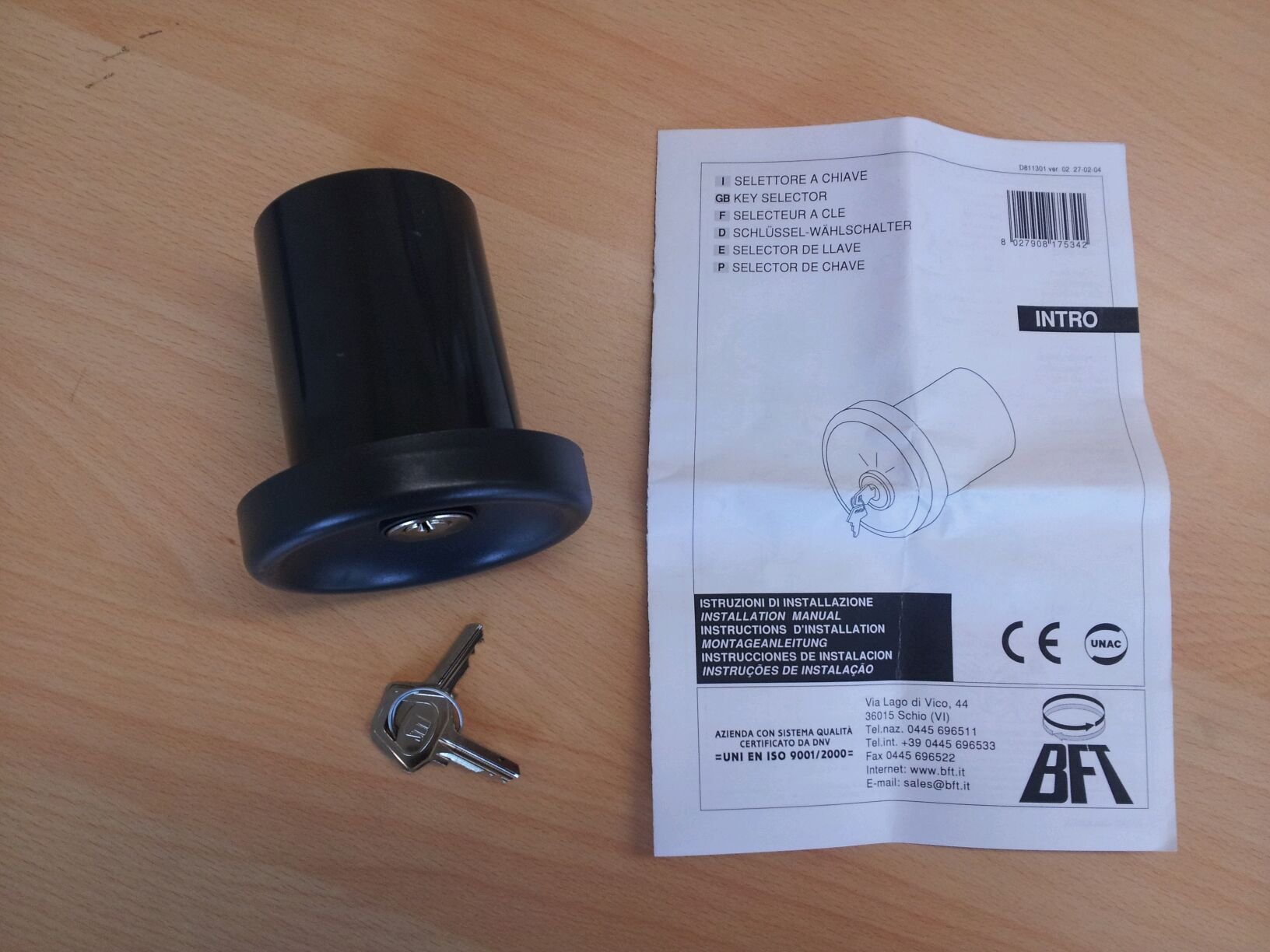
Figure 1: BFT P121011 Intro Key Selector. This image shows the circular key selector unit, dark gray in color, with the BFT logo at the top. Below the logo, the positions 'A', '0', and 'B' are marked around the central keyhole. Two silver keys are visible in the foreground, resting on a wooden surface.
2. Información de seguridad
- Lea atentamente todas las instrucciones antes de la instalación y el uso.
- La instalación debe ser realizada por personal calificado de acuerdo con los códigos y regulaciones eléctricas locales.
- Disconnect power to the system before performing any installation, maintenance, or troubleshooting.
- Asegúrese de que todas las conexiones del cableado sean seguras y estén adecuadamente aisladas para evitar cortocircuitos.
- No exponga el dispositivo a temperaturas extremas, humedad o sustancias corrosivas.
- Mantenga las llaves fuera del alcance de los niños y del personal no autorizado.
3. Especificaciones
| Característica | Especificación |
|---|---|
| Marca | BFT |
| Modelo | P121011 |
| Modo de funcionamiento | On-off |
| Tipo de contacto | Normalmente cerrado |
| Tipo de interruptor | Llave |
| Tipo de terminal | Tornillo |
| Material | Plástico |
| Dimensiones (LxAnxAl) | 30 x 195 x 260 cm (Note: These dimensions seem unusually large for a key selector. Please verify with product packaging.) |
| Tipo de circuito | 1 vías |
| Tipo de montaje | Superficie |
| Tipo de actuador | Button, Knob (Note: This refers to the key as the actuator) |
4. Instalación y configuración
4.1. Comprobaciones previas a la instalación
- Verifique que todos los componentes estén presentes y sin daños.
- Ensure the mounting surface is flat, stable, and suitable for surface mounting.
- Confirm that the power supply to the gate or access system is disconnected.
4.2. Montaje del selector de llaves
- Choose an appropriate location for the key selector, ensuring it is easily accessible but protected from potential damage.
- Mark the drilling points on the mounting surface using the key selector's base as a template.
- Taladre agujeros piloto en los puntos marcados.
- Secure the key selector base to the surface using appropriate screws and fasteners (not included).
4.3. Conexiones de cableado
- Route the necessary control cables through the designated entry points on the key selector's housing.
- Connect the control wires to the screw terminals inside the key selector. Refer to the wiring diagram provided with your gate or access system control unit for specific connections. The key selector typically acts as a momentary contact switch.
- Asegúrese de que todas las conexiones estén firmes y seguras.
- Close the key selector housing, ensuring it is properly sealed.
4.4. Postinstalación
- Restaurar la energía al sistema.
- Test the key selector's functionality as described in the Operating Instructions section.
5. Instrucciones de funcionamiento
The BFT P121011 Intro Key Selector provides a simple, key-operated control for your access system.
- Insertar clave: Insert the provided key into the keyhole on the front of the selector.
- Activar: Turn the key to the desired position (e.g., 'A' or 'B' if multiple functions are supported, or simply to activate the single function). The key selector is designed to provide a momentary contact closure, which signals the connected control unit to perform an action (e.g., open/close gate).
- Tecla de retorno: After activation, return the key to the '0' (neutral) position and remove it. The key selector will return to its normally closed state.
The specific action triggered by turning the key (e.g., opening, closing, or stopping a gate) depends on how the key selector is wired to the main control unit of your access system.
6. Mantenimiento
Regular maintenance ensures the longevity and reliable operation of your BFT P121011 Intro Key Selector.
- Limpieza: Periodically clean the exterior of the key selector with a soft, damp Paño. No utilice limpiadores abrasivos ni disolventes.
- Keyhole Inspection: Ensure the keyhole remains free of debris. If necessary, use a small, soft brush to clear any obstructions. Avoid using lubricants that may attract dust.
- Comprobación del cableado: Annually, or if issues arise, disconnect power and inspect the wiring connections inside the unit for any signs of corrosion or loosening. Re-tighten connections as needed.
- Key Condition: Inspect the keys for wear or damage. Worn keys may not operate the selector smoothly or reliably.
7. Solución de problemas
| Problema | Posible causa | Solución |
|---|---|---|
| Key selector does not activate the system. | No llega energía a la unidad de control. Cableado incorrecto. Faulty key selector contacts. |
Check power supply to the main control unit. Verify wiring connections against the system's diagram. Test the key selector's contacts with a multimeter. Replace if faulty. |
| La llave es difícil de girar o quitar. | Debris in keyhole. Worn key or lock mechanism. |
Clean keyhole with a soft brush. Try a different key. If issue persists, the lock mechanism may need replacement. |
| Operación intermitente. | Conexiones de cableado sueltas. Interferencia ambiental. |
Revise y apriete todas las conexiones del cableado. Ensure the unit is properly sealed and protected from elements. |
8. Garantía y soporte
Specific warranty information for the BFT P121011 Intro Key Selector is typically provided at the point of purchase or within the product packaging. Please refer to your purchase documentation for details regarding warranty coverage and duration.
For technical support, spare parts, or service inquiries, please contact your authorized BFT dealer or the BFT customer service department. Contact information can usually be found on the BFT official websitio o en la documentación original del producto.