
Introducción
The D-Link DGS-1210-52 is a 52-Port Gigabit Web Smart Switch designed for small and medium-sized businesses. It integrates D-Link Green 3.0 technology and complies with IEEE 802.3az Energy Efficient Ethernet standards. This switch offers advanced Layer 2 features, IPv6 management, and comprehensive security functions to ensure network protection and efficient operation. This manual provides essential information for setting up, operating, maintaining, and troubleshooting your DGS-1210-52 switch.
¿Qué hay en la caja?
Verifique que su paquete contenga los siguientes elementos:
- D-Link DGS-1210-52 52-Port Gigabit Web Interruptor inteligente
- Power Cord and Retainer
- Kit de montaje en bastidor
- Pies de goma
- Guía de instalación rápida
Características del producto
The DGS-1210-52 switch offers a robust set of features for enhanced network performance and security:
- 48 puertos Gigabit: Provides high-speed connectivity for a wide range of network devices.
- 4 Gigabit Optical SFP Ports: Enables high-speed uplinks and long-distance fiber connectivity, enhancing network flexibility and scalability.
- Gestión avanzada del tráfico: Includes bandwidth control, Quality of Service (QoS), VLAN support, Port Mirroring, Link Aggregation Control Protocol (LACP), Spanning Tree Protocol, and IGMP Snooping to optimize network performance.
- Seguridad integral: Features Access Control List (ACL), 802.1X port-based authentication, RADIUS support, ARP Spoofing Prevention, and D-Link Safeguard Engine.
- Modo de vigilancia con soporte ONVIF: Streamlines IP surveillance network deployment and management by automatically detecting ONVIF-compliant devices and optimizing video traffic.
- Operación de eficiencia energética: Complies with IEEE 802.3az Energy Efficient Ethernet standard and features a fan-less design for silent running and reduced power consumption.
- Cumple con la NDAA: Meets strict regulatory standards for government and high-security enterprise projects.

Figura 1: Sobreview of DGS-1210-52 features.
Instrucciones de instalación
Follow these steps to set up your DGS-1210-52 switch:
- Ubicación física: Place the switch on a stable, flat surface or mount it in a standard 19-inch equipment rack using the provided rack-mount kit. Ensure adequate ventilation around the device.
- Conecte la electricidad: Connect the power cord to the switch's power inlet and then to a suitable power outlet. Use the power cord retainer to secure the connection.
- Conectar dispositivos de red: Connect your network devices (e.g., computers, servers, printers, IP cameras) to the 48 Gigabit Ethernet ports using standard Ethernet cables. For high-speed uplinks or fiber connections, use the 4 Gigabit SFP ports with compatible SFP transceivers.
- Initial Configuration (Web-based Management):
- Connect a computer directly to any Ethernet port on the switch.
- Configure your computer's IP address to be in the same subnet as the switch's default IP address (refer to the Quick Installation Guide for default IP).
- Abrir una web navegador e ingrese la dirección IP predeterminada del conmutador.
- Log in using the default credentials (refer to the Quick Installation Guide).
- Once logged in, you can configure various network settings, including IP address, VLANs, QoS, and security features.
- Surveillance Mode Activation: If deploying an IP surveillance network, navigate to the Surveillance Mode section in the web user interface. Activating this mode will automatically detect ONVIF-compliant devices and segment them into a dedicated Auto Surveillance VLAN for optimized video traffic management.
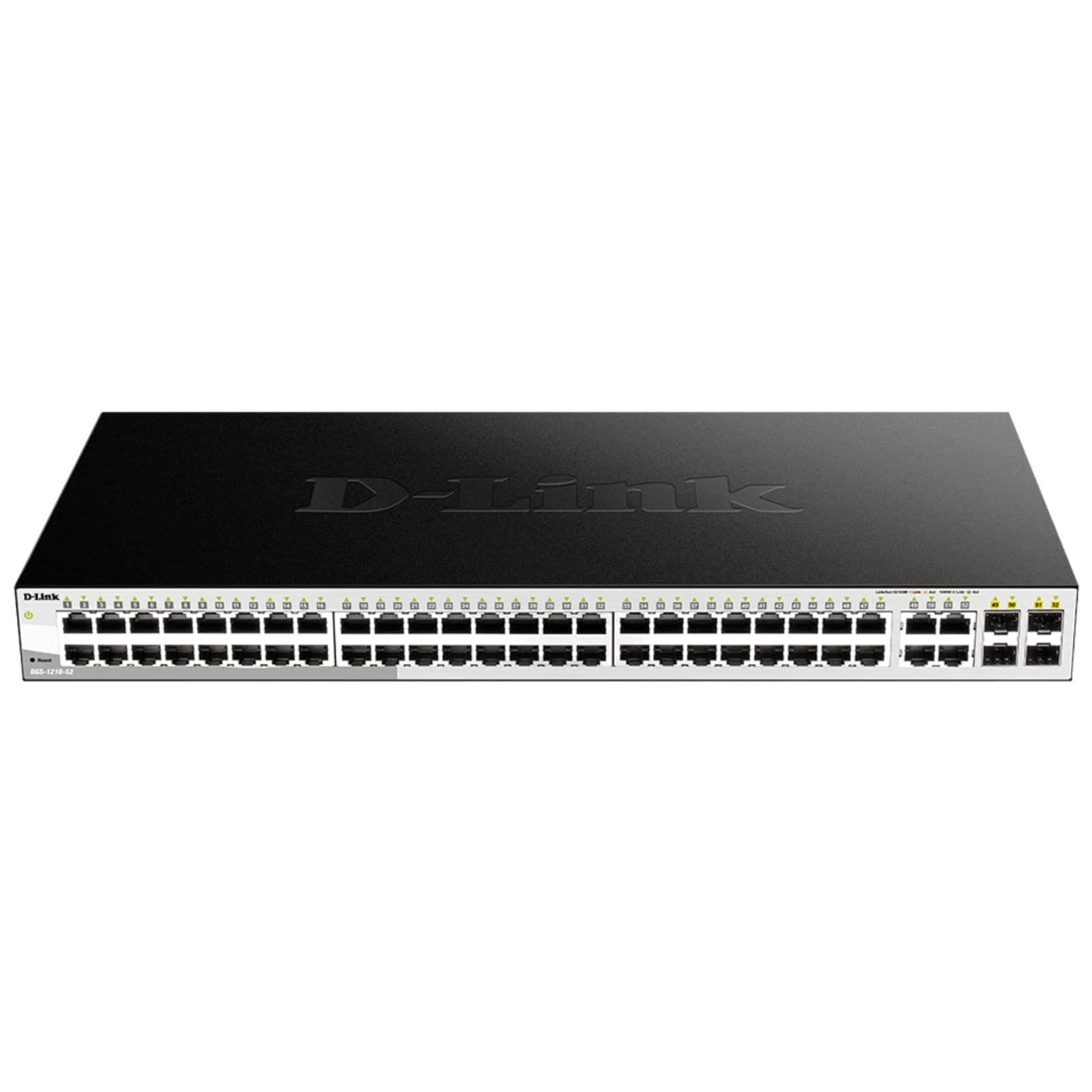
Figure 2: Front panel of the DGS-1210-52 switch showing Ethernet and SFP ports.

Figure 3: Rear panel of the DGS-1210-52 switch.
Instrucciones de funcionamiento
The DGS-1210-52 switch provides extensive management capabilities through its intuitive webinterfaz basada en.
Gestión de red
- Configuración de VLAN: Create and manage Virtual Local Area Networks (VLANs) to segment your network, improving security and performance.
- Calidad de servicio (QoS): Prioritize critical network traffic (e.g., VoIP, video streaming) to ensure consistent performance.
- Agregación de enlaces (LACP): Combine múltiples enlaces físicos en un solo enlace lógico para aumentar el ancho de banda y proporcionar redundancia de enlace.
- Protocolo de árbol de expansión (STP): Evite bucles de red y garantice la estabilidad de la red.
- Indagación IGMP: Optimice la entrega de tráfico de multidifusión, especialmente útil para aplicaciones IPTV.
- Enrutamiento estático: Configure static routes for basic Layer 3 functionality, directing traffic between different IP subnets.
Características de seguridad
- Lista de control de acceso (ACL): Filter network traffic based on MAC or IP addresses, port numbers, and other criteria to enhance security.
- Autenticación 802.1X: Authenticate network clients through external RADIUS servers for secure network access.
- ARP Spoofing Prevention: Protect against malicious intruders sending fake ARP messages.
- D-Link Safeguard Engine: Protects the switch from traffic flooding caused by virus attacks.
- DHCP Server Screening: Blocks rogue DHCP server packets from user ports to prevent unauthorized IP assignment.
Nuclias Connect Management (Optional)
The DGS-1210-52 can be optionally managed via D-Link's Nuclias Connect software. This free software provides scalable, flexible control and insightful reporting for up to 1,500 D-Link access points and DGS-1210 Smart Switches, offering centralized management for your network infrastructure.

Figure 4: Nuclias Connect for centralized network management.
Mantenimiento
Proper maintenance ensures the longevity and optimal performance of your DGS-1210-52 switch.
- Eficiencia Energética: The switch's compliance with IEEE 802.3az Energy Efficient Ethernet helps reduce power consumption during periods of low network utilization.
- Operación silenciosa: The fan-less design eliminates noise and reduces potential points of failure, contributing to a longer lifespan.
- Guardar configuración: Always save the running configuration to the switch's non-volatile memory (NVRAM) after making changes. Changes take effect immediately but will be lost upon reboot or power cycle if not explicitly saved.
- Actualizaciones de firmware: Verifique periódicamente el soporte de D-Link webSitio para actualizaciones de firmware para garantizar que su conmutador tenga las últimas funciones y mejoras de seguridad.
- Condiciones ambientales: Operate the switch within the specified temperature range (23 to 122 Degrees Fahrenheit) and ensure proper airflow to prevent overheating.
Solución de problemas
If you encounter issues with your DGS-1210-52 switch, consider the following:
- Sin energía: Asegúrese de que el cable de alimentación esté bien conectado tanto al interruptor como a la toma de corriente. Verifique que la toma de corriente funcione.
- Sin luz de enlace: Check the Ethernet cable connections between the switch and the connected device. Try a different cable or port. Ensure the connected device is powered on and functioning correctly.
- Problemas de rendimiento de la red:
- Detección de bucle invertido: The switch features loopback detection to identify and resolve network loops that can cause performance degradation. Check the switch logs for loop detection events.
- Diagnóstico de cables: Use the cable diagnostics feature in the web interface to test the integrity of connected Ethernet cables.
- Verify QoS settings are correctly configured if specific traffic types are experiencing issues.
- Accediendo Web Interfaz: Ensure your computer's IP address is in the same subnet as the switch. Clear your browser's cache or try a different browser. If the password is unknown, a factory reset may be required (refer to the Quick Installation Guide for reset procedures).
- Restablecimiento de fábrica: If configuration issues persist or you forget the password, perform a factory reset. This will revert all settings to their default values. Consult the Quick Installation Guide for specific instructions on performing a factory reset.
Presupuesto
| Característica | Especificación |
|---|---|
| Marca | Enlace D |
| Número de modelo | DGS-1210-52 |
| Número de puertos | 52 (48 Gigabit Ethernet, 4 Gigabit SFP) |
| Interfaz | RJ45, SFP |
| Velocidad de transferencia de datos | 104 Gigabits por segundo (capacidad de conmutación) |
| Tipo de interruptor | Metal, Smart Managed Layer 2+ |
| Número de capas | 2 |
| Tipo de material de la caja | Metal |
| Dimensiones del artículo (largo x ancho x alto) | 17.25" de largo x 8.21" de ancho x 1.73" de alto |
| Peso del artículo | 7.65 libras |
| Volumentage | 120 voltios |
| Calificación actual | 0.01 Amps |
| Temperatura de funcionamiento | 23 a 122 grados Fahrenheit (-5 a 50 grados Celsius) |
| Dispositivos compatibles | Desktop, Laptop, Printer, Router |
Información de garantía
The D-Link DGS-1210-52 switch is backed by a Garantía limitada de por vida. This warranty provides long-term confidence in the quality and reliability of your network infrastructure. For detailed terms and conditions, please refer to the warranty documentation included with your product or visit the official D-Link websitio.
Apoyo
For technical assistance, product documentation, or further information, please visit the official D-Link support website. You can also find resources related to Nuclias Connect management software and other D-Link business solutions.
D-Link is a business solutions provider with over 35 years of experience in networking, committed to providing reliable and secure products.
Vídeo del producto
Vídeo 1: Un finalview of D-Link Gigabit Smart Managed and Surveillance Switches, highlighting their features and applications.