
1. Introducción
Gracias por la compraasing the KLH R5100 Surround Sound Receiver. This receiver is designed to provide high-quality audio and video performance for your home entertainment system. It features multiple audio and video inputs, surround sound processing, and a powerful amplifier to deliver an immersive listening experience. Please read this manual thoroughly before operating the unit to ensure proper setup and optimal performance.
2. Información importante de seguridad
Para reducir el riesgo de descarga eléctrica, incendio o daños a la unidad, observe las siguientes precauciones de seguridad:
- Fuente de energía: Conecte la unidad únicamente a una fuente de alimentación de CA de 120 V, 60 Hz.
- Ventilación: Asegúrese de que haya una ventilación adecuada. No obstruya las aberturas de ventilación. Deje suficiente espacio alrededor de la unidad para una ventilación adecuada.
- Agua y humedad: No exponga la unidad a la lluvia, la humedad ni la humedad excesiva. No coloque objetos con líquidos, como jarrones, sobre la unidad.
- Calor: Mantenga la unidad alejada de fuentes de calor como radiadores, rejillas de calefacción, estufas u otros aparatos (incluidos ampificadores) que producen calor.
- Limpieza: Desconecte la unidad del tomacorriente antes de limpiarla. Utilice un paño seco para limpiarla.
- Servicio: No intente reparar esta unidad usted mismo. Encargue cualquier reparación a personal técnico cualificado.
- cables: Proteja el cable de alimentación para que no sea pisado ni aplastado, especialmente en los enchufes, receptáculos y en el punto donde sale de la unidad.
3. Contenido del paquete
Por favor, compruebe que su paquete contiene los siguientes artículos:
- KLH R5100 Surround Sound Receiver
- Unidad de control remoto
- Manual del usuario
- Cables de audio/vídeo (tipo RCA)
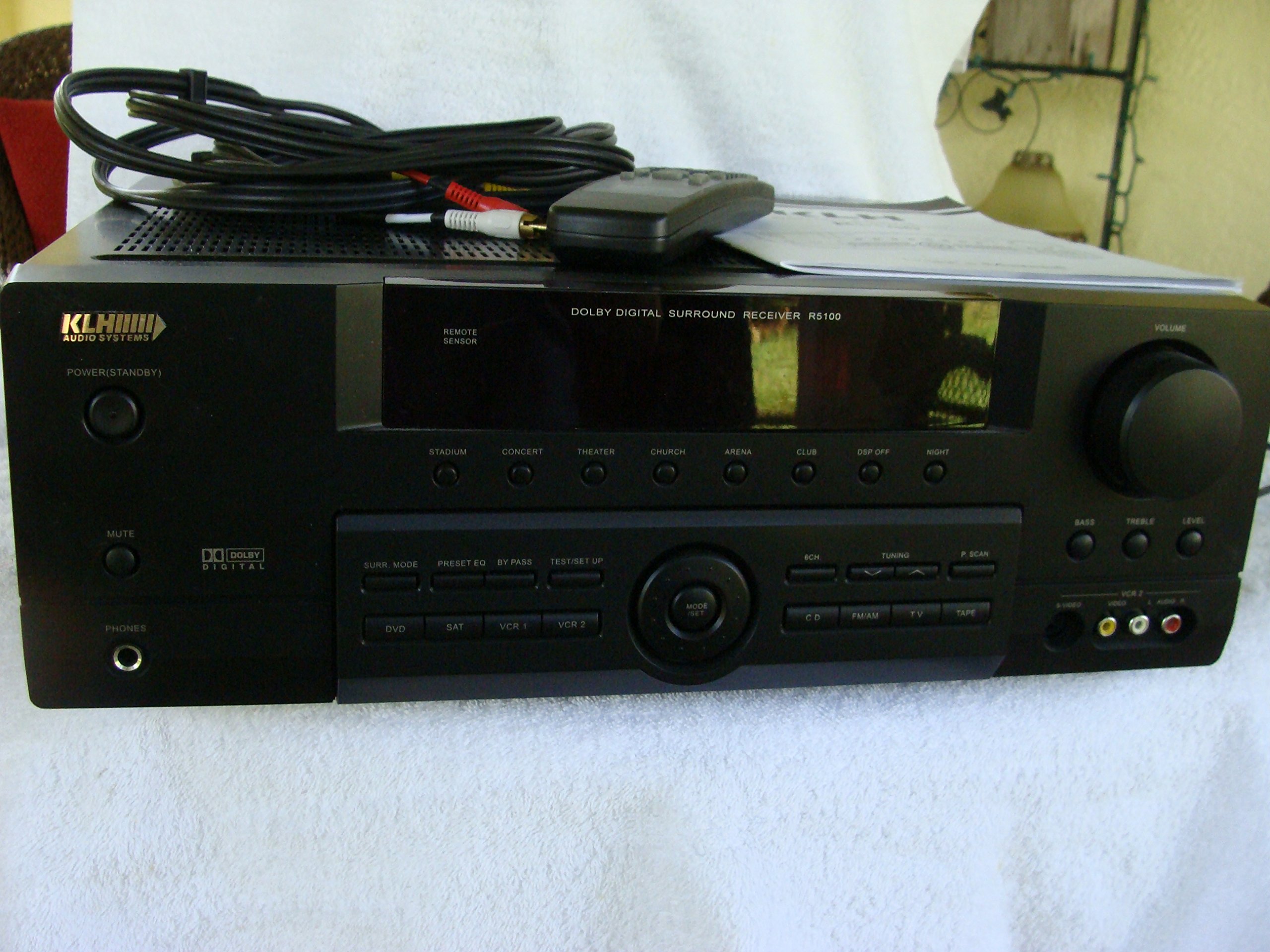
Image: The KLH R5100 receiver, its remote control, user manual, and included audio/video cables.
4. Producto terminadoview
4.1 Controles del panel frontal
The front panel provides access to essential controls and indicators for daily operation.

Imagen: Un detalle view of the receiver's front panel, highlighting the display, volume control, and input selection buttons.
- Botón de encendido: Enciende o apaga el receptor.
- Selectores de entrada: Buttons for DVD, SAT, VCR 1, VCR 2, CD, FM/AM, TV, TAPE to choose your audio/video source.
- Perilla de volumen: Ajusta el volumen de salida general.
- Surround Mode Buttons: Select various sound fields like Stadium, Concert, Theater, Church, Arena, Club, DSP Off, Night.
- Bass/Treble/Level: Controls for adjusting audio tone and individual channel levels.
- Toma de auriculares: Para escucha privada.
4.2 Conexiones del panel posterior
The rear panel houses all input and output terminals for connecting your audio and video components, as well as speakers.

Image: The full rear panel of the receiver, displaying all connection ports for audio, video, and speakers.
- Terminales de altavoz: Connections for Main (Front Left/Right), Center, and Rear (Surround Left/Right) speakers.
- Entradas de audio (RCA): For connecting CD players, tape decks, VCRs, TVs, and other stereo audio sources.
- Video Inputs/Outputs (RCA/S-Video): For connecting video sources like DVD players, VCRs, and TVs.
- Entradas de audio digital (óptica/coaxial): For connecting digital audio sources like DVD players or set-top boxes.
- 6CH Direct Input: For connecting external multi-channel decoders or players with 5.1 analog outputs.
- Salida de subwoofer: Salida RCA para conectar un subwoofer activo.
- Terminales de antena: For FM and AM antennas.
4.3 unidad de control remoto
The remote control provides convenient access to all receiver functions from your listening position.

Imagen: Un primer plano view of the remote control unit, detailing its buttons for various functions.
- Encendido/apagado: Enciende o apaga el receptor.
- Selectores de entrada: Dedicated buttons for each input source (DVD, CD, TV, etc.).
- Subir/Bajar volumen: Ajusta el volumen principal.
- Silenciar: Silencia temporalmente la salida de audio.
- Modo envolvente: Cycles through available surround sound modes.
- Level/Test: For adjusting individual speaker levels and running a test tone.
- Controles del sintonizador: For FM/AM station tuning and memory functions.
5. Configuración
5.1 Conexión de los altavoces
Ensure the receiver is unplugged from the power outlet before making any connections.
- Altavoces delanteros: Connect your main left and right speakers to the 'MAIN SPEAKERS (8Ω)' terminals. Ensure correct polarity (+ to + and - to -).
- Altavoz central: Connect your center channel speaker to the 'CENTER SPEAKER (8Ω)' terminals.
- Altavoces traseros: Connect your surround left and right speakers to the 'REAR SPEAKERS (8Ω)' terminals.
- Subwoofer: Connect an active subwoofer to the 'SUBWOOFER OUT' RCA jack using a single RCA cable.

Imagen: Detallada view of the speaker connection terminals on the rear panel.
5.2 Conexión de fuentes de audio/vídeo
Use appropriate cables (RCA, Optical, Coaxial) to connect your source components to the receiver.
- Reproductor de DVD: Connect the audio output of your DVD player to the 'DVD' audio input jacks (RCA) on the receiver. For digital audio, use either the 'DIGITAL IN OPTICAL' or 'DIGITAL IN COAXIAL' input. Connect the video output to the 'DVD' video input.
- Reproductor de CD: Connect the audio output of your CD player to the 'CD' audio input jacks (RCA).
- TV/Cable Box: Connect the audio output of your TV or cable box to the 'TV' audio input jacks (RCA). Connect video output to the 'TV' video input.
- Otros dispositivos: Use 'SAT', 'VCR 1', 'VCR 2', or 'TAPE' inputs for other audio/video components as needed.

Image: A close-up of the digital audio inputs (Coaxial, Optical) and the 6-channel direct input section on the rear panel.
5.3 conexión de antena
Connect the supplied FM and AM antennas to their respective terminals on the rear panel for radio reception.
6. Instrucciones de funcionamiento
6.1 Funcionamiento básico
- Encendido: Presione el botón de encendido en el panel frontal o en el control remoto.
- Seleccionar entrada: Press the desired input selector button (e.g., 'DVD', 'CD') on the front panel or remote control to choose your source.
- Ajustar el volumen: Turn the Volume knob on the front panel or use the Volume Up/Down buttons on the remote control.
6.2 Surround Sound Modes
The R5100 offers various sound modes to enhance your listening experience:
- Estadio: Simulates the acoustics of a large stadium.
- Concierto: Creates a concert hall ambiance.
- Teatro: Optimized for movie playback, enhancing dialogue and effects.
- Iglesia: Replicates the spaciousness of a church.
- Arena: Provides a wide, open sound field.
- Club: Simulates a lively club environment.
- DSP Off: Disables digital sound processing for a direct stereo signal.
- Noche: Reduces dynamic range for late-night listening without disturbing others.
Press the 'SURR. MODE' button on the remote or front panel to cycle through these modes.
Control de 6.3 tonos
Use the BASS and TREBLE controls on the front panel or remote to adjust the low and high frequency response. The LEVEL controls allow for fine-tuning of individual speaker output levels.
6.4 Funcionamiento del sintonizador
To listen to radio:
- Press the 'FM/AM' input selector.
- Use the 'TUNING' buttons on the front panel or remote to find stations.
- Press 'MEMORY' to store favorite stations, and 'P.SCAN' to scan through presets.
7. Mantenimiento
To ensure the longevity and optimal performance of your KLH R5100 receiver, follow these maintenance guidelines:
- Limpieza: Wipe the exterior surfaces with a soft, dry cloth. Do not use abrasive cleaners, waxes, or solvents as they may damage the finish.
- Ventilación: Regularly check that the ventilation openings are not obstructed by dust or debris. Use a soft brush or vacuum cleaner to gently remove any build-up.
- Cable de alimentación: Inspect the power cord periodically for any signs of damage. If damaged, discontinue use and contact qualified service personnel.
- Almacenamiento: Si va a almacenar la unidad durante un período prolongado, desconéctela del tomacorriente y cúbrala para protegerla del polvo.
8. Solución de problemas
If you encounter problems with your receiver, refer to the following common issues and solutions before seeking professional service.
| Problema | Posible causa | Solución |
|---|---|---|
| Sin poder | Cable de alimentación desenchufado; toma de corriente no activa | Asegúrese de que el cable de alimentación esté enchufado de forma segura; verifique la toma de corriente con otro dispositivo |
| Sin sonido | Incorrect input selected; Speakers not connected properly; Volume too low; Mute function active | Select correct input source; Check speaker connections and polarity; Increase volume; Deactivate Mute |
| El control remoto no funciona | Batteries depleted; Obstruction between remote and receiver; Remote sensor blocked | Replace batteries; Remove any obstructions; Ensure remote sensor on receiver is clear |
| Mala recepción de radio | Antena no conectada o mal posicionada | Connect antennas securely; Adjust antenna position for better reception |
| Sonido distorsionado | Input signal too high; Speaker impedance mismatch; Damaged cables | Reduce source volume; Ensure speakers match 8Ω impedance; Check and replace damaged cables |
9. Especificaciones
The following are the technical specifications for the KLH R5100 Surround Sound Receiver:
- Número de modelo: R5100
- Dimensiones del producto: 16.88 x 6.88 x 15.75 pulgadas
- Peso del artículo: 24.2 libras
- Fuente de energía: AC 120V, 60Hz
- Consumo de energía: 320 W
- Modo de salida de audio: Rodear
- Configuración del canal de sonido envolvente: 5.1
- Tecnología de conectividad: RCA, 3.5mm Jack, Optical, Coaxial
- Dispositivos compatibles: Oradores
- Tipo de controlador: Remoto
- Característica especial: Advanced Room Calibration (as per product listing, though specific details may vary)
- Color: Negro
10. Garantía y soporte
For warranty information and customer support, please refer to the documentation included with your purchase or contact KLH customer service directly. Keep your proof of purchase for any warranty claims.