
Introducción
This manual provides detailed instructions for the installation, operation, and maintenance of your VTech VTCS6619 DECT 6.0 Expandable Speakerphone with Caller ID. Please read this manual thoroughly before using your new telephone system to ensure proper functionality and to take full advantage de sus características.
Contenido del paquete
Verifique que su paquete contenga los siguientes elementos:
- Cordless Phone with Caller ID/Call Waiting
- Unidad base del teléfono
- Adaptador de corriente alterna
- Cable de línea telefónica
- Rechargeable Battery for Handset
- Funda para teléfono
Configuración
Follow these steps to set up your VTech VTCS6619 telephone system.
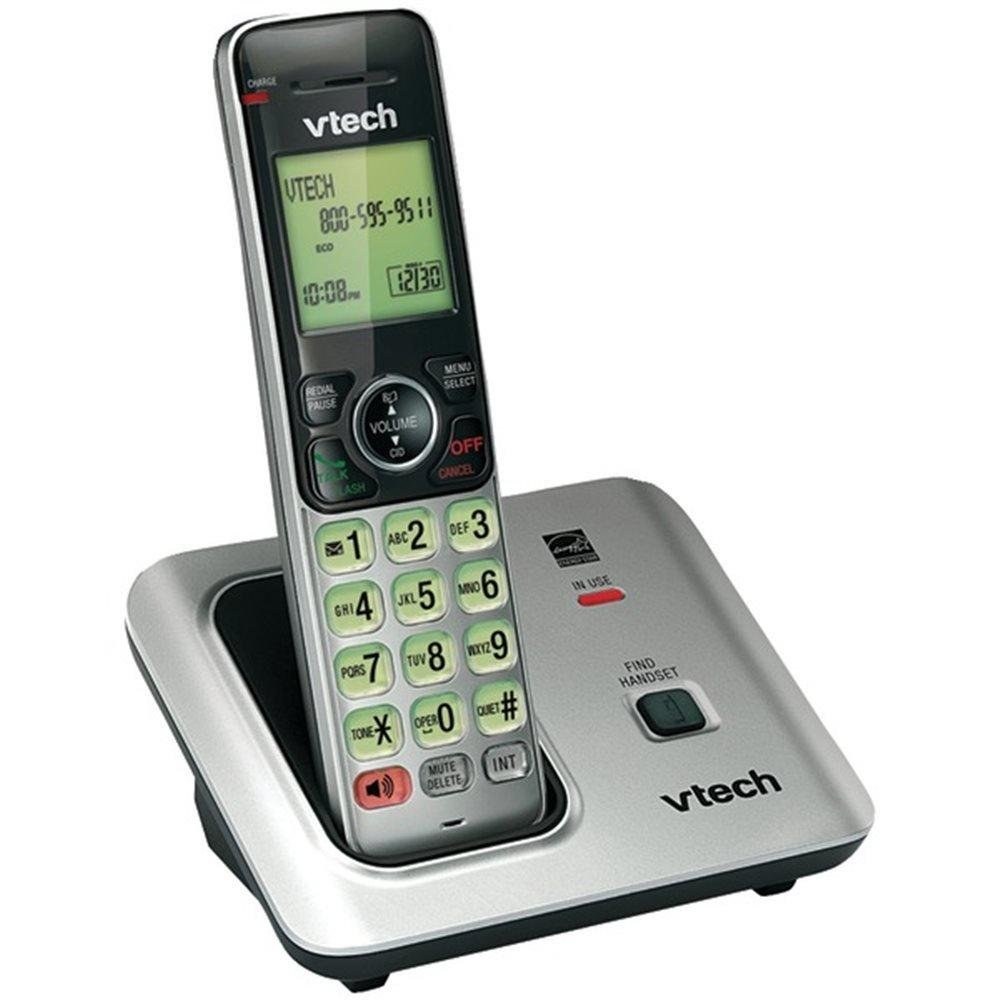
Image: The VTech VTCS6619 DECT 6.0 Cordless Speakerphone with Caller ID, showing the black handset and base unit.
1. Instalación de la batería
- Abra la tapa del compartimiento de la batería en la parte posterior del teléfono.
- Conecte el enchufe del paquete de batería de forma segura en el conector dentro del compartimiento.
- Coloque el paquete de baterías con la etiqueta hacia ARRIBA y meta los cables cuidadosamente dentro del compartimiento.
- Cierre la tapa del compartimento de la batería.
2. Conexión de la unidad base
- Plug the small end of the AC power adapter into the power jack on the back of the telephone base.
- Plug the large end of the AC power adapter into a wall outlet not controlled by a wall switch.
- Plug one end of the telephone line cord into the TEL LINE jack on the back of the telephone base.
- Conecte el otro extremo del cable de la línea telefónica a una toma telefónica de pared.
3. Carga del teléfono
Once the battery is installed and the base unit is connected, place the handset on the telephone base. The CHARGE light on the handset will illuminate, indicating that the battery is charging. Allow the handset to charge for at least 10 hours before initial use.
Instrucciones de funcionamiento
This section details the basic functions and features of your VTech VTCS6619 phone.
Realizar y recibir llamadas
- Hacer una llamada: Prensa HABLAR / FLASH or VOCERO, luego marque el número de teléfono.
- Para contestar una llamada: Cuando suene el teléfono, presione HABLAR / FLASH or VOCERO.
- Para finalizar una llamada: Prensa APAGADO/BORRAR or place the handset back on the telephone base.
Función de altavoz
Para activar el altavoz durante una llamada, presione el botón VOCERO Botón. Presiónelo nuevamente para volver al auricular del teléfono.
Identificador de llamadas y llamada en espera
The phone displays the caller's name and number (if available) before you answer. If you subscribe to Call Waiting service, the phone will alert you to an incoming call while you are on another call. Press DESTELLO para cambiar entre llamadas.
Llamadas en conferencia
The VTech VTCS6619 supports 3-way conference calls. While on a call, you can add a third party by pressing the DESTELLO button, dialing the new number, and then pressing DESTELLO again to connect all parties.
Sistema de contestador digital
The integrated digital answering system records incoming messages when you are unavailable. Access messages by pressing the REPRODUCIR/DETENER button on the base or through the handset menu. Refer to the full user guide for detailed instructions on setting up your outgoing message and managing messages.
Mantenimiento
Proper care ensures the longevity of your telephone system.
Limpieza
Clean the telephone and base unit with a soft, damp cloth. Do not use cleaning sprays or liquid cleaners, as they may damage the finish or electrical components.
Cuidado de la batería
To maintain optimal battery performance, avoid exposing the handset to extreme temperatures. If the phone will not be used for an extended period, remove the battery to prevent leakage.
Solución de problemas
If you experience any issues with your phone, refer to the following common problems and solutions:
| Problema | Solución |
|---|---|
| Sin tono de marcado | Ensure the telephone line cord is securely plugged into both the base unit and the wall jack. Check if the AC power adapter is properly connected. |
| Mala calidad de sonido | Move the handset closer to the base unit. Check for interference from other electronic devices. Ensure the battery is fully charged. |
| El teléfono no se carga | Verify the handset is correctly placed on the base unit. Clean the charging contacts on both the handset and base with a dry cloth. Check the power connection to the base unit. |
| El identificador de llamadas no se muestra | Ensure you have subscribed to Caller ID service from your telephone service provider. The feature may not work if the caller has blocked their number. |
Presupuesto
- Marca: VTech
- Modelo: VTCS6619
- Tipo de teléfono: Sin cable
- Color: Negro
- Número de baterías: Se requieren 1 pilas AAA (incluidas)
- Material: Plástico
- Fuente de energía: Funciona con pilas
- Tipo de marcador: Tono
- Dimensiones del artículo (largo x ancho x alto): 6.9 x 5.2 x 6.7 pulgadas
- Tipo de sistema de contestación: Digital
- Peso del artículo: 1 libra
- Dispositivos compatibles: VTech CS6619 handsets, basic answering machines
- Capacidad de llamada de conferencia: 3 vías
- Operación multilínea: Operación de una sola línea
- Tiempo de espera del teléfono: 7200 minutos
- Identificador de llamadas: Sí
Garantía y soporte
Your VTech VTCS6619 telephone system is covered by a Garantía limitada de 1 año from the date of purchase. This warranty covers defects in material and workmanship under normal use. For warranty service or technical support, please refer to the contact information provided in your product packaging or visit the official VTech webSitio para obtener detalles de servicio al cliente.
Conserve su recibo de compra como comprobante de compra para reclamos de garantía.