
Introducción
This manual provides essential instructions for setting up, operating, maintaining, and troubleshooting your Sony KDL-32W655A 32-inch Full HD Smart TV. Please read this manual thoroughly before using your television to ensure proper and safe operation. Keep this manual for future reference.

Figure 1: Sony KDL-32W655A Smart TV (Front View)
Información de seguridad
Observe siempre las siguientes precauciones de seguridad al utilizar su televisor:
- No bloquee las aberturas de ventilación. Asegúrese de que haya suficiente espacio alrededor del televisor para una ventilación adecuada.
- No coloque el televisor sobre un carrito, soporte, trípode, soporte o mesa inestable.
- Proteja el cable de alimentación para que no sea pisado ni aplastado.
- Desenchufe el televisor durante tormentas eléctricas o cuando no lo utilice durante períodos prolongados.
- Deje todo servicio a personal de servicio calificado.
Configuración
1. Desembalaje
Retire con cuidado el televisor y todos los accesorios del embalaje. Conserve el material de embalaje para posibles futuras reparaciones o transportes.
2. Montaje del soporte
Attach the desktop stand to the television. Ensure all screws are securely fastened. Refer to the diagram below for proper assembly.

Figure 2: TV with Desktop Stand Attached
Alternatively, the TV can be wall-mounted using a compatible VESA wall mount (sold separately). Consult a professional for wall-mounting installation.
3. Conexión de periféricos
Conecte sus dispositivos externos a los puertos del televisor. Asegúrese de que el televisor esté desenchufado antes de realizar cualquier conexión.
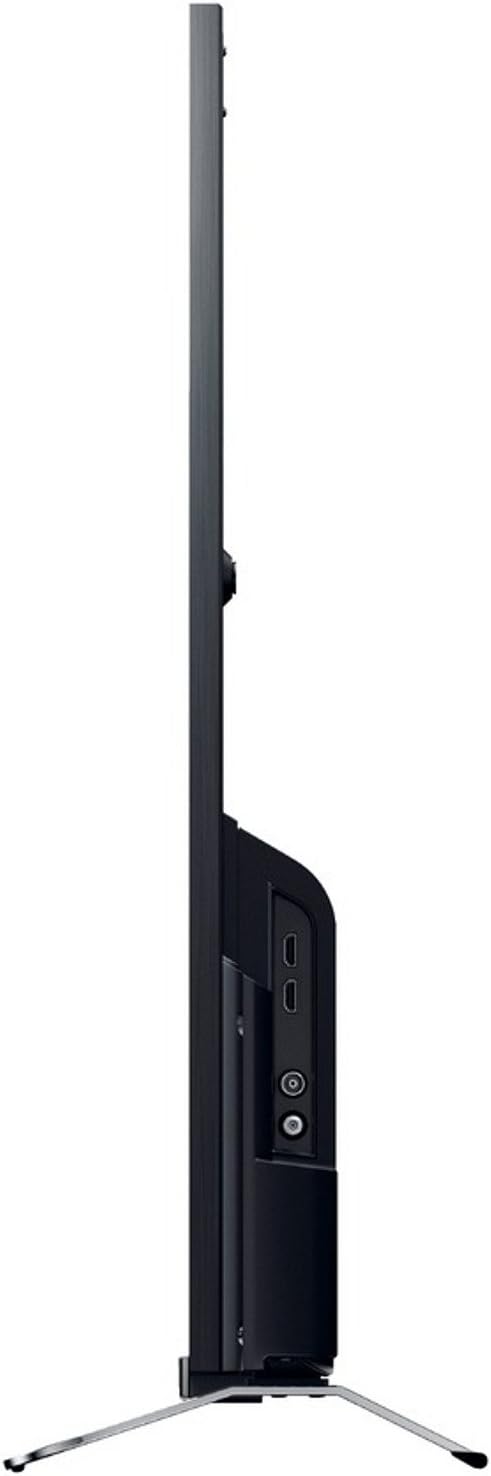
Figura 3: Lado View con puertos de conexión
- Fuerza: Connect the power cord to the AC inlet on the TV and then to a wall outlet.
- HDMI: Use an HDMI cable to connect devices like Blu-ray players, game consoles, or set-top boxes to the HDMI 1 or HDMI 2 puertos.
- USB: Connect USB storage devices for media playback or DVR functionality to the USB 2.0 puerto.
- Ethernet (LAN): Para una conexión a Internet por cable, conecte un cable Ethernet al Red local puerto.
- Antena/Cable: Connect your antenna or cable TV feed to the RF aporte.
- Vídeo componente (YPbPr/YCbCr): Connect older video devices using component cables to the dedicated input.
- Video compuesto: Connect legacy video devices using a composite video cable to the dedicated input.
- Salida de audio digital (óptica): Para conectar a una barra de sonido o un sistema de cine en casa con una entrada óptica.
- Auricular: Conecte auriculares para escuchar en privado.
4. Asistente de configuración inicial
After connecting all cables, plug in the TV and press the power button on the remote control. The initial setup wizard will guide you through:
- Selección de idioma.
- Selección de región/país.
- Channel scanning (for DVB-C, DVB-S, DVB-T).
- Network setup (Wi-Fi or wired Ethernet).
- Ajustes de fecha y hora.
Instrucciones de funcionamiento
1. Funciones de control remoto
The included remote control allows you to access all TV functions. Insert the provided batteries into the remote control, observing polarity.
- Botón de encendido: Enciende o apaga el televisor.
- Canal arriba/abajo: Cambia los canales de televisión.
- Subir/Bajar volumen: Ajusta el nivel de sonido.
- Fuente de entrada: Selecciona la fuente de entrada (HDMI, USB, etc.).
- Inicio/Smart TV: Accede a la interfaz de Smart TV.
- Botones de navegación (flechas, Enter): Navega por los menús y confirma las selecciones.
- Atrás/Retorno: Vuelve a la pantalla o menú anterior.
- Opciones: Muestra opciones sensibles al contexto.
2. Funciones de Smart TV
Your Sony KDL-32W655A is equipped with Smart TV capabilities, allowing access to internet content and applications.
- Conexión a Internet: Connect to your home network via Wi-Fi or Ethernet. Navigate to the Network Settings menu to configure.
- Televisión por Internet: Access various online streaming services and content directly from your TV.
- Aplicaciones: The TV supports lifestyle applications such as Skype. An Opera browser is also available for web hojeada.
- DLNA Certified: Transmita contenido multimedia desde dispositivos compatibles en su red doméstica.
3. Reproducción y grabación de medios
- Reproducción de medios USB: Insert a USB storage device into the USB port. The TV will detect the device, allowing you to browse and play supported media files (JPG, MPO for images; 3GP, AVCHD, AVI, M-JPEG, MKV, MOV, MP4, MPEG1, MPEG2, TS, XVID for video).
- Grabadora de vídeo digital (DVR): Record digital TV broadcasts to a connected USB hard drive. Consult the on-screen menu for DVR setup and scheduling.
4. Configuración de imagen y sonido
Personaliza tu viewing and listening experience through the TV's settings menus.
- Modos de imagen: Select from predefined picture modes such as Cine, Juego, Foto, Deportes, y Vívido to optimize display settings for different content types.
- Motionflow 200 Hz: This technology enhances motion clarity for fast-moving scenes.
- Configuración de sonido: Adjust bass, treble, and other audio parameters using the 6-band equalizer. The TV features 2 built-in speakers with a total RMS power of 10W.
- Formato de pantalla: Adjust the aspect ratio (16:9, 14:9, Auto, Zoom) to fit your content.
5. Características adicionales
- Guía electrónica de programas (EPG): View upcoming TV programs and schedule recordings.
- Imagen en imagen (PiP): Display two different sources simultaneously.
- Sleep Timer/On/Off Timer: Set the TV to automatically turn off or on at specified times.
Mantenimiento
1. Limpieza del televisor
- Pantalla: Limpie suavemente la pantalla con un paño suave que no deje pelusa. Para manchas difíciles, limpie ligeramenteampEnjuague el paño con agua o un limpiador de pantallas específico. No rocíe el líquido directamente sobre la pantalla.
- Gabinete: Limpie el mueble del televisor con un paño suave y seco. Evite usar limpiadores abrasivos o disolventes.
- Ventilación: Ensure the ventilation openings on the back of the TV remain clear of dust and obstructions.
2. Actualizaciones de software
Periodically check for software updates to ensure your TV has the latest features and performance improvements. Updates can usually be performed via the network connection in the TV's settings menu.
Solución de problemas
Antes de contactar con el servicio de atención al cliente, pruebe las siguientes soluciones para problemas comunes:
| Problema | Posible causa / solución |
|---|---|
| Sin poder |
|
| Sin imagen / Pantalla negra |
|
| Sin sonido |
|
| No se puede conectar al Wi-Fi |
|
| El control remoto no funciona |
|
If the problem persists after trying these steps, please contact Sony customer support.
Presupuesto
| Característica | Detalle |
|---|---|
| Modelo | KDL-32W655A |
| Tamaño de pantalla | 32 pulgadas (81.3 cm) |
| Tecnología de visualización | CONDUJO |
| Resolución | Full HD (1920 x 1080 píxeles) |
| Mejora del movimiento | Motionflow 200 Hz |
| Relación de aspecto | 16:9 |
| Funciones de Smart TV | Yes (Internet TV, Skype, Opera Browser, DLNA) |
| Wifi | Sí |
| Ethernet (LAN) | 1 puerto |
| Puertos HDMI | 2 |
| Puertos USB 2.0 | 1 |
| Puertos SCART | 1 |
| Entrada de vídeo componente | 1 |
| Entrada de video compuesto | 1 |
| Entrada RF | 1 |
| Salida de audio digital (óptica) | 1 |
| Salida de auriculares | 1 |
| Tipo de sintonizador | Analog & Digital (DVB-C, DVB-S, DVB-S2, DVB-T) |
| Oradores | 2 (incorporados) |
| Potencia nominal RMS | 10 W |
| Consumo de energía (en funcionamiento) | 41 W |
| Consumo de energía (en espera) | 0.45 W |
| Consumo anual de energía | 57 kWh |
| Clase de eficiencia energética | A |
| Dimensiones (An x Al x Pr) sin soporte | 725 x 438 x 69 mm |
| Peso sin soporte | 6.8 kilogramos |
| Peso con soporte | 7.8 kilogramos |
| Color | Negro |
Nota: las especificaciones están sujetas a cambios sin previo aviso.
Garantía y soporte
Your Sony KDL-32W655A television comes with a limited warranty. Please refer to the warranty card included in your product packaging for detailed terms and conditions, including the warranty period and coverage.
For technical assistance, product registration, or to find authorized service centers, please visit the official Sony support website or contact Sony customer service in your region. Keep your purchase receipt and product serial number handy when contacting support.
Soporte en línea: https://www.sony.com/electronics/support


