
Introducción
Thank you for choosing the Divoom Onbeat 200 Bluetooth Portable Speaker. This manual provides essential information for setting up, operating, and maintaining your speaker. Please read it thoroughly before use to ensure optimal performance and longevity of your device.
The Divoom Onbeat 200 is a compact and powerful portable speaker designed to deliver rich audio with the convenience of Bluetooth wireless connectivity. It features a built-in microphone for hands-free calling, making it versatile for both music playback and communication.
Contenido del paquete
Por favor revise el paquete para ver los siguientes artículos:
- Divoom Onbeat 200 Bluetooth Portable Speaker
- Cable de carga USB
- Cable de audio de 3.5 mm
- Manual de usuario
Si falta algún artículo o está dañado, comuníquese con su distribuidor para obtener ayuda.
Producto terminadoview
The Divoom Onbeat 200 features a sleek design with intuitive controls. Familiarize yourself with the speaker's components before use.
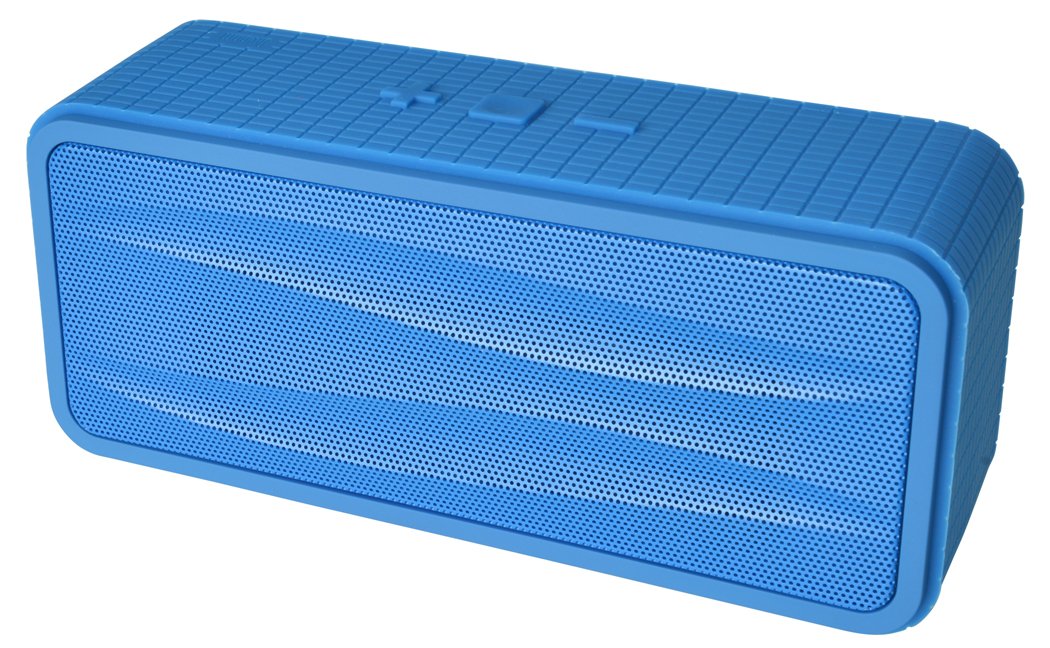
Figura 1: Divoom Onbeat 200 Bluetooth Portable Speaker shown with various compatible smartphones, highlighting its wireless connectivity. The speaker is blue and rectangular with a mesh grille.
The speaker is equipped with dual drivers for stereo sound and a passive radiator for enhanced bass. The control panel typically includes power, volume, and Bluetooth pairing buttons. A built-in microphone is integrated for hands-free communication.

Figura 2: Detailed dimensions of the Divoom Onbeat 200 speaker. The speaker measures approximately 16.5 cm in length, 7 cm in height, and 5.2 cm in depth.
Configuración
1. Carga del altavoz
- Conecte el extremo pequeño del cable de carga USB al puerto de carga del altavoz.
- Conecte el extremo grande del cable de carga USB a un adaptador de corriente USB (no incluido) o al puerto USB de una computadora.
- La luz indicadora de carga se iluminará, generalmente en rojo, durante la carga.
- Once fully charged, the indicator light will change color or turn off (refer to specific LED behavior in the full manual if available). A full charge usually takes 2-3 hours.
Nota: Para el primer uso, asegúrese de que el altavoz esté completamente cargado.
2. Emparejamiento Bluetooth
- Asegúrese de que el altavoz esté cargado y apagado.
- Press and hold the Power button (or dedicated Bluetooth button) for a few seconds until you hear an audible prompt or see the Bluetooth indicator light flashing rapidly, indicating it's in pairing mode.
- En su teléfono inteligente, tableta u otro dispositivo con Bluetooth habilitado, vaya a la configuración de Bluetooth.
- Habilite Bluetooth y busque dispositivos disponibles.
- Select "Onbeat 200" from the list of devices.
- Once paired, you will hear a confirmation tone, and the Bluetooth indicator light will typically glow solid blue.
Consejo: El altavoz intentará reconectarse automáticamente con el último dispositivo emparejado cuando se encienda, si el Bluetooth de ese dispositivo está activo y dentro del alcance.
Instrucciones de funcionamiento
Encendido/apagado
- Para encender: Mantenga presionado el botón de encendido hasta que se ilumine la luz indicadora.
- Para apagar: Mantenga presionado el botón de encendido hasta que la luz indicadora se apague.
Control de volumen
- To increase volume: Press the Volume Up (+) button.
- To decrease volume: Press the Volume Down (-) button.
You can also adjust the volume directly from your connected device.
Reproducción de música
- Play/Pause: Press the Play/Pause button (often integrated with the Power or Bluetooth button).
- Next Track: Double-press the Volume Up (+) button (or a dedicated skip button).
- Previous Track: Double-press the Volume Down (-) button (or a dedicated skip button).
Nota: Specific button functions may vary slightly. Refer to the physical markings on your speaker.
Entrada auxiliar (AUX)
Para dispositivos sin Bluetooth, puedes utilizar el cable de audio de 3.5 mm:
- Conecte un extremo del cable de audio de 3.5 mm al puerto de entrada AUX del altavoz.
- Conecte el otro extremo a la toma de auriculares de su dispositivo de audio.
- The speaker will automatically switch to AUX mode, or you may need to press a mode button.
Realizar y recibir llamadas
The Divoom Onbeat 200 features a built-in microphone for hands-free calling when connected via Bluetooth to a smartphone.
- Responder una llamada: When a call comes in, the music will pause. Press the Play/Pause button (or phone icon button) once to answer the call.
- Terminar una llamada: During a call, press the Play/Pause button (or phone icon button) once to end the call.
- Rechazar una llamada: Press and hold the Play/Pause button (or phone icon button) for approximately 2 seconds to reject an incoming call.
- Volver a marcar el último número: Double-press the Play/Pause button (or phone icon button) to redial the last number called.
Audio will be routed through the speaker, and your voice will be picked up by the built-in microphone.
Mantenimiento
- Mantenga el altavoz alejado del agua, la humedad y las temperaturas extremas.
- Limpie el altavoz con un paño suave y seco. No utilice limpiadores abrasivos ni disolventes.
- Evite dejar caer el altavoz o someterlo a impactos fuertes.
- Cuando no utilice el altavoz durante períodos prolongados, guarde el altavoz en un lugar fresco y seco y cárguelo periódicamente para mantener la salud de la batería.
Solución de problemas
| Problema | Posible solución |
|---|---|
| El altavoz no se enciende. | Asegúrese de que el altavoz esté completamente cargado. Conéctelo a una fuente de alimentación y vuelva a intentarlo. |
| No se puede emparejar a través de Bluetooth. |
|
| No hay sonido o volumen bajo. |
|
| Distorsión de sonido. |
|
Presupuesto
- Nombre del modelo: Onbeat 200
- Número de modelo del artículo: Onbeat 200-Blue
- Marca: Divóom
- Tipo de altavoz: Estante para libros
- Características especiales: Built-in Microphone, Stereo
- Usos recomendados: Música
- Dispositivos compatibles: Teléfono inteligente
- Configuración del canal de sonido envolvente: 2.0
- Color: Azul
- Peso del artículo: 544 g (1.2 libras)
- Es resistente al agua: No
- Método de control: App (Note: While listed, primary control is via physical buttons and connected device)
- Tecnología de comunicación inalámbrica: Bluetooth
- Fuente de energía: Funciona con pilas (1 batería de iones de litio incluida)
- Dimensiones del producto: 16.51 x 5.08 x 7.11 cm
- Potencia máxima de salida del altavoz: 4 vatios
- Tecnología de conectividad: Bluetooth
- Tipo de montaje: Superficie de la mesa
- Primero disponible: 17 de mayo de 2013
Garantía y soporte
The Divoom Onbeat 200 comes with a standard manufacturer's warranty. Please refer to the warranty card included in your package or visit the official Divoom webSitio para conocer los términos y condiciones detallados de la garantía.
For technical support, troubleshooting assistance, or service inquiries, please contact Divoom customer support through their official channels. Keep your purchase receipt and product model information handy when contacting support.