
1. Introducción
The Lorex LW2231 is a wireless real-time security camera equipped with an audio microphone, designed for both indoor and outdoor surveillance. This camera utilizes MPEG4 compression for clear video at 640 x 480 VGA resolution and features Lorex Signal Guard technology to maintain a stable connection. It includes night vision capabilities for low-light conditions and is built with weatherproof and vandal-resistant housing. This manual provides detailed instructions for the proper installation, operation, and maintenance of your LW2231 camera.
2. Contenido del paquete
Verify that all components are present in your package. If any items are missing or damaged, contact Lorex customer support.
- Lorex LW2231 Wireless Real-Time Security Camera with Audio Microphone
- Adaptador de corriente para cámara
- Herrajes de montaje (tornillos y anclajes de pared)
- Guía de inicio rápido
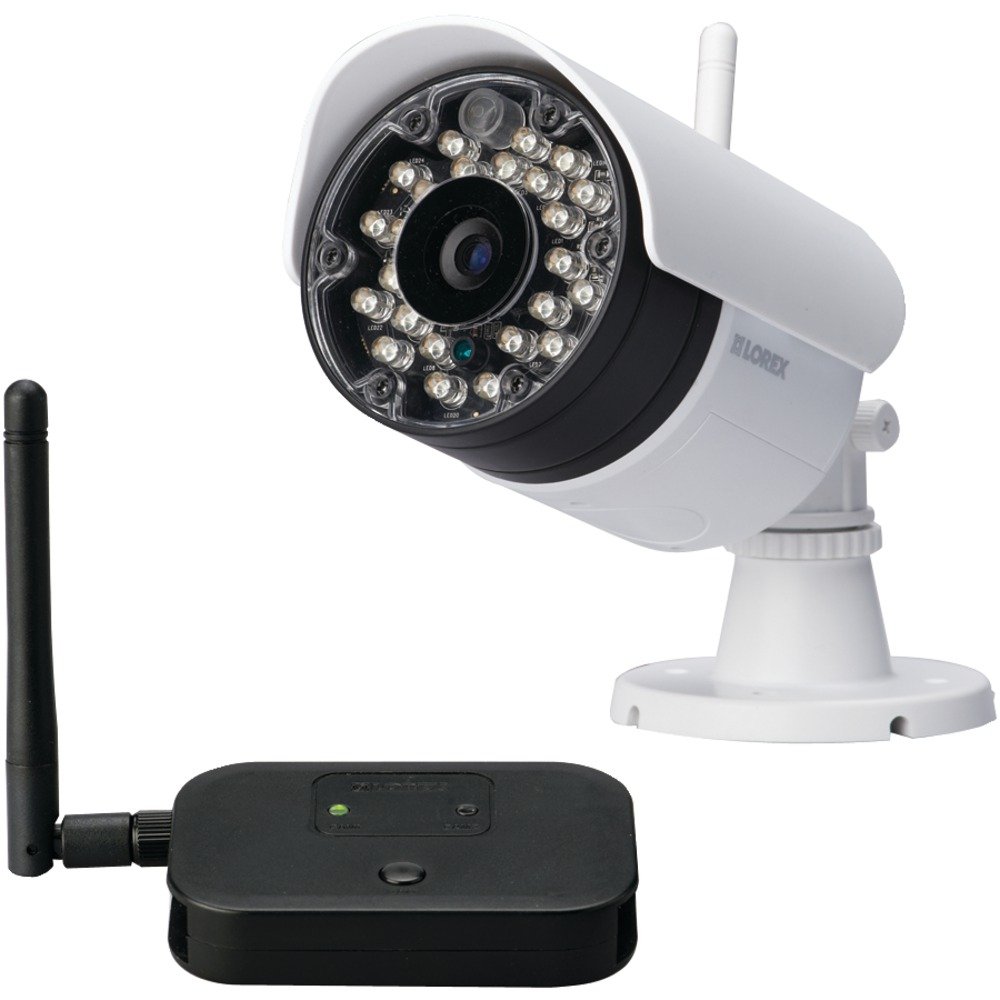
Figura 2.1: Lorex LW2231 Wireless Security Camera with Audio Microphone. This image shows the front view of the white camera unit, highlighting its compact design and integrated antenna.
3. Información de seguridad
Please read and follow all safety instructions to prevent damage to the product and ensure user safety.
- Fuente de alimentación: Utilice únicamente el adaptador de corriente incluido con la cámara. El uso de una fuente de alimentación no autorizada podría dañar la cámara y anular la garantía.
- Ventilación: No bloquee las aberturas de ventilación. Asegúrese de que haya una ventilación adecuada alrededor de la cámara para evitar el sobrecalentamiento.
- Agua y humedad: Although weatherproof, avoid submerging the camera in water. Do not install in areas where it may be exposed to extreme water pressure or prolonged submersion.
- Temperatura: Operate the camera within the specified temperature range. Extreme temperatures can affect performance and lifespan.
- Limpieza: Desconecte la alimentación antes de limpiar. Utilice un paño seco y suave. No utilice limpiadores líquidos ni en aerosol.
- Servicio: No intente reparar este producto usted mismo. Refiera todo el servicio a personal de servicio calificado.
4. Producto terminadoview y características
The LW2231 camera offers advanced features for reliable surveillance:
- MPEG4 Compression: Provides efficient video encoding with 640 x 480 VGA resolution.
- Auto-mechanical IR Camera Filter: Ensures accurate color reproduction during the day and enhanced night vision.
- Signal Guard Technology: Automatically re-establishes connection upon detecting low signal strength, ensuring continuous monitoring.
- Amplio campo de View: A 3.6mm lens provides a 55-degree field of view.
- Transmisión de vídeo en tiempo real: Delivers smooth video with strong signal conditions at 30 frames per second.
- Audio Microphone: Micrófono integrado para monitoreo de audio.
- Visión nocturna: Infrared illumination for clear viewtrabajando en condiciones de poca luz.
- Diseño resistente a la intemperie: Clasificación IP65 para uso en exteriores.
5. Configuración e instalación
5.1 Planificación de la instalación
Before mounting, plan the camera's location. Consider the following:
- Área de cobertura: Position the camera to cover the desired surveillance area effectively.
- Intensidad de la señal: For optimal wireless performance, minimize obstacles (walls, large metal objects) between the camera and its receiver. Test the signal strength before final mounting.
- Acceso a la energía: Ensure a power outlet is within reach of the camera's power adapter cable.
- Factores ambientales: While weatherproof, avoid direct exposure to extreme weather conditions if possible to prolong the camera's life.
5.2 Montaje de la cámara
- Choose a suitable mounting surface (wall or ceiling).
- Use the included mounting template (if provided) or mark the screw holes using the camera base as a guide.
- Drill pilot holes for the screws. If mounting on drywall or masonry, insert the provided wall anchors.
- Secure the camera base to the surface using the screws.
- Ajuste el ángulo y la orientación de la cámara para lograr el resultado deseado. view.
5.3 Conexión de la alimentación
Connect the camera's power adapter to the camera's power input port, then plug the adapter into a standard electrical outlet. The camera will power on automatically.
5.4 Pairing with a Receiver (if applicable)
If your system requires manual pairing, refer to your Lorex receiver's manual for specific instructions. Typically, this involves activating a pairing mode on both the camera and the receiver within a short timeframe.
6. Operación de la cámara
6.1 en vivo View
Once the camera is powered and successfully connected to your Lorex receiver/system, you can view the live video feed. Consult your receiver's manual for instructions on selecting and viewcanales de cámara ing.
6.2 Visión nocturna
The LW2231 camera automatically activates its infrared (IR) LEDs in low-light conditions to provide black and white night vision. The auto-mechanical IR filter ensures optimal image quality during both day and night.
6.3 Monitoreo de audio
The integrated microphone captures audio from the camera's vicinity. Ensure your receiver or viewing device has audio output enabled to hear the sound. Audio recording capabilities depend on your connected recording device.
7. Mantenimiento
7.1 Limpieza de la cámara
Periodically clean the camera lens and housing to ensure clear image quality. Use a soft, damp cloth. Do not use harsh chemicals or abrasive cleaners, as these can damage the lens or finish.
7.2 Consideraciones ambientales
While the camera is weatherproof (IP65 rated), extreme weather conditions such as heavy snow accumulation or direct, prolonged exposure to saltwater spray can affect its performance over time. Regularly check the camera's mounting for stability, especially after severe weather.
8. Solución de problemas
This section addresses common issues you might encounter with your LW2231 camera.
- Sin señal de vídeo:
- Ensure the camera is powered on and its power adapter is securely connected.
- Verify that the camera is within range of its receiver and that there are no significant obstructions.
- Check the receiver/DVR settings to ensure the correct camera channel is selected.
- If using a wireless system, try re-pairing the camera with the receiver.
- Poor Video Quality / Interference:
- Wireless interference can be caused by other 2.4 GHz devices (e.g., Wi-Fi routers, cordless phones, microwaves). Try repositioning the camera or receiver, or adjust Wi-Fi channels on other devices if possible.
- Asegúrese de que la lente de la cámara esté limpia y libre de suciedad o manchas.
- Check for strong signal conditions; weak signals can lead to choppy or pixelated video.
- Sin audio:
- Asegúrese de que el micrófono no esté obstruido.
- Check the audio settings on your receiver or viewdispositivo de ing.
- La visión nocturna no funciona:
- Ensure the area around the camera is sufficiently dark for IR LEDs to activate.
- Check for any obstructions directly in front of the IR LEDs.
9. Especificaciones
| Característica | Especificación |
|---|---|
| Nombre del modelo | LW2231 |
| Uso en interiores y exteriores | Interior, exterior |
| Protocolo de conectividad | Wifi |
| Resolución de captura de video | 480p (640 x 480 VGA) |
| Velocidad de cuadros | 30 fps |
| Lente | 3.6mm (55 Degree field of view) |
| Tecnología con poca luz | Color nocturno (infrarrojo) |
| Audio | Micrófono integrado |
| Calificación de protección internacional | IP65 (resistente a la intemperie) |
| Dimensiones del artículo (largo x ancho x alto) | 10.5 x 10.1 x 4.3 pulgadas |
| Peso del artículo | 0.6 libras (9.6 onzas) |
| Fuente de poder | Eléctrico con cable (no requiere pilas) |
| Fabricante | Corporación Lorex |
10. Garantía y soporte
Lorex products are designed for reliability and performance. For specific warranty information, please refer to the warranty card included with your product or visit the official Lorex webSitio. Para obtener asistencia técnica, registrar productos o acceder a recursos adicionales, visite www.lorex.com/support or contact Lorex customer service directly.