
Introducción
The Bogen TAMB2PS Telephone Access Module is designed to serve as an interface between a telephone system and a paging system. This module facilitates dual-purpose voice paging, allowing for seamless communication. It is compatible with various analog telephone port types and supports both station port and trunk port operations. A 24V power supply is included and is essential for all operational modes.
Información importante de seguridad
ADVERTENCIA: Este producto contiene sustancias químicas que el Estado de California reconoce como causantes de cáncer, defectos congénitos u otros daños reproductivos. Manipule con cuidado y consulte las normativas locales para su eliminación.
Producto terminadoview y características clave
The TAMB2PS module integrates telephone and paging functionalities. Its key features include:
- 600-ohm output: Ensures compatibility with various audio systems.
- Adjustable tone volume: Allows customization of alert tones.
- Background music input with volume control: Enables integration of background music, which can be muted during paging.
- Dual-purpose voice paging: Supports both telephone and paging system integration.
- Analog telephone port compatibility: Works with a full range of analog telephone port types.
- Station port or trunk port operation: Opciones de implementación flexibles.
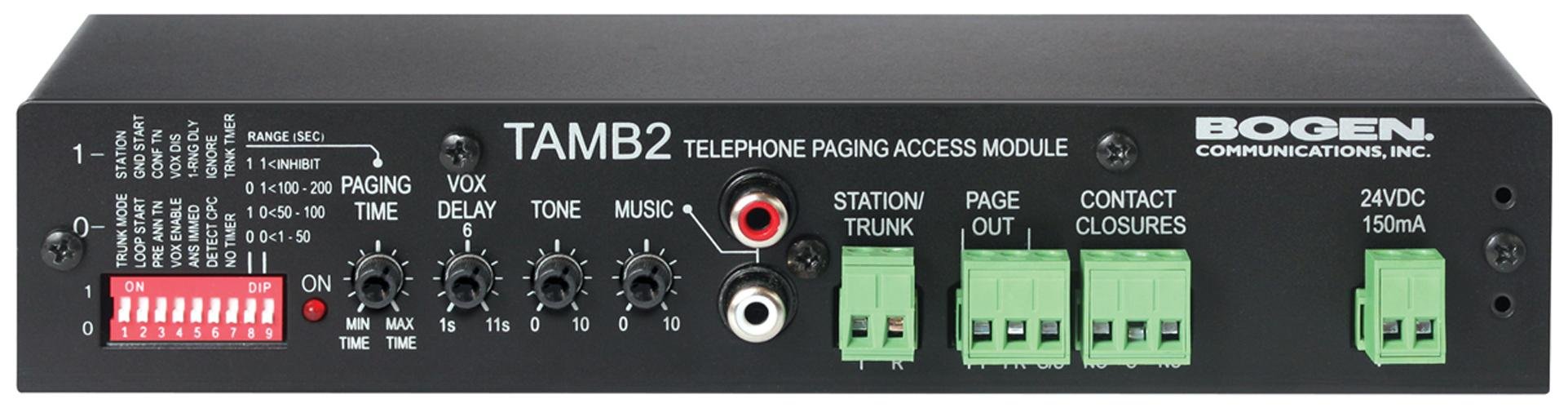
Figure 1: Bogen TAMB2PS Telephone Access Module with included power supply. This image shows the front and side view of the compact black unit, highlighting its various ports and indicators.
Configuración e instalación
Follow these steps to properly set up your Bogen TAMB2PS module:
- Desempaquetar el módulo: Carefully remove the TAMB2PS module and its 24V power supply from the packaging.
- Connect to Telephone System: Connect the module to your analog telephone system. The TAMB2PS supports both station port and trunk port configurations. Refer to your telephone system's documentation for the appropriate connection method.
- Connect to Paging System: Connect the 600-ohm output of the TAMB2PS to the input of your paging amplifier. Ensure proper impedance matching for optimal audio quality.
- Background Music Input (Optional): If using background music, connect your audio source (e.g., CD player, radio) to the line-level input RCA jacks on the module. Adjust the background music volume control as needed.
- Conecte la fuente de alimentación: Plug the included 24V power supply into the designated power input on the TAMB2PS module, then connect the power supply to a standard electrical outlet. The module requires continuous power for operation.
- Pruebas iniciales: After all connections are made, perform a test page through the telephone system to verify proper functionality and audio output.
Operación
Once installed, the Bogen TAMB2PS operates as follows:
- Búsqueda de voz: To initiate a page, access the telephone line connected to the TAMB2PS module. Speak into the telephone handset to broadcast your message through the connected paging system.
- Background Music Muting: When a page is initiated, the TAMB2PS automatically mutes the background music playing through its input, allowing the page to be heard clearly. Music resumes once the page is complete.
- Ajuste del volumen del tono: Use the adjustable tone volume control on the module to set the desired level for any alert tones generated by the system.
Mantenimiento
The Bogen TAMB2PS module requires minimal maintenance to ensure long-term performance:
- Limpieza: Limpie periódicamente el exterior de la unidad con un paño suave y seco. No utilice limpiadores líquidos ni disolventes.
- Ambiente: Ensure the module is installed in a dry, well-ventilated area, away from direct sunlight, extreme temperatures, and excessive dust.
- Conexiones de cable: Revise periódicamente todas las conexiones de cables para asegurarse de que estén seguras y libres de daños.
Solución de problemas
If you encounter issues with your TAMB2PS module, refer to the following common problems and solutions:
- Sin salida de audio:
- Verify the 24V power supply is correctly connected and receiving power.
- Check all audio connections between the TAMB2PS and the paging ampmás duradero.
- Ensure the telephone line connected to the module is active and functioning.
- Confirm the paging amplifier is powered on and its volume is adjusted appropriately.
- Low Paging Volume:
- Adjust the output level control on the TAMB2PS module.
- Increase the input sensitivity or volume on your paging ampmás duradero.
- Ensure the telephone system's output level to the TAMB2PS is sufficient.
- Humming or Static Noise:
- Check for ground loops. Try connecting the TAMB2PS and paging amplifier to the same power outlet or using a ground loop isolator.
- Ensure all cables are properly shielded and not running parallel to power lines.
- Inspeccione los cables para detectar daños o conexiones sueltas.
- Background Music Not Muting:
- Verify the background music source is connected to the correct input on the TAMB2PS.
- Ensure the telephone system is properly signaling the TAMB2PS when a page is initiated.
If problems persist, contact Bogen customer support or a qualified technician.
Especificaciones técnicas
| Característica | Especificación |
|---|---|
| Marca | Arco |
| Nombre del modelo | TAMB2PS |
| Número de modelo del artículo | TAMB2PS |
| Dimensiones del producto (LxAnxAl) | 8.5 x 3 x 1.75 pulgadas |
| Peso del artículo | 2 libras |
| Tipo de conector | RCA (for background music input) |
| Vol máximotage | 24 Volts DC (from included power supply) |
| Impedancia de salida | 600 ohmios |
| Uso en interiores y exteriores | Interior |
| Código Postal | 643749567672, 765368482058 |
| ASIN | B00D61HS2I |
Nota: las especificaciones están sujetas a cambios sin previo aviso.
Información de garantía
Specific warranty details for the Bogen TAMB2PS Telephone Access Module are typically provided with the product packaging or can be found on the official Bogen Communications website. Please retain your proof of purchase for warranty claims. For the most current and detailed warranty information, please visit the manufacturer's official support page or contact your authorized dealer.
Atención al cliente
For technical assistance, product inquiries, or further support regarding your Bogen TAMB2PS module, please contact Bogen Communications directly:
- Fabricante Websitio: Visit the official Bogen Communications webSitio para documentación de productos, preguntas frecuentes e información de contacto.
- Servicio al cliente: Consulte los datos de contacto que se encuentran en el embalaje del producto o en el sitio web del fabricante. webSitio para soporte telefónico o por correo electrónico.
When contacting support, please have your product model number (TAMB2PS) and purchase information readily available.