
1. Introducción
This manual provides detailed instructions for the safe and efficient operation of your VOLTCRAFT 8210 Function Generator. The 8210 is a versatile instrument combining a sweep function, function generator, pulse generator, and frequency counter into a single unit. It is designed for professional use, generating various waveforms with precision.
2. Instrucciones de seguridad
Please read these safety instructions carefully before operating the device to prevent injury and damage. Keep this manual for future reference.
- Siempre conecte el dispositivo a una toma de corriente con conexión a tierra.
- No opere el dispositivo en mojado o damp condiciones.
- Asegúrese de que haya una ventilación adecuada para evitar el sobrecalentamiento.
- No abra el dispositivo casing; No contiene piezas que el usuario pueda reparar. Solicite el servicio técnico a personal cualificado.
- Desconecte la alimentación antes de limpiar o mover la unidad.
- Evite aplicar voltages exceeding the specified maximum input ratings.
3. Producto terminadoview
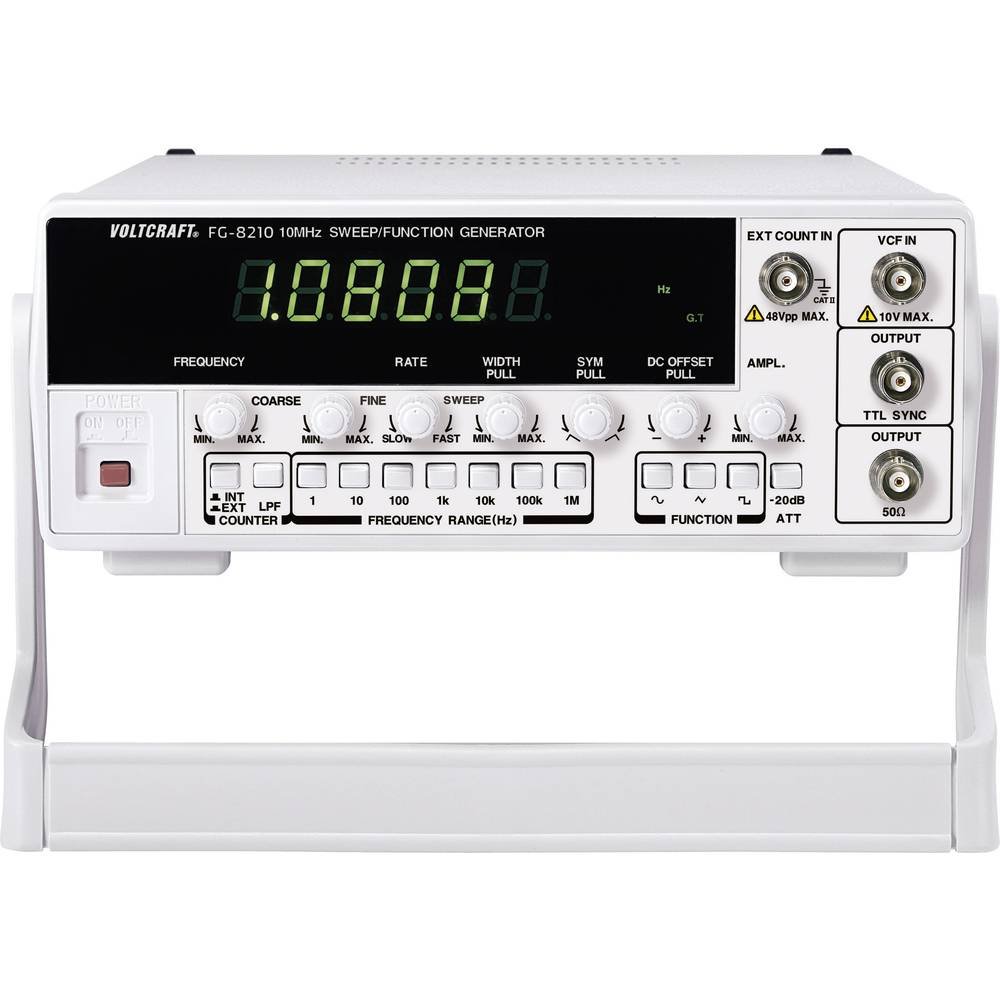
The VOLTCRAFT 8210 is a versatile 4-in-1 instrument designed for various electronic testing and development applications. It integrates the functionalities of a sweep function generator, a standard function generator, a pulse generator, and a frequency counter.
Características principales:
- Four-in-one functionality: Sweep function, function generator, pulse generator, and frequency counter.
- Rango de frecuencia: Generates signals from 0.1 Hz to 10 MHz.
- Contador de frecuencia: Measures frequencies from 2 Hz to 100 MHz.
- Generación de forma de onda: Produces professional-grade rectangular, triangular, and sawtooth signals.
- Producción Amplatitud: Máximo amplitude of 20 Vpp (10 Vpp into 50 ohms).
Imágenes del producto:


Vídeos oficiales del producto:
No hay vídeos oficiales de productos del vendedor disponibles para incrustar en este momento.
4. Configuración
- Desembalaje: Carefully remove the function generator from its packaging. Inspect the unit for any signs of damage during transit. Retain the packaging for future storage or transport.
- Colocación: Place the unit on a stable, flat surface with adequate ventilation around it. Avoid placing it near heat sources or in direct sunlight.
- Conexión de energía: Connect the provided power cord to the power input on the rear panel of the 8210 and then to a suitable grounded AC power outlet. Ensure the power switch is in the OFF position before connecting.
- Encendido inicial: Flip the power switch to the ON position. The display should illuminate, indicating the unit is receiving power.
- Conexiones de salida: Connect your test leads or cables to the appropriate output terminals (e.g., BNC connectors for main output, TTL output) on the front panel, depending on your application.
5. Instrucciones de funcionamiento
This section details the basic operation of the VOLTCRAFT 8210 for its primary functions.
5.1. Function Generator Mode
- Seleccionar forma de onda: Use the dedicated buttons (e.g., Sine, Square, Triangle) on the front panel to select the desired output waveform.
- Establecer frecuencia: Adjust the frequency using the frequency control knob and range buttons. The display will show the current frequency.
- Ajustar Amplatitud: Utilice el amplitude knob to set the desired output voltage peak-to-peak (Vpp). Monitor the output with an oscilloscope for precise adjustment.
- Compensación de CC: If available, use the DC offset control to add a DC bias to the output signal.
- Conectar salida: Connect the main output (e.g., BNC) to your circuit or device under test.
5.2. Sweep Function Mode
The sweep function allows the output frequency to vary automatically over a specified range.
- Activar barrido: Press the "Sweep" button to enable this mode.
- Set Start/Stop Frequencies: Use the frequency controls to define the lower and upper limits of the sweep range.
- Adjust Sweep Rate: Set the sweep duration or rate using the dedicated control.
- Salida de monitor: Observe the sweeping signal on an oscilloscope to verify the settings.
5.3. Frequency Counter Mode
The built-in frequency counter measures external signals.
- Select Counter Input: Connect the external signal to the designated frequency counter input terminal.
- Activate Counter: Press the "Counter" or "Freq. Meas." button to switch to frequency measurement mode.
- Frecuencia de lectura: The display will show the frequency of the input signal.
6. Mantenimiento
Proper maintenance ensures the longevity and accuracy of your VOLTCRAFT 8210.
- Limpieza: Utilice un paño suave y seco para limpiar el exterior de la unidad. Para la suciedad persistente, utilice un paño ligeramente seco.amp Se puede usar un paño con detergente suave, asegurándose de que no entre líquido en el dispositivo. No utilice limpiadores abrasivos ni disolventes.
- Almacenamiento: When not in use for extended periods, store the unit in a dry, dust-free environment, preferably in its original packaging.
- Calibración: Periodic calibration by qualified service personnel is recommended to maintain measurement accuracy, especially for critical applications.
7. Solución de problemas
If you encounter issues with your VOLTCRAFT 8210, refer to the following common problems and solutions:
| Problema | Posible causa | Solución |
|---|---|---|
| Sin energía/Pantalla apagada | Power cord disconnected, power switch off, faulty outlet. | Check power cord connection, ensure power switch is ON, test outlet with another device. |
| Sin señal de salida | Output cable disconnected, amplitude set to zero, incorrect function selected. | Verify output cable connection, increase amplitude, ensure correct waveform/function is selected. |
| Incorrect frequency reading (counter) | Signal too weak, incorrect input range, noisy signal. | Ensure signal amplitude is sufficient, check input range settings, use shielded cables. |
Si el problema persiste después de probar estas soluciones, comuníquese con el servicio de atención al cliente.
8. Especificaciones
The following are the technical specifications for the VOLTCRAFT 8210 Function Generator:
- Fabricante: VOLTCRAFT
- Número de modelo: 8210
- Peso del artículo: 3 kilogramos
- Number of items in package: 1
- Pilas incluidas: No
- Pilas necesarias: No
- ASIN: B00EPLFP46
- Primera fecha disponible en Amazon.fr: 15 de febrero de 2014
- Disponibilidad de repuestos: Información no disponible sobre repuestos
9. Garantía y soporte
Information regarding specific warranty terms and conditions for the VOLTCRAFT 8210 Function Generator is not available in the provided product data. Please refer to the documentation included with your purchase or contact VOLTCRAFT customer support directly for warranty details and technical assistance.
For further support, visit the official VOLTCRAFT websitio o comuníquese con sus centros de servicio autorizados.