
1. Introducción
Thank you for choosing the SCHWAIGER DCR600HD Full HD Cable TV Receiver. This manual provides essential information for the safe and efficient use of your device. Please read these instructions carefully before installation and operation, and keep them for future reference.
2. Instrucciones de seguridad
- Fuente de alimentación: Utilice únicamente el adaptador de corriente suministrado con el dispositivo. Asegúrese de que el voltage coincide con su fuente de alimentación local.
- Ventilación: Do not block ventilation openings. Ensure adequate space around the receiver for proper airflow to prevent overheating.
- Humedad: Keep the device away from water, moisture, and high humidity. Do not expose it to rain or splashes.
- Limpieza: Desconecte la alimentación antes de limpiar. Utilice un paño suave y seco. No utilice limpiadores líquidos ni en aerosol.
- Ubicación: Place the receiver on a stable, flat surface. Avoid direct sunlight, heat sources, and strong magnetic fields.
- Servicio: No intente abrir ni reparar el dispositivo usted mismo. Encargue cualquier reparación a personal cualificado.
3. Contenido del paquete
Por favor revise el paquete para ver los siguientes artículos:
- SCHWAIGER DCR600HD Cable TV Receiver
- Mando a distancia
- Power Cable (integrated or separate adapter)
- Manual de usuario (este documento)
4. Producto terminadoview
4.1 Panel frontal
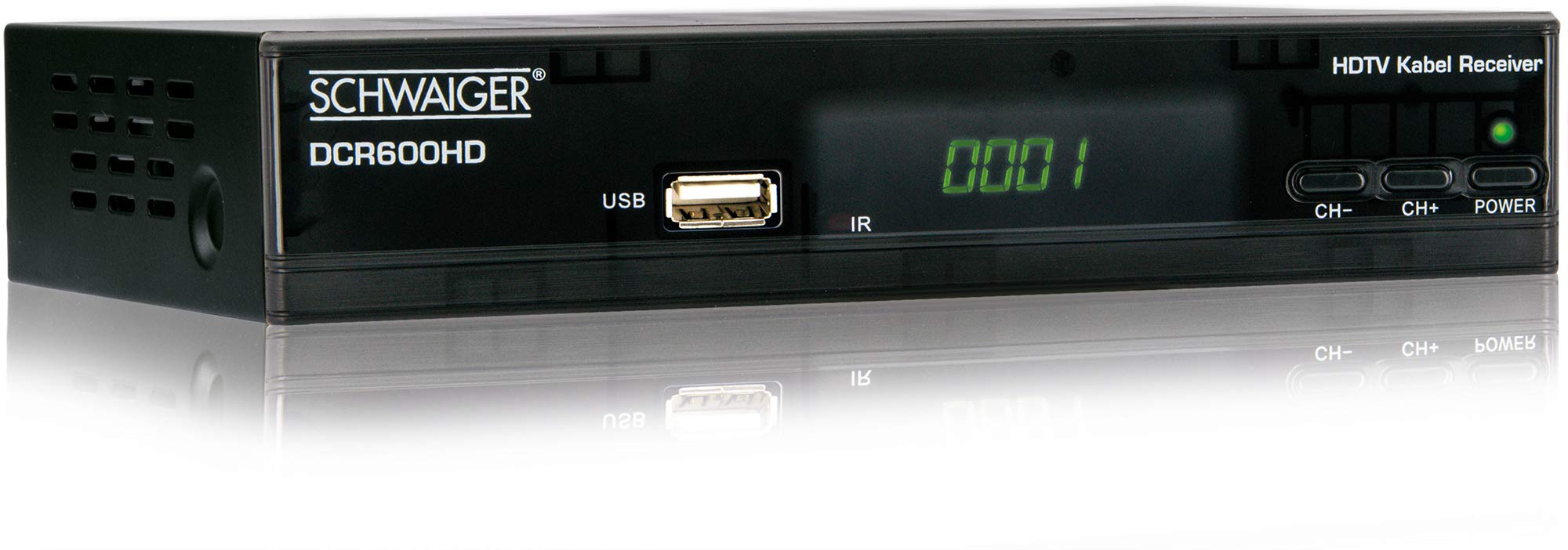
Imagen: Frente view of the SCHWAIGER DCR600HD receiver, showing the display, USB port, IR receiver, and control buttons.
- Mostrar: Muestra el número de canal o la hora.
- Puerto USB: Para conectar dispositivos de almacenamiento USB para reproducción de medios.
- IR: Receptor de infrarrojos para el mando a distancia.
- CH- / CH+: Buttons for changing channels.
- FUERZA: Button to turn the receiver on or off (standby).
4.2 Panel trasero

Imagen: Trasero view of the SCHWAIGER DCR600HD receiver, displaying various input and output ports.
- RF EN: Input for connecting to your cable TV network.
- ETHERNET / LAN: For network connection (if supported for updates or specific services).
- HDMI: High-Definition Multimedia Interface output for connecting to an HD TV.
- TV SCART (CVBS): SCART output for connecting to older TVs or other devices.
- ~220-240V 50/60Hz: Power input for the receiver.
4.3 control remoto

Imagen: Layout of the SCHWAIGER DCR600HD remote control, showing various function buttons.
The remote control allows you to operate all functions of your receiver. Familiarize yourself with the button layout for easy navigation.
5. Configuración
5.1 Conexión del receptor
- Conectarse a la red de cable: Connect your cable TV antenna cable to the ENTRADA DE RF puerto en el panel trasero del receptor.
- Conectar al televisor:
- For High Definition (HD) picture quality, connect an HDMI cable from the HDMI puerto del receptor a una entrada HDMI de su televisor.
- For standard definition (SD) or older TVs, connect a SCART cable from the TV SCART (CVBS) puerto del receptor a la entrada SCART de su televisor.
- Conecte la electricidad: Plug the power cable into the receiver's power input and then into a wall outlet.
- Encender la televisión: Switch on your television and select the correct input source (HDMI or SCART) corresponding to your connection.
5.2 Instalación por primera vez
Upon first power-on, the receiver will typically guide you through an initial setup process:
- Selección de idioma: Use the remote control to select your preferred language for the on-screen menus.
- Selección de país: Select your country. This helps configure regional settings and channel frequencies.
- Escaneo de canales: The receiver will prompt you to perform an automatic channel scan. Confirm to start scanning for available cable TV channels. This process may take several minutes.
- Guardar configuración: Once the scan is complete, save the found channels. Your receiver is now ready for use.
6. Instrucciones de funcionamiento
6.1 Funcionamiento básico
- Encendido/apagado: Presione el FUERZA button on the remote control or front panel to switch the receiver on or to standby mode.
- Selección de canal: Utilice el CH+ / CH- buttons on the remote or front panel to change channels sequentially. Alternatively, use the number buttons to directly enter a channel number.
- Ajuste de volumen: Utilice el VOL+ / vol- buttons on the remote control to adjust the audio volume.
- Silenciar: Presione el MUTE Botón para silenciar temporalmente el sonido. Presiónelo de nuevo para restaurarlo.
6.2 Guía electrónica de programas (EPG)
The EPG provides a schedule of current and upcoming TV programs.
- Presione el Guía electrónica de programas button on the remote control to access the Electronic Program Guide.
- Navigate through channels and program times using the arrow buttons.
- Prensa OK a view información detallada sobre un programa seleccionado.
6.3 Reproducción de medios a través de USB
Puedes reproducir multimedia files (AVI, MKV, MP3) from a USB storage device.
- Insert a USB flash drive or external hard drive into the USB puerto en el panel frontal.
- The receiver should detect the USB device and prompt you to open the media player, or you can access it via the main menu.
- Navegar por tu files and folders using the arrow buttons and press OK para seleccionar y reproducir un file.
- Use the media control buttons (Play, Pause, Stop, Fast Forward, Rewind) on the remote control for playback.
6.4 Teletexto
Access teletext services provided by broadcasters.
- Presione el TTX button on the remote control to activate teletext.
- Use the number buttons to enter page numbers or the arrow buttons to navigate.
- Prensa TTX again to exit teletext.
7. Mantenimiento
- Limpieza: Regularly wipe the receiver with a soft, dry, lint-free cloth. Do not use abrasive cleaners, waxes, or solvents.
- Ventilación: Ensure that the ventilation slots are not obstructed by dust or other objects.
- Actualizaciones de software: Revise periódicamente las instrucciones del fabricante. website for any available software updates for your model. Follow the instructions provided with the update carefully.
8. Solución de problemas
Si tiene problemas con su receptor, consulte los siguientes problemas y soluciones comunes:
| Problema | Posible causa / solución |
|---|---|
| Sin imagen ni sonido |
|
| El control remoto no funciona |
|
| No se encontraron canales durante el escaneo |
|
| Los medios USB no se reproducen |
|
9. Especificaciones
| Característica | Descripción |
|---|---|
| Nombre del modelo | DCR600HD |
| Tipo de producto | Digital DVB TV Tuner / Digital Player |
| Color | Negro |
| Dimensiones (An x Pr x Al) | 17 cm x 4.5 cm x 10 cm |
| Peso | 380 gramos |
| Tecnología de conectividad | HDMI, USB, SCART, RF |
| Dispositivos compatibles | Televisión |
| Codificación de vídeo | H.264 |
| Resoluciones admitidas | 576i, 576p, 720p, 1080i, 1080p |
| Relaciones de aspecto | 4:3, 16:9 |
| Modo de salida de audio | Estéreo |
| Formatos de audio compatibles | MP3 |
| Tipos de medios admitidos | AVI, MKV, MP3 |
| Puertos USB totales | 1 (USB 4-pin Type A) |
| Puertos HDMI totales | 1 |
| Consumo de energía | 3.8 W |
| Volumentage | 240 voltios |
| Características especiales | Electronic Program Guide (EPG), Teletext, Built-in Bluetooth (Note: Bluetooth functionality may vary by region/firmware) |
| Mando a distancia | Incluido |
10. Garantía y soporte
For warranty information and technical support, please refer to the documentation included with your product packaging or visit the official SCHWAIGER webSitio. Conserve su recibo de compra como comprobante para reclamaciones de garantía.