
1. Introducción
This manual provides comprehensive instructions for the setup, operation, and maintenance of your A4tech Natural A Ergonomic Keyboard, model KRS-85. Designed with patented A-Shape keys and round-edged keycaps, this keyboard aims to promote a natural typing position, thereby helping to prevent Repetitive Strain Injury (RSI).
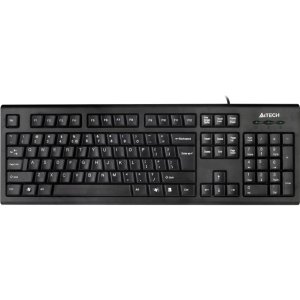
Figure 1: A4tech Natural A Ergonomic Keyboard (KRS-85). This image displays the full layout of the black wired keyboard, highlighting its ergonomic design with A-Shape keys and round keycaps.
2. Configuración
2.1 Requisitos del sistema
- IBM or Compatible Systems
- Windows 2000 / XP (X64) / 2003 (X64) / Vista
2.2 Conexión del teclado
- Ubique un puerto USB disponible en su computadora.
- Insert the USB connector of the A4tech KRS-85 keyboard firmly into the USB port.
- Su sistema operativo debería detectar e instalar automáticamente los controladores necesarios. Este proceso puede tardar unos instantes.
- Una vez completada la instalación, el teclado estará listo para usarse.
3. Instrucciones de funcionamiento
The A4tech Natural A Keyboard is designed for comfortable and efficient typing. Its unique features are intended to enhance your typing experience and reduce strain.
3.1 Características principales
- Patented A-Shape Keys: The layout of the keys is designed to align with the natural position of your hands and wrists, promoting a more relaxed posture.
- Round Edged Keycaps: These keycaps provide a smooth and comfortable typing surface.
- Diseño estándar: The keyboard features a full-size layout including a numeric keypad, function keys (F1-F12), and navigation keys.
3.2 Uso básico
Use the keyboard as you would any standard computer keyboard for typing, navigating, and executing commands. The ergonomic design is intended to provide comfort during extended use.
4. Mantenimiento
Un mantenimiento adecuado garantiza la longevidad y el rendimiento óptimo de su teclado.
4.1 Limpieza
- Desconecte el teclado de su computadora antes de limpiarlo.
- Utilice un paño suave y sin pelusa ligeramente seco.ampLimpie con agua o una solución de limpieza suave la superficie del teclado.
- Evite utilizar productos químicos agresivos, limpiadores abrasivos o humedad excesiva.
- Para limpiar entre las teclas, utilice aire comprimido para eliminar el polvo y los residuos.
5. Solución de problemas
If you encounter issues with your A4tech Natural A Keyboard, please refer to the following common solutions.
5.1 El teclado no responde
- Ensure the USB cable is securely connected to a working USB port on your computer. Try a different USB port.
- Reinicie su computadora.
- Check your computer's Device Manager (Windows) to see if the keyboard is recognized and if there are any driver issues.
5.2 Specific Key Combinations Not Working (e.g., Ctrl-Alt-Del)
- Some users have reported that certain key combinations, such as Ctrl-Alt-Del, may not function as expected on this keyboard with Windows operating systems. This is a known compatibility limitation for some configurations.
- If this issue persists, consider using alternative methods for these functions within your operating system, or consult A4tech support for potential workarounds or driver updates if available.
6. Especificaciones
| Característica | Detalle |
|---|---|
| Nombre del producto | Natural_A Rounded Edge Keyboard |
| Número de modelo | KRS-85 |
| Tecnología de conectividad | Cable (USB) |
| Descripción del teclado | Ergonómico |
| Número de llaves | 85 |
| Dimensiones del producto | 19.69 x 7.87 x 1.97 pulgadas |
| Peso del artículo | 2.2 libras |
| Fabricante | ERGOGUYS (A4tech Co., Ltd) |
| Fecha de primera disponibilidad | 31 de octubre de 2013 |
7. Información de garantía
The A4tech Natural A Ergonomic Keyboard (KRS-85) comes with a Garantía limitada de 1 año Del fabricante. Esta garantía cubre defectos de materiales y mano de obra en condiciones normales de uso.
Please retain your proof of purchase for warranty claims. For detailed terms and conditions, refer to the warranty documentation provided with your product or contact the manufacturer directly.
8. Soporte
For further assistance, technical support, or warranty inquiries, please contact the manufacturer or your point of purchase. Ensure you have your product model number (KRS-85) and proof of purchase ready when contacting support.