
1. Introducción
The Connection SLI 2.2 is a 2-channel speaker level interface designed to convert high-level speaker outputs from an OEM (Original Equipment Manufacturer) source or amplifier into a low-level RCA signal suitable for aftermarket amplifiers. This device ensures optimal audio quality and seamless integration with various car audio systems.
2. Características principales
- Excellent Audio Quality: Utilizes high-quality transformers and STOP NOISE technology for full bandwidth preservation and total rejection of electrical interference through galvanic separation.
- Fácil instalación: Features a robust, compact, and shielded aluminum chassis with a clear connection diagram and side-mounted connection panel.
- Single Connector Wiring: Labeled wiring terminated with a Molex connector and tear-proof plastic strip for secure and easy connections.
- Total OEM Integration (DSR): Double Step-Down Ratio (DSR) offers selectable 8:1 (High-Power) and 4:1 (Low-Power) conversion ratios via DIP switches for each input (front and rear), supporting outputs up to 35V RMS.
- Universal Speakers Simulator (USS): Simulates speaker load on all 4 input channels (front and rear) for compatibility with OEM sources that detect original speaker impedance.
- Automatic Remote Turn-On (ARTTM): Generates a 12V output for amplifier remote control, compatible with all OEM sources, including latest generation units.
3. Contenido del paquete
Please ensure all items are present before installation:
- Connection SLI 2.2 Speaker Level Interface unit
- Wiring harness with Molex connector
- Manual de usuario (este documento)

Image: The Connection SLI 2.2 unit shown with its protective cover and part of the packaging.
4. Configuración e instalación
Seguridad ante todo: Disconnect the vehicle's battery before beginning any electrical installation to prevent short circuits and damage to components.
- Mounting the SLI 2.2:
Choose a secure, dry location for mounting the SLI 2.2 unit, away from excessive heat or moisture. The robust aluminum chassis is designed for durability. Use appropriate fasteners (not included) to secure the unit.
- Connecting Speaker Level Inputs:
Identify the speaker output wires from your OEM head unit or amplifier. Connect these high-level outputs to the corresponding input wires on the SLI 2.2 wiring harness. Ensure correct polarity (positive to positive, negative to negative) for each channel.

Image: Detail of the SLI 2.2 showing input/output labels and DIP switches for ratio selection.
- Setting the Double Step-Down Ratio (DSR) DIP Switches:
The SLI 2.2 features DIP switches to select the appropriate step-down ratio for each input channel independently. Refer to the diagram on the unit or the table below:
Configuración del interruptor DIP Tasa de conversión Solicitud OFF (Low-Power) 4:1 Traditional OEM sources (lower voltagsalidas electrónicas) ON (High-Power) 8:1 Fabricante de equipos originales (OEM) amplifiers with high-voltage outputs (up to 35V RMS) Adjust the DIP switches according to the output voltage of your OEM source. Incorrect settings may result in distorted audio or insufficient signal to your aftermarket ampmás duradero.
- Connecting RCA Outputs:
Connect the RCA output cables from the SLI 2.2 to the RCA input jacks on your aftermarket amplifier. Ensure left and right channels are correctly matched.
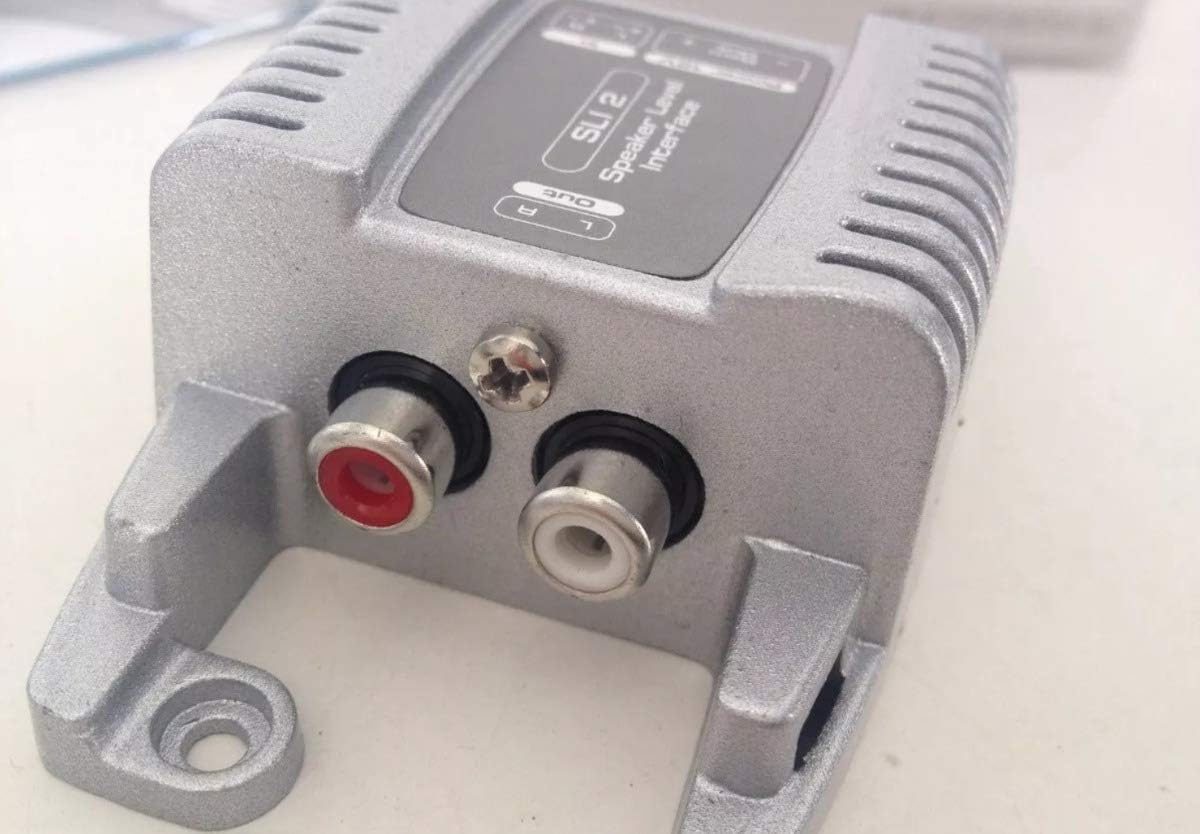
Image: Detail of the SLI 2.2 showing the Left (white) and Right (red) RCA output connectors.
- Connecting Remote Turn-On (ARTTM):
The SLI 2.2 provides an Automatic Remote Turn-On (ARTTM) output. Connect the remote output wire from the SLI 2.2 to the remote input terminal on your aftermarket amplifier. This will automatically turn on your amplifier when the OEM source is active.
- Conexión de energía:
Connect the power and ground wires of the SLI 2.2 wiring harness to appropriate power sources in your vehicle. Typically, the positive wire connects to a switched 12V source (or constant 12V if preferred, but switched is recommended to prevent battery drain), and the negative wire connects to a solid chassis ground point.
5. Principios de funcionamiento
The Connection SLI 2.2 operates by taking the high-voltage speaker output from your vehicle's factory audio system and safely converting it into a low-voltage RCA signal. This process is critical for integrating aftermarket amplifiers, which typically require a low-level input signal.
- Conversión de señal: High-quality transformers within the unit perform the voltage step-down, ensuring minimal signal degradation.
- Rechazo de Ruido: STOP NOISE technology and galvanic isolation prevent electrical interference from affecting the audio signal, resulting in a clean output.
- Speaker Load Simulation (USS): The Universal Speakers Simulator ensures that the OEM head unit detects a proper speaker load, preventing it from shutting down or altering its output due to the absence of connected speakers.
- Automatic Activation (ARTTM): The Automatic Remote Turn-On feature simplifies system operation by automatically activating the connected amplifier when the OEM audio system is turned on, eliminating the need for a separate remote wire from the head unit.
6. Mantenimiento
The Connection SLI 2.2 is designed for maintenance-free operation. To ensure longevity and optimal performance:
- Mantenga la unidad libre de polvo y residuos.
- Asegúrese de que todas las conexiones estén bien sujetas. Revise periódicamente el cableado para detectar signos de desgaste o corrosión.
- Evite exponer la unidad a temperaturas extremas o humedad.
7. Solución de problemas
| Problema | Posible causa | Solución |
|---|---|---|
| No audio output from ampmás duradero. |
|
|
| Distorted or low audio. |
|
|
| Amplifier does not turn on automatically. |
|
|
8. Especificaciones
- Modelo: 02026SLI2
- Canales: 2 canales
- Step-Down Ratios (DSR): 4:1 (Low-Power), 8:1 (High-Power) selectable via DIP switch
- Volumen de entrada máximotage: Up to 35V RMS (with 8:1 ratio)
- Características: STOP NOISE technology, USS (Universal Speakers Simulator), ARTTM (Automatic Remote Turn-On)
- Material del chasis: Shielded Aluminium
- Tipo de conector: RCA (Output), Molex (Input harness), Mini USB (Note: Product images show RCA, Mini USB might refer to an internal component or a different model variant. Please refer to physical product for exact connector types.)
- Dispositivos compatibles: Ampamplificador, altavoz
- Peso del artículo: 9.2 onzas (aprox. 260 gramos)
- Dimensiones del paquete: 5.2 x 4.72 x 1.5 pulgadas (aprox. 13.2 x 12 x 3.8 cm)
9. Garantía y soporte
For warranty information and technical support, please refer to the official Connection webSitio web o contacte a su distribuidor autorizado. Conserve el recibo de compra como comprobante.
Fabricante: Conexión