
Introducción
The Nyko Media Remote for Xbox One provides convenient control over your Xbox One console and various media applications. This remote simplifies navigation and playback of streaming content and physical media, offering dedicated buttons for common functions. It also features the ability to power your Xbox One on and off, and control basic functions of your television.

Image: Nyko Media Remote for Xbox One, front view.
Contenido del paquete
- Nyko Media Remote for Xbox One (Model: 86116)
- Nota: Las pilas AAA no están incluidas y deben comprarse por separado.

Image: Nyko Media Remote for Xbox One in its retail packaging.
Configuración
1. Instalación de la batería
- Ubique el compartimiento de la batería en la parte posterior del control remoto.
- Deslice la tapa de la batería hacia abajo para abrirla.
- Inserte dos (2) baterías AAA, asegurándose de la polaridad correcta (+/-) como se indica dentro del compartimiento.
- Vuelva a colocar la tapa de la batería deslizándola hacia arriba hasta que encaje en su lugar.
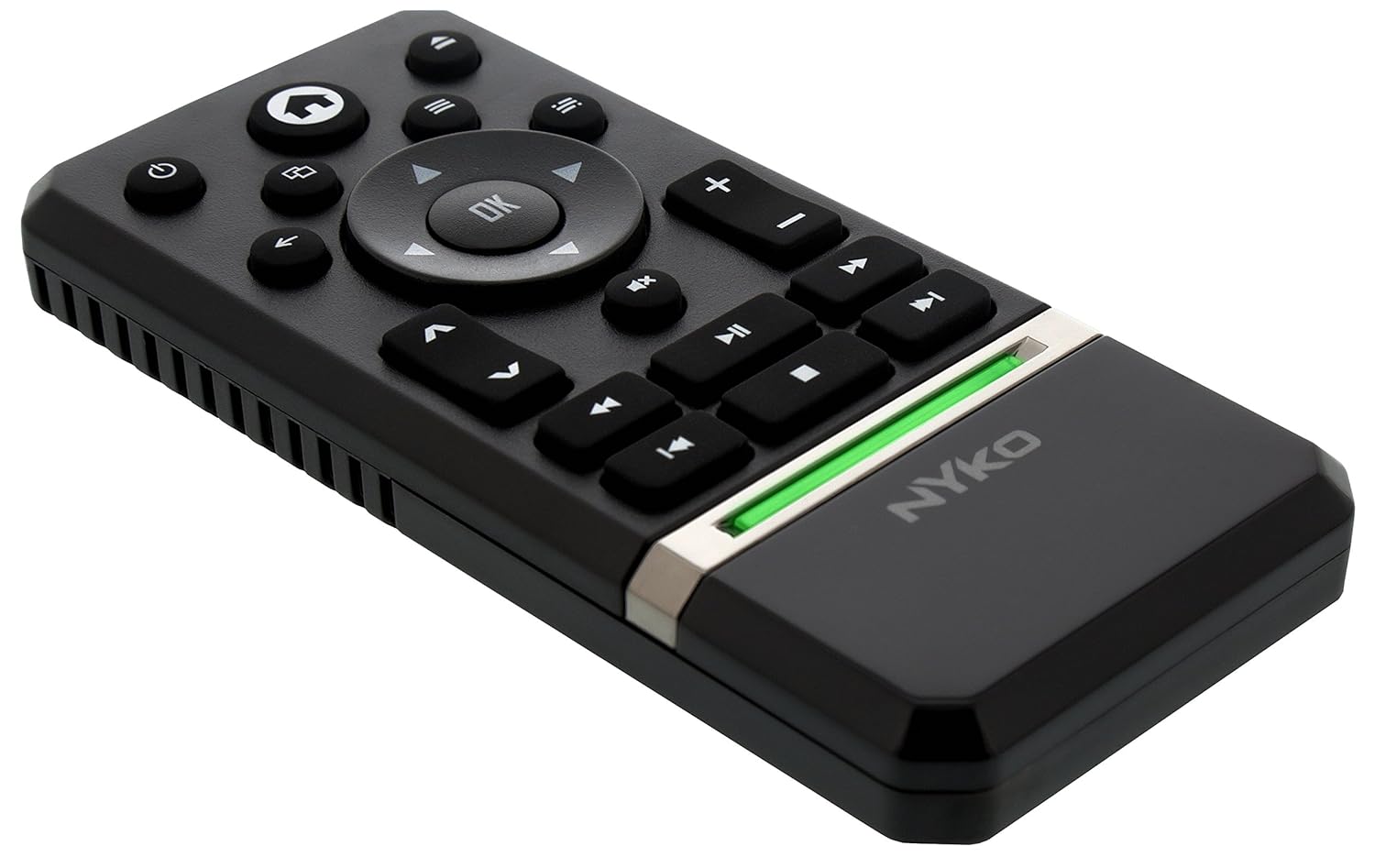
Imagen: Trasera view of the remote with the battery cover removed, illustrating the AAA battery placement.
2. Conexión inicial
The Nyko Media Remote uses infrared (IR) technology. No manual pairing is required for the Xbox One. Simply ensure a clear line of sight between the remote's IR emitter and the Xbox One's IR receiver.
For TV control functions (volume, channels, power), your TV must be configured to respond to the Xbox One's IR signals, typically through the Xbox One's OneGuide settings. The remote sends commands to the Xbox One, which then relays them to your TV via its IR blaster (if configured) or Kinect sensor.
Instrucciones de funcionamiento
The Nyko Media Remote provides comprehensive control for your Xbox One and various media applications. Refer to the diagram below for button identification and their primary functions.

Imagen: Frente view of the Nyko Media Remote, displaying all control buttons.
Funciones de los botones:
| Botón | Función |
|---|---|
| Botón de encendido (⏻) | Powers the Xbox One console on or off. |
| Botón de inicio (⌂) | Returns to the Xbox One Home screen. |
| View Botón (🗀) | Accesses additional information or options within an app or game. |
| Botón de menú (☰) | Abre menús u opciones sensibles al contexto. |
| Pad direccional (D-Pad) | Navega a través de menús y contenidos. |
| Botón OK | Confirms selections. Can also function as Play/Pause in some apps. |
| Botón Atrás (←) | Vuelve a la pantalla o menú anterior. |
| OneGuide Button (📱) | Launches the Xbox OneGuide for live TV and media. |
| Subir/Bajar volumen (⏸ / ⏷) | Adjusts the television volume (requires TV setup via Xbox One). |
| Botón de silencio (🔇) | Mutes or unmutes television audio. |
| Canal arriba / abajo (▲ / ▼) | Changes television channels (requires TV setup via Xbox One). |
| Rebobinado rápido (⏪) | Rebobina la reproducción multimedia. |
| Reproducir/Pausa (⏯) | Reproduce o pausa la reproducción multimedia. |
| Avance rápido (⏩) | Avanza rápidamente la reproducción de medios. |
| Pista anterior (⏮) | Salta al comienzo de la pista actual o a la pista anterior. |
| Detener (⏹) | Detiene la reproducción multimedia. |
| Pista siguiente (⏭) | Salta a la siguiente pista o capítulo. |
Media and App Control:
The remote is designed for seamless control of various Xbox One applications, including:
- OneGuide
- Netflix
- Hulu Plus
- Vídeo instantáneo de Amazon
- Other streaming services and Blu-ray/DVD playback
Dedicated playback buttons (Play, Pause, Fast Forward, Rewind, Stop, Skip) provide intuitive control for movies, music, and other media.
Mantenimiento
Reemplazo de batería:
When the remote's performance diminishes or it stops responding, it is likely time to replace the batteries. Follow the "Battery Installation" steps in the Setup section to replace the two AAA batteries.
Limpieza:
To clean the remote, gently wipe it with a soft, dry cloth. Avoid using harsh chemicals, abrasive cleaners, or excessive moisture, as these can damage the remote's finish or internal components.
Solución de problemas
- El control remoto no responde:
- Asegúrese de que las pilas AAA nuevas estén instaladas correctamente.
- Verify there is a clear line of sight between the remote and the Xbox One console. Obstructions can block the infrared signal.
- Move closer to the Xbox One console. The remote has a maximum effective range of approximately 9 meters (25 feet).
- TV Control (Volume, Channel, Power) Not Working:
- Confirm that your Xbox One's OneGuide settings are properly configured for your television. The remote sends commands to the Xbox One, which then controls the TV.
- Ensure any necessary IR blasters or Kinect sensors are correctly set up and positioned.
- Respuesta intermitente:
- This can sometimes occur due to weak batteries or environmental interference. Replace batteries and ensure a clear line of sight.
Presupuesto
| Característica | Detalle |
|---|---|
| Marca | Nyko |
| Nombre del modelo | Control remoto de medios |
| Número de modelo | 86116 |
| Tecnología de conectividad | Infrarrojos (IR) |
| Dispositivos compatibles | Xbox One, Television (via Xbox One IR blaster/Kinect) |
| Tipo de batería | 2 pilas AAA (no incluidas) |
| Alcance máximo | Hasta 9 metros (25 pies) |
| Peso del artículo | 0.1 libras (aproximadamente 45 gramos) |
| Color | Gris oscuro |
| Características adicionales | Ergonomic design, dedicated media playback controls. |
Garantía y soporte
Nyko products are designed for quality and reliability. For specific warranty details, please refer to the documentation included with your purchase or visit the official Nyko website. The product includes warranty information in multiple languages.
Atención al cliente:
- Correo electrónico: customer.support@nyko.com
- Teléfono: +1-888-400-6956
- Inscripción en línea: www.nyko.com
- Información adicional: http://uqr.me/nykotechnologies/qr/83215

Imagen: Trasera view of the product packaging, detailing features and customer support contact information.