
1. Introducción
Thank you for choosing the Xanlite PR10WR Rechargeable Outdoor LED Floodlight. This manual provides essential information for the safe and efficient use of your device. The PR10WR is a versatile and durable LED floodlight designed for outdoor use, featuring IP54 water resistance, USB charging capability, 1000 lumens output, 9W power consumption, and 6000 Kelvin cool white light.
Please read this manual thoroughly before operating the floodlight and retain it for future reference.
2. Instrucciones de seguridad
- No mire directamente a la luz LED cuando esté encendida, ya que esto puede causar daños en los ojos.
- Mantenga el dispositivo alejado de temperaturas extremas, luz solar directa y líquidos corrosivos.
- Ensure the USB charging port cover is securely closed when not charging to maintain IP54 water resistance.
- Do not attempt to disassemble or modify the floodlight. This will void the warranty and may cause damage or injury.
- Use only the specified charging method (USB) and appropriate power sources.
- Deseche el producto y su batería de forma responsable de acuerdo con las regulaciones locales.
3. Producto terminadoview
The Xanlite PR10WR is designed for portability and durability, featuring a robust metal and plastic construction with a convenient handle and adjustable stand.

Image 3.1: Xanlite PR10WR LED Floodlight showcasing its key features: IP54 water resistance, 6 hours of battery life, 1000 lumens of powerful illumination, and USB rechargeability.

Imagen 3.2: Frente view of the floodlight, illustrating its design optimized for easy storage and transport.
Componentes:
- Panel de luz LED
- Adjustable Stand/Handle
- Botón de encendido
- Puerto de carga USB
- Luces indicadoras de batería
4. Configuración
4.1 Carga inicial
Before first use, fully charge the floodlight. The device is equipped with a Lithium-polymer battery.
- Locate the USB charging port on the back of the floodlight.
- Open the protective cover of the USB port.
- Connect a standard USB charging cable (not always included) to the floodlight's USB port and to a suitable USB power adapter (e.g., 5V/1A) or computer USB port.
- The battery indicator lights will illuminate to show charging progress. Once all indicators are solid, the floodlight is fully charged.
- After charging, securely close the protective cover of the USB port to maintain water resistance.

Imagen 4.1: Trasera view of the floodlight's control panel, featuring the USB charging port, power button, and battery level indicators.
5. Instrucciones de funcionamiento
5.1 Encendido / Apagado
Press the power button located on the back panel to turn the floodlight on or off. Multiple presses may cycle through different brightness modes if available (refer to product packaging for specific mode details).
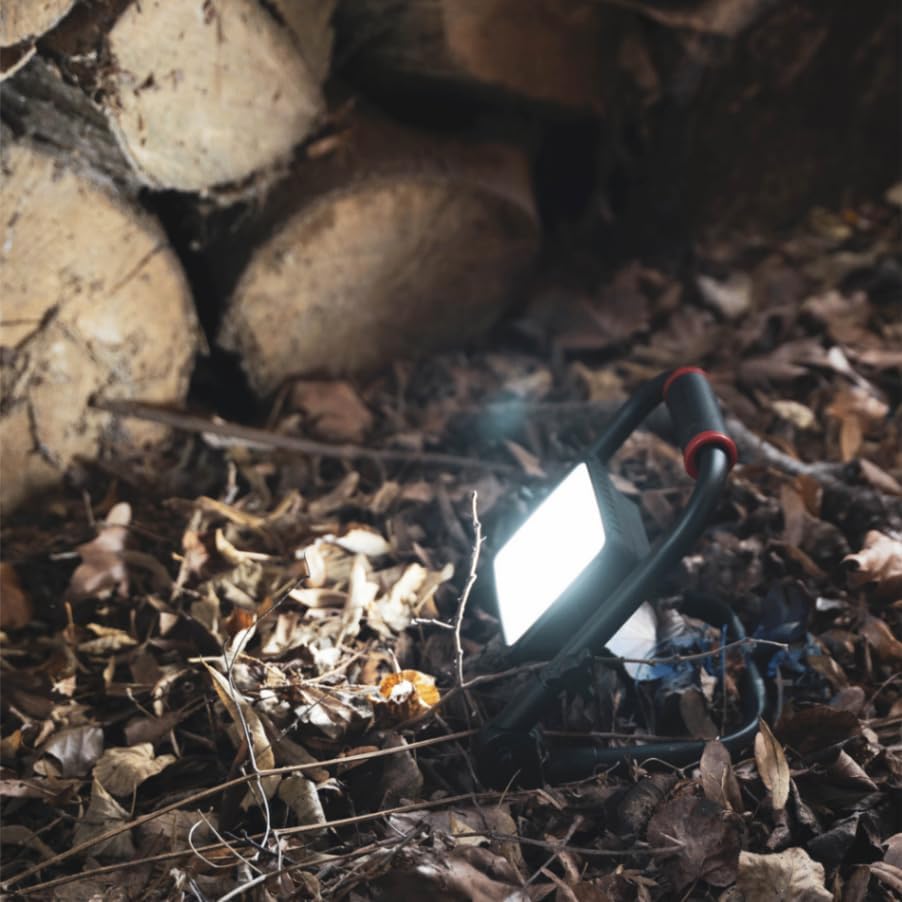
Image 5.1: The floodlight in operation, providing illumination in a natural environment.
5.2 Ajuste del ángulo de la luz
The floodlight features a rotatable head that can be adjusted 180 degrees. Loosen the adjustment knobs on either side of the light panel, position the light to your desired angle, and then tighten the knobs to secure it.

Image 5.2: Detail of the floodlight's adjustable pivot, allowing for 180-degree rotation of the light head.
5.3 Indicador de batería
The battery indicator lights on the back panel show the remaining charge. Recharge the floodlight when the battery level is low to ensure continuous operation.
6. Mantenimiento
6.1 Limpieza
Wipe the floodlight with a soft, damp cloth. Do not use abrasive cleaners or solvents, as these may damage the finish or electronic components. Ensure the USB port cover is closed during cleaning.
6.2 Almacenamiento
Store the floodlight in a cool, dry place when not in use. For long-term storage, it is recommended to charge the battery every 3-6 months to maintain battery health.
7. Solución de problemas
- La luz no se enciende: Ensure the battery is charged. If fully charged, try pressing the power button firmly.
- Light dim or flickering: The battery may be low. Recharge the floodlight.
- Problema de carga: Check the USB cable and power adapter. Ensure the cable is securely connected to both the floodlight and the power source.
- Ingreso de agua: If water enters the device despite its IP54 rating, ensure the USB port cover was properly sealed. Discontinue use and contact support.
8. Especificaciones
| Número de modelo | PR10WR |
| Marca | Xanlita |
| Tipo de fuente de luz | LED (diodo emisor de luz) |
| Quétage | 10 vatios |
| Maximum Light Output | 1000 lúmenes |
| Temperatura de color | 6000 Kelvin (blanco frío) |
| Nivel de resistencia al agua | IP54 (resistente al agua) |
| Fuente de poder | Rechargeable Lithium-polymer Battery |
| Duración de la batería (aprox.) | 6 horas |
| Cargando | USB |
| Material | Metal, Plástico |
| Color | Rojo/negro |
| Dimensiones del producto | 20 x 18 x 19.5 cm |
| Peso del artículo | 600 gramos |
| Tipo de montaje | Freestanding / Floor |
| GTIN | 03700619406503 |

Image 8.1: Dimensional drawing of the Xanlite PR10WR floodlight.
9. Garantía y soporte
9.1 Información de garantía
This Xanlite PR10WR LED Floodlight is covered by a manufacturer's warranty. Please refer to the warranty card included with your purchase or contact Xanlite customer service for specific terms and conditions.
9.2 Atención al cliente
For technical assistance, troubleshooting, or warranty claims, please contact Xanlite customer support through their official websitio o la información de contacto proporcionada con el embalaje de su producto.