
1. Introducción
This manual provides essential information for the safe and efficient operation, installation, and maintenance of your COTEK SP-1000-124 Pure Sine Wave Inverter. This device converts 24VDC battery power into 120VAC household electricity, suitable for sensitive electronics. Please read this manual thoroughly before use.
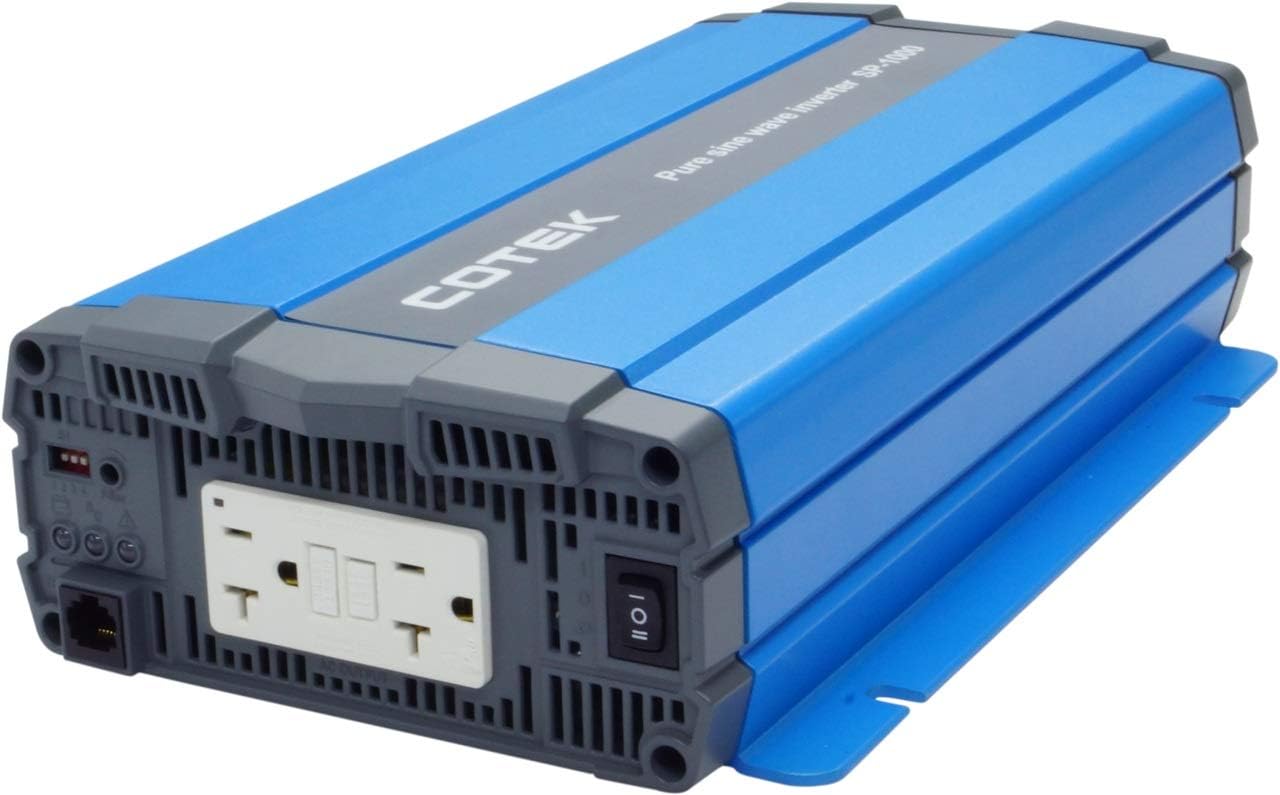
Imagen 1.1: Frente view of the COTEK SP-1000-124 Pure Sine Wave Inverter, showcasing su diseño compacto.
2. Información de seguridad
Always observe the following safety precautions to prevent injury or damage to the inverter and connected equipment.
- Peligro eléctrico: Este inversor produce alto volumentage AC power. Treat the output terminals with the same caution as a standard AC wall outlet.
- Ventilación adecuada: Ensure adequate airflow around the inverter. Do not block ventilation openings. Overheating can cause the inverter to shut down or be damaged.
- Seguridad de la batería: Work in a well-ventilated area when connecting to batteries. Batteries can produce explosive gases. Wear appropriate personal protective equipment.
- Toma de tierra: The inverter must be properly grounded. Refer to local electrical codes for grounding requirements.
- Humedad: Do not expose the inverter to rain, snow, spray, or any liquids. It is designed for indoor use (Type 1 Indoor Aluminum Enclosure).
- Personal calificado: La instalación y el mantenimiento deben ser realizados únicamente por personal calificado.

Imagen 2.1: Example of recommended safety equipment for electrical work.
3. Características del producto
The COTEK SP-1000-124 Inverter offers the following key features:
- Pure sine wave output for compatibility with all AC loads, including sensitive electronics.
- Power ON / OFF remote control capability via a dedicated Green Terminal.
- La entrada y la salida están completamente aisladas para mayor seguridad.
- Temperature and load controlled cooling fan ensures optimal performance and extends unit lifespan.
- Interfaz fácil de usar para facilitar la operación.
- Type 1 Indoor Aluminum Enclosure for durability and protection.
4. Configuración e instalación
Siga estos pasos para la correcta instalación de su inversor.
4.1 Montaje
Mount the inverter in a dry, well-ventilated area, away from direct sunlight, heat sources, and flammable materials. Ensure sufficient clearance around the unit for proper airflow, especially around the fan vents. Refer to the mechanical drawings for dimensions and mounting hole locations.

Image 4.1: Mechanical drawings illustrating the inverter's dimensions and mounting points.
4.2 Conexión de entrada de CC
Connect the inverter directly to a 24VDC battery bank using appropriate gauge cables. Ensure correct polarity: connect the positive (+) terminal of the inverter to the positive (+) terminal of the battery, and the negative (-) terminal of the inverter to the negative (-) terminal of the battery. Use a fuse or circuit breaker on the positive DC line, close to the battery, as recommended by the inverter specifications.

Image 4.2: Rear panel of the inverter with DC input terminals clearly marked.
4.3 Conexión de salida de CA
The inverter features dual GFCI 120VAC outlets. Plug your AC appliances directly into these outlets. Ensure the total wattagLa potencia de los aparatos conectados no supera la potencia nominal continua del inversor de 1000 W.

Image 4.3: Front panel of the inverter with dual GFCI AC outlets and the main power switch.
4.4 Conexión del control remoto (opcional)
The inverter supports a remote ON/OFF control via the green terminal block. Connect a compatible remote switch or control system to this terminal for convenient power management.
5. Instrucciones de funcionamiento
5.1 Encendido / Apagado
To power on the inverter, ensure all DC connections are secure, then press the main power switch on the front panel to the 'ON' position. Alternatively, if a remote control is connected, use the remote switch. To power off, reverse this process.
5.2 Gestión de carga
The SP-1000-124 provides 1000 watts of continuous power and can handle a surge power of up to 1750 watts for less than 3 seconds. Avoid exceeding the continuous power rating to prevent overload shutdowns. If the inverter shuts down due to overload, reduce the connected load and restart the unit.
5.3 salidas GFCI
The integrated Ground Fault Circuit Interrupter (GFCI) outlets provide enhanced safety by quickly cutting power in case of a ground fault. If a GFCI outlet trips, disconnect the appliance, reset the GFCI, and re-evaluate the appliance for faults before reconnecting.

Image 5.1: The inverter provides power for various AC loads, including lighting.
6. Mantenimiento
El mantenimiento regular garantiza la longevidad y el funcionamiento confiable de su inversor.
- Limpieza: Periodically clean the inverter's exterior with a dry cloth. Ensure ventilation openings and the cooling fan are free from dust and debris. Do not use liquid cleaners.
- Conexiones: Regularly check all DC and AC connections for tightness. Loose connections can cause overheating and poor performance.
- Estado de la batería: Monitor the health of your battery bank. A weak or improperly maintained battery can affect inverter performance and lifespan.

Image 6.1: Proper battery maintenance is crucial for inverter performance.
7. Solución de problemas
Esta sección aborda problemas comunes que puede encontrar con su inversor.
- Sin potencia de salida: Verifique las conexiones de entrada de CC y el volumen de la batería.tage. Ensure the inverter is switched ON. Check for tripped GFCI outlets.
- El inversor se apaga: This often indicates an overload, low input voltage, or overheating. Reduce the load, check battery charge, and ensure proper ventilation. Allow the unit to cool if it's hot.
- GFCI Outlet Trips Frequently: This may indicate a fault in the connected appliance or wiring. Disconnect all appliances and test the GFCI. If it still trips, the inverter may require service. If it holds, connect appliances one by one to identify the faulty device.
- El ventilador no funciona: The cooling fan is temperature and load controlled. It will only activate when necessary. If the inverter is hot and the fan is not running, contact support.
8. Especificaciones
Especificaciones técnicas detalladas del inversor de onda sinusoidal pura COTEK SP-1000-124.
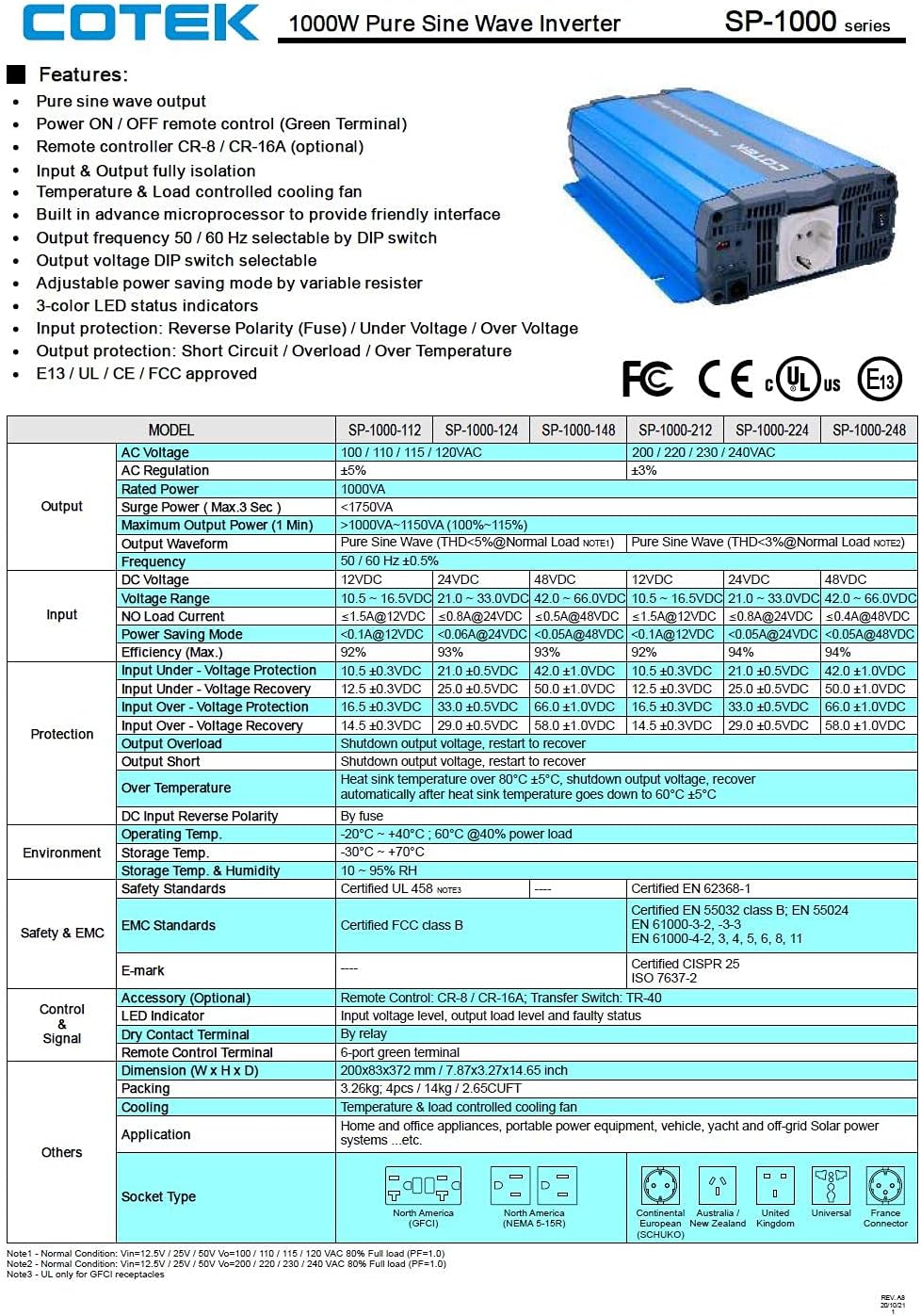
Image 8.1: Official specification sheet for the COTEK SP-1000 series inverters.
| Especificación | Valor |
|---|---|
| Marca | COTEK |
| Nombre del modelo | SP-1000-124 (SP Series) |
| Quétage (Continua) | 1000 vatios |
| Surge Power (Max 3 sec) | 1750 vatios |
| Vol de entradatage | 24 voltios CC |
| Vol de salidatage | 120 Voltios AC |
| Forma de onda de salida | De onda sinusoidal pura |
| Frecuencia | 60 Hz |
| Número de puntos de venta | 2 (Dual GFCI) |
| Peso del artículo | 8.94 libras |
| Tipo de recinto | Type 1 Indoor Aluminum |
| Enfriamiento | Ventilador con control de temperatura y carga |
9. Garantía y soporte
El inversor de onda sinusoidal pura COTEK SP-1000-124 viene con un Garantía del fabricante de 2 año. This warranty covers defects in materials and workmanship under normal use. For warranty claims or technical support, please contact your authorized COTEK dealer or the manufacturer directly. Keep your purchase receipt as proof of purchase.