
Introducción
This manual provides essential information for the safe and efficient operation of your VIZIO SB3851-C0 38-Inch 5.1 Channel Sound Bar System. Please read these instructions thoroughly before using your product and retain them for future reference. This system includes a 38-inch sound bar, a wireless subwoofer, and two satellite speakers, designed to deliver a comprehensive 5.1 channel surround sound experience.
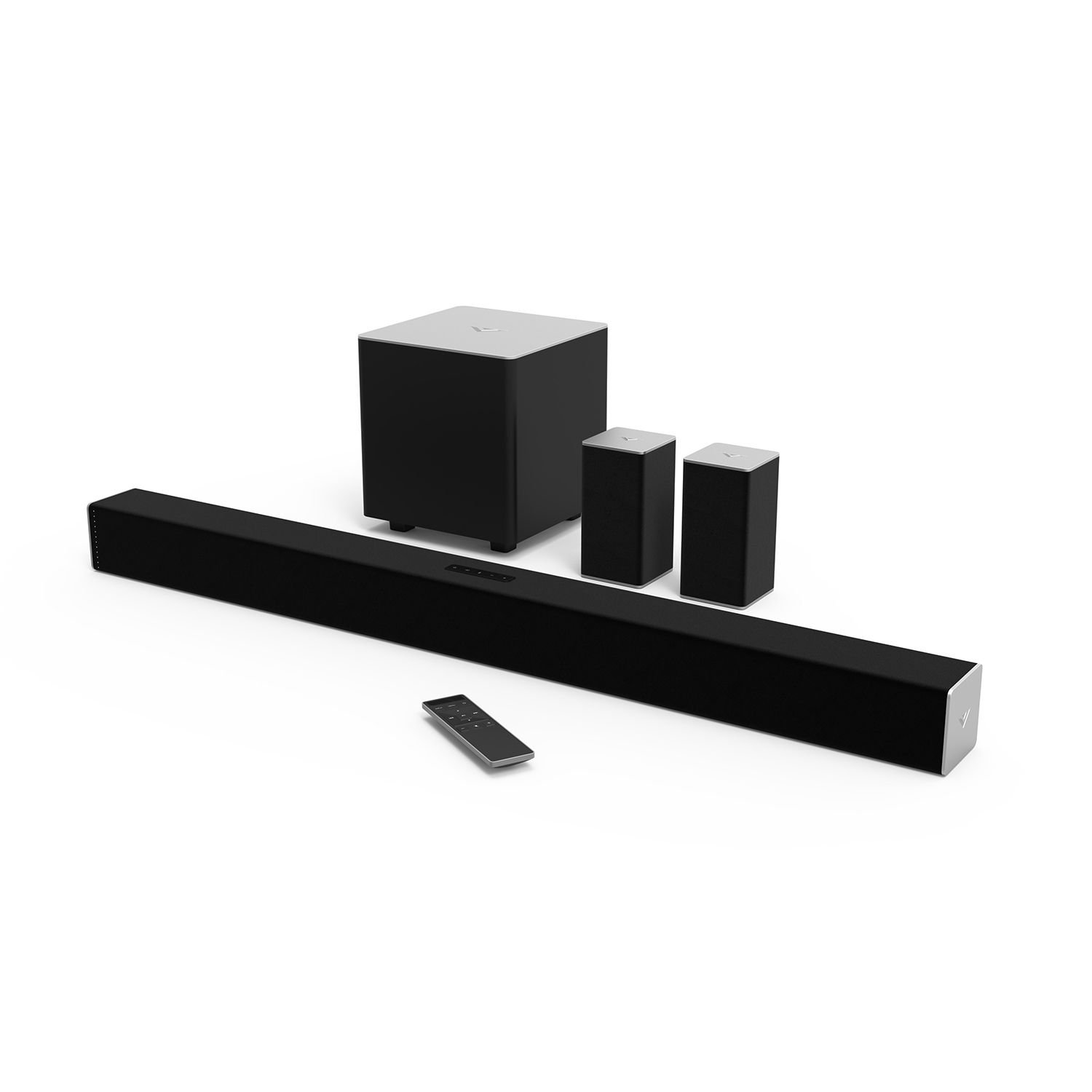
Figure 1: VIZIO SB3851-C0 38-Inch 5.1 Channel Sound Bar System. This image displays the main sound bar unit, the wireless subwoofer, and the two satellite speakers.
1. Configuración
1.1 Desembalaje y comprobación de componentes
Retire con cuidado todos los componentes del embalaje. Asegúrese de que estén presentes todos los elementos enumerados a continuación:
- VIZIO 38-Inch Sound Bar (SB3851-C0)
- Subwoofer inalámbrico
- Dos altavoces satélite
- Control remoto con pilas
- Cables de alimentación (para barra de sonido y subwoofer)
- RCA to RCA Audio Cable (for Satellite Speakers)
- Cable óptico digital
- Cable de audio estéreo RCA a 3.5 mm
- Soportes y tornillos para montaje en pared
- Guía de inicio rápido (este manual proporciona instrucciones detalladas)
1.2 Ubicación de los altavoces
Optimal placement is crucial for the best surround sound experience.
- Barra de sonido: Coloque la barra de sonido en el centro, debajo del televisor. Asegúrese de que no esté obstruida.
- Subwoofer inalámbrico: Position the subwoofer anywhere in the room. For best bass response, try placing it in a corner or near a wall. The subwoofer connects wirelessly to the sound bar.
- Altavoces satélite: Connect the satellite speakers to the wireless subwoofer using the provided RCA cables. Place the satellite speakers behind your primary listening position, one to the left and one to the right, facing towards the listening area.
Figura 2: Example of optimal speaker placement. (Image not available, refer to diagram in Quick Start Guide for visual reference).
1.3 Conexiones de audio
Connect your audio source (TV, Blu-ray player, game console) to the sound bar. Only one audio connection type is typically needed.
- Digital Optical (Recommended): Connect one end of the Digital Optical Cable to the OPTICAL OUT port on your TV and the other end to the OPTICAL IN port on the sound bar. This provides the best audio quality and supports Dolby Digital and DTS Digital Surround.
- RCA (Analog): Connect the Stereo RCA to 3.5mm Audio Cable from your TV's audio output (usually red and white RCA jacks) to the AUX IN (3.5mm) port on the sound bar.
- Bluetooth: Para la transmisión de audio inalámbrica desde dispositivos móviles, consulte la Sección 2.3 para obtener instrucciones de emparejamiento de Bluetooth.
Figure 3: Sound bar rear panel connections. (Image not available, refer to diagram in Quick Start Guide for visual reference).
1.4 Conexión de alimentación
- Connect the power cable to the AC IN port on the sound bar, then plug the other end into a wall outlet.
- Connect the power cable to the AC IN port on the wireless subwoofer, then plug the other end into a wall outlet.
- The subwoofer and sound bar will automatically pair. The LED indicator on the back of the subwoofer will turn solid white when connected.
2. Instrucciones de funcionamiento
2.1 Encendido y apagado
- Presione el FUERZA button on the sound bar or the remote control to turn the system on or off.
- The sound bar will automatically enter standby mode after a period of inactivity.
2.2 Selección de entrada
Presione el APORTE button on the sound bar or the remote control repeatedly to cycle through available audio inputs (Optical, AUX, Bluetooth).
Figure 4: Remote control layout. (Image not available, refer to diagram in Quick Start Guide for visual reference).
2.3 Emparejamiento Bluetooth
- Mantenga pulsado el BLUETOOTH button on the sound bar or remote control for 3 seconds. The LED indicators on the sound bar will begin to flash.
- On your mobile device, enable Bluetooth and search for new devices. Select "VIZIO SB3851-C0" from the list.
- Once paired, the LED indicators on the sound bar will stop flashing and glow solid. You can now stream audio from your device.
2.4 Volume Control and Audio Settings
- Volumen: Utilice el SUBIR/BAJAR VOLUMEN botones del control remoto o de la barra de sonido.
- Nivel de subwoofer: Utilice el SUBWOOFER +/- buttons on the remote to adjust bass intensity.
- Sonido envolvente: The system supports Dolby Digital and DTS Digital Surround. Ensure your audio source is configured to output these formats for the best experience.
- DTS TruVolume: This feature helps maintain a consistent volume level, preventing sudden jumps in sound. Activate/deactivate via the remote.
- Sonido de estudio DTS: Enhances audio for a wider soundstage and clearer dialogue. Activate/deactivate via the remote.
- DTS Circle Surround: Creates a virtual surround sound experience from stereo sources. Activate/deactivate via the remote.
3. Mantenimiento
- Limpieza: Disconnect the power before cleaning. Use a soft, dry, lint-free cloth to wipe the surfaces of the sound bar, subwoofer, and satellite speakers. Do not use liquid cleaners or abrasive materials.
- Almacenamiento: Si va a almacenar la unidad durante un período prolongado, desconéctela de la alimentación y guárdela en un lugar fresco y seco, lejos de la luz solar directa y de temperaturas extremas.
4. Solución de problemas
Si encuentra problemas, consulte los siguientes problemas y soluciones comunes:
4.1 Sin energía
- Ensure all power cables are securely connected to the sound bar, subwoofer, and wall outlets.
- Verifique que el tomacorriente de pared funcione enchufando otro dispositivo.
4.2 Sin sonido
- Verifique que la barra de sonido esté encendida y no silenciada.
- Verify the correct input source is selected on the sound bar (e.g., Optical, AUX, Bluetooth).
- Ensure the audio cable (Optical, RCA) is securely connected between the sound bar and your audio source.
- If using Optical, check your TV's audio output settings to ensure it's set to "PCM" or "Bitstream" and not "TV Speakers."
- Increase the volume on both the sound bar and your audio source.
4.3 Subwoofer / Satellite Speakers Not Working
- Ensure the subwoofer is powered on and its LED indicator is solid white, indicating a successful wireless connection to the sound bar.
- Check that the satellite speakers are securely connected to the subwoofer's RCA ports.
- Ajuste el nivel del subwoofer utilizando el control remoto.
4.4 Problemas de conexión Bluetooth
- Ensure the sound bar is in Bluetooth pairing mode (flashing LEDs).
- Make sure your mobile device's Bluetooth is enabled and within range (approximately 30 feet).
- Intente desvincular y volver a vincular el dispositivo.
- Clear any previous "VIZIO SB3851-C0" entries from your device's Bluetooth list.
5. Especificaciones
| Característica | Descripción |
|---|---|
| Modelo | SB3851-C0 |
| Tipo de sistema | 5.1 Channel Sound Bar System |
| Sound Bar Size | 38 pulgadas |
| Rendimiento de audio | Up to 100 dB SPL, less than 1% Total Harmonic Distortion |
| Respuesta de frecuencia | 50 Hz (System) |
| Conectividad | Bluetooth, Digital Optical, RCA (3.5mm AUX) |
| Descodificación de audio | Dolby Digital, DTS Digital Surround |
| Audio Post Processing | DTS TruVolume, DTS Studio Sound, DTS Circle Surround |
| Tipo de montaje | Bar Mount (Wall Mountable) |
6. Garantía y soporte
For warranty information, please refer to the warranty card included with your product or visit the official VIZIO webSitio. Para obtener asistencia técnica, registrar el producto o descargar la última versión de este manual, visite www.vizio.com/support o comuníquese con el servicio de atención al cliente de VIZIO.