
Introducción
The Behringer NEKKST K8 is an ultra-linear 150-Watt reference-class studio monitor designed for accurate sound reproduction. It features an 8-inch woofer and a 1-inch silk dome tweeter, utilizing advanced waveguide technology for optimal acoustic dispersion and a wide 'sweet zone'. This monitor operates in a true bi-amping mode with two separate amplifiers for enhanced sound clarity.

Imagen: Frente view of the Behringer NEKKST K8 Studio Monitor, showcasing the 8-inch woofer and 1-inch tweeter.
Instrucciones de seguridad importantes
Please read and follow all safety instructions before operating the Behringer NEKKST K8 studio monitor. Retain these instructions for future reference.
- Riesgo de descarga eléctrica: Do not open the device. Refer all servicing to qualified service personnel.
- No exponga este aparato a la lluvia ni a la humedad.
- No utilice este aparato cerca del agua.
- Limpiar únicamente con un paño seco.
- No obstruya las aberturas de ventilación. Instale el producto según las instrucciones del fabricante.
- No lo instale cerca de fuentes de calor como radiadores, rejillas de calefacción, estufas u otros aparatos (incluidos ampificadores) que producen calor.
- Proteja el cable de alimentación para que no sea pisado ni aplastado, especialmente en los enchufes, receptáculos y en el punto donde sale del aparato.
- Utilice únicamente accesorios especificados por el fabricante.
- Desenchufe este aparato durante tormentas eléctricas o cuando no lo utilice durante períodos prolongados.

Image: Safety and regulatory labels found on the Behringer NEKKST K8, indicating electrical warnings and compliance information.
Configuración
Desembalaje
Carefully unpack your NEKKST K8 monitor. Inspect the unit for any signs of damage that may have occurred during transit. Retain the original packaging for future transport or storage.
Conexiones
The NEKKST K8 offers both balanced XLR and unbalanced RCA input options. Connect your audio source (e.g., audio interface, mixer) to the appropriate input on the rear panel of the monitor.
- Entrada XLR: For balanced audio signals, providing optimal noise rejection.
- Entrada RCA: For unbalanced audio signals, commonly used with consumer audio equipment.
Ensure the monitor is powered off before making any connections.
Placement and Room Compensation
Proper placement of your studio monitors is crucial for accurate sound reproduction. The NEKKST K8 features 'ROOM COMPENSATION' switches on the rear panel to help optimize its performance for your specific acoustic environment.
- Free Field: Use this setting when the monitor is placed away from walls and corners.
- Muro: Select this setting if the monitor is placed close to a wall.
- Esquina: Choose this setting if the monitor is placed in a corner, which typically results in increased bass response.
Experiment with these settings to achieve the most balanced sound in your listening space.
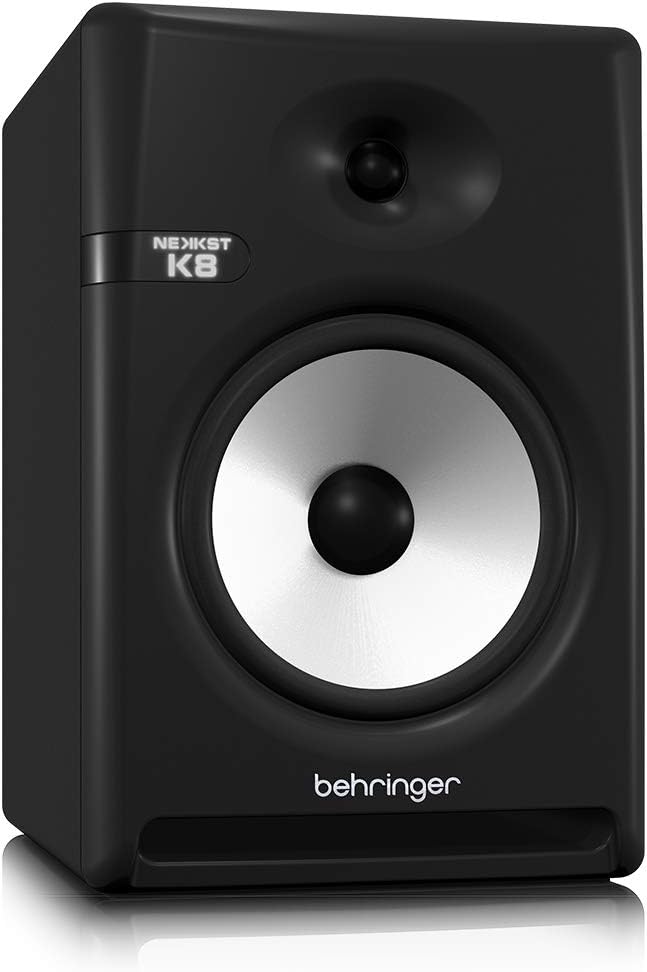
Image: Rear panel of the Behringer NEKKST K8, displaying XLR and RCA inputs, along with various control switches for room compensation and frequency adjustments.

Imagen: Detallada view of the NEKKST K8's rear control panel, highlighting the input trim, frequency adjustments, and room compensation switches.
Conexión de energía
Connect the provided power cord to the AC IN socket on the rear panel and then to a suitable power outlet. Ensure the power switch is in the OFF position before connecting to power.
Operación
Encendido/apagado
After all connections are made, switch the power button on the rear panel to the ON position. It is recommended to power on your monitors last and power them off first to prevent any pops or clicks through your speakers.
Input Trim Adjustment
The 'INPUT TRIM' knob on the rear panel allows you to adjust the input sensitivity of the monitor. Start with the knob at a lower setting and gradually increase it to achieve a comfortable listening level without distortion. This control helps match the output level of your audio source to the monitor's input.
Frequency Adjustments
The NEKKST K8 provides 'HIGH FREQUENCY' and 'LOW FREQUENCY' switches for fine-tuning the monitor's response to your listening environment and personal preference. These switches allow you to cut or boost specific frequency ranges.
- FRECUENCIA ALTA: Adjusts the treble response. Options typically include flat, -2 dB, +2 dB.
- LOW FREQUENCY: Adjusts the bass response. Options typically include flat, -2 dB, -4 dB, -6 dB. This can be useful for compensating for room acoustics or when using a subwoofer.
Refer to the markings on the rear panel for specific dB adjustments.
Mantenimiento
Limpieza
To clean the exterior of your NEKKST K8 monitor, use a soft, dry cloth. Do not use liquid cleaners, abrasive cleaners, or solvents, as these can damage the finish or internal components. Ensure the monitor is unplugged before cleaning.
Almacenamiento
If storing the monitor for an extended period, it is recommended to use the original packaging to protect it from dust and physical damage. Store in a cool, dry place away from direct sunlight and extreme temperatures.
Solución de problemas
| Problema | Posible causa | Solución |
|---|---|---|
| Sin sonido |
|
|
| Sonido distorsionado |
|
|
| zumbido o ruido |
|
|
If the problem persists after trying these solutions, please contact Behringer customer support.
Presupuesto
| Nombre del modelo | K8 |
| Tipo de altavoz | Monitor |
| Diámetro del woofer | 8 pulgadas |
| Diámetro del tweeter | 1 pulgadas |
| Potencia máxima de salida del altavoz | 150 vatios |
| Quétage | 150 vatios |
| Respuesta de frecuencia | 20000 Hz (Upper limit; full range typically wider) |
| Tecnología de conectividad | RCA, XLR |
| Modo de salida de audio | Estéreo |
| Fuente de poder | Eléctrico con cable |
| Dimensiones del producto | 13.4" de profundidad x 13.4" de ancho x 18.8" de alto |
| Peso del artículo | 19.18 libras |
| Material | Plástico, metal, tela |
| Fabricante | Tribu musical de EE. UU. |
| Código Postal | 748252139344 |
Información de garantía
The Behringer NEKKST K8 Studio Monitor comes with a Limited Warranty. For detailed information regarding warranty terms, conditions, and registration, please refer to the official Behringer websitio o la tarjeta de garantía incluida con su producto.
Apoyo
Para obtener más ayuda, soporte técnico o para descargar los controladores y el software más recientes, visite el sitio web oficial de Behringer. websitio o comuníquese con su departamento de servicio al cliente.
También puedes visitar el Behringer Store on Amazon Para información sobre productos y accesorios.