
1. Introducción
Thank you for choosing the Baseus COVO BC10 Wireless Bone Conduction Headset. This manual provides detailed instructions for the proper use, setup, and maintenance of your device. The BC10 headset utilizes advanced bone conduction technology to transmit sound through your cheekbones, allowing you to remain aware of your surroundings while enjoying audio. Its open-ear design and IP55 water resistance make it suitable for various activities.
2. Producto terminadoview
Familiarize yourself with the components and controls of your Baseus COVO BC10 headset.

Imagen 2.1: Arriba view of the Baseus COVO BC10 Wireless Bone Conduction Headset, showcasing its ergonomic design and flexible neckband.

Imagen 2.2: Abajo view of the headset, highlighting the control buttons and charging port location.

Imagen 2.3: Close-up of the multi-function power button, typically used for power on/off and pairing.
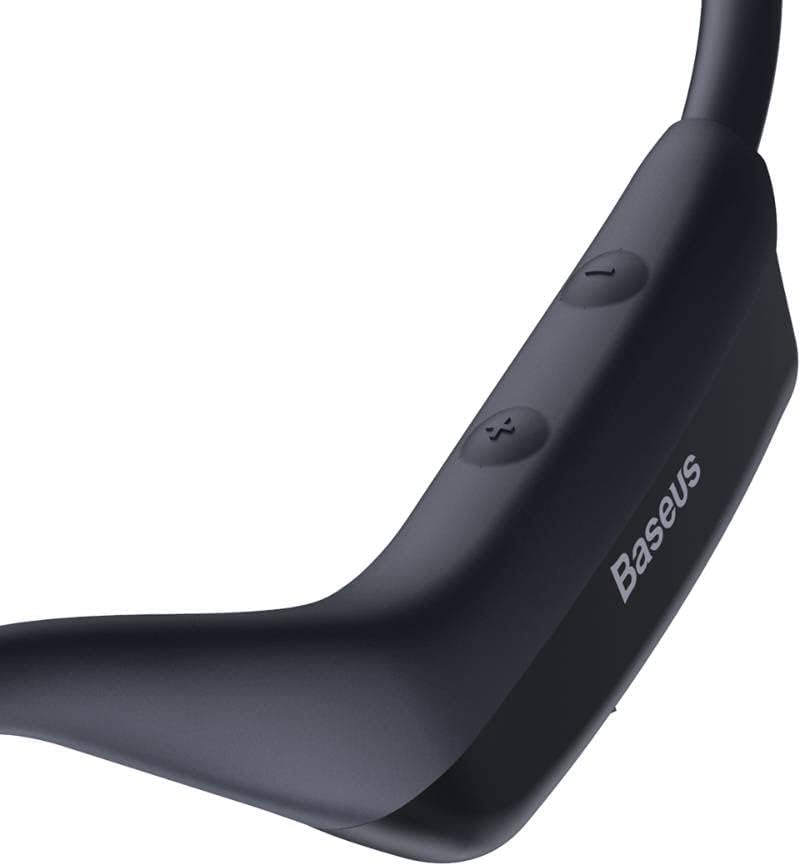
Imagen 2.4: Close-up of the volume control buttons (+ and -) and the Baseus branding.
2.1 Contenido del paquete
- Baseus COVO BC10 Wireless Bone Conduction Headset
- Charging Cable (USB-C, assumed)
- Manual de usuario (este documento)
- (Other accessories if applicable, not specified in product data)

Imagen 2.5: The retail packaging of the Baseus COVO BC10 headset, showing the product inside.
3. Configuración
3.1 Carga de los auriculares
Antes del primer uso, cargue completamente los auriculares.
- Locate the charging port on the headset (refer to Image 2.2).
- Conecte el cable de carga al puerto de carga del auricular.
- Conecte el otro extremo del cable de carga a un adaptador de corriente USB (no incluido) o al puerto USB de una computadora.
- La luz indicadora mostrará el estado de carga (por ejemplo, rojo para carga, azul/verde para carga completa).
- Una carga completa proporciona hasta 8 horas de tiempo de escucha.
3.2 Emparejamiento Bluetooth
Pair your headset with your Bluetooth-enabled device (e.g., smartphone, tablet, computer).
- Encendido: Press and hold the multi-function power button (refer to Image 2.3) for approximately 3-5 seconds until the indicator light flashes rapidly (e.g., red and blue alternately), indicating pairing mode.
- Activar Bluetooth: En su dispositivo, vaya a la configuración de Bluetooth y asegúrese de que Bluetooth esté activado.
- Seleccione el dispositivo: In the list of available devices, select "Baseus COVO BC10" or a similar name.
- Confirmar emparejamiento: Once connected, the indicator light on the headset will typically turn solid blue or flash slowly. A voice prompt may also confirm the connection.
- Si se le solicita una contraseña, ingrese "0000".
- El auricular intentará reconectarse automáticamente al último dispositivo emparejado cuando se encienda.
4. Instrucciones de funcionamiento
Learn how to control your headset for audio playback and calls.
4.1 Encendido y apagado
- Encendido: Press and hold the multi-function power button for 3-5 seconds.
- Apagado: Press and hold the multi-function power button for 3-5 seconds until the indicator light turns off.
4.2 Reproducción de música
- Reproducir/Pausa: Short press the multi-function power button.
- Pista siguiente: Mantenga presionado el botón Volumen + durante 2 segundos.
- Pista anterior: Mantenga presionado el botón Volumen - durante 2 segundos.
4.3 Gestión de llamadas
- Responder/Finalizar llamada: Short press the multi-function power button.
- Rechazar llamada: Press and hold the multi-function power button for 2 seconds.
- Volver a marcar el último número: Double-press the multi-function power button.
4.4 Control de volumen
- Aumenta el volumen: Presione brevemente el botón Volumen +.
- Disminuir volumen: Presione brevemente el botón Volumen -.

Imagen 4.1: The Baseus COVO BC10 headset connected and playing audio from a smartphone.
5. Mantenimiento
El cuidado adecuado garantiza la longevidad y el rendimiento óptimo de sus auriculares.
- Limpieza: Limpie los auriculares con un paño suave y seco. Para la suciedad difícil, utilice un paño ligeramente seco.amp Paño y séquelo inmediatamente. Evite productos químicos agresivos o limpiadores abrasivos.
- Resistencia al agua: The headset has an IP55 rating, meaning it is resistant to sweat and light splashes of water. Do not submerge the headset in water or expose it to heavy rain. Ensure the charging port cover (if present) is securely closed.
- Almacenamiento: Store the headset in a cool, dry place away from direct sunlight and extreme temperatures. When not in use for extended periods, charge it periodically to maintain battery health.
- Evitar daños: Do not drop, disassemble, or modify the headset. Keep it away from sharp objects.

Imagen 5.1: The Baseus COVO BC10 headset in a compact, folded state, suitable for storage or transport.
6. Solución de problemas
Si encuentra problemas, consulte las siguientes soluciones comunes.
| Problema | Posible solución |
|---|---|
| El auricular no se enciende. | Asegúrate de que los auriculares estén completamente cargados. Conéctalos a una fuente de alimentación y vuelve a intentarlo después de unos minutos. |
| No se puede emparejar con el dispositivo. |
|
| No hay sonido o volumen bajo. |
|
| Conexión intermitente. |
|
7. Especificaciones
Key technical specifications for the Baseus COVO BC10 Wireless Bone Conduction Headset.
| Característica | Detalle |
|---|---|
| Nombre del modelo | NGBC10-01 |
| Tecnología de conectividad | Inalámbrico (Bluetooth V5.0) |
| Colocación de orejas | Oído abierto (conducción ósea) |
| Capacidad de la batería | Polímero de litio de 150 mAh |
| Tiempo de escucha | Hasta 8 horas |
| Tiempo de espera | Hasta 200 horas |
| Clasificación de resistencia al agua | IP55 (Resistant to sweat and light splashes) |
| alcance inalámbrico | Hasta 10 metros |
| Dimensiones del producto | 18.5 x 13.5 x 5.8 cm |
| Peso del producto | 50 gramos |
| Fabricante | Baseus |
| País natal | Porcelana |
8. Garantía y soporte
For warranty information and customer support, please refer to the warranty card included with your purchase or visit the official Baseus websitio.
Baseus oficial Websitio: Visita la tienda Baseus en Amazon