
Introducción
This manual provides instructions for the setup, operation, and maintenance of your Youshiko Large LCD Radio Controlled Wall and Desk Clock, Model YC8055. This clock is designed to provide accurate time, date, indoor temperature, and humidity readings. It automatically synchronizes with the MSF radio time signal from the UK, ensuring precise timekeeping and automatic adjustments for Daylight Saving Time.
Información de seguridad
- Use only the specified battery type (2 x AA Mignon LR06).
- No mezcle baterías viejas y nuevas, o diferentes tipos de baterías.
- Asegúrese de que las baterías estén insertadas con la polaridad correcta (+/-).
- Retire las baterías agotadas rápidamente para evitar fugas.
- No exponga el reloj a temperaturas extremas, luz solar directa o humedad alta.
- Mantenga el reloj alejado de campos magnéticos fuertes.
- Clean the clock with a soft, dry cloth. Do not use abrasive cleaners or liquids.
Contenido del paquete
- Youshiko Large LCD Radio Controlled Wall and Desk Clock (Model YC8055)
- Integrated stand for desk placement
- Agujeros de montaje en pared
Nota: Las 2 pilas AA no están incluidas y deben comprarse por separado.
Producto terminadoview
Diseño de pantalla
The large LCD screen provides clear visibility of time, date, temperature, and humidity. The display is designed for easy readability in various indoor environments.

Imagen: Frente view of the Youshiko YC8055 clock display, showing the time, date, day, temperature, humidity, and radio signal indicator. Dimensions are overlaid, indicating a height of 279mm and width of 246mm for the main unit, with display sections measuring 63mm and 25mm in height respectively.
Botones y controles
The control buttons are located on the back of the unit for setting and adjusting various functions.

Imagen: Trasero view of the Youshiko YC8055 clock, highlighting the control buttons: SET, ALARM, UP (▲), DOWN (▼), WAVE, and SNOOZE. The battery compartment is also visible at the bottom center.
Stand and Mounting Options
The clock can be placed on a desk using its integrated stand or mounted on a wall using the provided hanging holes.
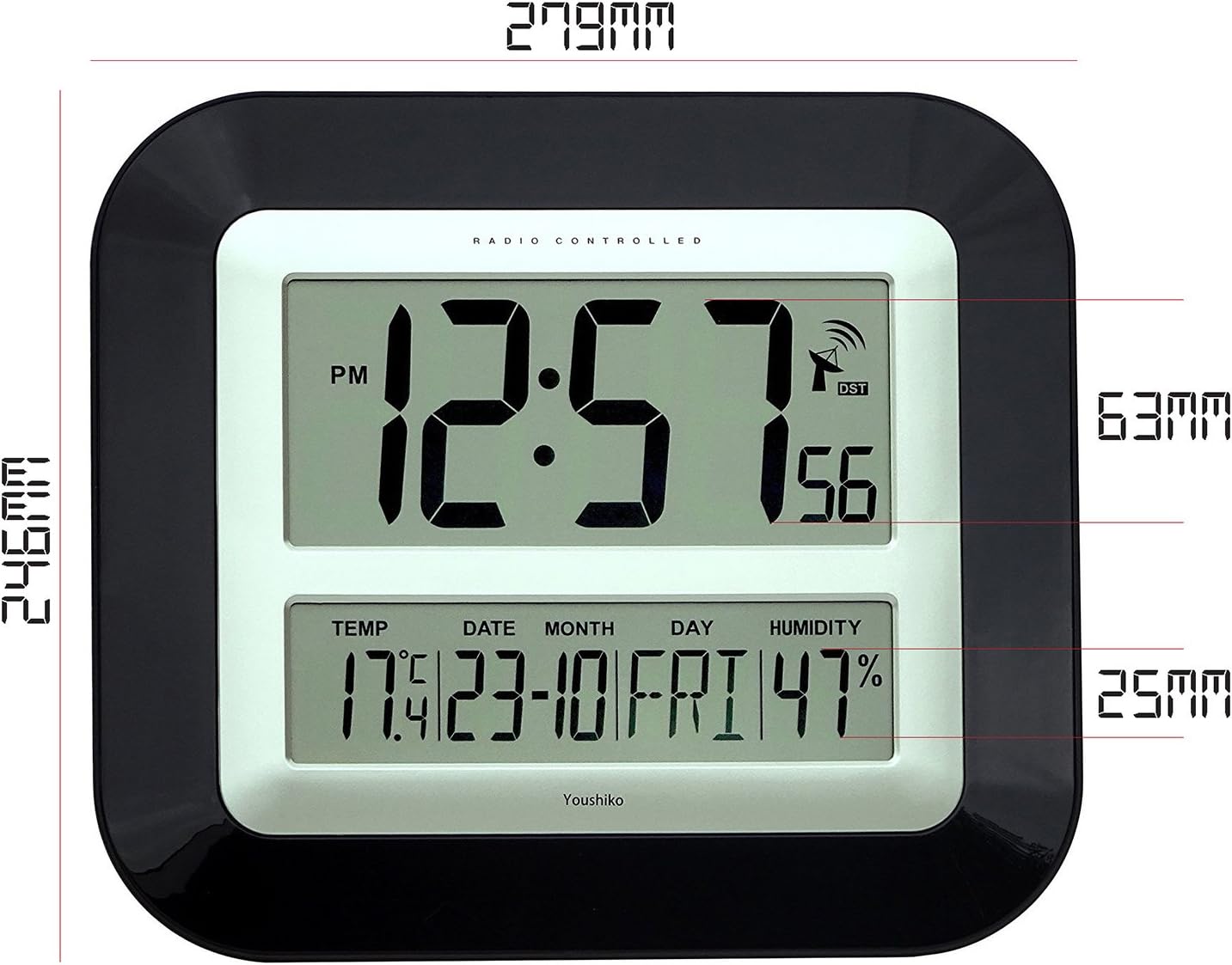
Imagen: Lado view of the Youshiko YC8055 clock, illustrating the extended integrated stand for stable desk placement.
Configuración
1. Instalación de la batería
- Abra la tapa del compartimiento de la batería en la parte posterior del reloj.
- Insert 2 x AA (LR6) batteries, ensuring correct polarity (+ and -).
- Cierre bien la tapa del compartimento de la batería.
2. Recepción inicial de la señal de radio
Upon battery insertion, the clock will automatically attempt to receive the MSF radio time signal. This process may take a few minutes (typically less than 3 minutes). During this time, an antenna symbol will usually appear on the display, indicating it is searching for the signal. Once the signal is received, the clock will automatically set the correct time, date, and adjust for Daylight Saving Time (DST) if applicable.
If the clock does not set itself within a few minutes, try placing it near a window for better signal reception. Radio-controlled clocks can sometimes struggle to pick up signals in certain rooms or locations due to interference or building materials.
3. Radio Control Systems
This clock is designed for the UK and Ireland market, utilizing the MSF signal. For other regions, different radio control systems may be in use.

Imagen: Diagram illustrating the two main radio control systems in Europe: MSF for the UK and Ireland (transmitters in Cumbria, UK) and DCF-77 for the rest of Europe (transmitters in Mainflingen, Germany). It advises choosing the correct system for your location.
4. Manual Time/Date Adjustment (if needed)
In rare cases where the radio signal cannot be received, or if you wish to manually adjust certain settings, follow these steps:
- To change 12h/24h display format: Mantenga pulsado el [Colocar] button until the display shows either '12h' or '24h'. Use the [▲] (Arriba) o [▼] (Down) buttons to toggle to your desired setting. Press [Colocar] again to confirm. Continue pressing [Colocar] a few more times until the clock returns to displaying the time.
- Other manual settings (e.g., time zone, specific time/date) may be available by repeatedly pressing the [Colocar] Botón. Utilice el [▲] y [▼] Botones para ajustar los valores.
Operante
Visualización de la hora
The clock displays hours, minutes, and seconds. It can be set to either a 12-hour format (with AM/PM indicator) or a 24-hour format.
Visualización de fecha y día
The lower section of the display shows the current date (day and month) and the day of the week.
Pantalla de temperatura y humedad
The clock continuously monitors and displays the indoor temperature (in Celsius or Fahrenheit) and relative humidity. While providing a general indication, these readings are not intended for scientific accuracy.
Función de alarma
The clock includes an alarm with a snooze function.
- Configuración de la alarma: Presione el [ALARMA] Botón para entrar en el modo de configuración de alarma. Utilice el [▲] y [▼] Botones para configurar la hora de alarma deseada. Presione [ALARMA] De nuevo para confirmar.
- Activación/desactivación de la alarma: Presione el [ALARMA] button briefly outside of setting mode to toggle the alarm on or off. An alarm icon will appear on the display when activated.
- Función de repetición: Cuando suene la alarma, presione el [SIESTA] button to temporarily silence the alarm. The alarm will sound again after a short interval.
Mantenimiento
Limpieza
Wipe the clock with a soft, dry cloth. Do not use liquid cleaners, sprays, or abrasive materials, as these can damage the display or casing.
Reemplazo de batería
When the display dims or the clock stops functioning, replace the batteries. Follow the battery installation steps in the Setup section. It is recommended to replace both batteries simultaneously.
Solución de problemas
| Problema | Posible causa | Solución |
|---|---|---|
| Clock does not display time or is incorrect. | Batteries are low or incorrectly inserted. No radio signal received. | Check battery polarity and replace if necessary. Move the clock to a location near a window and allow it to search for the signal. Manually set the time if signal reception remains an issue. |
| Antenna symbol is flashing or not displayed. | Clock is searching for or has lost the radio signal. | Ensure the clock is placed in an optimal location for signal reception (e.g., near a window, away from electronic interference). Allow several minutes for synchronization. |
| Las lecturas de temperatura y humedad parecen inexactas. | Environmental factors or general indication. | The temperature and humidity displays provide general indications and are not calibrated for scientific precision. Ensure the clock is not in direct sunlight or near heat/cold sources. |
| La alarma no suena. | La alarma no está activada o el volumen es demasiado bajo (si es ajustable). | Ensure the alarm function is turned on (check for alarm icon on display). This model has a fixed alarm volume. |
Presupuesto
| Característica | Detalle |
|---|---|
| Marca | Yoshiko |
| Número de modelo | YC8055 |
| Tipo de pantalla | LCD digital |
| Formato de hora | 12h / 24h selectable |
| Control de radio | MSF (UK & Ireland) 60 kHz |
| Funciones | Time, Date, Day of Week, Indoor Temperature, Indoor Humidity, Alarm with Snooze |
| Unidad de temperatura | Celsius / Fahrenheit selectable |
| Fuente de poder | 2 pilas AA (LR6) (no incluidas) |
| Opciones de montaje | Wall mount or Desk stand |
| Dimensiones (alto x ancho x profundidad) | 27.9 cm x 24.6 cm x 3.0 cm (aprox. 11 x 9.7 x 1.2 pulgadas) |
| Material | Plástico con lente de vidrio transparente. |
| Color | Negro |
| Uso interior/exterior | Interior |
| UPC / GTIN | 635346122354 |
Garantía y soporte
For warranty information and customer support, please refer to the documentation provided with your purchase or contact Youshiko customer service directly. Keep your proof of purchase for any warranty claims.