
Solight TE09
Solight TE09 Weather Station User Manual
Modelo: TE09
Introducción
Thank you for choosing the Solight TE09 Weather Station. This manual provides essential information for the proper setup, operation, and maintenance of your device. Please read it thoroughly before use and retain it for future reference.
Información de seguridad
- No exponga el dispositivo a temperaturas extremas, luz solar directa o humedad alta.
- Evite dejar caer o someter el dispositivo a impactos fuertes.
- No intente desmontar ni modificar el dispositivo. Esto anulará la garantía.
- Mantenga las baterías fuera del alcance de los niños. Si se ingiere, busque atención médica inmediata.
- Deseche las baterías usadas de acuerdo con las normas locales.
- Limpie el dispositivo con un paño suave y seco. No utilice limpiadores abrasivos ni disolventes.
Contenido del paquete
Por favor, revise el contenido del paquete al desembalarlo. Si falta algún artículo o está dañado, contacte con su vendedor.
- Solight TE09 Weather Station Unit
- Manual de usuario (este documento)
Producto terminadoview
The Solight TE09 Weather Station is designed to provide accurate indoor temperature and humidity readings. Its compact design makes it suitable for various indoor environments.
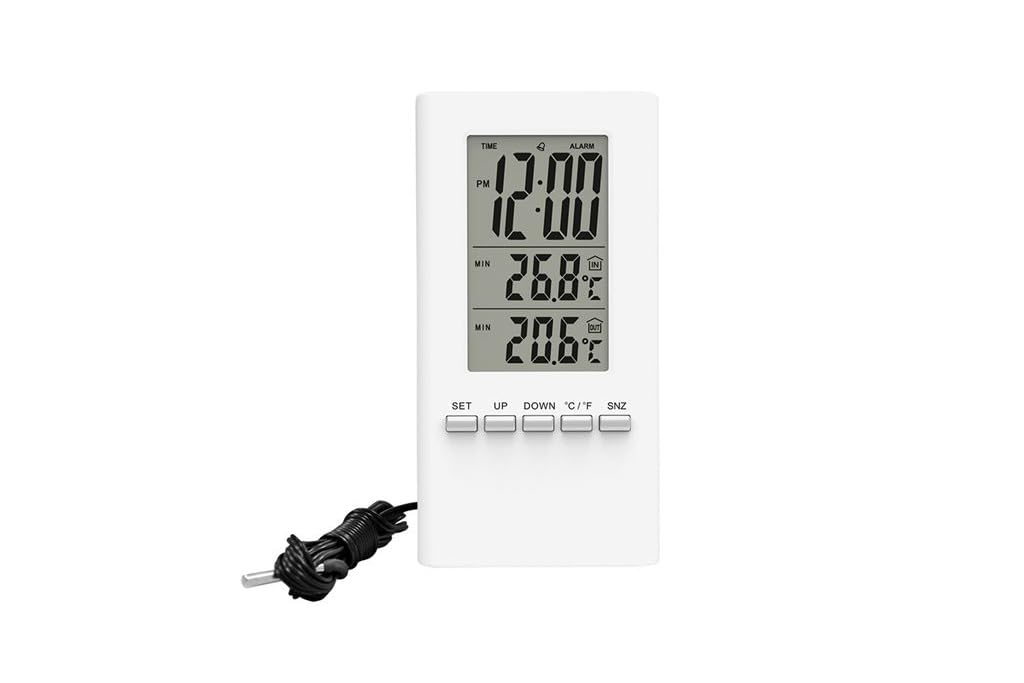
Imagen 1: Frente view of the Solight TE09 Weather Station, displaying its screen and compact white casing.
Componentes clave:
- Pantalla LCD: Shows temperature, humidity, and other relevant information.
- Botones de control: For setting time, units, and other functions.
- Compartimento de la batería: Ubicado en la parte trasera de la unidad.
Configuración
1. Instalación de la batería
- Locate the battery compartment cover on the back of the Solight TE09 Weather Station.
- Deslice o desenganche la cubierta para abrirla.
- Insert 1.5V AAA alkaline batteries (not included) according to the polarity indicators (+ and -) inside the compartment.
- Cierre bien la tapa del compartimento de la batería.
Nota: Ensure batteries are inserted correctly. Incorrect insertion may damage the device.
2. Initial Power-On and Placement
- Once batteries are installed, the device will power on automatically and display initial readings.
- Place the weather station in a suitable indoor location, away from direct sunlight, heat sources, and drafts, which could affect temperature and humidity accuracy.
- Allow the device a few minutes to stabilize and display accurate readings after initial setup.
Instrucciones de funcionamiento
1. Displaying Temperature and Humidity
The main display continuously shows the current indoor temperature and humidity. No specific action is required to view estas lecturas.
2. Changing Temperature Units (Celsius/Fahrenheit)
Para cambiar entre Celsius (°C) y Fahrenheit (°F):
- Locate the "°C/°F" button, usually on the back or side of the unit.
- Press the button once to toggle between the two temperature units. The display will update accordingly.
3. Setting Time and Date (if applicable)
Nota: The Solight TE09 is primarily a temperature and humidity monitor. If your model includes time/date functionality, follow these general steps:
- Press and hold the "SET" or "MODE" button for a few seconds until the time display starts flashing.
- Use the "UP" or "DOWN" buttons to adjust the hour, then press "SET" or "MODE" to confirm and move to minutes.
- Repeat for minutes, then for date (year, month, day) if available.
- Press "SET" or "MODE" again to exit the setting mode.
Mantenimiento
1. Limpieza del dispositivo
- Wipe the exterior of the weather station with a soft, dry, or slightly damp paño.
- Do not use abrasive cleaners, alcohol, or corrosive chemicals, as these can damage the surface and internal components.
- Asegúrese de que no entre líquido en el dispositivo.
2. Reemplazo de la batería
- When the display becomes dim or the device stops functioning, it's time to replace the batteries.
- Follow the "Battery Installation" steps in the Setup section to replace the old batteries with new 1.5V AAA alkaline batteries.
- Deseche las baterías viejas de forma responsable de acuerdo con las regulaciones ambientales locales.
3. Almacenamiento
If the device will not be used for an extended period, remove the batteries to prevent leakage and store the unit in a cool, dry place.
Solución de problemas
| Problema | Posible causa | Solución |
|---|---|---|
| Sin pantalla o pantalla tenue. | Las baterías están agotadas o insertadas incorrectamente. | Reemplace las baterías con baterías alcalinas AAA nuevas de 1.5 V, asegurándose de la polaridad correcta. |
| Lecturas inexactas de temperatura y humedad. | Device placed near heat sources, direct sunlight, or drafts. | Relocate the weather station to a stable indoor environment away from interfering factors. Allow time for readings to stabilize. |
| Los botones no responden. | Fallo temporal del software o batería baja. | Retire y vuelva a colocar las pilas para reiniciar el dispositivo. Si el problema persiste, reemplace las pilas. |
Presupuesto
- Modelo: Solight TE09
- Color: Blanco
- Material: Plástico
- Fuente de energía: Battery (AAA alkaline, 1.5V)
- Pilas incluidas: No
- GTIN: 08592718012212
- Fabricante: Muy liviano
- Primera fecha disponible: 7 de octubre de 2018
Garantía y soporte
For warranty information and technical support, please refer to the documentation provided at the point of purchase or contact your retailer. Keep your purchase receipt as proof of purchase.
Ask a question about this manual
Ask about setup, troubleshooting, compatibility, parts, safety, or missing instructions. Manuals+ will review the question and use this page’s manual context to help answer it.