
1. Introducción
Welcome to the Jaybird X2 Sport Wireless Bluetooth Headphones user manual. These premium Bluetooth headphones are designed to provide skip-free music and calls, perfect for sports and active lifestyles. This manual will guide you through the setup, operation, and maintenance of your new headphones.
2. ¿Qué hay en la caja?
Your Jaybird X2 package includes the following items:
- Jaybird Premium X2 wireless earbuds
- Puntas de silicona para los oídos (6 pares)
- Aletas para los oídos con ajuste seguro (6 pares)
- Almohadillas de espuma Sport Comply (6 pares)
- Clip de cable
- Clips para gestión de cables (2)
- Cable de carga USB 2.0
- Estuche protector
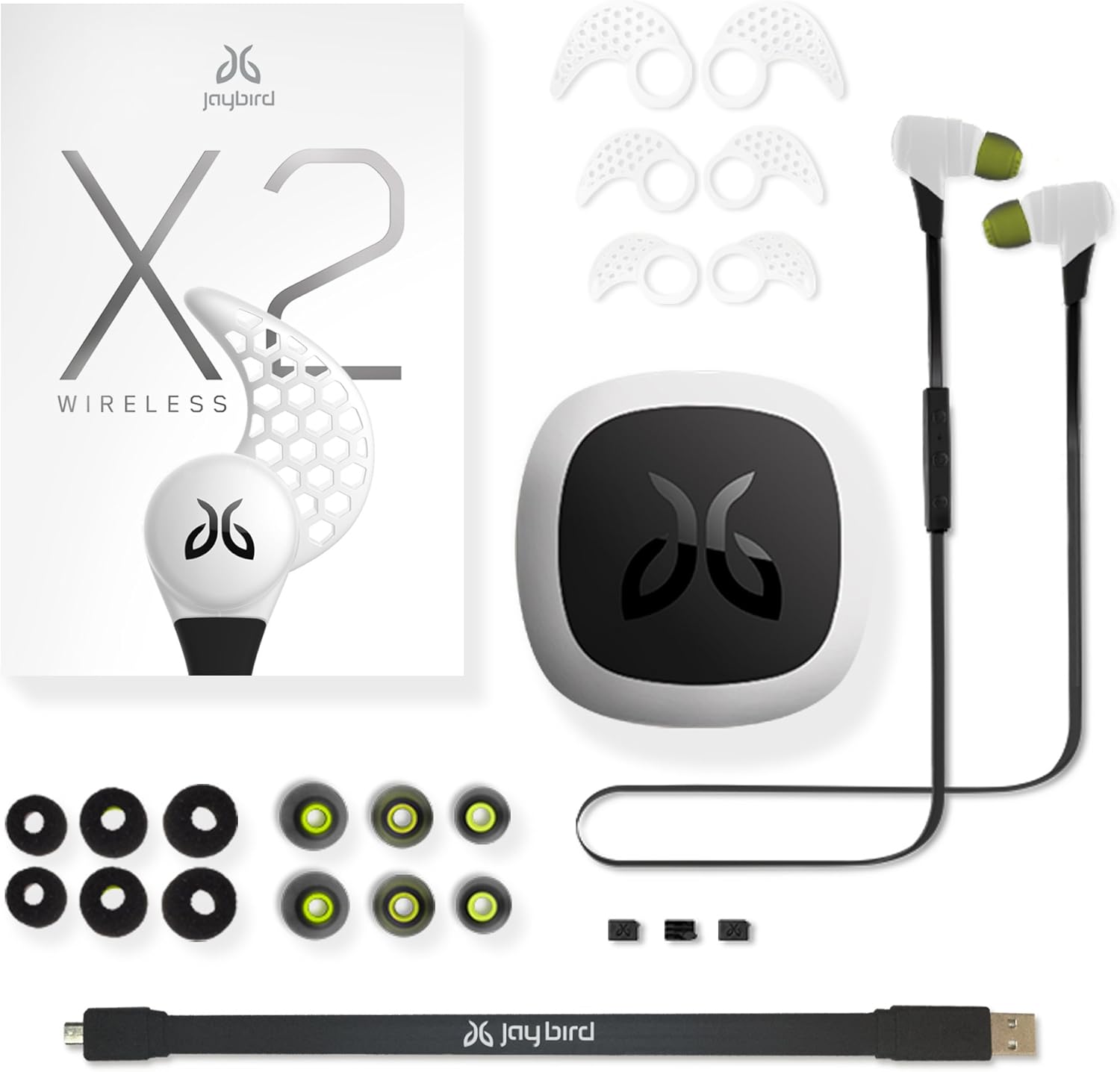
Image: Jaybird X2 headphones, protective case, various ear tips, ear fins, charging cable, and cord management clips.
3. Configuración
3.1. Carga de sus auriculares
Before first use, it is recommended to fully charge your Jaybird X2 headphones. Locate the micro USB charging port on one of the earbuds. Gently remove the back cover to reveal the port. Insert the micro USB charging cable and connect it to any USB power source.

Imagen: Un primer plano view of a Jaybird X2 earbud with its back cover removed, exposing the micro USB charging port. Text on the image indicates "Micro USB Charging (Cable Included)" and "8 Hour Super-Capacity Battery HD™".
A red LED light indicates that your headphones are charging. A green LED light indicates a full charge. A full charge typically takes about 2 hours and provides approximately 8 hours of playtime. A 30-minute charge can provide about 90 minutes of play.
Video: This video demonstrates the process of charging and pairing your Jaybird X2 Sport Wireless Bluetooth Headphones, showing how to access the charging port and initiate Bluetooth connection.
3.2. Emparejamiento de los auriculares
To pair your Jaybird X2 headphones with a device:
- Ensure your headphones are within 1 meter (3 feet) of your device.
- Press and hold the middle button on the controller for at least 4 seconds until the LED status indicator flashes red and green. A voice prompt will confirm that your buds are searching for a music device.
- Enable Bluetooth on your phone or music device.
- Select "Jaybird X2" from the list of available devices.
- Si se le solicita un código de acceso, introdúzcalo 0000.
- A voice prompt will confirm that your headphones are connected.
If pairing is unsuccessful, power off your X2 buds by pressing the middle button for at least 4 seconds, then repeat the pairing steps. Your X2 buds can pair with and remember up to eight devices.

Image: The Jaybird X2 headphones are shown with a graphic indicating compatibility with various Bluetooth-enabled devices such as smartphones, laptops, desktops, tablets, and smart speakers.
4. Ajuste y comodidad
The Jaybird X2 headphones are designed for a perfect fit, offering multiple customization options for optimal sound and security.
4.1. Comply Premium Sport Memory Foam Ear Tips
Your X2 buds include three pairs of premium Comply foam ear tips (small, medium, large). These memory foam tips expand to provide a custom fit, excellent noise isolation, and comfort.
- Place the foam tips over the speaker housing.
- Once securely in place, roll the foam between your thumb and finger to compress it.
- Insert the compressed foam tip into your ear.
- Hold in place for 15-30 seconds while the foam expands to create a custom seal.
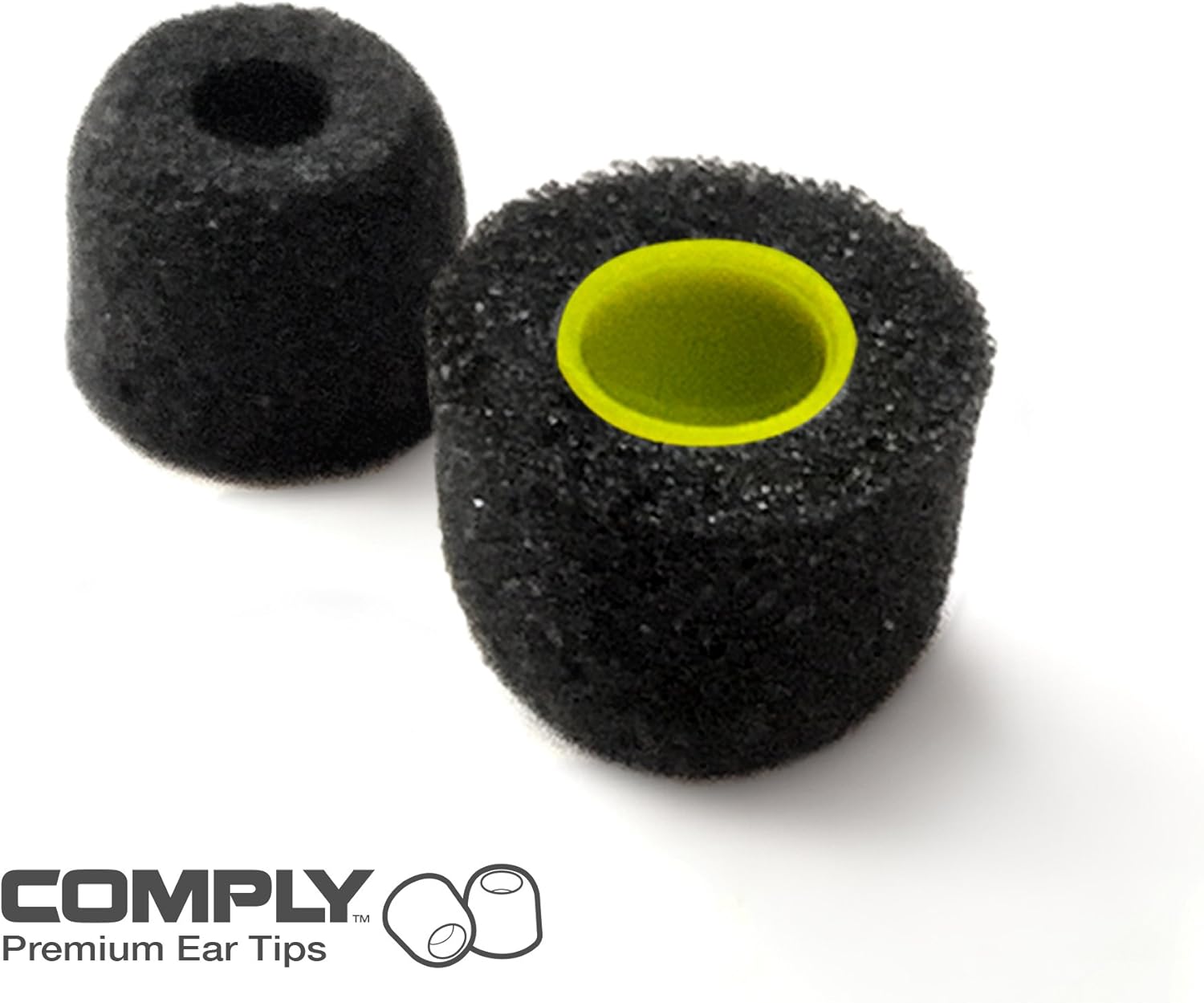
Image: A close-up of two black Comply Premium Ear Tips, highlighting their foam material and the yellow inner core.
4.2. Secure-Fit Ear Fins
The X2 buds come with patented ergonomic Secure-Fit Ear Fins in various sizes to ensure they stay in place during activity.
- Slide the Secure-Fit Ear Fins all the way back onto the buds, behind the locking ridge.
- Rotate each bud so the tip of the ear fin fits into the top of the bowl of each ear. The fins should fit snugly.
4.3. Over/Under-Ear Fit Options
You can wear your X2 buds either under your ears (traditional fit) or over your ears for an advanced fit that keeps the cord off the back of your neck. Silicone ear tips are also provided as an alternative to the foam tips.

Image: A pair of Jaybird X2 headphones shown in an over-ear wearing style, with the cable running behind the neck.
4.4. Cord Management
Use the included cord management clips to secure any slack in the cable. Make an S-shape with the middle section of the cord and insert it into two of the three slots in each clip. Adjust the clips to allow for head movement.
5. Instrucciones de funcionamiento
The in-line controller on your Jaybird X2 headphones provides intuitive control over your audio and calls.
5.1. Controles básicos
- Encendido/apagado: Press and hold the middle button for at least 4 seconds.
- Sube el volumen: Presione el botón '+'
- Bajar volumen: Presione el botón '-'.
- Reproducir/Pausa: Presione el botón central.
- Saltar pista hacia adelante: Mantenga presionado el botón '+' durante 1 segundo.
- Saltar pista hacia atrás: Mantenga presionado el botón '-' durante 1 segundo.
5.2. Gestión de llamadas
- Responder/Finalizar llamada: Presione el botón central.
- Rechazar llamada: Press and hold the middle button for 1 second.
- Rellamada Presione el botón central dos veces.
- Silenciar/Activar silencio de llamada: Press the '+' and '-' buttons at the same time.
Vídeo: Este vídeo ofrece una explicación detalladaview of the earbud controls on the Jaybird X2 Sport Wireless Bluetooth Headphones, demonstrating how to manage volume, playback, and calls.
6. Mantenimiento
Your Jaybird X2 headphones are designed for durability and performance, especially during active use.
6.1. Sweatproof Design
The Jaybird X2 headphones feature a lifetime sweatproof warranty, ensuring they withstand intense workouts and outdoor activities. After heavy use or exposure to sweat, it is recommended to gently wipe down the earbuds and cable with a dry cloth.
6.2. Limpieza
Regularly clean the ear tips and ear fins to maintain hygiene and optimal sound quality. Remove the ear tips and fins and wipe them with a damp paño. Asegúrese de que estén completamente secos antes de volver a colocarlos en los auriculares.
7. Solución de problemas
If you encounter issues with your Jaybird X2 headphones, try the following steps:
- Sin energía: Ensure the headphones are fully charged. Connect them to the charging cable and check for the red LED indicator.
- Problemas de emparejamiento: Make sure Bluetooth is enabled on your device and the headphones are in pairing mode (flashing red and green LED). Try turning both the headphones and your device off and on again.
- Conexión intermitente: Ensure your device is within the Bluetooth range (up to 10 meters/33 feet) and there are no significant obstructions. Avoid placing your device in areas that might block the signal, such as deep pockets or behind multiple layers of clothing.
- Mala calidad de sonido: Check that the ear tips are correctly sized and properly sealed in your ear canal. Ensure the ear tips are clean and free from debris.
- Los controles no responden: Ensure the headphones are powered on and connected to your device. Try restarting the headphones.
8. Especificaciones
| Característica | Detalle |
|---|---|
| Nombre del modelo | X2-S |
| Tecnología de conectividad | Bluetooth |
| Tecnología de comunicación inalámbrica | Bluetooth |
| Duración de la batería | 8 horas |
| Alcance de Bluetooth | 10 metros |
| Peso del artículo | 0.03 kilogramos (1.2 onzas) |
| Nivel de resistencia al agua | Resistente al agua (a prueba de sudor) |
| Colocación de orejas | En el oído |
| Factor de forma | En el oído |
| Tipo de control | Remoto |
| Dispositivos compatibles | Teléfonos inteligentes, portátiles, ordenadores de sobremesa, tabletas y altavoces inteligentes |
| Fabricante | Logitech, Inc |
| Dimensiones del producto | 7.3 x 2 x 4.75 pulgadas |
9. Garantía y soporte
Jaybird X2 Sport Wireless Bluetooth Headphones come with a Lifetime Sweatproof Warranty. For any warranty claims or technical support, please refer to the official Jaybird support channels or contact the manufacturer, Logitech, Inc.