
Introducción
Gracias por la compraasing the SENTRY HPXBT150 Bluetooth Flat Cord Earbuds. This manual provides detailed instructions on how to set up, operate, and maintain your new wireless earbuds. Please read this manual thoroughly before use to ensure optimal performance and longevity of your device.
Contenido del paquete
- SENTRY HPXBT150 Bluetooth Flat Cord Earbuds
- Estuche protector
- Cable de carga USB (Micro-USB)
- Removable Ear Hooks
- Manual de usuario
Producto terminadoview
The SENTRY HPXBT150 earbuds feature Bluetooth wireless technology, allowing for a cord-free listening experience. They include an in-line microphone for hands-free calls and media control buttons for easy operation. Removable ear hooks provide a secure fit, especially during physical activity.
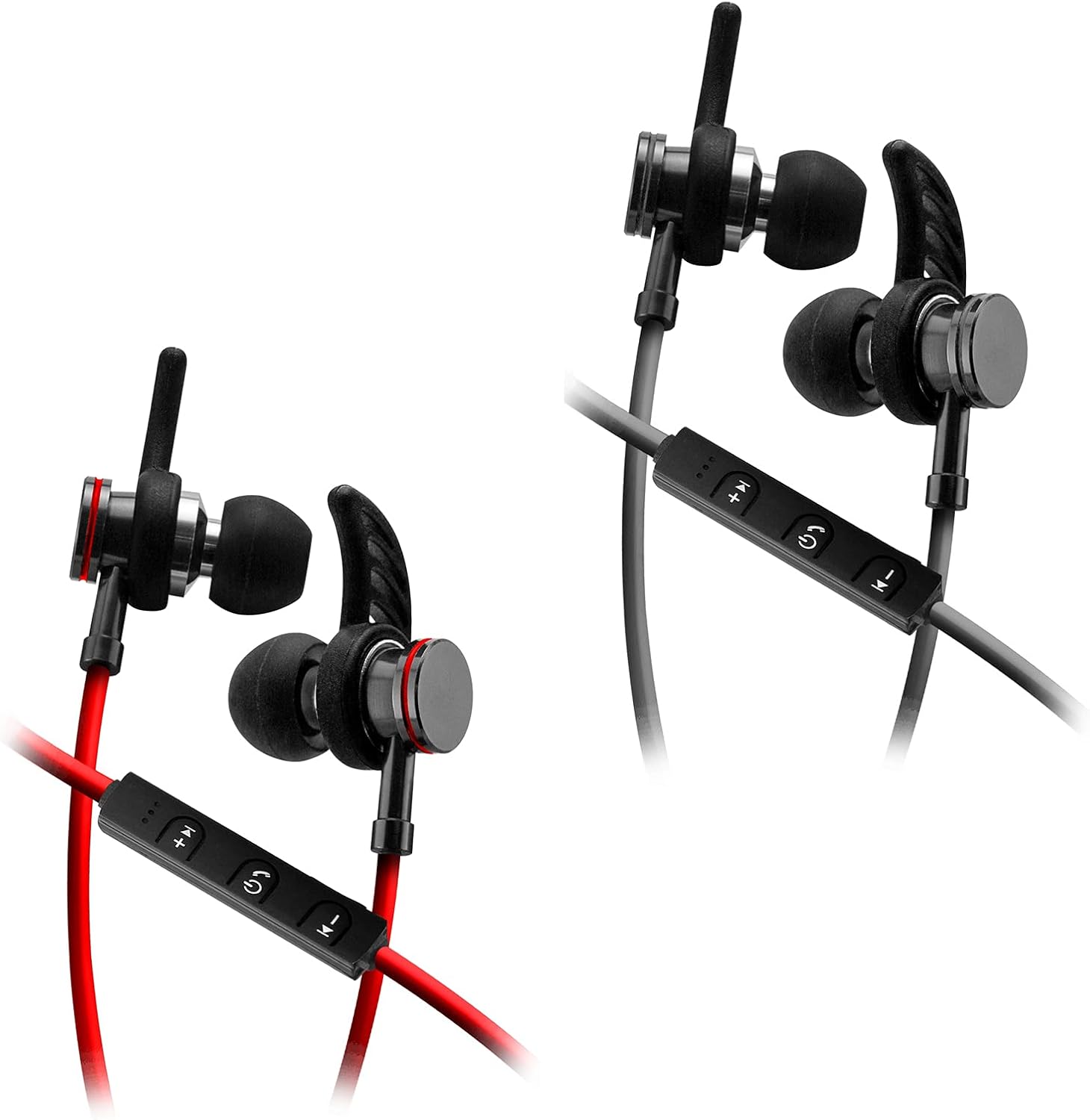
Image: SENTRY HPXBT150 Bluetooth Earbuds showing the in-line control panel and ear hooks. The control panel features volume up/next track, power/multifunction, and volume down/previous track buttons.
Configuración
1. Carga de los auriculares
- Locate the Micro-USB charging port on the in-line control unit.
- Conecte el cable de carga USB provisto al puerto de carga de los auriculares.
- Conecte el otro extremo del cable USB a una fuente de alimentación USB compatible (por ejemplo, puerto USB de computadora, adaptador de pared USB).
- The LED indicator light will illuminate during charging. It will change color or turn off once charging is complete. A full charge typically takes approximately 1-2 hours.
2. Emparejamiento Bluetooth
- Asegúrese de que los auriculares estén completamente cargados antes del emparejamiento inicial.
- Press and hold the multi-function button (usually the center button on the in-line control) for approximately 5-7 seconds until the LED indicator light flashes red and blue alternately. This indicates the earbuds are in pairing mode.
- En su dispositivo con Bluetooth habilitado (teléfono inteligente, tableta, computadora), vaya al menú de configuración de Bluetooth.
- Habilite Bluetooth y busque dispositivos disponibles.
- Select "HPXBT150" or a similar name from the list of found devices.
- Once successfully paired, the LED indicator on the earbuds will typically flash blue slowly or turn off, and you will hear an audible confirmation.
- Si se le solicita una contraseña, ingrese "0000".
Instrucciones de funcionamiento
Encendido/apagado
- Encendido: Mantenga presionado el botón multifunción durante aproximadamente 3 segundos hasta que el indicador LED parpadee en azul y escuche un tono de encendido.
- Apagado: Press and hold the multi-function button for approximately 3-5 seconds until the LED indicator flashes red and you hear a power-off tone.
Reproducción de música
- Reproducir/Pausa: Presione el botón multifunción una vez.
- Sube el volumen: Presione el botón '+'
- Bajar volumen: Presione el botón '-'.
- Pista siguiente: Mantenga presionado el botón '+'.
- Pista anterior: Mantenga presionado el botón '-'.
Gestión de llamadas
- Responder/Finalizar llamada: Presione el botón multifunción una vez.
- Rechazar llamada: Mantenga presionado el botón multifunción durante aproximadamente 2 segundos.
- Volver a marcar el último número: Presione dos veces el botón multifunción.
Mantenimiento
- Limpieza: Utilice un paño suave y seco para limpiar los auriculares. No utilice productos químicos agresivos ni materiales abrasivos.
- Almacenamiento: When not in use, store the earbuds in the provided protective case to prevent damage.
- Cuidado de la batería: Para prolongar la duración de la batería, evite descargar completamente los auriculares con frecuencia. Cárguelos regularmente, incluso si no los usa durante periodos prolongados.
- Evite la humedad: Mantenga los auriculares alejados del agua y la humedad excesiva.
Solución de problemas
| Problema | Posible solución |
|---|---|
| Los auriculares no se encienden. | Ensure the earbuds are fully charged. Connect to a power source and allow time to charge. |
| No se puede emparejar con el dispositivo. | Ensure earbuds are in pairing mode (flashing red/blue). Turn off and on Bluetooth on your device. Move earbuds closer to your device. Forget previous pairings on your device and try again. |
| No hay sonido o volumen bajo. | Check volume levels on both the earbuds and your connected device. Ensure earbuds are properly paired. Try re-pairing the earbuds. |
| Conexión intermitente. | Asegúrese de que no haya obstrucciones entre los auriculares y el dispositivo. Acérquese al dispositivo. Evite entornos con una conexión Wi-Fi potente u otras interferencias inalámbricas. |
Presupuesto
- Modelo: HPXBT150
- Tecnología de conectividad: Inalámbrico (Bluetooth)
- Unidad de controlador: 10 mm
- Impedancia: 32+/-3 Ohms
- Sensibilidad: 103dB +/- 3dB
- Respuesta de frecuencia: 20 Hz - 20 kHz
- Dispositivos compatibles: Phones, Tablets, MP3 Players, Computers, Gaming Consoles
- Tipo de control: Control de medios
- Características especiales: Microphone Included, USB Connectivity, Removable Ear Hooks
- Peso del artículo: 2.08 onzas
Información de seguridad
- Do not expose the earbuds to extreme temperatures, direct sunlight, or fire.
- No desmonte ni modifique los auriculares. Esto podría anular la garantía y causar daños.
- Evite escuchar a niveles de volumen altos durante períodos prolongados para evitar daños auditivos.
- Mantener fuera del alcance de los niños y las mascotas.
- Deseche el producto de manera responsable de acuerdo con las regulaciones locales.
Garantía y soporte
For warranty information and technical support, please refer to the documentation included with your purchase or contact SENTRY customer service directly. Keep your proof of purchase for warranty claims.