
1. Introducción
This manual provides essential instructions for the installation, operation, maintenance, and troubleshooting of the APC Smart-UPS SRT3000RMXLT 3kVA 208V Rackmount Uninterruptible Power Supply (UPS). Please read this manual thoroughly before installing or operating the equipment to ensure proper usage and safety.
2. Información de seguridad
Observe todas las advertencias e instrucciones de funcionamiento de este manual. De lo contrario, podrían producirse lesiones o daños al equipo.
- Seguridad eléctrica: Esta unidad contiene vol. peligrosostages. Do not attempt to disassemble the UPS. Servicing should only be performed by qualified personnel.
- Seguridad de la batería: Las baterías pueden presentar riesgo de descarga eléctrica y cortocircuito. Quítese el reloj, el anillo u otros objetos metálicos antes de manipular las baterías. Utilice herramientas con mangos aislantes.
- Peso: The UPS is heavy. Use proper lifting techniques and ensure adequate support during installation.
- Ambiente: Install the UPS indoors in a controlled environment, free from excessive dust, moisture, and extreme temperatures.
3. Contenido del paquete
Carefully unpack the UPS and inspect for shipping damage. The package should contain the following items:
- APC Smart-UPS SRT3000RMXLT Unit
- Power Supply (Built-In)
- Hardware de montaje en bastidor
- CD de documentación
- Cable USB
- Cable serial
4. Configuración
4.1 Instalación física
The SRT3000RMXLT is designed for rack installation. Ensure the rack is stable and capable of supporting the UPS weight (approximately 69 pounds).
- Mount the UPS into a standard 19-inch rack using the provided rack-mounting hardware.
- Asegúrese de que haya suficiente ventilación alrededor de la unidad. No bloquee las aberturas de ventilación.

Figura 4.1: Frente view of the APC Smart-UPS SRT3000RMXLT. This image shows the front panel with the display and ventilation grille.
4.2 Conexión del SAI
Connect the UPS to the utility power and your equipment.
- Connect the UPS input power cord to a dedicated 208V AC outlet. The UPS uses a Type B - 3 pin (North American) power plug.
- Connect your equipment to the output receptacles on the rear of the UPS. The unit provides 12 IEC 320 C13/C14 outlets.
- For communication, connect the USB cable or serial cable from the UPS to your computer or network management card.
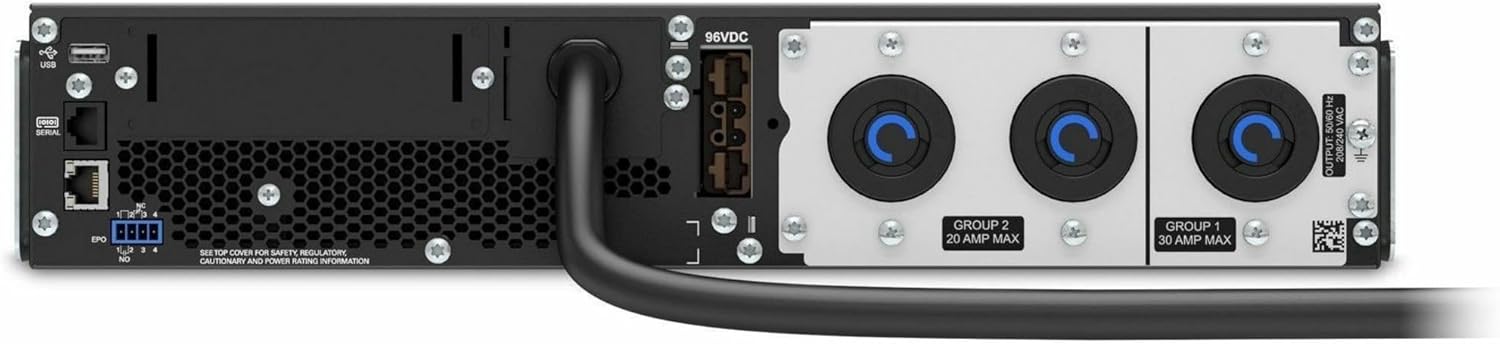
Figura 4.2: Posterior view of the APC Smart-UPS SRT3000RMXLT. This image displays the various input and output ports, including USB, serial, EPO, and the 12 output receptacles, along with the main power input.
4.3 Encendido inicial
Una vez que todas las conexiones estén seguras:
- Presione el botón de encendido en el panel frontal para encender el UPS.
- The UPS will perform a self-test and the display will show the current status.
- Allow the batteries to charge for at least 6 hours before relying on them for extended backup time.
5. Funcionamiento del SAI
5.1 Pantalla y controles del panel frontal
The front panel features an LCD display and control buttons for monitoring and configuring the UPS.
- Pantalla LCD: Shows real-time status, load, battery charge, input/output voltage, and event logs.
- Botón ESC: Sale del menú actual o cancela una operación.
- Botón OK: Confirma una selección o ingresa a un menú.
- Flechas arriba/abajo: Navegue por las opciones del menú o ajuste la configuración.
5.2 Funcionamiento básico
- Encendiendo: Mantenga presionado el botón de encendido hasta que la pantalla se ilumine.
- Apagando: Press and hold the power button until the UPS powers down. Ensure all connected equipment is safely shut down first.
- Modo batería: En caso de un corte de energíatage, the UPS will automatically switch to battery power. The display will indicate 'On Battery'.
- Autotest: Initiate a manual self-test through the front panel menu to verify battery and UPS functionality.
6. Mantenimiento
6.1 Reemplazo de batería
The UPS uses sealed lead-acid batteries. Battery life is typically 3-5 years, depending on environmental conditions and usage. Replace batteries when the UPS indicates a 'Battery Fault' or 'Replace Battery' warning.
- Contact APC support or a certified service technician for battery replacement.
- Always use genuine APC replacement battery cartridges (RBCs) to ensure compatibility and optimal performance.
- Recycle old batteries responsibly.
6.2 Limpieza
Keep the UPS free from dust and debris to ensure proper ventilation.
- Use a soft, dry cloth to clean the exterior of the UPS.
- No utilice limpiadores líquidos ni disolventes.
- Asegúrese de que las aberturas de ventilación estén libres de obstrucciones.
7. Solución de problemas
Esta sección ofrece soluciones a problemas comunes. Para problemas más complejos, contacte con el soporte técnico.
| Problema | Posible causa | Solución |
|---|---|---|
| El UPS no se enciende | No input power; Battery disconnected or discharged | Check power cord connection; Ensure utility power is present; Allow batteries to charge. |
| El UPS emite un pitido continuo | On battery power; Overload condition | Check utility power; Reduce connected load. |
| Indicador 'Reemplazar batería' | La batería se acerca al final de su vida útil | Order and replace the battery cartridge. |
| UPS not providing power to outlets | Output circuit breaker tripped; UPS in fault mode | Reset circuit breaker; Check display for fault codes and consult manual. |
8. Especificaciones
Key technical specifications for the APC Smart-UPS SRT3000RMXLT.
| Característica | Especificación |
|---|---|
| Número de modelo | SRT3000RMXLT |
| Marca | Vehículo blindado |
| Capacidad de potencia de salida | 3000 VA / 2700 vatios |
| Vol. De salida nominaltage | 208 V CA |
| Vol. De entrada nominaltage | 208 V CA / 230 V CA |
| Frecuencia de entrada | 60 Hz |
| Conexiones de salida | 12 x IEC 320 C13/C14 |
| Tipo de batería | Plomo ácido |
| Tiempo de recarga típico | 6 horas |
| Tiempo de respaldo típico (carga completa) | 4 minutos |
| Factor de forma | Estante |
| Dimensiones (alto x ancho x profundidad) | 9 x 23 x 34 pulgadas |
| Peso | 69 libras |
| Temperatura de funcionamiento | 0 - 40 °C (32 - 104 °F) |
9. Garantía y soporte
9.1 Información de garantía
APC provides a standard warranty for this product. Please refer to the warranty card included with your product or visit the official APC webSitio para conocer los términos y condiciones de garantía detallados específicos de su región.
9.2 Soporte técnico
For technical assistance, product information, or troubleshooting beyond the scope of this manual, please contact APC customer support. Have your model number (SRT3000RMXLT) and serial number ready when contacting support.
- Visita la página oficial de APC webSitio para recursos de soporte, preguntas frecuentes e información de contacto.
- Online resources often include updated manuals, firmware, and diagnostic tools.