
1. Introducción
The Noyafa NF-909C is a compact and easy-to-use 2-in-1 testing instrument designed for optical fiber networks. It integrates both an optical power meter and an optical light source, making it suitable for absolute optical power measurements and insertion loss tests. This device offers a wide range of power measurement, high accuracy, and stable output, providing a cost-effective solution for fiber optic testing.
2. Información de seguridad
- Lea el manual: Before operating the device, thoroughly read and understand this user manual.
- Seguridad de la batería: Use only specified 1.5V batteries (3x AAA). Do not mix old and new batteries or different types of batteries. Remove batteries if the device will not be used for an extended period.
- Seguridad láser: The optical light source emits laser radiation. NO look directly into the optical output port or into a fiber connected to the light source. Direct exposure to laser light can cause severe eye damage.
- Condiciones ambientales: Operate the device within the specified operating temperature range (-10°C to +60°C). Avoid exposure to extreme temperatures, humidity, or dust.
- Limpieza: Keep optical connectors clean. Use only approved cleaning methods and materials to avoid damaging the fiber end-faces.
- Mantenimiento: No intente abrir ni reparar el dispositivo. Encargue cualquier servicio técnico a personal cualificado.
3. Contenido del paquete
Verifique que todos los artículos estén presentes y en buenas condiciones al desembalar:
- Noyafa NF-909C Fiber Optic Tester Unit
- Manual de usuario
- Protective Cap for Optical Ports
- (Batteries may or may not be included depending on the retailer)
4. Producto terminadoview
The NF-909C features a clear LCD display, intuitive control buttons, and standard optical connectors for versatile use.
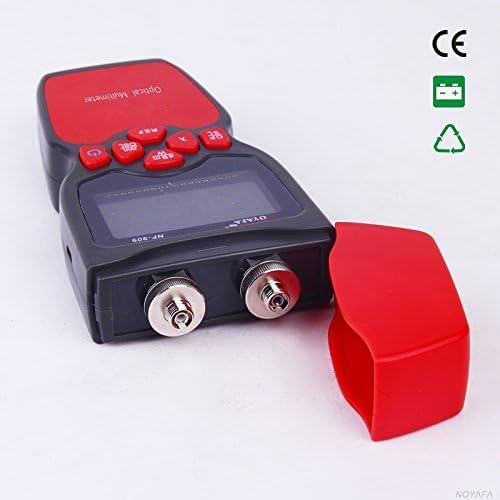
Figura 1: Frente view of the Noyafa NF-909C Fiber Optic Tester. This image shows the device's display screen, the red control buttons (Power, REF, dBm/W, λ, Hz), and the two optical input/output ports on the front, protected by a red cap. The device is black and red.
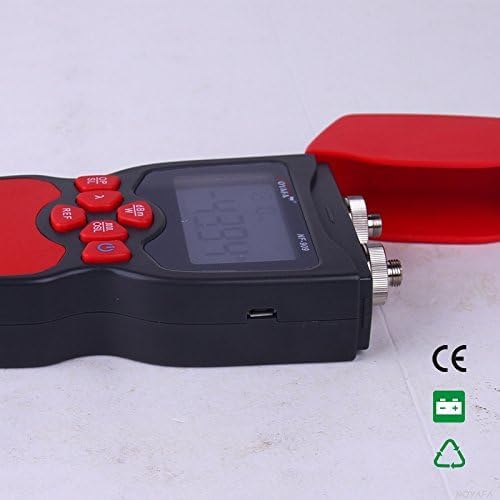
Figura 2: Lado view of the Noyafa NF-909C Fiber Optic Tester. This image highlights the micro USB port located on the side of the device, which may be used for power or data transfer, though its primary function is typically for charging or external power supply. The red protective cap is shown detached.
Componentes clave:
- Pantalla LCD: Shows measurement readings, selected wavelength, unit, and battery status.
- Botones de control: Power On/Off, Reference (REF), Unit (dBm/W), Wavelength (λ), Frequency (Hz).
- Optical Power Meter Input: Typically supports SC, ST, LC connectors (optional).
- Optical Light Source Output: Typically FC connector (SC, ST, LC optional).
- Compartimento de la batería: Located on the rear, for 3x 1.5V batteries.
- Puerto micro USB: For power supply or charging (refer to Figure 2).
5. Configuración
5.1 Instalación de la batería
- Localice la tapa del compartimiento de la batería en la parte posterior del dispositivo.
- Deslice o desenganche la cubierta para abrirla.
- Insert three (3) 1.5V AAA batteries, ensuring correct polarity (+/-) as indicated inside the compartment.
- Vuelva a colocar la tapa del compartimiento de la batería de forma segura.
5.2 Encendido inicial
Mantenga pulsado el Fuerza button to turn on the device. The LCD display will illuminate, showing the current mode and settings.
6. Instrucciones de funcionamiento
6.1 Optical Power Meter Mode
This mode measures the absolute optical power or relative loss in optical fiber networks.
- Conectar fibra: Connect the optical fiber to be tested to the Power Meter input port. Ensure the connector is clean.
- Seleccionar longitud de onda: Presione el λ button to cycle through the available calibrated wavelengths: 850nm, 1300nm, 1310nm, 1490nm, 1550nm, 1625nm. Select the wavelength matching your light source.
- View Medición: The display will show the optical power in dBm.
- Unidad de cambio: Presione el dBm/W button to switch between dBm and W (Watts) units.
- Establecer referencia (REF): For relative measurements (loss), connect a known good fiber to a stable light source and the power meter. Press the ÁRBITRO button to set the current power reading as the reference (0dB). Subsequent measurements will show the loss relative to this reference.
- Frequency Identification: The power meter can identify modulation frequencies from 10Hz to 60KHz. If the incoming signal is modulated, the frequency will be displayed.
6.2 Optical Light Source Mode
This mode provides a stable optical signal for testing fiber optic cables.
- Conectar fibra: Connect the optical fiber to be tested to the Light Source output port. Ensure the connector is clean.
- Seleccionar longitud de onda: Presione el λ button to cycle through the available wavelengths: 1310nm and 1550nm. Select the desired wavelength.
- Select Modulation Frequency: Presione el Hz button to cycle through modulation frequencies: 270Hz, 1KHz, 2KHz, or continuous wave (CW).
- Señal de salida: The device will emit a stable optical signal at the selected wavelength and modulation.
6.3 Función de apagado automático
The device features an auto-off function to conserve battery life. If no operation is performed for approximately 15 minutes, the device will automatically power off. Press the Fuerza Botón para volver a encenderlo.
7. Mantenimiento
- Limpieza de conectores ópticos: Always ensure optical connectors are clean before use. Use lint-free wipes and appropriate optical cleaning solutions. Dirty connectors can lead to inaccurate measurements and damage to the device or fiber.
- Reemplazo de batería: When the battery indicator on the display shows low power, replace all three 1.5V AAA batteries promptly.
- Almacenamiento: When not in use, store the device in a dry, cool place, away from direct sunlight and extreme temperatures. Always replace the protective caps on the optical ports to prevent dust and damage.
- Limpieza Externa: Limpie el exterior del dispositivo con un paño suave yamp Paño. No utilice limpiadores abrasivos ni disolventes.
8. Solución de problemas
- El dispositivo no se enciende:
- Compruebe si las baterías están instaladas correctamente con la polaridad apropiada.
- Reemplácelas con baterías nuevas.
- Inaccurate power meter readings:
- Ensure optical connectors are clean.
- Verify the selected wavelength on the power meter matches the light source wavelength.
- Check if the fiber under test is properly connected and not damaged.
- No light output from light source:
- Ensure the device is powered on and in light source mode.
- Verifique el nivel de la batería.
- Verify the fiber is properly connected to the output port.
- Auto-off activates too quickly:
- The auto-off is fixed at 15 minutes of inactivity. This is normal operation.
9. Especificaciones
| Característica | Especificación |
|---|---|
| Optical Power Meter Module | |
| Detector Measurement Range | -50 ~ +26 dBm |
| Longitudes de onda calibradas | 850, 1300, 1310, 1490, 1550, 1625 nm |
| Resolución | 0.01 dBm |
| Identification Frequency Range | 10Hz ~ 60KHz |
| Conector óptico | SC, ST, LC (optional) |
| Optical Light Source Module | |
| Emitter Wavelengths | 1310 / 1550 nm (other wavelengths customizable) |
| Potencia de salida | -7 dBm |
| Estabilidad de salida | 0.05 dB / 15 mins; 0.1 dB / 8 hours |
| Frecuencias de modulación | 270 Hz, 1 KHz, 2 KHz |
| Conector óptico | FC (SC, ST, LC optional) |
| Especificaciones generales | |
| Fuente de alimentación | 3 pilas AAA de 1.5 V |
| Hora de apagado automático | 15 minutos (aprox.) |
| Temperatura de funcionamiento | -10 °C ~ +60 °C |
| Dimensiones (L x An x Al) | 160 x 75 x 32 mm |
| Peso | 400 g (unit only) / 150 g (item weight from specs) |
| Vol. Mínimo de funcionamientotage | 1.5 voltios |
| Vol. De funcionamiento máximotage | 5 voltios |
| Especificación cumplida | UL 61010-1, IEC 61010-2-030 |
| Fabricante | Shenzhen Noyafa Electronic |
10. Garantía y soporte
For warranty information, technical support, or service inquiries, please refer to the warranty card included with your product or contact your authorized Noyafa dealer or the manufacturer directly. Keep your purchase receipt as proof of purchase.